Many teams in Bangladesh start with free video calls and only think about a google meet paid plan when a meeting cuts off at the worst moment. This guide is for school teachers, office managers, freelancers and small business owners who already use Gmail and Google Calendar every day. We explain how the free version limits group calls, what changes when you pay, how to choose between a 100 and a 500 participant room, and what to check about recording before you order.
Google Meet has a big advantage for many people here: it is already on their phone. Anyone with a Gmail account can join from a browser or the app without installing anything new, which matters when your students or clients use budget Android phones with little storage. That ease is why so many coaching centres, NGOs and offices pick Meet first, and why the free limits come as a surprise once meetings grow longer and busier.
Themeve sells the Google Meet Premium – 1 Month Plan for people who want paid features for a month at a time. Google Meet is made and run by Google, not by Themeve; the store sells access to a monthly plan. Before we look at that plan, let us be clear about what the free version does well, so you only pay for something you actually need.
How Free Google Meet Works Today
A personal Google account can host video calls for free, with screen sharing, chat, captions and joining from phone or computer. At the time of writing, one-to-one calls can run for a long time, but calls with three or more people are cut off after 60 minutes, and the free room holds up to 100 people. Google updates its plans often, so confirm the current limits on the official Google Workspace website before making a decision.
Sixty minutes sounds like a lot until you run a real class or a real workshop. A lesson that starts five minutes late, a long question round or a client who wants to go through every page of a proposal can easily push past the hour. When the call ends, everyone has to rejoin, and in a group of thirty people some never come back. That is the moment most hosts start looking for a paid option.
Signs Your Team Has Outgrown the Free Version
The free plan is not bad. It simply has a size and a shape. If your meetings fit that shape, keep using it. If they keep spilling over, the cost of restarts, lost attendees and awkward apologies adds up quickly. Look at your last few weeks of calls and see which of the situations below sound familiar to you and your team.
Virtual classrooms that run past the hour
School teachers and private tutors often teach in blocks of 90 minutes or two hours, especially before board exams. Splitting that into two calls breaks concentration and wastes time while everyone reconnects. Parents who pay monthly tuition also notice when a class keeps restarting. Extended meeting time is usually the single biggest reason a teacher decides to upgrade, even before thinking about room size.
Webinars, seminars and large events
An admission seminar for a school, a product launch, a union meeting or an online training for field staff can draw far more than a hundred people. If you expect a crowd, you need a room that fits it from the start. Turning people away at the door of an online event is just as damaging as doing it at a physical venue, and it is much harder to explain afterwards.
Client calls where you need to look professional
Freelancers and agencies who work with foreign clients cannot afford a call that drops mid-presentation. A paid plan with longer calls and secure connections makes long reviews and planning sessions smoother. It also signals to the client that you take the work seriously, which matters when you are competing with sellers from other countries for the same project.
What a Google Meet Paid Plan Changes
According to the product description, the monthly plan gives full-time access to premium features for the month, with extended meeting durations, so a long class or seminar can run its full length. It mentions secure connections and enhanced security, which matters when you discuss client work, student data or internal business plans. Audio and video are described as high quality, and the plan is activated instantly after purchase, so you are not left waiting before an urgent meeting.
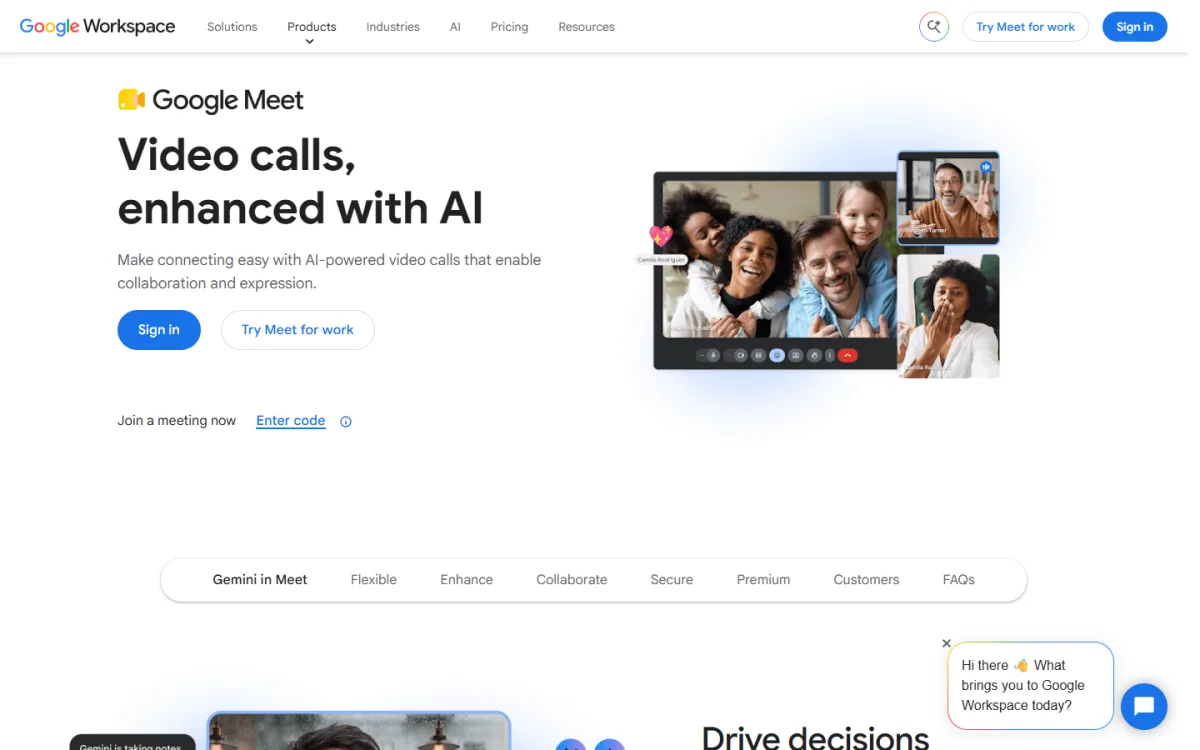
The other big point is how well Meet fits into the Google tools you already use. The product description highlights easy integration with Google Workspace. In practice that means meetings are created from Google Calendar, invites arrive in Gmail, and shared files open from Google Drive during the call. For a small office that already keeps its documents in Drive, this saves time compared with switching between unrelated apps.
Choosing Between 100 and 500 Participants
The Themeve listing describes two sizes. The 100 participant plan suits medium-sized team meetings and virtual classrooms, such as a coaching batch, a department meeting or a weekly client update. The 500 participant plan is meant for larger webinars, conferences and seminars, where an audience can arrive from several districts or several countries at once. Both come with extended meeting durations and secure video conferencing.
To choose, look at your biggest regular meeting rather than your average one. A tutor with batches of forty students is well served by the smaller plan. A school running a parents meeting for every class, an organisation hosting an annual general meeting, or a trainer selling seats to an open webinar should lean towards the larger room. If you only need the bigger size for one event, plan that month carefully and switch back afterwards.
Recording: What to Check Before You Order
Many people upgrade because they want to record classes for absent students or keep a copy of client meetings. Google offers recording on many of its paid Workspace editions, but not on every one, and the details change over time. The Themeve product description focuses on longer meetings, bigger rooms and security, and it does not list recording as a feature. If recording matters to you, ask support before ordering whether your plan includes it.
If recording is not included, you still have options. You can run a screen recorder on the host computer during the call, or share your slides and notes in a Google Drive folder after each class. Whatever method you choose, tell participants that the session is being recorded, and keep recordings only as long as you need them. Students and clients appreciate that kind of respect for their privacy.
Setting Up Meetings the Google Way
Once your access is active, build a simple routine. Create recurring events in Google Calendar for each class or weekly meeting, with the Meet link attached. Participants then get the same link every time, along with reminders on their phone. Add a short agenda in the event description, and attach any files from Drive so people can open them before the call instead of asking for them during it.
Before an important meeting, run a short test with a colleague. Check screen sharing with your actual slides, test your microphone and camera, and see how the call looks on a phone. Learn how to mute participants and remove someone who joined by mistake. For classes, share the link in a closed group, not on a public Facebook page, so only enrolled students can join.
Your connection matters as much as your plan. Host from a broadband line whenever you can, keep mobile data ready as a backup, and put the router on a small UPS if load shedding is common in your area. Close heavy browser tabs before the call. If your connection is weak, turn off your own video while sharing the screen; the audio and slides matter more than your face.
Google Meet or Zoom for Your Team?
Both tools do the core job well, so the choice often comes down to habits. If your team already lives in Gmail, Calendar and Drive, a google meet paid plan keeps everything in one place and lets people join from a browser without extra apps. If your audience is used to Zoom, or you rely heavily on breakout rooms for group work, the Zoom Premium Subscription – 1 Month Plan is worth comparing.
Whatever you pick, stay consistent. Students and clients get confused when one class is on Meet and the next is on Zoom, and every switch costs a few minutes of “which link is it today?” messages. Pick the platform that suits your audience, set it up properly, and use it for a full month before judging it. One steady month will tell you far more than a single trial call.
Bangladesh Tips for Online Meetings That Earn Money
If you sell classes, coaching or consulting through video calls, plan the business side as carefully as the technical side. Collect fees before the session through a mobile wallet such as bKash or Nagad, keep a simple sheet of who has paid, and share the meeting link only with paid participants. Send a reminder an hour before each session on WhatsApp or Messenger, because many people here check those apps more often than email.
Clients also want to find you outside the call. A simple website with your services, past work, client reviews and a contact form makes you look established and gives clients a place to book meetings. If you do not have one yet, the Website Design Services – Full Package Solution listing is one place to start. Link your booking calendar from that site, and you will spend less time arranging meeting times by message.
Common Mistakes With Paid Video Plans
The first mistake is choosing the largest room by default. If your largest meeting is forty people, the 500 seat plan adds nothing useful. The second is upgrading at the last minute before a big seminar and having no time to test. The third is sharing one account among several unrelated hosts, which causes clashes when two people need to run meetings at the same time on the same day.
Stay away from so-called free premium accounts traded in Facebook groups. They often stop working in the middle of a meeting, and handing your data to strangers is a real risk. Use the official Google Meet app or browser version only. Finally, do not post meeting links publicly. Uninvited guests can disrupt a class within seconds, so use calendar invites and closed groups instead.
Frequently Asked Questions
Is a google meet paid plan worth it for a small coaching centre?
If your group classes regularly run longer than the free time limit, yes, because forced restarts cost attendance and time. If most of your calls are short one-to-one sessions, the free version may be enough. Look at a month of real classes before you decide.
How many people can join the plan from Themeve?
The product listing describes a 100 participant plan for team meetings and virtual classrooms, and a 500 participant plan for larger webinars, conferences and seminars. Choose based on your biggest regular meeting, not your average one, and confirm the size with support when you order.
How quickly does the plan start working?
The product description says the plan is activated instantly after purchase and runs for one month. Still, order a day before any important event, so you have time to test screen sharing, audio and the meeting link with a colleague first.
Does Google Meet Premium include recording?
The Themeve listing does not mention recording, so do not assume it. Google offers recording on many paid editions, but not on all of them. Ask support before ordering if recording is essential for your classes or client meetings.
Final Thoughts
Free Google Meet is a solid starting point, but long classes, seminars and professional client calls soon run into its time and size limits. A google meet paid plan gives you extended meeting time, a room sized for your audience and secure calls inside the Google tools your team already uses. If a one-month commitment suits you, look at the Google Meet Premium – 1 Month Plan, test it on your real schedule, and keep it only if it earns its place.