 −38%
−38%
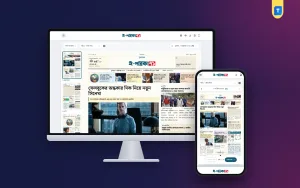
Auto News Sync — Automatic News Importer for WordPress
 −12%
−12%
✦ Key features
- RSS feed, category page URL & WordPress REST sources
- Per-category schedule, interval & daily limit
- Clean content without ads or clutter
- Smart paragraph detection
- Full-size featured images
- Stylish source box
- Duplicate news protection
- One-click test & preview
- Dashboard & detailed logs
- Server cron support
- Fully responsive settings panel
- Lifetime updates
Overview
Auto News Sync automatically imports category-wise news into your WordPress site from RSS feeds, category page URLs, or the WordPress REST API. It works with news sites built on any CMS, and the source site doesn't need to give you a login.
Each category gets its own schedule: a start and end time, the interval between posts,s and a daily limit. Only today's news is imported, oldest first, and the same story never comes in twice.
Every post keeps its original headline and arrives clean, with ads, scripts, tags, share buttons, and related-news blocks removed. Smart paragraph detection rebuilds proper paragraphs even when a feed sends one long block of text. Full-size featured images display neatly in your theme, and a stylish source box links to the original story.
A one-click test shows how each story will look before you save. The dashboard, detailed logs,s and server cron support make it easy to keep everything running on autopilot.
Reviews
0.0
Write a review
★★★★★
0 reviews from buyersNo reviews yet — be the first to share your experience after buying.
Frequently Asked Questions
01Which websites can I import news from?
Sites built on WordPress, a custom CMS or any other platform. If the site has an RSS feed, you can use the feed. For your own organisation's sites without a feed, you can also use the category page URL.
02Do I need a login or access to the source site?
No. An RSS feed or page URL is enough, and no password is required.
03Will the full article be imported?
From your own sites, or sites you have written permission to republish, yes. From other publishers' sites, only what they provide in their RSS feed is imported. If the feed has the full text, you get the full text. If it only has a summary, you get the summary with a "Read the rest" button linking to the original.
04How often do posts come in, and how many per day?
You set this separately for each category. For example, one post every 20 minutes between 6 AM and 11 PM, with a maximum of 10 per day. Once the daily limit is reached, no more posts come in that day.
05Where are the images stored?
You can choose. Images can be shown directly from the source server, which uses no space on your hosting, or downloaded to your Media Library.
Delivery & Support
1Place your orderAdd to cart, sign in and pay with bKash, Nagad or Rocket.
2Payment verified automaticallyEnter your Transaction ID — the payment is matched automatically, usually within seconds.
3Get your productYour license key and download appear in My Account → Licenses.
- Secure automatic payment verification
- Delivery to your account & e-mail
- Friendly WhatsApp support
Refund Policy
This policy applies to every product in our store.
You get a refund when the product does not work as described and we cannot fix it, when your license will not activate your website, or when a manually delivered product is late and you cancel before delivery. A working license, or a single license already used on a live domain, is not refundable. Approved refunds go back to the number you paid from within one working day, minus the Send Money charge.
More items
View all →