 −36%
−36%
Madrasa Management Software – Website, Admin & Parent App
 −40%
−40%
✦ Key features
- Hifz lesson reports with sabak, sabqi and amukhta
- QR card scanning for student attendance
- Gate pass with late-return alerts
- Exams, admit cards, report cards and results search
- Befaq registration, marks and report
- Monthly fee invoices with receipts and due reminders
- Zakat, Lillah and Sadaqah funds with cash book
- Staff salary slips and canteen stock
- Madrasa website with admission and donation pages
- Parent app with progress, fees and messages
- Teacher app plus Android apps for your domain
- Role permissions, two-factor login and nightly backup
Overview
Madrasa management software in Bangla for Qawmi, Hifz, Alia and Noorani madrasas: Hifz lesson reports, attendance, exams, Befaq, fees, accounts, a madrasa website, a parent app and a teacher app.
This madrasa management software runs your whole madrasa from one place: students, Hifz lessons, attendance, exams, fees, accounts and a public website, plus a parent app and a teacher app. It works in Bangla by default and has a full English mode.
It is a standalone web application, not a WordPress plugin. Our team installs it on your own hosting and domain, so you start with a working system from the first day.
Madrasa management software for Qawmi, Hifz, Alia and Noorani
Four department types are built in: Hifz, Qawmi Kitab, Alia and Noorani or Maktab. Under each one you add your own classes, sections, student groups, subjects and academic years. One install serves one madrasa. Super admin, principal (muhtamim), accountant, teacher and guardian each get their own login, and each role sees only the pages it needs. Student profiles hold the photo, guardian and class details. Residential students get rooms and meal bills, and at year end you promote a whole class in one step. ID cards, testimonials and TC certificates print with a serial number and a QR code.Hifz lesson reports, attendance and gate pass
Teachers write a daily lesson report for each Hifz student: sabak with para, sabqi, amukhta or manzil, mistakes, quality, behaviour and a remark for the parent. The lesson register keeps the full history, and parents follow it on the Progress page of their app. Class attendance takes a few taps, and an absent student can trigger an SMS to the guardian. You can also take attendance by scanning QR cards with a phone camera. Staff attendance has its own register, with monthly and yearly sheets. The gate pass records when a student goes out and when they come back. The system checks every five minutes and sends an alert when a student is late returning. Guardians can also send requests to talk to their child, meet a teacher or ask for leave. A teacher approves the request and the guardian is told.Exams, results and Befaq
Set up exams and the exam schedule, enter marks, build the tabulation sheet and publish results. Final results can merge several exams, and admit cards and report cards print straight from the dashboard. Grading follows the Mumtaz and Jayyid style for Qawmi classes and GPA for Alia. Students and parents can search published results on the madrasa website. For students sitting the Befaq board, the madrasa management software keeps Befaq registration, marks and a Befaq report. Class routine, library, daily amal records and teacher work reports are included too.Fees, accounts, donations, salary and canteen
The madrasa management software creates monthly fee invoices on the first day of each month. Collecting a fee prints a receipt and sends the guardian an SMS, and a daily reminder covers dues. You set the fee types and concessions yourself. Parents can pay with bKash from the parent app once your bKash merchant account is connected. The accounts module keeps income and expense in separate funds such as Zakat, Lillah and Sadaqah. It has a cash book, printable vouchers and a donor list, and the website has a donation page for online gifts. Staff salary payments come with printable salary slips. The canteen tracks products, stock, purchases, sales on cash or due, and suppliers. An audit log shows who changed which money record.Website, parent app and teacher app
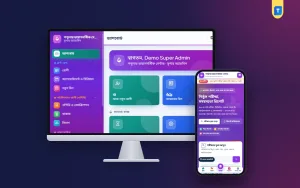
Every copy of the madrasa management software comes with a public madrasa website. It has a banner slider, departments, teachers, notices, gallery, events, results search, online admission, donations and certificate verification. You edit the banners, gallery, events and notices from the dashboard, and admission forms arrive there for review. The parent app is a mobile web app with Home, Progress, Activities, Fees and Messages. Guardians with more than one child switch between them, and they see only their own children. Login works with a password or a six-digit SMS code. The teacher app shows today's attendance, classes still pending, Hifz reports done, who is outside and new messages, with quick buttons for daily work. Both apps can be added to the phone home screen. Our team also builds two Android apps for your domain, one for staff and one for parents, which open these web apps. A change on your website shows up in the apps right away.Security, roles, backup and licence
The super admin ticks which modules each role may open, and can switch whole features off for everyone without losing any data. Two-factor login with Google Authenticator, QR login and a login history protect staff accounts. A backup runs every night, and you can download or restore it from the settings. The licence is checked against your domain, so your copy of the madrasa management software stays tied to your madrasa.What you get with this madrasa management software
You get a lifetime single licence for one madrasa and one domain. You buy your own hosting and domain, and the Themeve team installs the software on it with your licence activated. Ongoing help comes through a monthly paid support plan, and updates are delivered while your licence is active. The download and licence key appear in My Account → Licenses as soon as your payment is checked. Want to see it first? Open the live demo and log in with one click as admin, principal, accountant, teacher or parent. The demo resets every 30 minutes. Running a general school instead? See our School Management Software. If your trust or organisation also wants a separate company website, Shikhor is our website theme for organisations.Reviews
0.0
Write a review
★★★★★
0 reviews from buyersNo reviews yet — be the first to share your experience after buying.
Frequently Asked Questions
01Is this a WordPress plugin or theme?
No. It is a standalone web application with its own website, admin dashboard and apps. It does not need WordPress.
02Who installs the software?
Our team does. You buy your own hosting and domain, send us the hosting access on WhatsApp, and we install it there with your licence activated.
03Is the licence lifetime, and how many madrasas can I use it for?
Yes, it is a one-time lifetime licence. It covers one madrasa on one domain.
04How does support work?
Ongoing support is a monthly paid plan. Updates are delivered while your licence is active.
05Is it in Bangla or English?
Bangla is the default, with Bangla digits and dates. Every user can switch to the full English mode with the EN/বাংলা button, and the choice is remembered.
06Is there a parent app for Android?
Yes. Parents can use the parent app in the phone browser or add it to the home screen. Our team also builds an Android app for your domain that opens it.
07Do SMS and bKash work right away?
They need your own accounts. SMS needs an account and API key from an SMS provider, and bKash payments need your own bKash merchant account.
08Can I try a demo before buying?
Yes. The live demo has one-click logins for admin, principal, accountant, teacher and parent, plus both Android apps. It resets every 30 minutes.
Delivery & Support
1Place your orderAdd to cart, sign in and pay with bKash, Nagad or Rocket.
2Payment verified automaticallyEnter your Transaction ID — the payment is matched automatically, usually within seconds.
3Get your productYour license key and download appear in My Account → Licenses.
- Secure automatic payment verification
- Delivery to your account & e-mail
- Friendly WhatsApp support
Refund Policy
This policy applies to every product in our store.
You get a refund when the product does not work as described and we cannot fix it, when your license will not activate your website, or when a manually delivered product is late and you cancel before delivery. A working license, or a single license already used on a live domain, is not refundable. Approved refunds go back to the number you paid from within one working day, minus the Send Money charge.
More items
View all →You may also like
−36%
 −42%
−42%
 −52%
−52%
 −27%
−27%
