 −50%
−50%
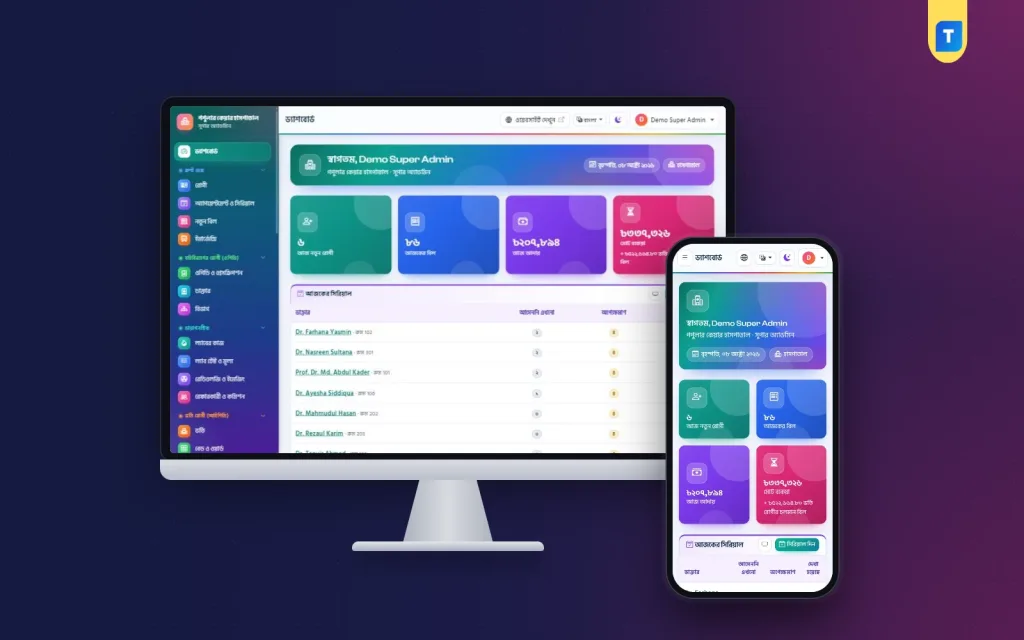
Hospital Management Software – Hospital Management Software in Bangladesh
✦ Key features
- 22 modules from reception to theatre
- Web installer in cPanel, no SSH
- Patient registration with QR card
- Billing with discount, VAT, dues and refunds
- Doctor serials and waiting-room TV queue
- Colour bed board, admission and discharge summary
- Nursing vitals and medication chart
- Operation theatre board with pre-op checklist
- Emergency triage, blood bank and ambulance
- Lab labels and verified QR reports
- Pharmacy POS with barcode and expiry-first stock
- Patient website and portal with bKash and SSLCommerz
Overview
Hospital management software in Bangladesh with 22 modules from reception to wards, theatre, lab and pharmacy. Bangla and English dashboard, patient website and portal, installs from cPanel with no SSH.
This is hospital management software in Bangladesh that runs a private hospital from one Bangla and English dashboard. Reception, doctors, the lab, wards, the operation theatre, the pharmacy and accounts all work in the same system. Each person sees only the menus their role allows.
It is a standalone Laravel web application. You install it on your own hosting and domain, and it comes with a public hospital website and a patient portal. It is not a WordPress plugin, and you do not need a developer or SSH access to install it.
Who can use this hospital management software in Bangladesh
The hospital version is the full system, with 22 modules on top of a core of patient registration, billing, users and settings. It suits:
- Private hospitals with outpatient and inpatient care
- Hospitals that run wards, cabins and an ICU
- Hospitals with an operation theatre and an emergency department
- Hospitals that keep a blood bank or run ambulances
- Hospitals with their own pharmacy and lab
- Groups that want one website, one dashboard and one patient record
If you run a small clinic with no emergency, blood bank or ambulance, the Clinic Management Software is the closer fit. A diagnostic centre that runs mainly on tests has its own version too. You can move up later, and your data stays.
Every module of the hospital management software in Bangladesh
The Super Admin can switch any module off if the hospital does not use it, and switch it on again later. The menu is grouped the way a hospital works: Front Desk, Outpatient, Diagnostics, Inpatient, Pharmacy and Store, Finance, Staff and Payroll, Support Services, Website and SMS, and Administration.
- Patient registration, billing and cash
- Doctors, departments, appointments and serials
- OPD and prescriptions
- Pathology lab and radiology and imaging
- Referral and commission
- Admission, beds and discharge
- Nursing
- Operation theatre
- Emergency, blood bank and ambulance
- Pharmacy and store
- Accounts and nine reports
- Staff, attendance and payroll
- SMS, online payment, website and patient portal
Front desk, doctors and the waiting room
Patients and billing
Register a patient once with name, gender, age, blood group, phone, guardian, NID, address, allergies and history. Each patient gets an ID and a printed card with a QR code. The profile shows the full history from every module.
- Bills from your service price list
- Discount with a reason, and VAT you can set in percent
- Full or part payment by cash, bKash, Nagad, Rocket, card or bank
- Printed money receipt
- Due collection list with due reminder SMS
- Refunds that need a permission, and cancels with a reason
Doctors and serials
Every doctor has a profile with degrees, chamber room, fees and a weekly schedule with slot length, patient limit and leave days. The desk gives walk-in and phone serials. Patients take online serials from the website and the portal and get an SMS.
A TV in the waiting room can show the queue screen. It shows each doctor sitting today, the serial now being seen and the next five, with first names only.
Prescriptions
- Writer made for the keyboard, with medicine names that fill in as you type
- Templates for each doctor
- Print on A4 or A5 in Bangla or English
- QR code that confirms the prescription without showing the medicines
- Advised tests go straight to an unpaid bill
- Follow-up SMS the day before the next visit
Wards, beds and discharge
A colour-coded bed board shows free, occupied, cleaning and closed beds ward by ward. The wards range from general wards and cabins to ICU, CCU, NICU, HDU, maternity and post-operative. Every free bed has an Admit here button.
- Admission with an advance and guardian details
- Every transfer between beds is kept
- Running bill with the bed charge so far
- Doctor rounds, services and medicines added during the stay
- Discharge summary and final bill, with one line for each bed stay
- SMS to the family on admission and on discharge
Nursing
Nurses record blood pressure, pulse, temperature, respiration, SpO2, sugar, intake and output, with a chart of temperature and pulse. They keep a medication chart where each dose is marked given, refused or missed, and write notes by shift.
Operation theatre, emergency, blood bank and ambulance
Operation theatre
Book a theatre by date, time and surgeon. The board shows the schedule. A pre-op checklist covers consent, fasting, investigations, blood and site marking. Operation notes and one-time charges for the surgeon, anaesthetist, theatre and consumables go to the admission bill.
Emergency
The emergency board sorts patients into four triage colours. Staff record the arrival mode, vitals with GCS and police cases. A patient who needs a bed moves to the admission form with the details filled in.
Blood bank
- Donor register with age, weight, haemoglobin and the 90-day gap check
- Bags split by component
- Screening results, with reactive bags blocked
- Cross-match and compatible issue
- Stock by group, and bags that expire soon
Ambulance
Add vehicles with a rate per kilometre and a minimum fare. Book trips with pickup, destination and distance. A trip is billed once, and to the admission bill if the patient is admitted.
Lab, imaging and pharmacy
Pathology lab
- Test setup with sample type, container, parameters, units and normal ranges
- Barcode tube labels, shared by tests on the same tube
- H and L flags against male and female ranges
- Previous result shown beside the new one
- Pathologist verifies the report before it is released
- A4 report with a QR check
- Report-ready SMS and online download
Imaging
Set up X-Ray, ultrasound, Doppler, ECG, echo, CT, MRI, mammography and endoscopy. Report templates hold findings and impression. Approved reports print with a QR code and can be downloaded online.
Pharmacy and store
- Purchases from suppliers with batch number and expiry date
- Sale by barcode scan or by name
- Stock taken from the batch that expires first
- Expired medicine is never sold
- Medicines can be charged to an admitted patient's bill
- Returns, stock adjustments and expiry write-off
- Lists of medicines expiring in 30, 60 and 90 days
- A store for non-medicine items
Accounts, reports and payroll
Accounts keeps a cash book, income and expense heads, vouchers with attached scans and a daily closing sheet. Referral commission has statements and payout vouchers.
Nine reports filter by date and print or download as CSV: daily collection, income by category, doctor-wise report, test-wise count, referral commission, due list with ageing, discount given, patient registrations, and cancelled bills and refunds.
Payroll covers staff profiles with ID cards, attendance, leave, monthly salary sheets and payslips. Salary payments go into Accounts automatically.
Website and patient portal
The hospital gets a mobile-first public website. Its pages cover the home page, about, departments, doctors, online appointment, services and prices, health packages, news, careers, gallery, contact, emergency care and test report download.
- Home page that leads with emergency numbers, departments, doctors and rooms
- Online booking: department, doctor, date and free serial
- Banner, announcement ticker, opening hours, map and social links set from the dashboard
- Bangla versions of the texts
- Search-engine tags and an automatic sitemap
In the patient portal, patients book appointments, read prescriptions, download reports, see bills and receipts, and pay online through bKash, SSLCommerz or a send-money TrxID that your counter approves.
Administration and safety
The Super Admin controls who can do what. A receptionist can bill but cannot refund. A nurse can chart but cannot see accounts. The activity log records discounts, refunds, report approvals and changes to settings, so you can check later.
- Eleven ready roles, from Super Admin to Patient, with permissions you can change
- Activity log that shows who did what and when
- SMS through BulkSMSBD, Alpha SMS, Greenweb, ElitBuzz or another company
- Eight automatic SMS, each with an on and off switch
- Daily backup, with an optional copy to your own Google Drive
- QR checks on reports, prescriptions and staff cards
- Bangla can be turned off, with your own currency and time zone
- Light and dark mode for each user
Requirements and setup
Most hospitals in Bangladesh run on ordinary shared or VPS hosting. You do not need a special server for a first installation.
You need hosting with PHP 8.2 or newer, MySQL or MariaDB, SSL and one cron job. The download already contains everything, so you do not need Composer or npm.
- Upload the zip in cPanel File Manager and extract it.
- Move the files into your domain folder.
- Create an empty database and a user.
- Open your domain. The web installer starts with Hospital already selected.
- Check the server, enter the hospital details, the database and the Super Admin.
- Press Install now and add the cron line shown.
- Switch off the modules you do not need, then add departments, doctors, services, wards and medicines.
Why choose this over a general system
Before any hospital management software buy decision, check the local fit. Many hospital systems are built for another country. This one uses bKash, Nagad, Rocket, SSLCommerz and local SMS companies, and it prints in Bangla. If you plan to buy hospital management software in Bangladesh, ask the seller to show the bed board, the lab report and the discharge bill. Those three screens tell you most of what you need to know.
- One shared record from reception to discharge
- 22 modules that you can switch on or off
- Bangla and English dashboard and website
- Installs from cPanel without a developer
- Patient website and portal included
- Each purchase works on one domain
What is included
- Laravel software with the web installer
- Staff dashboard with 22 modules
- Public hospital website
- Patient portal
- Documentation in Bangla and English
- Lifetime updates
- WhatsApp support
Before you decide, open the live demo. The one-click demo logins on the /demo page cover roles from Super Admin to patient. The data resets every 3 hours.
Buy hospital management software in Bangladesh with the demo in hand
A hospital management software buy is a big step for any owner, so take your time with the demo. Try the reception, the bed board and the lab. Then match the modules to your hospital. Pay with bKash, Nagad or Rocket and the download appears in your account. If you have a question, send it on WhatsApp.
Hospital Management Software is built on the Laravel framework standards, and you can browse more of our Laravel projects.
Reviews
0.0
Write a review
★★★★★
0 reviews from buyersNo reviews yet — be the first to share your experience after buying.
Frequently Asked Questions
01Is this hospital management software in Bangladesh a WordPress plugin?
No. It is a standalone Laravel web app that runs on your own domain, with its own website, dashboard and patient portal.
02Can I run hospital management software in Bangladesh without a developer?
Yes. Upload the zip in cPanel File Manager, create an empty database and open your domain. The web installer does the rest in your browser.
03We are a small clinic. Should we buy the hospital version?
If you have no emergency, blood bank or ambulance, the Clinic Management Software is the closer fit. You can move to the hospital version later and your data stays.
04Is the dashboard in Bangla or English?
Both. Users can switch the language, and you can turn Bangla off in Settings to run in English only.
05Can I use one purchase on two hospitals?
No. Each purchase works on one domain, so a second hospital website needs its own.
06How are bed charges added to the bill?
The running bill shows the bed charge so far. At discharge each bed stay becomes one line on the final bill.
07Do I need my own SMS and payment accounts?
Yes. SMS needs an account with a company such as BulkSMSBD or Alpha SMS. Online payment needs your own bKash or SSLCommerz account, or you can use send money with TrxID approval.
08Can I try a demo before buying?
Yes. The demo has one-click logins on the /demo page, from Super Admin to patient. The data resets every 3 hours.
Delivery & Support
1Place your orderAdd to cart, sign in and pay with bKash or Rocket.
2Payment verified automaticallyEnter your Transaction ID — the payment is matched automatically, usually within seconds.
3Get your productYour license key and download appear in My Account → Licenses.
- Secure automatic payment verification
- Delivery to your account & e-mail
- Friendly WhatsApp support
Refund Policy
This policy applies to every product in our store.
You get a refund when the product does not work as described and we cannot fix it, when your license will not activate your website, or when a manually delivered product is late and you cancel before delivery. A working license, or a single license already used on a live domain, is not refundable. Approved refunds go back to the number you paid from within one working day, minus the Send Money charge.
More items
View all →You may also like
−50%
 −51%
−51%
Laravel Project
Prova – Cosmetics Shop Website for Skincare and Makeup in Laravel
৳15,590
৳31,500Save −51%
 −54%
−54%
Laravel Project
Digonto – Electronics Script for Computer and Gadget Stores in Laravel
৳16,500
৳35,500Save −54%
 −50%
−50%
Laravel Project
Multi-Vendor Marketplace – Multi Vendor Ecommerce PHP Script in Laravel
৳15,000
৳30,000Save −50%
