 −25%
−25%
Mou – Honey Landing Page WordPress Theme
 −14%
−14%
✦ Key features
- Which honey is which hexagon guide
- Forest-to-jar journey in honeycomb cells
- 16 sections to hide or re-order
- Jar packages as cards and form picker
- Order form with COD, bKash, Nagad
- Review wall and comparison sections
- Offer line with a countdown
- Floating hotline and WhatsApp buttons
- Sticky order bar on phones
- Any page can sell any product
- 4 honey palettes and 3 font choices
- Demo with three honeys and a combo
Overview
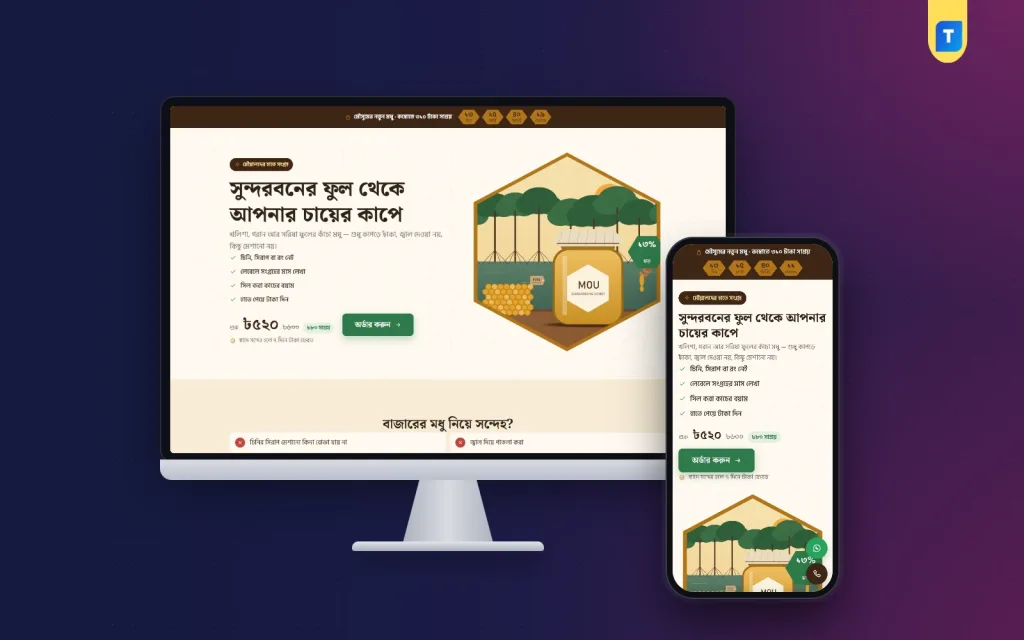
Mou is a honey landing page WordPress theme for beekeepers selling from ads, with a which-honey-is-which guide that picks the jar, a forest-to-jar story and a built-in COD, bKash and Nagad order form.
Mou is a honey landing page WordPress theme for beekeepers and natural food sellers who take orders from Facebook and Google ads. It is one long page for one product, with no site header or footer and the order form built right into the page.
The page feels like a honey house: hexagon frames, comb-brown bands, cream paper, forest-green buttons and Noto Serif Bengali headings. Warm, slow and honest, the way good honey should be sold.
Selling honey means selling trust
Every honey buyer asks the same thing first: is it pure? An ad alone cannot answer that. Buyers want to know where the honey comes from, how it is collected and how one kind differs from another. Mou gives each of those questions its own place on the page.
The theme cannot prove purity for you. What it does is give you room to show it, with your own photos, your own steps and your buyers’ own words.
It works for a Sundarbans honey collector, a family apiary, a pure food page with one star product, or a seller of ghee or dates who wants to tell a similar story. Mou runs on WordPress 6.0+ and PHP 7.4+, and it is tested up to WordPress 7.1.
Two blocks only Mou has
Which honey is which
Each kind of honey is a hexagon in its own colour. Open one and it shows the season, the taste and the best use, with a button that picks its jar in the order form. A buyer stuck between khalisha and mustard can decide in a few taps.
From the forest to the jar
A picture sits beside honeycomb cells, one cell per step, showing how the honey travels from the hive to the buyer’s kitchen. You write the steps, so it tells your real story. It might begin in the mangrove forest, or in a mustard field near your village.
Inside the honey landing page WordPress theme
Sixteen sections come in this order: hero, problem and answer, honey kinds, journey, benefits beside the jar, packages, photos, video, review wall, comparison, specifications, steps, delivery charges, guarantee, FAQ and the order form.
The “Landing page” box in the page editor is where you switch sections on or off and set their order. Open the page under Pages to find it. If your journey story is strong, put it right after the hero. If your buyers trust other buyers most, lift the review wall.
That box also holds the product, every line of text, the offer with its countdown, and the hotline and WhatsApp numbers. Any page can become a landing page for any product, so black seed oil or ghee can get its own page next month.
Jars, combos and the order form
The demo carries khalisha, goran and mustard honey plus a three-kind combo. These are product variations, shown as package cards and again as a picker inside the order form. The plugin’s own checkout updates the price and delivery charge live as the buyer switches.
The offer line can carry a countdown for a harvest price. The comparison section is the right spot to set your honey against cheap market honey, and the guarantee section is where your purity promise goes.
Buyers enter name, mobile, address and district, then pay cash on delivery or send money by bKash or Nagad to your numbers. Orders arrive under Shop in the WordPress dashboard.
Ordering on a phone
Most honey buyers find you while scrolling, so this honey landing page WordPress theme is built for the small screen. A sticky order bar appears once the buyer passes the top and hides at the form. Floating call and WhatsApp buttons make it easy to ask one question before ordering.
The store side
Themeve Commerce comes bundled. It brings Telegram alerts for new orders, SMS and OTP, invoices, coupons, an order tracking page and Steadfast or Pathao courier for sending jars across the country.
Connect the Facebook Pixel and the Conversion API to report every order back to your ad account. Over a few weeks you will see which ad, and which honey, sells best.
Design without code
Mou → Theme Options gives you 4 palettes, Wild honey, Mangrove, Mustard and Dark comb, or full control of each colour. Fonts come as Noto Serif Bengali, Tiro Bangla or Baloo Da 2, each with Hind Siliguri, and Google Fonts can be switched off. A darker palette such as Dark comb suits a premium raw honey.
Search, reset, settings export and import, and a sticky save bar are all there. The Live Customizer in the Mou menu is for quick visual edits.
Demo and setup
The one-click demo brings the honey product with photos and reviews, the landing page as your front page, and policy pages for privacy, terms, and returns and replacement. Order tracking, checkout and thank-you pages are included. All artwork and brand names are samples, ready for photos of your own hives and jars.
Upload and activate the honey landing page WordPress theme, then open Mou → Setup to add Themeve Commerce in one click, enter your license key and run Demo Import. Edit the page in Pages, add your bKash and Nagad numbers in the store’s payment settings, and start your campaign.
Selling seasonal mangoes as well? Mukul is built for mango boxes. For a full pure food shop, see Khaati.
Good honey sells itself once people trust you. Mou gives that trust a page.
Reviews
0.0
Write a review
★★★★★
0 reviews from buyersNo reviews yet — be the first to share your experience after buying.
Frequently Asked Questions
01Can I add more kinds of honey?
Yes. Each kind is a product variation. The demo has khalisha, goran, mustard and a three-kind combo, and you can change them on the product.
02What does Which honey is which show?
Each kind appears as a hexagon in its colour. Opening one shows its season, taste and best use, with a button that picks that jar in the order form.
03Can I tell my own collection story?
Yes. The From the forest to the jar block shows one honeycomb cell per step, and you write each step yourself.
04Does Mou work for other natural foods?
Yes. Any page can become a landing page for any product, so ghee, dates or oils can get their own page.
05How do buyers pay for an order?
By cash on delivery, or bKash and Nagad Send Money to your numbers, which you set in the store’s payment settings.
06Can I put reviews above the packages?
Yes. The “Landing page” box in the page editor lets you switch each section on or off and change the order.
07Which courier can I use for jars?
Steadfast and Pathao courier are supported through the bundled Themeve Commerce plugin.
08Do I get updates?
Yes, through your license. Enter the key from My Account → Licenses in Mou → License.
Delivery & Support
1Place your orderAdd to cart, sign in and pay with bKash, Nagad or Rocket.
2Payment verified automaticallyEnter your Transaction ID — the payment is matched automatically, usually within seconds.
3Get your productYour license key and download appear in My Account → Licenses.
- Secure automatic payment verification
- Delivery to your account & e-mail
- Friendly WhatsApp support
Refund Policy
This policy applies to every product in our store.
You get a refund when the product does not work as described and we cannot fix it, when your license will not activate your website, or when a manually delivered product is late and you cancel before delivery. A working license, or a single license already used on a live domain, is not refundable. Approved refunds go back to the number you paid from within one working day, minus the Send Money charge.
More items
View all →


