Walk through any computer market in Dhaka and you will see the same scene: a customer with a budget and a parts list, asking which processor fits which motherboard. A computer shop website lets you serve that customer online, at midnight as well as at noon, with the specs, prices and stock in front of them. This guide is for computer and IT shop owners, laptop sellers and freelancers who build stores for them, and it covers planning, product pages, PC builds, payments and delivery.
Computer buyers are some of the most careful shoppers there are. They compare cores, memory speed and storage, they check warranty terms, and they read reviews before spending a month's salary. A shop that hides specs or makes them call for every price will lose them to a competitor whose site answers those questions on the page. The good news is that a well-planned site turns that care into trust.
Throughout this guide we use Gonok – Computer Store WordPress Theme as the working example. It is made for shops that sell desktops, laptops, processors, motherboards, RAM, SSDs, graphics cards, monitors, networking gear, UPS and office equipment, and it includes a PC Builder that adds a whole build to the cart in one go.
What Buyers Expect From a Computer Shop Website
First, they expect specifications, early and in order. A laptop listing without the processor, RAM, storage and screen size is useless to a serious buyer. Second, they want warranty details: how long, who handles it and what is covered. Third, they want payment choices that suit large amounts, including EMI where you offer it. Fourth, they want to compare two products side by side before deciding.
Gamers and builders add one more need: putting together a full PC from parts. Today that usually means a long call or chat, with the seller quoting each part and adding the total by hand. A PC builder website section, where the customer picks a part for each slot and sees the running total, removes that work and lets customers experiment with budgets until the build feels right.
Planning Your Catalogue and Policies
Structure categories like your shelves
Organise products the way buyers think: desktop PCs, laptops, components, monitors, accessories, networking and power, and office equipment. Under components, split processors, motherboards, RAM, storage, graphics cards, casings and power supplies. That structure also feeds a PC builder, since each slot draws from its own category. Keep spec names consistent across products, so a buyer comparing two SSDs sees the same fields in the same order.
Write warranty, EMI and delivery pages first
Before you upload a single product, write three pages: warranty policy, payment and EMI, and delivery information. Say how warranty claims work and how long they take, which cards or banks offer EMI if you provide it, and how fragile items are packed and shipped. These pages answer the questions that otherwise fill your phone line and give buyers a reason to trust a shop they found online.
Keep prices and stock honest
Component prices move quickly with the dollar rate and import costs. Update prices and stock regularly, and remove items you cannot supply. Nothing annoys a builder more than ordering a full PC, then hearing that the graphics card is out of stock. An up-to-date computer shop website with fewer products beats a large catalogue full of stale prices.
How Gonok Builds a Computer Shop Website
Gonok opens with a slim indigo promo line, then a white header with a long search box and a category picker. Offers, PC Builder and Account sit beside an indigo cart pill, and under that a category bar with small pictures takes people straight to monitors or RAM. The homepage has 15 blocks, each of which can be switched off or moved.

In the demo, the category bar lists Desktop PC, Laptop, Components, Monitor, Accessories, Networking & Power and Office Equipment. The hero slider carries a new arrivals slide for laptops for work and study, with side banners for graphics cards and a monitor week. Below, the category grid shows picture tiles such as Gaming PC, Brand PC, Ultrabook, Processor, Motherboard, RAM, Storage and Graphics Card, each with a small product count.
The PC Builder
The PC Builder has a slot each for processor, motherboard, RAM, storage, graphics, and casing and power. Shoppers pick one part per slot and watch the total change as they go, and a single button adds every part to the cart. The parts come from your own product categories, set in Gonok, Theme Options, so a new graphics card you upload lands in its slot without extra work.
Rows, deals and brands
Seven product rows each carry a title, a View all link and sliding cards, ready for gaming laptops, SSDs, routers or whatever moves fastest. The flash sale block brings an amber countdown and stock bars beside discounted products. Two wide banners stretch one picture across the page, Shop by brand lines up brand logos, and Latest products closes the page with a big grid and a Load more button.
Cards and product pages for careful buyers
Product cards show key specs under the name, a Save ribbon on discounted items, a compare option and a soft Add to cart button. On the product page, specifications are grouped in a two-column table that is far easier to scan than a long paragraph, with warranty and EMI details next to compare. Compare also has its own page, and reviews open in a fold.
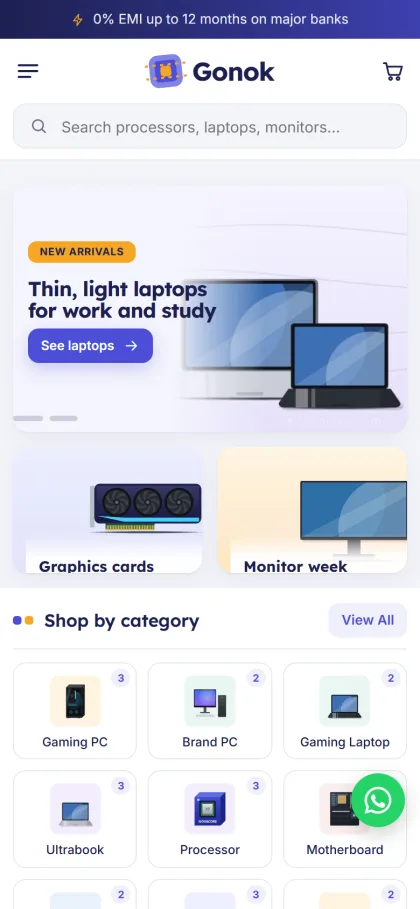
On phones the header shows menu, logo and cart, and product cards turn compact so they are quick to scroll. In the demo, the mobile view also puts the search box right under the header, stacks the two side banners below the slider and lays out the categories as a three-column grid. A WhatsApp button appears in the demo corner as well.
Setting Up Gonok Step by Step
Gonok needs WordPress 6.0 or newer and PHP 7.4 or higher, and it is tested up to WordPress 7.1. Upload the zip under Appearance, Themes, Add New, Upload Theme, and click Activate. Open Gonok, Setup and install the bundled Themeve Commerce plugin in one click; it runs the cart, checkout, payments, couriers and orders. Then activate your license in Gonok, License with the one from My Account, Licenses on Themeve.
Run Gonok, Demo Import to load a full computer and IT store: 45 products from 8 invented brands, covering gaming and brand PCs, laptops, components, monitors, keyboards, mice, routers, UPS and printers, with grouped specs, banners, the PC Builder, menus and every page. Pages include Payment & EMI, Warranty Policy, Delivery Information, Tech Guides, Compare, Track Order and Wishlist.
Then open Gonok, Theme Options. Switch homepage blocks on or off and drag them into order, set your PC Builder parts and banners, and choose one of six palettes (Indigo & amber, Ocean, Emerald, Graphite, Violet or Crimson) and four font pairs. A Live Customizer, settings search, sticky save bar, and export and import are there too. The WordPress documentation helps with menus and pages.
Before buying, open the live demo and put together a build in the PC Builder, then compare two laptops and walk through checkout on your phone. After that, look through the demo dashboard to see where products, orders and settings are kept.
Payments and Courier Delivery in Bangladesh
Customers can pay by bKash, Nagad, SSLCommerz, cash on delivery or manual payment. You ship with Steadfast or Pathao courier, and the Track Order page lets buyers check where their parcel is. Sign in and register open in a popup so nobody loses a half-built cart, and checkout fits on one page, ending with an Order placed popup.
For costly items, cash on delivery carries real risk: a refused graphics card costs you two delivery charges and a week of waiting. Many shops ask for a partial advance through a mobile wallet on high-value orders, and confirm every large order by phone before packing. Pack fragile parts with care, take photos of serial numbers before shipping, and record them against the order for warranty claims later.
Gonok also includes wishlist, coupons and invoices, SMS and OTP messages, new-order alerts on Telegram, and Facebook Pixel with the Conversion API. Attributes, offers, back-in-stock and returns are switched on. Back-in-stock is especially useful for computer shops, where popular graphics cards and processors sell out quickly and buyers are willing to wait for the next shipment.
Marketing a PC Builder Website
PC builders gather in Facebook groups, where people post their builds and ask for advice on budgets. Share honest build suggestions at different price points and link them to the PC Builder, so readers can load the same parts and adjust. Use the Tech Guides page for short articles, such as choosing an SSD or a UPS. These posts help buyers, earn trust and bring visitors from search over time.
Common Mistakes Computer Shops Make Online
The biggest mistake is incomplete specs. A laptop page that skips the generation of the processor or the type of RAM invites calls and returns. Next come stale prices and phantom stock, which damage trust fast. Another is a vague warranty policy that only says warranty available. A computer shop website should state the warranty period, who handles claims and roughly how long a claim takes.
Shops also forget the phone. Most visitors open your site from a Facebook link on a mobile, so test the PC Builder, product pages and checkout on a real phone using mobile data. Finally, do not copy product photos and descriptions from other shops. Write your own spec tables and take your own photos where you can; it helps buyers and keeps your listings clear of disputes.
Frequently Asked Questions
Which products show up in each PC Builder slot?
Each slot draws from your own product categories, set in Gonok, Theme Options. When you add a new processor or graphics card to that category, it appears in its slot automatically, so the builder grows with your stock.
Can product pages show warranty and EMI?
Yes. Gonok product pages show grouped two-column specifications with warranty and EMI details, and the demo includes Payment & EMI and Warranty Policy pages you can edit with your own terms.
What if I sell a wider mix of electronics?
If your shop carries phones, gadgets and home electronics as well as computers, look at Tech Bazer – Electronics Store WordPress Theme. For a large multi-category electronics store, Jontro – Electronics Marketplace WordPress Theme suits better.
Final Thoughts
A computer shop succeeds online with full specs, honest prices, clear warranty terms, safe payments and careful delivery. Add a way for customers to build a PC themselves and you save hours of quoting every week. If you sell laptops, parts and custom builds, start with Gonok – Computer Store WordPress Theme and set up your first PC Builder slots today.