A cosmetics website template for a big shop has to work very differently from one built for a small boutique brand. When you stock petroleum jelly, body lotion, cold cream, lip balm, glycerin, baby care and soap from many brands, your buyers come with a shopping list, not a single wish. This guide is for owners of large beauty and toiletry shops, wholesale-style counters and family-run stores in Bangladesh that want to sell their full range online.
We look at how to organise a large catalogue, how shoppers find things quickly, how to price packs and offers, and how to run the back office when orders come in all day. The example throughout is Poush – Cosmetics Megastore WordPress Theme, a busy, deal-led theme made for big winter-care shops that sell to whole families.
Small brand shops sell a story. A megastore sells range, price and speed. Keep that difference in mind while you plan, because it shapes every page, from the size of the search box to how many products fit on one phone screen and how quickly a full basket reaches checkout.
How a Large Beauty Shop Differs From a Boutique
Walk into a busy cosmetics shop in a Dhaka market in December and you will see the pattern. A mother buys lotion for the parents, a mild cream for the baby, petroleum jelly for her mother-in-law's cracked heels and three lip balms for school bags. One person, one large basket, and price matters on every line. She does not want to read long stories. She wants to find each item, compare sizes and pay.
An online cosmetics store of this size must copy that experience. Search must be prominent, categories must be obvious, prices must be easy to spot, and family packs must show clearly how much they save. A slow, decorative site that hides products behind big lifestyle photos will lose this buyer to a Facebook page that simply lists prices.
Stock is the other big difference. A boutique might have forty products. A megastore can have hundreds, from several brands, in many sizes. Your site must stay tidy as the range grows, and your team must be able to see orders, pack them and update stock without confusion.
Planning a Big Online Cosmetics Store
Begin with categories that match how people shop, not how your suppliers invoice you. Petroleum jelly, body lotion, creams and heel care, lip balm, oils and glycerin, baby care, soap and wash, and family packs is a clear set for a winter-care store. Keep the number of top-level categories under ten, and use brands and tags for finer sorting rather than adding more menu items.
Product data at scale
With hundreds of items, consistency matters more than beautiful writing. Create one simple template for product pages: size, brand, key ingredients, who it suits, a short usage tip. Photograph items on the same background. Name products the way customers search for them, such as "glycerin 100 ml" rather than only an internal code. Clean data makes search work, and search is how big-store shoppers move.
Packs, offers and seasons
Family packs are a strong seller in winter, but only if buyers can see the saving. Decide which items you will bundle in packs of three or four, and price them so the saving per unit is real. Plan your season too: winter-care demand rises from late autumn and drops in spring. Order stock early, plan deals by week, and know which items you will clear when the cold ends.
What a Cosmetics Website Template Needs for a Megastore
For a large shop, the most important feature of a cosmetics website template is a big, visible search box, ideally with a category filter. Next come a category grid near the top, deal blocks with countdowns and stock levels, best-seller tabs by category, and price-based browsing for budget shoppers. Product cards should be compact so many items fit on a phone screen at once.
Look for practical product pages too: key ingredients, a short tip and a delivery estimate help buyers decide without messaging you. On the back end, you want quick order alerts, invoices, coupons and courier booking in one place. A theme that looks calm and minimal in a demo with twelve products may feel empty or messy with four hundred, so judge it with your real catalogue in mind.
How Poush Handles a Busy Beauty Store
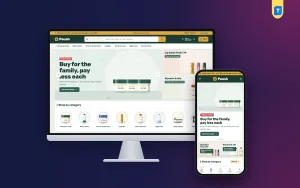
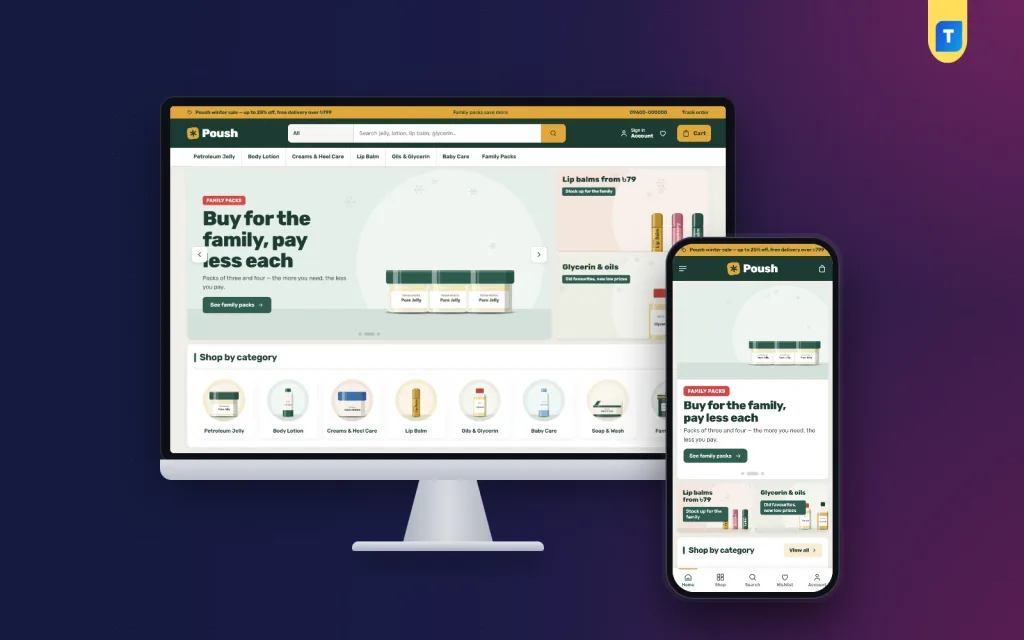
Poush is built like a busy market stall. A mustard sale strip runs over a deep green header with a large search box, and white product boxes sit close together on a warm grey background. In the demo, the search bar has an All category picker and suggests jelly, lotion, lip balm and glycerin, while the menu below lists Petroleum Jelly, Body Lotion, Creams & Heel Care, Lip Balm, Oils & Glycerin, Baby Care and Family Packs.

Large hero slides sit beside two side offers. The slide shown in the demo promotes family packs of three and four, while the side tiles feature lip balms and glycerin with oils. Below them, the Shop by category row shows round icons for each department, including Soap & Wash. Mustard price stickers keep prices easy to spot across the grids.
The season planner
This block is the heart of Poush. The shopper enters how many adults, children and elders live at home and how many cold months to cover. The planner then lists every essential with a quantity, using the cheapest product for each line, and shows a season total and cost per person. One button adds the whole list to the bag. For a family on a fixed budget, this is the answer they came for.
The pack saver
The pack saver places each family pack next to the single item, with the price each and the saving shown plainly. Buyers no longer need to do sums in their head or ask in Messenger whether the pack is cheaper. The decision takes a second, which is exactly what a large shop needs.
Homepage Blocks, Product Pages and the Phone View
Poush gives you 24 homepage blocks. Seventeen are active in the demo and seven more are ready when you need them. Under Homepage layout you switch blocks on or off and drag them into order, while phones use arrow buttons. Poush deals counts down with stock bars, Best sellers splits into tabs by category, Shop by budget pairs price tiles with products, and New arrivals shows two rows of fresh stock.
Three department blocks each carry a banner and eight products, For the whole family offers four cards, and Trending now, Top rated, Top brands and Winter tips round off the page. A promise strip covers genuine products, low prices, delivery and returns. Every product page shows a texture meter, key ingredients, a short tip and an expected delivery date.

On phones, the header shows menu, logo and cart, and product cards stay compact so more items fit on one screen. In the mobile screenshot, the two side offers move under the main slide, and a bottom navigation bar is shown in the demo. Customers sign in or register in a popup, reviews fold neatly on the product page, and a wishlist saves items until payday.
Setting Up Poush and Running the Back Office
Poush requires WordPress 6.0 or newer and PHP 7.4 or newer, and it is tested up to WordPress 7.1. Upload the zip under Appearance, Themes, Add New, Upload Theme, then activate it. Open Poush, Setup to install Themeve Commerce, which comes bundled, in one click. Add your licence key from My Account, Licenses on Themeve under Poush, License. The WordPress documentation explains the dashboard basics if you need them.
Import the Winter Megastore demo from Poush, Demo Import. It brings 36 products from 7 brands across all the winter-care categories, plus the season planner, the pack saver, winter tips, menus and pages such as About Poush, Delivery, FAQ, Our Stores, Returns & Refund, Track Order and Winter Tips. The brands and artwork are invented samples, so replace them with your own stock.
In Poush, Theme Options, which also works on a phone, you can pick one of five palettes, Green & mustard, Teal & orange, Maroon & gold, Navy & yellow or Olive, and fonts such as Rubik or Mukta. For daily work, new orders can ping your team on Telegram, and invoices, coupons, SMS and OTP are built in. Size guide, back-in-stock, offers, returns and store locations sit inside one Shop menu.
Before buying, browse the live demo on a phone and fill a family basket through the season planner. Then check the demo dashboard to see how orders and Theme Options are arranged for staff. If the person who packs parcels can find what they need there quickly, the theme will suit a busy shop.
Payments, Delivery and Promotion in Bangladesh
The cart and one-page checkout come from Themeve Commerce. Buyers pay with bKash, Nagad, SSLCommerz, cash on delivery or manual payment, then see an Order placed popup. Steadfast and Pathao courier carry the parcels, and a Track Order page answers the usual "where is my order?" call before it reaches your phone.
Large baskets bring their own risks. Cash on delivery orders with many items are expensive if they come back, so confirm big orders by phone and consider asking for the delivery charge in advance. Pack liquids such as glycerin and oils in sealed bags, and keep heavy jars at the bottom of the box. Free delivery above a basket value can raise order size, but work out your courier cost first.
For marketing, Facebook remains the main channel. Poush includes the Facebook Pixel with Conversion API, so you can see which ads bring orders. Promote the season planner and family packs rather than single items, post short Bangla videos showing a full family basket, and run deals on weekends when families shop together.
Common Mistakes When Choosing a Cosmetics Website Template
The first mistake is choosing a cosmetics website template designed for a single luxury brand and then trying to fit hundreds of products into it. Large white spaces and big photos look elegant with ten items but slow shoppers down with four hundred. The second mistake is a small or hidden search box. In a megastore, search is the main road.
Owners also forget to show savings on packs, leave old winter deals running in spring, and let product names become inconsistent as staff add items. Each mistake makes the shop harder to use. Finally, many never test a full family basket on a phone. Try it yourself: if adding ten items takes too long, buyers will give up halfway.
Frequently Asked Questions
Is Poush only for winter products?
The demo and blocks such as the season planner and Winter tips are built around winter care for families, including petroleum jelly, lotions, creams, lip balm, oils, glycerin, baby care, soaps and family packs. Its 24 blocks and five palettes let you adjust the look for the rest of the year.
Do I need a separate shop plugin?
No. Themeve Commerce is included and installs from Poush, Setup in one click. It handles the cart, checkout, payments and courier booking, so a large shop runs from one dashboard instead of several separate plugins that each need their own updates.
Which theme suits a skincare or makeup shop instead?
For a routine-led skincare store, look at Komol – Skincare Shop WordPress Theme. For lipsticks, palettes and shades, Rongin – Makeup Store WordPress Theme is the closer fit. Poush is for big family winter-care shops where range, packs and price comparison matter most.
Can staff learn the dashboard quickly?
Theme Options has a settings search, a sticky save bar, reset and export or import, and it works on a phone. Orders, coupons, offers and returns sit inside the Shop menu, so new staff have one place to learn from day one.
Final Thoughts
A large beauty shop succeeds online when buyers can find every item fast, see real savings on packs and trust that the parcel will arrive. Plan your categories, product data and season first, then pick a cosmetics website template that puts search, deals and family baskets at the front. For a big winter-care store that sells to whole households, Poush – Cosmetics Megastore WordPress Theme is a strong place to start.