Good epaper software lets a news publisher put a full newspaper edition online every day, with pages that look and read like print. This guide is for Bangla newspaper owners, district weekly editors and online portals in Bangladesh that want a daily e-paper without hiring a separate design team. We explain what readers expect from an e-paper, what the software must handle behind the scenes, how to plan your edition and which mistakes to avoid in the first months.
Many publishers still treat the e-paper as an afterthought: someone exports a PDF late at night and uploads it to a page nobody can read on a phone. That approach wastes a real asset. A well-made e-paper gives loyal readers the familiar front page they grew up with, gives advertisers a page they understand, and gives your newsroom a daily archive that shows the paper is alive and publishing on schedule.
As our example we use the Automatic WP Bangla E-Paper Plugin, sold as ePaper Pro, a WordPress plugin that turns your news website into a digital newspaper. It takes the stories you already publish and arranges them into a proper edition on the schedule you choose. Before we look at how it works, it helps to understand what any e-paper setup needs to do well.
Why Readers in Bangladesh Still Want an E-Paper
A website homepage changes every hour, which is great for breaking news but hard for readers who want a complete picture of the day. An e-paper is a fixed edition: today's front page, today's sports page, today's opinion page. Older readers, people living abroad and readers who used to buy the printed paper often prefer that order. They know where the editorial sits and where the district news starts, and they enjoy reading the day in one sitting.
There are practical reasons too. Readers share e-paper clips on Facebook and messaging apps, often as proof that a story appeared in print. Local advertisers, from coaching centres to property developers, understand a newspaper page better than a web banner. And a dated archive of editions shows readers, sources and partners that your paper keeps publishing. For a district paper with a small print run, a daily e-paper can reach far more people than the printed copies alone.
What Epaper Software Needs to Do
The first job of any epaper software is building the edition. Someone has to collect the day's stories, decide which ones go on the front page, lay out the section pages and publish the result at a fixed time. If that work is fully manual, the e-paper slips whenever the designer is ill or the night desk is busy. Automation, with editors keeping the final say, is what keeps an edition coming out on time every single day.
The second job is the page itself. A real newspaper page mixes large and small photos, boxes, highlighted quotes and stories that continue on another page. Good software should reproduce that rhythm instead of placing every story in an identical grid. The masthead should carry your brand, the date and useful daily information, because that top strip is the first thing readers look at when the edition opens.
The third job is reading. Most visitors arrive on a phone, so pages must zoom smoothly, readers need a quick way to jump between pages, and a single story should open on its own so it can be shared, downloaded or printed. For Bangla publishers there is one more need: proper Bangla fonts that render conjunct letters cleanly. Weak font support makes even a well-designed edition look broken on the very first screen.
Planning Your Daily Edition
Decide the page plan
Start with a simple page plan on paper. A typical daily might run a front page with the top stories, then pages for national news, countrywide and district news, international news, sports, entertainment and opinion. Eight pages is plenty for a new e-paper. Match each page to a WordPress category so the right stories flow to the right page, and keep the plan stable, because readers learn where to find things.
Set deadlines and roles
Next, decide when the edition goes live and who checks it. Many papers publish their e-paper early in the morning, so readers can open it with tea before work. Agree on a cut-off time for stories, name one editor who approves the front page, and keep a short checklist for headlines, photos and spelling. The WordPress documentation explains user roles and categories if your desk is new to managing a WordPress site.
How the Bangla E-Paper Plugin Builds Each Edition
ePaper Pro collects the stories you publish on your WordPress site and arranges them into a newspaper edition every day, week or month, on the schedule you set. Each edition is published automatically, with no manual work required. Every edition gets a branded masthead and a front page of your top stories, followed by dedicated section pages. Continued-on-page links take readers from the front page straight to the rest of a story.

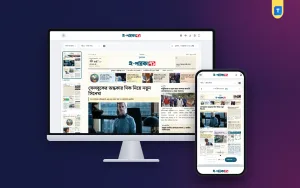
The screenshot of the live demo shows the result. At the top sits the masthead with a weather box for Dhaka, sunrise and sunset times, and the date shown in the English, Bangla and Hijri calendars along with the publishing time. Under it runs a strip of four story teasers with page references, then the lead story with a large photo and a highlighted subheading. The left column lists page thumbnails, and menus above them let readers pick the edition, the page and the date.
Each page is designed with mixed photo sizes, tinted story boxes, highlights and pull quotes, so it reads like a real newspaper rather than a list of posts. The page headers carry useful daily information: prayer times, weather, gold prices, stock market figures and currency rates, all updated automatically from online sources. For Bangladeshi readers that strip is genuinely useful, and it gives them one more reason to open the edition each morning.
Editors stay in control through the built-in edition builder, and the plugin can also create editions from PDF files. That matters if you already produce a print layout and want the e-paper to match it on some days, while relying on automatic editions on others. SolaimanLipi and four more Bangla fonts are included, so Bangla headlines and body text look right without extra font work from your team.
The Reader Side: Mobile, Zoom and Clips
Readers can zoom and browse pages easily on any device. On desktop the demo shows a zoom control in the corner and buttons for download, PDF and full-screen view at the top. Readers can also open any story as a clip, then share, download or print it. Clips are the part of an e-paper that travels furthest on Facebook, so make sure every clip carries your masthead and the date when you test it.
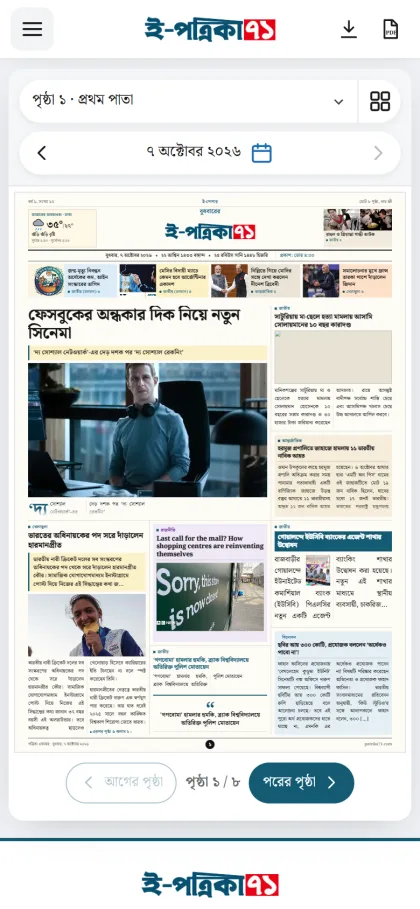
On a phone, the demo fits the whole front page on the screen, with a page menu and a date picker above it and large previous-page and next-page buttons below, plus a counter that shows the current page out of the total. Readers who want detail can zoom in, while those who just want the headlines can flip through quickly with a thumb. Test this on a budget Android phone, since that is what many of your readers will use.
Setting Up Your Epaper Website
If your news site already runs on WordPress, setup starts with installing the plugin, choosing the schedule for editions and mapping your categories to pages. Add your logo for the masthead, pick the Bangla font that matches your print identity and decide what time each edition should publish. Then let the plugin build a few test editions from real stories and check every page, especially long headlines and stories with unusual photo shapes.
Your epaper website will only be as good as the stories feeding it. Keep categories clean, give every story a proper featured image and write a clear excerpt, because those pieces appear on the pages. Groups that run a sister site and bring its stories across with Auto News Sync — Automatic News Importer for WordPress should still have an editor check what lands in each category before the edition is built.
Finally, protect the archive. An e-paper builds up hundreds of editions a year, and losing them would hurt. Take regular full backups, and when you move to bigger hosting, use a proper migration tool such as All in One WP Migration Pro Plugin 2026 so posts, media and settings move together. Run the site on reliable hosting with enough storage, and use caching so pages open quickly at peak morning hours.
Bangladesh Tips for Growing Your E-Paper
Promote the edition every morning on your Facebook page with an image of the front page and a link to the full e-paper. Share strong clips from inside pages during the day, especially district stories that local groups will pass around. Tell print subscribers that the e-paper exists, and print its address in the paper itself. Over time, a steady morning habit matters more than any single viral story or paid boost.
Advertisers in Bangladesh often still think in terms of newspaper pages and positions, such as front-page boxes or back-page strips. An e-paper that looks like a real edition makes those conversations easier, because the advertiser can see exactly where the notice will appear. Keep a simple rate sheet for e-paper positions and show prospects a recent edition on your own phone during the meeting.
Common Mistakes With Epaper Software
The biggest mistake is choosing epaper software that only uploads PDF files and offers nothing for mobile readers. Large PDFs are slow on mobile data and almost impossible to read on a small screen. The second mistake is publishing at random times, which breaks the morning habit. The third is ignoring fonts: if Bangla text breaks or falls back to a system font, readers lose trust in the paper within seconds.
Other mistakes include letting thin or unedited stories reach the front page, forgetting to check clips before sharing them, and never looking at the archive. Open a random edition from last month every week and make sure it still loads with all its pages. Also avoid pirated plugins from unknown sites, which can carry harmful code and stop working after a WordPress update, taking your editions down with them.
Frequently Asked Questions
Do I need a print edition to run an e-paper?
No. ePaper Pro builds editions from the stories you publish on your WordPress site, so an online-only portal can run a daily e-paper too. If you do have a print layout, the plugin can also create editions from PDF files, which lets you mix both approaches as your workflow changes.
How often can the plugin publish an edition?
You can set editions to be built every day, every week or every month, and each one is published automatically on that schedule. Editors can still use the built-in edition builder when they want to adjust an edition by hand before or after it goes out.
Can readers share a single story?
Yes. Readers can open any story as a clip, then share, download or print it. Clips work well on Facebook and messaging apps, where readers often pass around one district or sports story rather than the whole page, and each share brings new readers back to your epaper website.
Does good epaper software support Bangla fonts?
It should, and this plugin includes SolaimanLipi and four more Bangla fonts. Always test headlines with long conjunct letters and numbers in Bangla digits, and view them on a few phones, because font rendering is the first thing Bangla readers notice when an edition opens.
Final Thoughts
A daily e-paper works when it comes out on time, looks like a real newspaper and reads well on a phone. Plan your page list, set a fixed publishing time, keep categories clean and promote each edition every morning. If you want epaper software that builds editions automatically from your WordPress stories, with Bangla fonts and clip sharing included, explore the Automatic WP Bangla E-Paper Plugin and set up your first test edition this week.