A smart bulb on its own is a small sale. A bulb, a smart plug, an indoor camera and a video doorbell for the same flat is a real order. That gap is the whole story of selling smart gadgets, and it is why the gadget website template you pick matters more than it first seems. This guide is for Bangladeshi sellers of smart home kit, wearables, audio and charging gear, and for freelancers who build their shops.
Most shoppers cannot picture a full smart setup from a grid of product photos. They see a plug and think it is just a plug. Your job is to show them the room, the routine and the convenience, then make buying the whole set easy. We will look at how to plan a smart gadget range, how to present bundles and gifts, how to handle warranty and delivery, and what to avoid.
Our example throughout is Chomok – Smart Gadget Shop WordPress Theme. Its name means surprise, and it is playful on purpose: violet and coral on soft pastels, a floating capsule header, pill buttons and rounded headings. More importantly, it lets shoppers build a smart room by tapping devices in a drawing and then add the whole setup to the bag.
Why Smart Gadgets and Wearables Sell Differently
Phones and laptops are bought one at a time, after long comparison. Smart gadgets work the other way. People buy them in groups, for a room or a habit: a bedroom with a smart light and a sleep speaker, a front door with a camera and a doorbell, a desk with a charger, a power bank and earbuds. Wearables follow the same pattern, often bought together with a charger or a spare strap.
Smart gadgets are also popular gifts. Smartwatches, earbuds and small helpers like mini fans or smart lamps are easy presents for Eid, birthdays and weddings. Gift buyers usually know who the gift is for and how much they want to spend, but not which product to choose. A shop that helps them decide quickly wins those orders, while a long product list sends them back to Facebook to ask friends.
What a Gadget Website Template Should Do for Smart Products
For this kind of store, the template should do three jobs. First, show products in context, so buyers see a room or a moment rather than a lone device. Second, make bundles easy, ideally with a running total and one button to add everything. Third, answer the practical questions on the product page: what it connects to, what the warranty covers and when it will arrive. A plain grid does none of these well.
It should also stay friendly on a phone, because most smart gadget buyers in Bangladesh browse from Facebook links on mobile data. Big tap targets, a short header and compact product cards matter more than fancy desktop effects. Finally, look for a gift tool and a deals block with a countdown, because gadget sales spike around festivals and launches, and you need a way to show those offers clearly.
Planning Your Smart Gadget Range
Group your products by where and how people use them, not by brand. A simple structure is Smart Home, Audio & Screens, Wearables, Power & Charging and Little Helpers, which is exactly the menu shown in the Chomok demo. Under Smart Home you might hold bulbs, plugs, cameras and doorbells. Under Little Helpers you can place the handy items that do not fit elsewhere, such as mini fans, trackers and organisers.
Build bundles around real rooms
Walk through a typical Dhaka flat in your head: bedroom, living room, kitchen, front door. For each room, list three or four devices that work well together and that you actually stock. These become your room bundles. Check compatibility before you promise anything; if a plug needs a specific app or hub, say so on the product page. Honest notes cut returns, which matter a lot when every return costs a courier trip.
Plan gift ranges by person and budget
Make a short list of gift targets such as a teenager, a parent, a partner and a colleague, and pick a few products for each at different budgets. Tag them so a finder can pull them up. Write one line on each product explaining why it makes a good present. Gift shoppers read less and decide faster, so a single clear sentence often does more than a long spec table.
How Chomok Brings Smart Rooms to Life
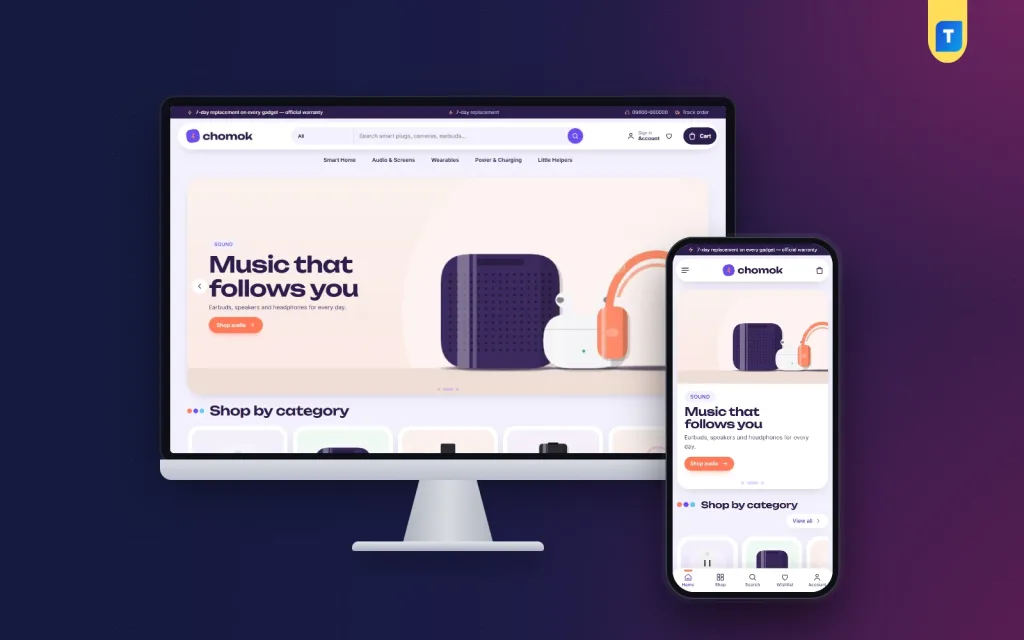
The live demo opens with a dark strip carrying a replacement and warranty message, a support line and a Track order link. Below it, a white capsule header floats over a pastel background, holding the logo, a category dropdown next to a search box, an account link, a wishlist heart and a dark Cart pill. The menu underneath lists the five departments.

The hero slider sets gadgets on pastel podiums. In the screenshot, a slide tagged Sound shows a speaker, earbuds and headphones with a coral Shop audio button, followed by Shop by category with round tiles for each department. The style is soft and cheerful, which suits gifts and lifestyle gadgets better than a dark, technical layout would.
Make your room smart
The standout block is Make your room smart. It draws four scenes, a bedroom, a living room, a kitchen and the front door, and each device in the drawing has a glowing hotspot. Tap a hotspot to add that device to the setup, tap again to remove it, and watch the total change as you go. When the room looks right, one button adds the whole setup to the bag. It feels like a game, and it ends at checkout.
Gift a gadget
The Gift a gadget block filters ideas by who the present is for and by a budget slider, so someone shopping for a teenager gets a short, sensible list. Pair it with the gift ranges you planned earlier and it becomes a quiet salesperson during Eid and wedding season, when many of your visitors are buying for someone else.
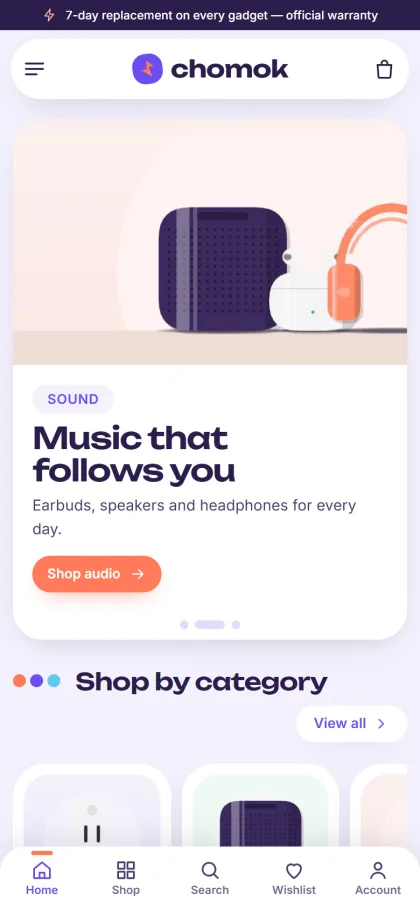
On phones the header keeps to menu, logo and cart, and compact cards fit more gadgets on each screen. The mobile screenshot also shows a bottom bar with Home, Shop, Search, Wishlist and Account. Further down the homepage, 24 blocks can be switched off or moved: New gadgets, Best sellers in tabs, Gadget deals with a countdown and stock bars, Shop by moment, Shop by budget, Trending now, Top rated, Brands, How-to guides and a promise strip covering warranty, replacement, delivery and cash on delivery.
Product Pages, Payments and Delivery
Smart gadget buyers read the fine print. Product pages show specifications, the warranty and a delivery date, so the questions people usually phone about are answered on the page. Reviews sit in a fold with a popup inviting the first one, and a wishlist plus back-in-stock help with gadgets that sell out fast. Login and registration open in a popup, so nobody loses their place.
Checkout takes one page. Customers pay with bKash, Nagad, SSLCommerz, cash on delivery or manual payment, see an Order placed popup and follow the parcel on the Track Order page. Steadfast and Pathao courier handle delivery. The engine is Themeve Commerce, bundled and installed from Chomok, Setup, which also brings coupons, invoices, SMS and OTP, new-order alerts on Telegram and the Facebook Pixel with Conversion API.
For room bundles, confirm larger cash on delivery orders by phone before dispatch, and pack fragile items like cameras and bulbs with extra padding. If a bundle crosses a value you are not comfortable sending on pure COD, ask for a small advance by mobile payment. Customers rarely mind when you explain that it protects both sides.
Setting Up Chomok Step by Step
Chomok needs WordPress 6.0 or newer and PHP 7.4 or newer, and it is tested up to WordPress 7.1. Upload the zip in Appearance, Themes, Add New, Upload Theme and activate it. From Chomok, Setup, install Themeve Commerce in one click, then activate Chomok, License with your key from My Account, Licenses on Themeve. The WordPress documentation is a good reference for menus and pages.
Import the Chomok Smart Gadgets demo through Chomok, Demo Import. It brings 23 products from 4 invented brands across smart home, audio and screens, wearables, power and charging, and little helpers, along with the room planner, gift finder, how-to guides, menus and pages such as Delivery, FAQ, Our Stores and Replacement & Warranty. You can explore the demo dashboard before you decide.
In Chomok, Theme Options, which also works on a phone, choose one of five palettes: Violet & coral, Sky, Mint, Peach or Graphite. Graphite suits a more serious store, and any colour can be set by hand. Fonts include Unbounded with Inter, Lexend, Onest or DM Sans. The smart room, gift finder, categories and deals share their own settings group, and the Live Customizer is there if you like to see changes as you make them.
Mistakes to Avoid With Smart Gadget Shops
The most common mistake is listing smart devices without saying what they need. If a camera needs a memory card or a plug needs 2.4 GHz Wi-Fi, write it in the first lines. Buyers who discover it after delivery send the parcel back. Another mistake is using the same generic gadget store website layout as a phone shop, which hides the bundle story that makes smart gadgets worth buying.
Sellers also forget the after-sale side. Write a simple setup guide for your best sellers and post it in How-to guides; it cuts support calls and helps you show up in search, as Google explains in its Search Central documentation. Finally, do not leave festival deals running after the festival. A stale countdown on a gadget website template tells buyers nobody is minding the shop.
Frequently Asked Questions
What is the smart room planner?
It is the Make your room smart block. It draws a bedroom, a living room, a kitchen and a front door with glowing hotspots on each device. Shoppers tap to add or remove devices, watch the total change and add the whole setup to the bag with one button.
Is the playful look too bright for my brand?
Not necessarily. You can switch to the Graphite or Sky palette, set your own colours, or use the Onest or DM Sans font in Theme Options. The layout stays the same, so you keep the room planner and gift finder with a calmer look.
Should I pick Chomok or another gadget theme?
If you sell phones and laptops and need side-by-side spec comparisons, Jhalak – Gadget Shop WordPress Theme is the better gadget store website choice. For a big store with ACs, TVs and fridges, look at Jontro – Electronics Marketplace WordPress Theme. Chomok suits smart home kit, wearables and gifts.
Does Chomok work well on mobile?
Yes. It is fully responsive, with a menu, logo and cart header and compact cards on phones. Theme Options works on a phone too, so you can update deals or reorder homepage blocks without sitting at a computer.
Final Thoughts
Smart gadgets sell best when buyers can see the whole setup, trust the warranty and get the parcel on time. Plan your range by room and by gift, write honest compatibility notes, offer the payments people use and keep your deals fresh. If you want a gadget website template that lets shoppers play with a smart room before they buy the lot, start with Chomok – Smart Gadget Shop WordPress Theme.