A handloom website lets a weaver, a family saree shop or a small ethnic label show cloth the way it deserves to be seen: close up, calmly and with the story of who made it. This guide is for people who already sell tant, khadi or kantha pieces at a market stall, from a showroom or through a Facebook page, and now want an online shop of their own. It is also for freelancers who build stores for such sellers.
Handloom is not like fast fashion. A buyer wants to know the count of the yarn, whether the colour is natural, how the border was woven and whether a blouse piece comes with the saree. Those questions need space, good photos and patient writing, which a social media post rarely gives. A shop of your own also keeps your catalogue in one place, so last year's best jamdani-style piece is still findable next Pohela Boishakh.
We use Tanti – Saree and Handloom WordPress Theme as the example throughout. Its name means the weaver, and it is built around cloth, with a woven saree border under its titles and a way for shoppers to browse by weave. Before looking at the theme, though, we start with the planning that every saree business should do first.
Why a Saree Business Needs Its Own Handloom Website
Most saree sellers in Bangladesh begin with live videos and Messenger orders. That route is fast, but it has limits. Every buyer asks the same five questions, prices are hidden in comments, and a good piece sold out last week still gets enquiries. When orders grow, the seller spends more time typing replies than packing parcels. A website answers those questions once, on the product page, for every visitor.
A website also changes how people judge you. A buyer in Chattogram or abroad who has never visited your stall in Tangail needs a reason to trust you with an advance payment. Clear policies, a real phone number, a track order page and honest photos give that reason. A handloom website with these basics turns a page follower into a repeat customer, because the second order is easier than the first.
Finally, handloom has a story that sells. Buyers who pay more for handwoven cloth want to hear about the loom, the district and the hands behind it. A blog section and an about page let you tell that story in full, instead of squeezing it into a caption that vanishes from the feed by the next morning.
Planning Your Catalogue Around Weaves
Start by listing what you actually sell. A typical handloom shop carries sarees, kurtis, three-piece sets, ornas and stoles, plus a few jewellery pieces and bags that go with them. Make these your top categories. Then think about how your buyers search. Many of them do not start with a product type at all. They start with a fabric: they want khadi for summer, tant for daily office wear or kantha work for a gift.
Group by fabric as well as by product
That is why it helps to tag every product by weave as well as by category. One saree might sit under Sarees and under Tant at the same time. Write a short line for each weave that tells a new buyer what to expect, such as light and crisp for tant or hand-spun for khadi. These small descriptions teach customers the difference, which makes them more confident when they spend more.
Photograph the texture
Shoot each piece in daylight on a plain background. Take one full shot, one draped shot and one close-up of the border and the body so the weave is visible. Note the length, the yarn, the dye and whether a blouse piece is included. If you sell kurtis or three-piece sets, measure every size and keep the chart ready. These details save you dozens of messages each week.
How Tanti Turns a Theme Into a Handloom Website
Tanti suits shops that sell tant, jamdani-style, khadi and kantha sarees, block-print kurtis, three-piece sets, ornas, jewellery and bags. The base colours are cream cotton, terracotta and indigo, with Gloock headings. A woven saree border, the par you see at a saree's edge, runs under the menu and under every section title, and kantha-style running stitches separate sections instead of heavy lines. A visitor knows what kind of shop they are in within a second.
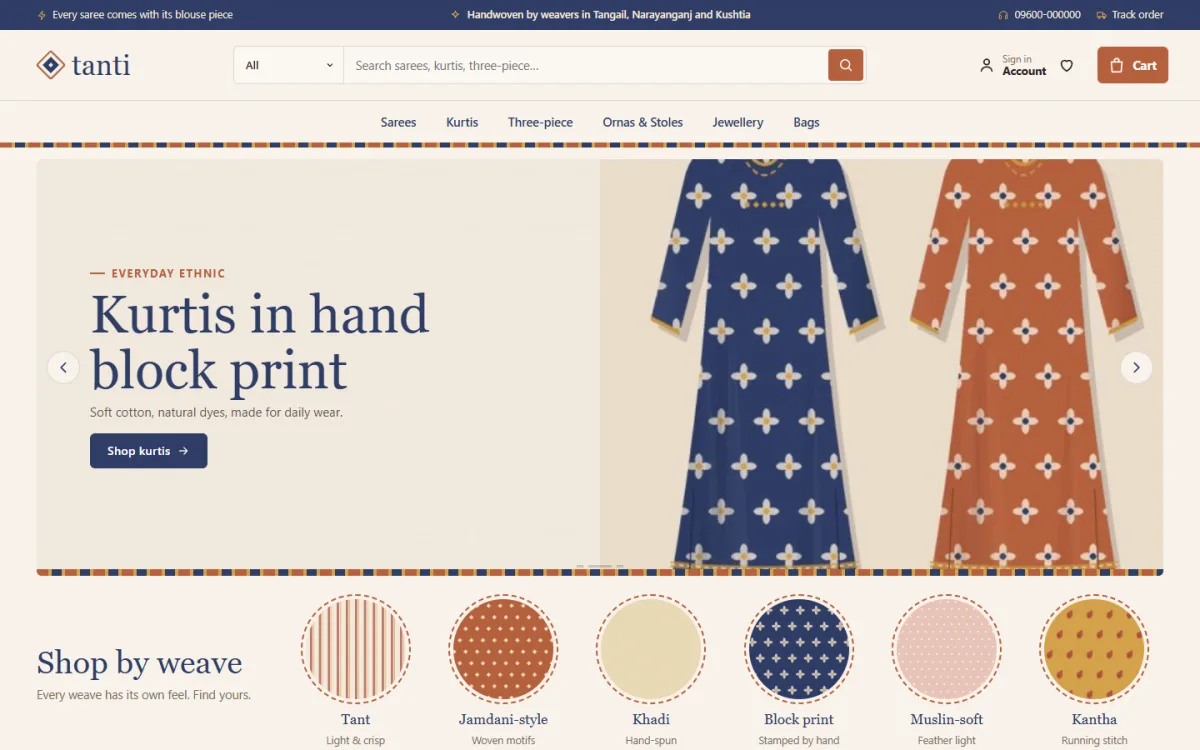
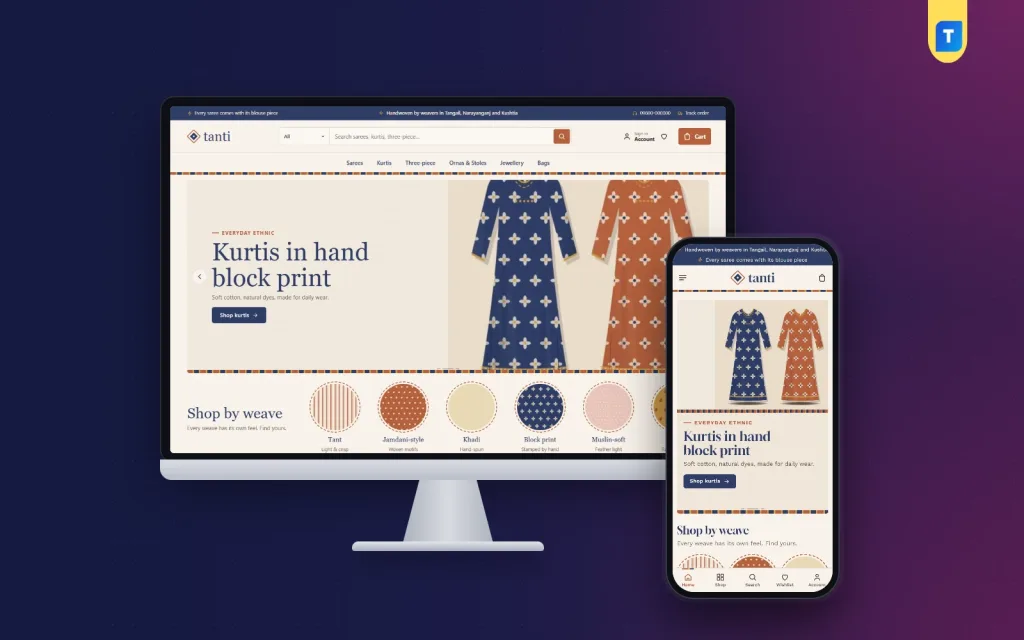
The desktop screenshot shows how this plays out in the demo. A dark top bar carries short promises, a search box with a category dropdown sits beside the sign-in, wishlist and cart, and the menu lists Sarees, Kurtis, Three-piece, Ornas and Stoles, Jewellery and Bags. The hero slide in the demo promotes hand block print kurtis, framed above and below by the striped border. Just under it, the shop by weave row begins.
Shop by weave and complete the look
Shop by weave is six round fabric swatches: tant, jamdani-style, khadi, block print, muslin-soft and kantha. Each opens the matching products, so a buyer who only wants khadi gets there in one tap. The weaves block has its own settings, so you can point each swatch at your own fabrics. Complete the look places one outfit picture beside three pieces that go together, such as a saree, a bag and jewellery. Each piece has its own add or choose button, and the price of the whole look is shown, which makes a second and third item an easy sale.
Twenty-four blocks you can switch and reorder
The homepage has 24 blocks. Fourteen are on after the demo import, including fresh off the loom, most loved in category tabs, two departments, wear it to with four picture cards, weaving families, stories and loom offers with a countdown and stock bars. Ten more wait switched off, among them shop by price, trending, top rated and a weaver spotlight. Any block can be turned on or off and dragged into a new order, and on a phone arrow buttons move them.
What Buyers See on a Phone

Most saree buyers in Bangladesh will open your handloom website on a phone. Tanti's phone header shows only the menu, logo and cart, and product cards stay compact. The mobile screenshot of the demo also shows a bar at the bottom of the screen with Home, Shop, Search, Wishlist and Account, plus the same woven border under the header. Product photos are tall, and a second picture appears on hover, so the drape and the border both get seen.
Product cards carry a price-tag badge, quick sizes and colour swatches. Kurtis and three-piece sets can use the size guide, and every saree can list its blouse piece. Shoppers sign in or register in a popup without leaving the page, save favourites to a wishlist and read reviews in a fold. A product with no reviews yet shows a popup inviting the first one. Checkout fits on one page and ends with an Order placed popup, after which the Track Order page lets the buyer follow the parcel.
Setting Up the Shop Step by Step
Tanti is built for WordPress 6.0 and up, tested to 7.1, on PHP 7.4 or newer. Upload the zip under Appearance, Themes, Add New, Upload Theme, and activate it. Go to Tanti, Setup and install the bundled Themeve Commerce plugin with one click. Then add your licence from your Themeve account in Tanti, License. If you are new to WordPress itself, the official WordPress documentation explains themes, menus and pages in plain steps.
Next, import the Handloom House demo from Tanti, Demo Import. It adds 36 pieces from 6 sample weaving families, three menus and pages such as About Tanti, Stories, Delivery, Exchange, Our Stores and Track Order. Every weaver name, brand and picture in the demo is invented, so replace them with your real products and your real weavers before launch. That swap is also the best moment to rewrite the promise strip, which covers handwoven, blouse piece, exchange and delivery.
Then open Tanti, Theme Options. Five palettes are named after dyes: Terracotta and indigo, Madder red, Indigo dye, Leaf green and Lac pink. Four font pairs are ready, led by Gloock with Work Sans. A search box finds any setting, a sticky bar saves your work, and you can export a backup or reset. Before buying, browse the live demo on your phone and look around the demo dashboard to see where products and orders sit under Shop.
Payments, Couriers and Seasonal Sales
Tanti runs on the Themeve Commerce plugin. Buyers can pay with bKash, Nagad, SSLCommerz, cash on delivery or manual payment, and you can ship through Steadfast or Pathao courier. Invoices, SMS and OTP, new-order alerts on Telegram and Facebook Pixel with the Conversion API come with the same plugin. Offers, returns, the size guide and a store locator are switched on from the start, and coupons help during Boishakh or puja sales.
For a saree business, cash on delivery brings both sales and risk. Sarees are expensive to send back, so call to confirm high-value COD orders and consider asking for the delivery charge in advance by mobile payment. Pack each saree folded in tissue and a sealed bag, since handloom cotton marks easily in transit. Mention washing advice on the product page and inside the parcel, because many complaints about colour come from the first wash.
Plan your year around the big seasons. Boishakh brings red and white cotton, puja brings festive tant and silk-look pieces, and winter suits kantha shawls and khadi. Use the loom offers block with its countdown for a short sale, and post the same collection on your Facebook page with a link to the category page rather than the homepage.
Mistakes Handloom Sellers Should Avoid
The first mistake is filtered photos. Heavy filters change the colour, and handloom buyers notice when the parcel arrives. Shoot in natural light and show the true shade. The second is hiding details. If a saree has no blouse piece, say so on the page. If the dye may bleed, say that too. Honest product pages reduce returns and build the trust that a handloom website depends on.
Other common slips include launching with demo text still on the homepage, copying product descriptions from other shops, and forgetting to test the checkout with a real phone on mobile data. Do not switch on every homepage block at once either. Tanti keeps ten of its blocks off by default for a reason. Start with a clean page and add shop by price or a weaver spotlight only when you have the products and stories to fill them.
Frequently Asked Questions
Can I change the six weaves in shop by weave?
Yes. The weaves block has its own settings in Tanti, Theme Options, so each swatch can point at your own fabrics and products. If you sell only three weaves today, you can keep the row honest and add more as your range grows over the coming seasons.
Do I need a developer to build the shop?
No. You upload and activate the theme, install the plugin from Setup, import the demo and edit everything else in Theme Options or the Live Customizer. A developer is only useful if you want custom work beyond what the settings already allow.
Is there a size guide for kurtis?
Yes. The size guide is switched on, and kurtis and three-piece sets can show it on the product page. Sarees can list their blouse piece instead, which answers the most common saree question before a buyer even sends a message.
What if I also sell plain everyday clothing?
Tanti is shaped for handloom and ethnic wear. For a store built around simple everyday basics, compare Shohoj – Basics Clothing WordPress Theme. If your range is nightwear and loungewear, Ghum – Sleepwear WordPress Theme is the closer match.
Bringing Your Looms Online
Selling handloom online comes down to a few habits: true-colour photos, fabric details, clear policies, payment choices buyers trust and careful packing. A handloom website gives all of that a permanent home and lets your weavers' work reach buyers far beyond your district. If your shelves are full of tant, khadi and kantha and you want a shop that feels like a weaver's house, start with Tanti – Saree and Handloom WordPress Theme and list your first collection this season.