If you have been asking how to make a news website without paying a programmer, the honest answer is that you can do most of it yourself in a few evenings. This guide is written for reporters starting their own portal, small publishers in district towns, students who run community pages and anyone in Bangladesh who wants to publish news online. It goes step by step, from choosing what to cover to getting your first stories read and shared.
A few years ago, a news site meant a custom-built system and a developer on call. Today the hard parts are already solved. WordPress gives you the publishing tools, hosting companies install it with one click, and a ready news theme gives you the newspaper-style homepage. What remains is the part no developer can do for you: deciding what you will report, writing well and publishing on a steady schedule.
For the design we use the BanglaPro News Theme, a responsive WordPress theme made for Bangla newspapers, magazines and online portals. It installs with a one-click demo import and needs no coding skills, which is exactly what a solo publisher needs. You will see where it fits in step three, after the planning work that decides whether your site has a real audience.
Can You Really Do This Without a Developer?
Yes, as long as you accept a simple rule: use tested tools instead of building new ones. You will not write code. You will fill in forms, upload a theme, click through settings and write stories. The skills you need are the ones you already use on Facebook and in Word: typing, uploading photos and following instructions. When something goes wrong, the answer is usually a setting, not a line of code.
Where do people get stuck? Mostly on choices, not on technology. They cannot decide on a name, spend weeks comparing hosting plans, or install twenty plugins because each one promises more traffic. Keep the first version small. A clean site with five sections and a steady flow of stories will grow. A complicated site with no stories will not, no matter how much was spent on it.
Step 1: Decide What Kind of News Site You Are Running
Start with the audience, not the design. A district portal covers one area in depth: local administration, schools, roads, crime, markets and sport. A niche portal covers one subject for the whole country, such as jobs, education, technology, agriculture or cricket. A general portal tries to cover everything and competes with the biggest papers in Dhaka, which is the hardest road for a newcomer with a small team.
Once you pick the type, write down your sections. For a district site that might be local news, upazila news, education, sports, entertainment and opinion. Then write down where your stories will come from: your own reporting, local correspondents, press releases or reader tips. If you cannot list at least three stories you could publish this week, narrow the idea further before you buy anything.
Step 2: Domain, Hosting and WordPress
Choose a short domain that is easy to say aloud and type on a phone. Avoid hyphens and numbers. Then pick hosting with a data centre close to your readers, enough storage for photos and daily backups. Most hosts offer a one-click WordPress installer in their control panel. After installing, set the site language and the time zone to Dhaka, and choose the post name option for permalinks so links stay clean when shared.
You may wonder whether a drag-and-drop news website builder from a hosted platform is easier. For a one-page site it can be. For news, where you will publish hundreds of stories, need user roles and want full control over ads, WordPress gives you more room to grow and you own everything. The WordPress documentation covers the first steps, from writing posts to managing users, in plain English.
Step 3: Pick a Theme That Does the Heavy Lifting
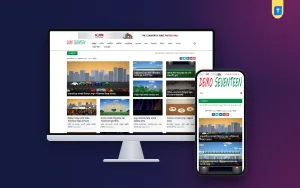
The theme decides how your homepage looks and how readers move through it. For a news site it should already include a headline ticker, a lead story area, section blocks, galleries and ad spaces, so you do not have to assemble them yourself. The BanglaPro News Theme comes with homepage widgets for breaking news, trending stories, featured posts and editorial picks, plus photo and video gallery sections, all in a lightweight, clean-coded build.

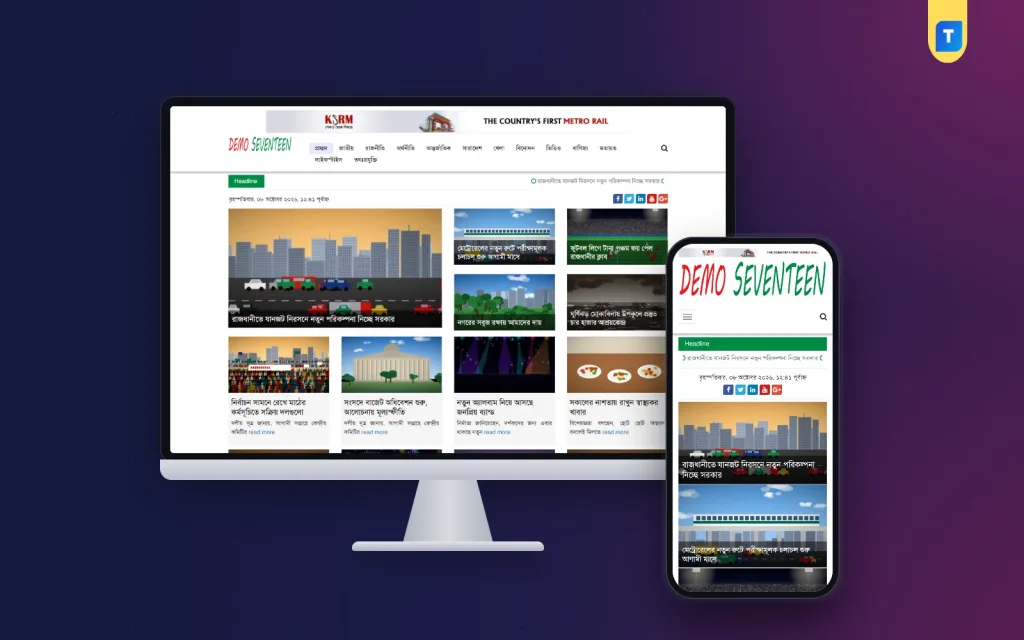
In the demo, a wide advert banner sits above everything, a natural spot for your biggest local sponsor. The red and green logo shares a row with the main Bangla menu and a search icon. A green Headline strip runs the ticker, and the Bangla date appears below it next to colourful social buttons. The top area pairs a big lead photo with four smaller stories, and the next row shows story cards with a short excerpt and a read more link.
Step 4: Import the Demo and Make It Yours
Upload the theme from Appearance, then Themes, and activate it. Run the one-click demo import so your site looks like the demo straight away. This is the moment most beginners feel the project become real. Now replace the demo logo with yours, then adjust colours and fonts to match your brand, and change the footer credits to your own name and contact details. All of these live in the dashboard, with no code involved.
Next, create your real categories from step one and build the main menu from them. Add an About page that names the editor, a Contact page, an Advertise page and a privacy policy. These pages build trust with readers and are expected by ad networks. Keep the demo posts until your own stories fill each homepage block, then delete them, so the site never looks half empty to early visitors.
Step 5: Fill Every Section Before Launch
Do not announce the site with two stories on it. Aim for at least five real stories in each homepage section before you share the link. Write clear Bangla headlines, add a featured image to every post and choose the right category. Resize photos before uploading, because full-size camera images make even a light theme feel slow. A consistent image width also keeps the story cards neat in every block.
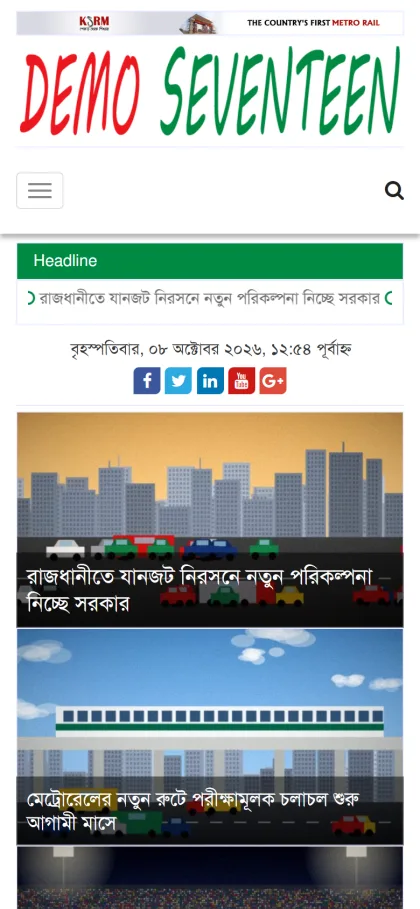
Check the site on your own phone and on a cheaper phone if you can borrow one. Most readers will arrive on mobile through a shared link, so the phone view is the real front page. The theme is fully responsive, and in the demo the phone layout keeps the banner, logo, a menu button with search, the green headline strip and the date at the top, with stories stacked one under another below.
Step 6: Promote, Earn and Keep Going
Create a Facebook page with the same name and logo as the site. Post every story with a short summary and a clear photo, reply to comments, and invite local readers to send tips. Small boosted posts can bring your first followers, but steady, useful local reporting keeps them. Connect Google Search Console, submit your sitemap and read the basics in Google's Search Central documentation.
The theme is Google AdSense optimised, with ad placements that adjust to any screen size. Apply once you have plenty of original stories and your About, Contact and privacy pages are live. Meanwhile, sell banner space directly to local shops, coaching centres and clinics, using the top banner position you saw in the demo. Direct local ads often earn more than network ads while a site is still small.
When You Might Still Want Help
Doing it yourself does not mean never asking for help. Server errors, a hacked site or a complicated migration from an old system are good reasons to call an expert. So is speed tuning once traffic grows into thousands of readers a day. The BanglaPro News Theme comes with 24/7 WhatsApp support from Themeve, which covers theme questions without you needing a developer on retainer.
Compare that with a hosted news website builder that charges monthly and keeps your content on its platform. If you outgrow it, moving out can be painful. With WordPress, your posts, photos and links belong to you, and you can move hosts whenever you like. That freedom matters more as your archive grows into thousands of stories that still bring search visitors years later.
How to Make a News Website: Questions People Ask
How long does the setup take?
With hosting ready and the one-click demo import, the theme part takes minutes, and a basic site with your logo, colours, menu and pages can be done in a day. Filling every section with real stories usually takes a week or two, depending on how many people are writing.
Can I use the same theme for client sites?
Yes. The theme has a built-in lifetime license that lets you use it on unlimited websites with no external license or renewal. That makes it practical for freelancers who build news sites for clients and for publishers who later start a second portal for another district.
Is WordPress better than a news website builder?
For a growing news site, usually yes. WordPress gives you user roles for reporters, full control over ads and a site you own. A hosted builder can be faster for a single page but tends to limit layout, ad options and the export of your archive later.
Which other themes should I look at?
If you want to compare layouts, see the Bangla Pro News Theme, with its ticker in the top bar and latest-update lists, and the Bangla News Media Theme, which suits magazine-style sites with trending sections and galleries. Open each demo on your phone and pick the one your readers will find easiest.
Wrapping Up
Now you know how to make a news website without hiring a developer: choose a focused audience, set up WordPress on decent hosting, install a ready news theme, fill every section before launch, and promote on Facebook and search. The technology is the easy part. If you want a fast, AdSense-ready Bangla layout with breaking news, trending and editorial widgets built in, start with the BanglaPro News Theme and publish your first story this week.