If you grow mangoes or buy straight from orchards in Rajshahi or Chapainawabganj, learning how to sell mangoes online can turn a short summer into the best few months of your year. This guide is for orchard families, fruit pages on Facebook and small traders who want to take box orders directly from buyers in Dhaka and other cities. We cover how to plan the season, pack and send boxes, take payment, and build an order page that answers questions before buyers type them.
City buyers no longer trust every carton at the bazaar, and many would rather order from someone who stands near the trees. That trust is your advantage, but it is fragile. One late box or one crate of bruised fruit can undo a season of good posts, so the work is more about planning and honest information than clever ads.
Throughout this guide we use Mukul – Mango Landing Page WordPress Theme as the example tool. It is a single long page that sells one product, with a harvest calendar, a box counter and an order form built into the page. The theme comes later, though. First comes the plan, because a page can only show buyers what you have already decided.
Why Mango Season Needs a Plan Before the First Post
The mango season in Bangladesh is short and arrives in waves. Early varieties such as Gopalbhog and Himsagar come first, Langra follows, and late varieties like Amrapali and Fazli carry the season toward its end. Each wave lasts only a few weeks. If you start building your page when the first fruit is already ripe, you lose the days when buyers are most excited and prices are easiest to hold.
Write down which varieties you can really supply, roughly when each is ready, and how many boxes you can pack per day without cutting corners. A seller who promises two hundred boxes a day and manages eighty creates angry buyers, while one who opens orders in small batches builds a waiting list that brings repeat buyers next year.
Choose your box sizes early
Most buyers think in kilograms, but what they really want to know is how many mangoes arrive and whether a box suits their family. Fix two or three box sizes and keep them the same all season. Weigh several test boxes of each variety, count the fruit and note the range. These numbers answer one of the most common questions you will get, and they make courier planning easier because every parcel has a known weight.
Decide what you will promise
Buyers worry about carbide, formalin and fruit picked too early. If your mangoes ripen on the tree without chemicals, say so, but only if orchard photos and videos can back it up. Also decide what happens when a box arrives damaged, whether a replacement, a partial refund or extra fruit next time, and keep that rule the same for every buyer.
How to Sell Mangoes Online: Packing, Couriers and Payment
Packing decides your reviews. Use strong cartons with air holes and paper or straw between layers, and do not pack so tight that the bottom layer bruises. Pick fruit that is mature but still firm, because it keeps ripening on the way, and write the variety and packing date on each box.
For mango delivery outside your own district, a courier is the usual route, though some sellers share a truck to Dhaka and hand boxes to local riders. Either way, tell the buyer the expected window in plain words, such as two to three days after picking, and send a message when the box leaves. Silence is what makes buyers call you ten times.
Payment needs two options. Cash on delivery is still what many first-time buyers choose, because they want to see the fruit before paying. Mobile payment through bKash or Nagad works well for repeat buyers and for orders going far away, where a returned parcel would cost you both the fruit and the courier charge. Many sellers ask for the delivery charge in advance on COD orders outside Dhaka, which filters out a lot of fake orders.
What a Good Mango Order Page Must Answer
When you sell from Facebook posts alone, every buyer asks the same things: which mango is ready now, how many come in a box, what delivery costs, and what happens if some are spoiled. A single order page that answers them in order, then shows the form, saves your evenings and turns more ad clicks into orders.
Anyone working out how to sell mangoes online soon finds that the page order matters as much as the words. Open with one clear promise and an order button. Below that, show which varieties are in season, how big each box is, real orchard photos, past buyers' reviews, delivery charges and your guarantee, then finish with a short form. Name, mobile number, address and district are enough for a courier. Every extra field is one more reason for a buyer on a slow connection to give up.
How Mukul Turns One Page Into a Mango Shop
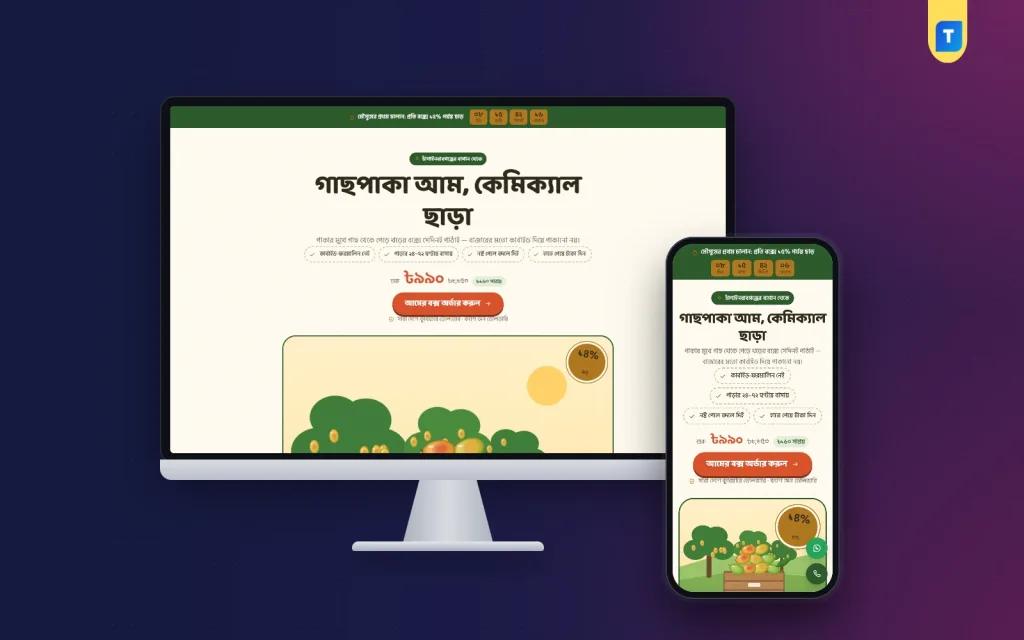
Mukul is built for exactly this kind of seller. It is one long page with no site header or footer, so the buyer who taps your ad sees only your mangoes and the way to order them. The look is like a market stall in early summer, with cream orchard paper, jute-stitched cards, leaf-green bands and round sticker buttons.
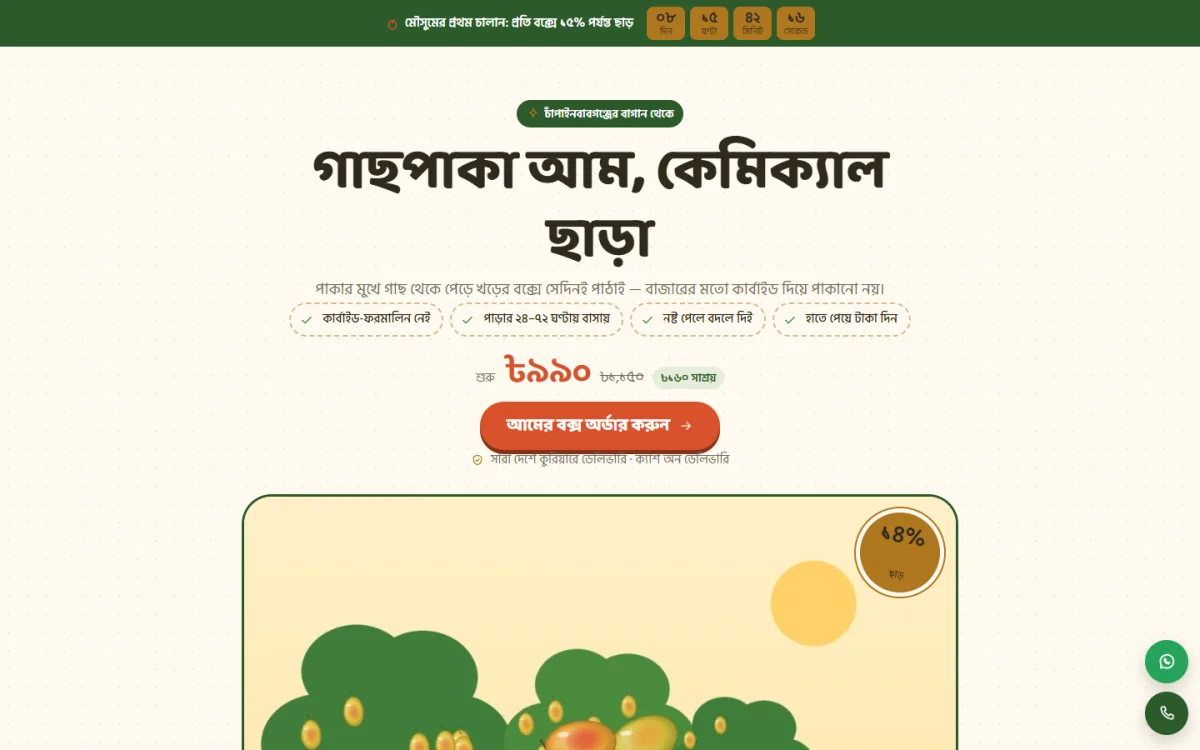
The demo opens with an offer line and countdown, a Bangla headline about tree-ripened fruit, short promise chips and a large order button. Those words are sample text shown in the demo, which you replace with your own. The offer countdown suits first-harvest prices you only want to run for a few days.
The harvest calendar
The harvest calendar gives each variety its own row with the months it is in season, and it marks the current month. A buyer sees at a glance which mango is ready now and which is still on the tree. Each row has a button that picks that variety's box in the order form. It is the season plan you made earlier, turned into something a buyer can read in five seconds.
How many mangoes come in a box
The "How many mangoes?" block answers the question you would otherwise reply to all day. The buyer chooses a variety and a box size, and the block shows about how many mangoes fit. Use the counts from your test boxes so the numbers match what people actually receive. Clear expectations here mean calmer buyers on delivery day and fewer complaints about small fruit.
Sections you can move with the season
Mukul has 16 sections: hero, season calendar, problem and answer, benefits, photo strip, mango counter, packages, chat-style reviews, steps, comparison, video, specifications, delivery charges, guarantee, FAQ and the order form. In the "Landing page" box in the page editor you can switch any of them off or move them up and down. Early in the season, lead with the calendar. Near the end, move the reviews up and let past buyers do the talking.
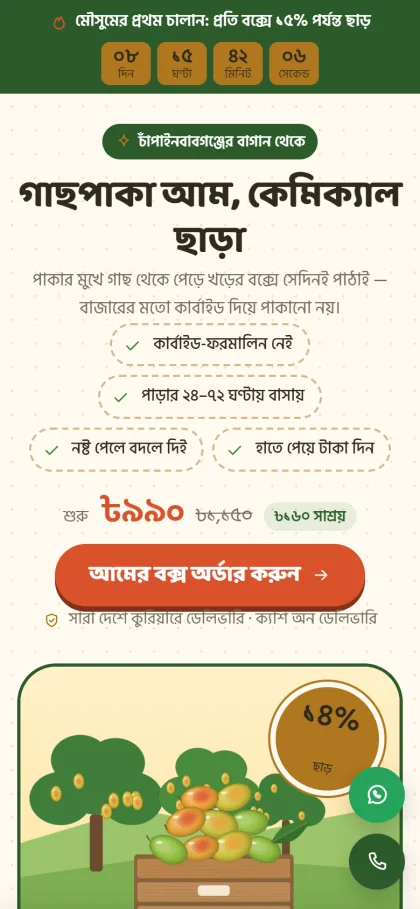
Nearly every mango order starts on a phone. After the buyer scrolls past the top, a sticky order bar stays at the bottom of the screen and hides when the form comes into view. Floating call and WhatsApp buttons wait for anyone who wants to ask about ripeness before ordering. Reviews appear chat-style, close to the messages buyers already send you on Facebook.
Boxes, Orders and Mango Delivery Inside the Theme
The demo carries Himsagar, Langra, Amrapali and a mixed box. Each one is a product variation, shown as a package row and again as a picker inside the order form. When the buyer changes the box, the price and delivery charge update straight away in the checkout of the bundled plugin. You can add or remove varieties on the product, so the page follows your own trees rather than the demo.
The form asks for name, mobile, address and district, and buyers pay by cash on delivery or by bKash and Nagad Send Money to your own numbers. Orders arrive under Shop in the WordPress dashboard. Themeve Commerce, the store plugin that comes bundled, adds Telegram alerts for new orders, SMS and OTP, invoices, coupons and an order tracking page, plus Steadfast and Pathao courier support for boxes going out of town.
A delivery charges section shows the cost before anyone asks, and the guarantee section holds your promise about damaged fruit. Link the Facebook Pixel and the Conversion API, and each order is reported back to your ad account, so you can see which mango ad is really selling and which one is only collecting likes.
Setting Up Your Mango Page Step by Step
Mukul needs WordPress 6.0 or newer and PHP 7.4 or newer, and it is tested up to WordPress 7.1. Upload the zip under Appearance, Themes, Add New, Upload Theme and click Activate. Then open Mukul, Setup and install Themeve Commerce in one click. Enter the license key from My Account, Licenses on themeve.com under Mukul, License so updates reach you. If WordPress is new to you, the WordPress documentation explains pages, menus and settings.
Next, run Mukul, Demo Import. It brings in the mango product with photos and reviews, sets the landing page as your front page, and adds pages for privacy, terms, and returns and replacement. The demo artwork and names are samples, so swap in your own orchard photos. Then fill the "Landing page" box with your text, offer, hotline and WhatsApp numbers, and add your bKash and Nagad numbers in the store's payment settings.
Design lives under Mukul, Theme Options. There are 4 palettes, Orchard, Green raw, Saffron and Monsoon, or you can pick each colour yourself. Fonts are Baloo Da 2, Anek Bangla or Tiro Bangla, each paired with Hind Siliguri, so Bangla headlines read naturally. Before you buy, open the live demo on your own phone, then look around the demo dashboard to see where the boxes and orders live.
Running Facebook Ads for Mango Boxes
Most mango sellers find buyers through Facebook. Short orchard videos of picking and packing usually beat studio photos because they show the fruit is real. Point every ad to your order page rather than the inbox, write the text in Bangla, and name the variety, district and delivery window. Run one ad per variety when its turn comes. When Himsagar ends, switch the ad and move the calendar so Langra sits on top.
Common Mistakes Mango Sellers Make Online
The first mistake is overselling, which fills the next week with apology calls. The second is shipping fruit that is already too ripe, so it arrives soft and bruised. The third is hiding the delivery charge until the end. A fourth is skipping a confirmation call on large COD orders, which leads to boxes coming back after two days in a hot van.
Another mistake is copying claims from other pages. Do not say chemical-free or carbide-free unless you can prove it, because one angry buyer with a video can hurt a whole season. Finally, keep your page and buyer list after the season ends. Next year, a message to past buyers saying the first Himsagar is ripe may be your cheapest campaign.
Frequently Asked Questions
Do I need a full online shop to sell mangoes?
No. Most mango sellers have one product with a few box sizes, so a single page that takes the order is enough. If you later sell many fruits all year round, a store theme such as Rosaal – Fruit Shop WordPress Theme is a better match.
Can I use Mukul after the mango season?
Yes. Any page can become a landing page for any product, so you can pick a different fruit in the "Landing page" box when lychee or jackfruit comes in. If you also sell honey from the same area, Mou – Honey Landing Page WordPress Theme is built for honey jars in the same one-page style.
How should I handle damaged boxes?
Decide your rule before the season starts and write it in the guarantee section and the returns page. Ask buyers to send a photo or short video when they open the box, then replace it, refund part of the order or add fruit to their next box. One rule for everyone makes mango delivery problems quick to settle and protects your reviews.
Final Thoughts
Knowing how to sell mangoes online comes down to a few things done well: honest promises, clear box sizes, careful packing, an open delivery charge and quick answers. Build your page before the first fruit is ripe. For one page that shows the harvest calendar, counts mangoes per box and takes the order, start with Mukul – Mango Landing Page WordPress Theme and have it ready for the first Himsagar.