If you already sell antivirus, office suites or design apps to friends and local businesses, you have probably wondered how to sell software online properly, with a real shop instead of a chain of inbox messages. This guide is for licence resellers, small computer shops, IT service providers and tech Facebook pages in Bangladesh that want to take orders and deliver keys quickly and honestly.
Software is an unusual product. There is nothing to pack and no courier to book, yet buyers still worry. Is the key genuine? Which edition do I need? Will it work on my Mac? How fast will I get it, and what happens if activation fails? A good online store answers those questions before payment, then delivers in minutes. Get that right and repeat orders follow, because licences expire and every renewal is a chance to sell again.
As the working example we use Chabi – Software Key Store WordPress Theme. Chabi means key, and the theme is built only for digital products: operating systems, office suites, antivirus, VPN, video and design apps, developer tools and utilities. Its look is periwinkle and mint with Space Grotesk headings, app-window panels and small keycap details.
How to Sell Software Online the Right Way
Start with the source of your keys. Buy from the software maker, an authorised distributor or a reseller programme, and keep invoices for every batch. Cheap keys from unknown sellers are often taken from volume licences or bought with stolen cards, and they can stop working weeks later, leaving you with angry customers and refunds. Never sell cracked copies or activators; they put buyers at risk and can bring legal trouble to your business.
Next, understand each product's terms. Some licences are for one device, some for five; some last a year, others are a one-time purchase; some subscriptions are tied to the buyer's own email. Write these details down before you list anything. Knowing exactly what you are selling is the base of every clear product page and every fair refund decision later.
Plan Your Catalogue, Plans and Promises
Organise by platform and need
Buyers think in two ways: by platform, such as Windows, Mac or Android, and by need, such as security, office work or video editing. Arrange your categories around both. A freelancer looking for a video editor for a Mac should reach the right list in two taps, without scrolling past Windows activation keys and antivirus bundles.
Price editions and plan lengths clearly
Many tools come in editions, such as home and business, and in lengths, such as one month or one year. Show each option with its own price and say what changes between them. A short comparison of three editions often closes a sale faster than a long description, because the buyer can see at once which one fits.
Set a delivery promise and a replacement policy
Decide how fast you deliver, for example instantly for keys in stock or within 30 minutes for items you activate by hand, and which hours your team works. Then write a replacement policy: what happens if a key fails, how the buyer reports it and how quickly you respond. Put both on the product page, not only in a policy page nobody opens.
What Your Software Key Store Needs on Every Page
Chabi handles these promises on the page itself. Each product opens with quick facts for platform, validity, devices, licence, account and delivery, all read from the product's specifications. A plan picker lists each plan with its price, followed by How you get it steps, a warranty note, an activation guide and reviews in a fold, with a popup inviting the first buyer to write one.

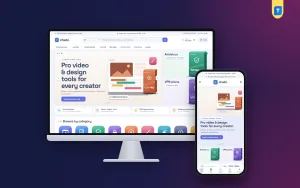
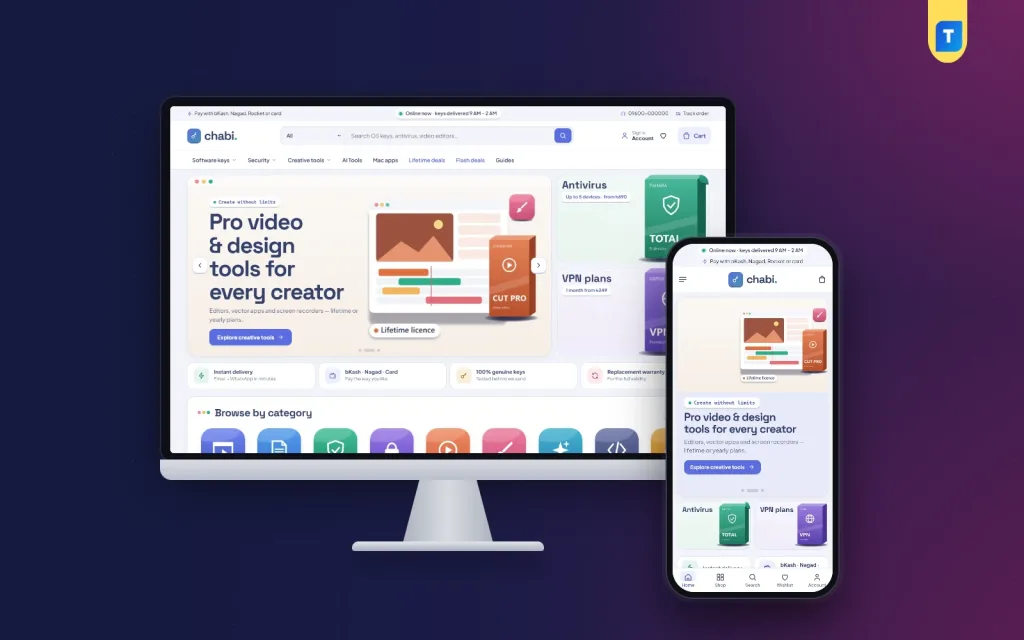
The desktop screenshot shows an online-now note in the top strip, a key logo, a category picker beside inline search, and a menu with Software keys, Security, Creative tools, Mac apps, Lifetime deals, Flash deals and Guides. The hero slide shown in the demo pitches video and design tools in an app-window panel, with Antivirus and VPN cards beside it. A strip of promises below, such as instant delivery and a replacement warranty, is demo text you would rewrite to match your real policy.
Cards that show platform and delivery
Every card carries a delivery chip and platform chips for Windows, Mac, Android, iOS, Web and Linux. Products with plans show a from price and a Choose plan button, and card toggles let you show or hide platform, delivery, rating and sold count. The header adds a mega menu with app tiles and a licence card, and live search shows results as the buyer types.
27 blocks for a software shop
The homepage has 27 blocks you can switch off or drag into a new order, using arrows on a phone. Shop by platform splits the range into tabs filled from product tags. Edition compare places three products side by side, Delivered in minutes explains your process in three steps, and Featured licence gives one product a big picture. Flash deals, Find your fit, category tiles, Questions answered and Guides & how-tos fill out the page.

On a phone, the header is just menu, logo and cart, and the mobile screenshot shows the online-now note and payment strip above it, the creative tools slide, the antivirus and VPN cards and a bottom bar with Home, Shop, Search, Wishlist and Account. Sign in and registration open in a popup, so a returning buyer never loses the product they were looking at.
Checkout and Delivery Without an Address
Digital buyers should not have to type a house number. Chabi's checkout asks only for name, mobile and a delivery email, with an online delivery note and no delivery charge. After payment, the thank-you page tells the buyer where and when the product arrives. You set that promise per product with a Delivery line in its specifications, and it also shows as a chip on the card.
Payments run through the bundled Themeve Commerce plugin with bKash, Nagad, SSLCommerz and manual payment. The demo strip also mentions Rocket and card, so match that line to the gateways you really enable. Coupons, invoices, SMS and OTP, Telegram alerts for new orders, a Track Order page and Facebook Pixel with Conversion API come with the plugin as well.
Speed matters more than anything once payment lands. Keep a ready stock of keys for your best sellers, use Telegram alerts so someone sees each order at once, and send the key with a short activation note in plain Bangla or English. Store every key you send against the order, so if a buyer loses the email you can resend it in seconds instead of searching your inbox.
Setting Up the Store Step by Step
Upload Chabi under Appearance, Themes, Add New, Upload Theme and activate it. Open Chabi, Setup and install Themeve Commerce in one click, then activate your license under Chabi, License with the details from My Account, Licenses. Run Chabi, Demo Import once to load 44 licences and subscriptions from 8 invented makers, with plans, platform tags, edition compare, guides, menus and every page, including How Delivery Works and Compare Products.
In Chabi, Theme Options, set your checkout note, delivery steps, FAQ text, palette and block order. Six palettes are ready, Periwinkle & mint, Teal terminal, Grape soda, Ocean key, Sunset code and Graphite, along with four font pairs including Space Grotesk, IBM Plex and Outfit. Chabi needs WordPress 6.0 and PHP 7.4 or newer and is tested up to WordPress 7.1. The WordPress documentation covers general setup, and you can try the live demo and the demo dashboard first.
Marketing and Support in Bangladesh
Your best customers are often small offices, freelancers and students. Offer business buyers a simple quote for several devices, remind subscribers before their plan expires, and post short how-to videos showing activation on Windows and Mac. The Guides page and the Guides & how-tos block give activation help a permanent home, so the same questions do not land in your inbox every day.
On Facebook, advertise single products with a clear edition and validity rather than vague bundles, and answer comments quickly. Many buyers search Google for terms like antivirus key price or office licence, so write honest guide posts around those topics. Facebook Pixel and the Conversion API help you see which ads actually lead to paid orders.
Mistakes to Avoid
Selling grey-market keys is the costliest mistake, because the refunds and reputation damage arrive later and all at once. Other common errors are vague product titles that skip the edition and device count, no clear replacement policy, delivery promises your team cannot meet at night and asking for a postal address that digital buyers find strange. Keep promises small, specific and kept.
Frequently Asked Questions
Does the checkout ask buyers for an address?
No. Buyers give their name, mobile number and a delivery email, and there is no delivery charge. An online delivery note explains how the product reaches them, and fewer fields mean less typing on a small phone screen and fewer abandoned orders.
How do I sell 1-month and 1-year plans of the same software?
Add the plans as variations of one product. The plan picker lists each with its price, and the card shows a from price with a Choose plan button. Buyers compare lengths on one page instead of hunting for separate products.
What if I sell downloads or monthly app plans instead?
For downloadable themes, templates and fonts, look at Jhuli – Digital Marketplace WordPress Theme. If most of your sales are monthly and yearly plans, Megh – AI Subscription Store WordPress Theme is built around subscriptions. Chabi stays strongest for keys and licences.
Do I need to write code?
No. Product facts come from simple specification lines such as Platform or Validity, and colours, fonts, texts and block order are all set in Chabi, Theme Options. Plans are ordinary product variations, so no extra plugin or custom field is needed to sell them.
Final Thoughts
Knowing how to sell software online comes down to trust and speed: genuine keys, clear editions, honest delivery promises and quick help when activation goes wrong. Build those habits first, then give them a shop that shows platform, plan and delivery at a glance. For a store that delivers in minutes rather than days, start with Chabi – Software Key Store WordPress Theme.