Many people in Bangladesh want premium apps but cannot pay for them easily with a dollar card, which is why so many resellers now offer plans in taka. If you are one of them, or about to start, this guide explains how to sell subscriptions online in a way that builds trust: clear plan lengths, honest account types, quick activation and renewals that bring buyers back every month.
It is written for resellers of AI assistants, design and video apps, streaming, courses, cloud storage, VPN and office plans, and for shops that bundle several tools for freelancers, students or small agencies. The questions buyers ask are always the same. How much for a year? Is the account shared or private? How soon will I get the login? What if it stops working halfway through the month?
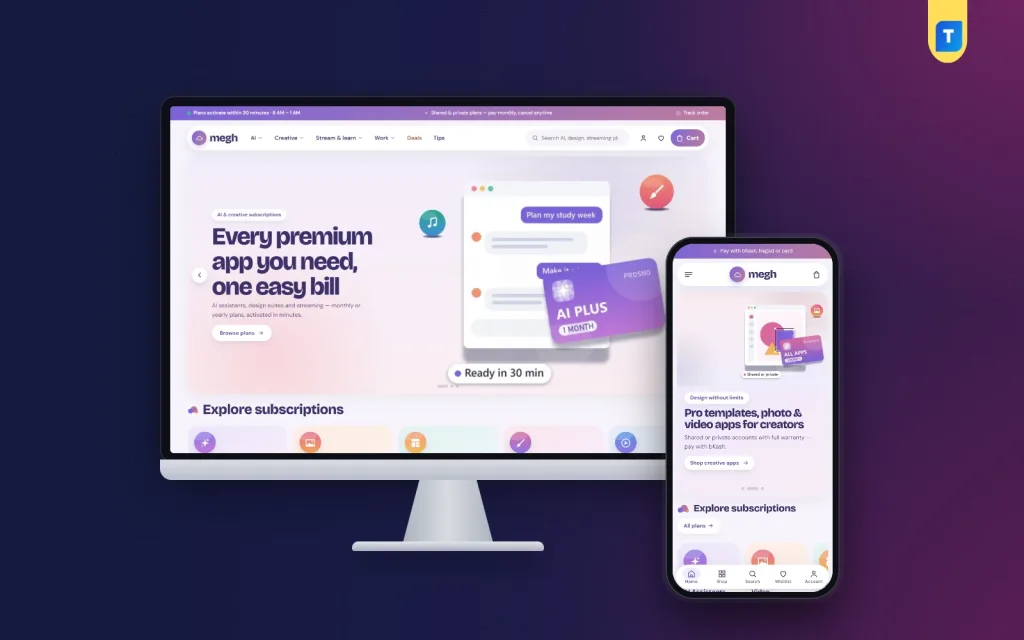
Our example is Megh – AI Subscription Store WordPress Theme, built for shops that sell plans rather than boxes. Megh means cloud, and its lavender and peach colours, Bricolage Grotesque headings, gradient pass tiles and floating capsule header give the store a soft, light feel. Before the theme, though, comes the business, because a plan shop lives or dies on its promises.
How to Sell Subscriptions Online: The Business Basics
A subscription shop sells time, not things. Every order has a start date and an end date, and the end date is your next sale. That changes how you think about customers. A buyer who has a smooth first month is likely to renew for three months or a year, while one bad activation can lose them for good. Your real product is reliability.
Before you list anything, read each provider's terms. Some plans may be bought for another person, some must be activated on the buyer's own email, and some forbid sharing a seat between several users. Where you can, prefer private accounts or activation on the buyer's own email, and say clearly when a plan is shared. Honest labels prevent most complaints before they happen.
Planning Plans, Prices and Promises
Offer three plan lengths
Monthly, three-month and yearly options cover almost every buyer. Monthly lowers the barrier for a first try, while longer plans reward loyalty and give you cash up front. Show what each plan works out to per month, so the saving is obvious without mental arithmetic. A small, real saving on the yearly plan nudges many buyers to commit.
Be clear about account types
Write on every product whether the plan is a private account, a shared seat or activation on the buyer's own email. Explain what that means in practice, such as whether the buyer can change the password or how many devices may sign in. Buyers do not mind a shared plan at a lower price; they mind finding out after they have paid.
Set activation times and a warranty
Decide how quickly you activate plans and during which hours your team works, then publish both. Promise a fix or replacement if a plan stops working within its period, and write how a buyer reports a problem. These promises are what separate a trusted shop from the dozens of inbox sellers offering the same apps.
How Megh Shows Plans and Bundles
Megh is built around two signature blocks. The plan board has a switch that flips between monthly, 3-month and yearly prices across up to four plans. Each card shows the price, what it works out to per month and a save percentage badge, then adds exactly that plan to the cart. The stack builder lets shoppers tick the apps they use, see one monthly total and add them all to the cart in one click.
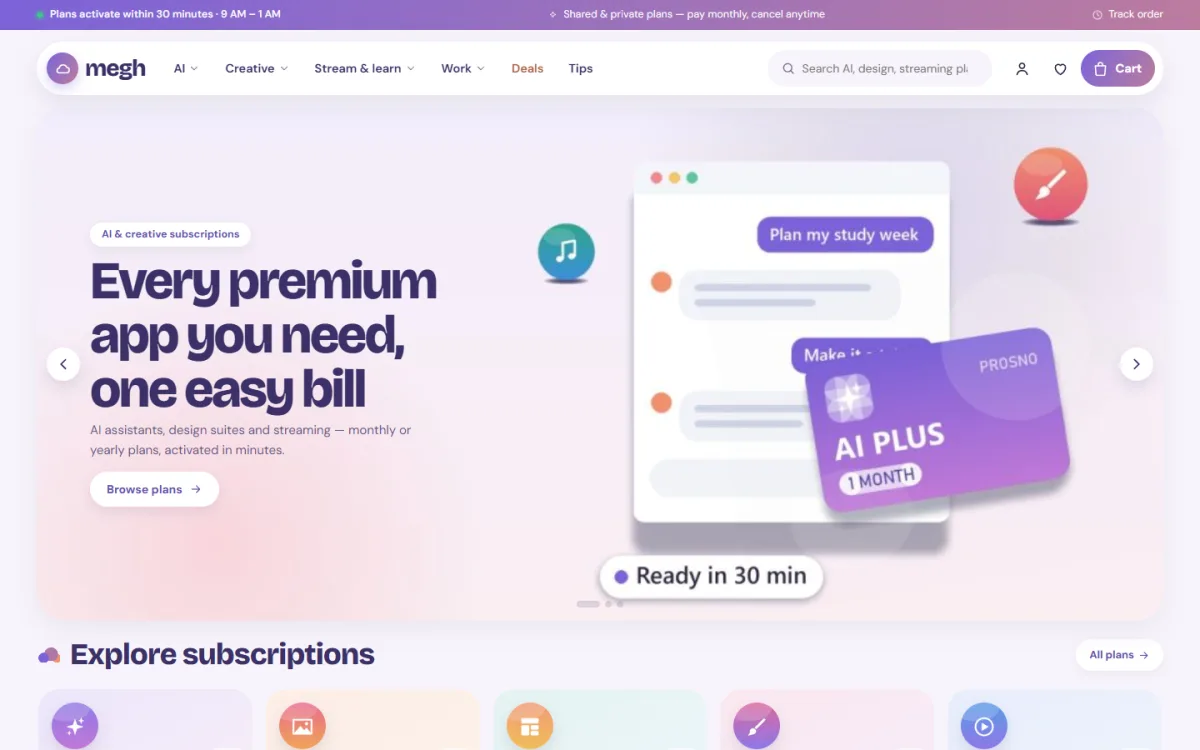
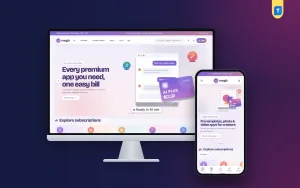
The desktop screenshot shows a gradient top strip and a floating capsule header with the cloud logo, menus for Creative, Stream & learn, Work, Deals and Tips, live search, account, wishlist and cart. The hero slide shown in the demo sells every premium app on one bill, with a mock chat window, a one-month pass card and a ready-in-minutes chip. Explore subscriptions follows with gradient pass tiles.
Both signature blocks read the plan lengths you add as product variations named 1 month, 3 months and 12 months, and you choose which products they show in Theme Options. A single-app seller can switch off the stack builder and still use the plan board to turn one product into a clear monthly, quarterly and yearly choice.
Cards and product pages that answer questions
Cards show an activation-time chip, a 3 plans chip, an account-type chip for private, shared seat or your own email, a from price and a See plans button. On the product page, quick-fact pills cover platform, validity, devices, account and delivery. A plan picker lists each plan with its price, followed by activation steps, a warranty note and reviews in a fold, with a popup inviting the first review.
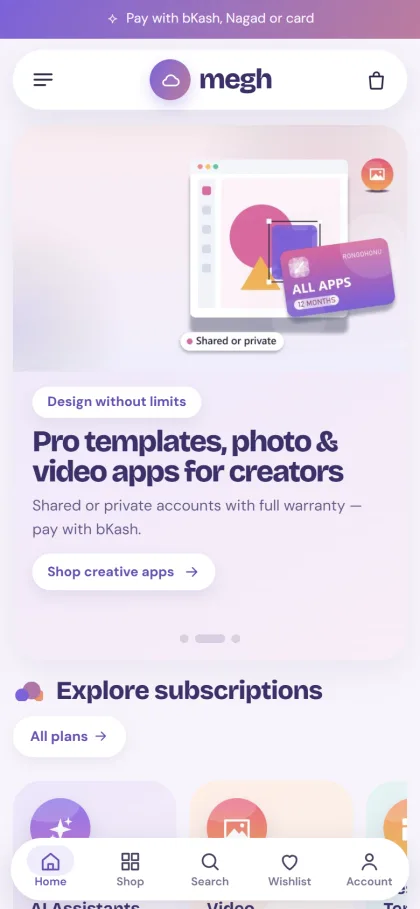
On phones, the header shows menu, logo and cart, with a floating bottom bar for Home, Shop, Search, Wishlist and Account. The mobile screenshot shows a payment strip on top, a slide for creative apps with a shared or private chip and a twelve-month pass card, then the Explore subscriptions tiles. Cards stay compact, and sign in and register open in a popup so nobody loses their place.
27 homepage blocks
Blocks can be switched on or off and dragged into order, with arrows on a phone. Alongside the plan board and stack builder you get Most subscribed in category tabs, Today's plan deals with a countdown and stock bars, How it works, Who is it for?, Plans by budget, App spotlight, Popular apps logos, Plan of the month, Good to know questions, Trending plans and Tips & guides for your latest three posts.
Setting Up Your Subscription Website Template
Upload Megh under Appearance, Themes, Add New, Upload Theme and activate it. Visit Megh, Setup and install the bundled Themeve Commerce plugin in one click, then activate your license under Megh, License using My Account, Licenses. The WordPress documentation is useful if WordPress itself is new to you.
Click Megh, Demo Import to load 46 plans from 11 invented app makers, with monthly, quarterly and yearly options, the plan board, stack builder, tips, menus and every page, including Compare Plans and How Activation Works. Treat it as a ready subscription website template: swap the sample apps for the ones you really sell, and rewrite the demo's activation hours and promises to match your team.
In Megh, Theme Options, pick the products for the plan board and stack builder, a palette and fonts, card toggles, the checkout note, steps and questions. Six palettes are included, Lavender & peach, Ocean breeze, Mint cloud, Sunset, Berry and Night sky, with font choices of Bricolage Grotesque with DM Sans, Lexend, Rubik and DM Sans. Megh needs WordPress 6.0 and PHP 7.4 or newer and is tested up to WordPress 7.1. Try the live demo and the demo dashboard before you decide.
Checkout, Payment and Activation in Bangladesh
Nobody needs a delivery address for a subscription. Megh's checkout asks for name, mobile and a delivery email, with an online-activation note and no delivery charge. The thank-you page tells the buyer where and when the login arrives, and you set that promise per product with a line such as Delivery: Within 30 minutes. A short checkout matters on phones, where most buyers will pay.
Payments run through the bundled Themeve Commerce plugin with bKash, Nagad, SSLCommerz and manual payment. Coupons, invoices, an order tracking page, SMS and OTP, Telegram alerts for each new order and Facebook Pixel with Conversion API come with it. Telegram alerts are especially useful here, because the faster someone sees an order, the faster the login goes out.
Renewals are where profit builds. Keep a simple sheet of every plan's end date and message buyers a few days before it runs out, ideally with a small reason to move up to a longer plan. Students and freelancers often pay monthly at first, then switch to yearly once they trust you, so make that switch easy and reward it.
Common Mistakes Subscription Sellers Make
The most common mistake is hiding the account type. A shared seat sold as if it were private will cost you a customer and a review. Others include promising instant activation when your team sleeps at night, quietly changing prices for renewals and selling plans whose terms you have not read. Keep a written process for failed logins, and answer within the hours you publish.
Another mistake is trying to list every app at once. Start with the ten or fifteen plans your buyers ask for most, learn what sells, then grow. When you understand how to sell subscriptions online at a small scale, with reliable activation and steady renewals, adding more apps becomes easy.
Frequently Asked Questions
How do I set monthly, 3-month and yearly prices?
Add the plan lengths as variations named 1 month, 3 months and 12 months, or 1 year. The plan board and the stack builder read those names and show each price with its per-month figure. You choose which products appear on the board.
Can I show whether an account is shared or private?
Yes. Add an Account line to the product's specifications, and the card shows the account type, such as private, shared seat or your own email. Showing this before checkout saves many awkward conversations after the order and keeps your reviews honest.
What if I sell one-off licences or game top-ups?
For one-off software licence keys, look at Chabi – Software Key Store WordPress Theme. For game top-ups and gift cards, Khela – Game Top-Up WordPress Theme is the better match. Megh is strongest when the same plans renew month after month.
Does the buyer have to enter an address?
No. Checkout asks only for name, mobile and a delivery email, with an online-activation note and no delivery charge. The thank-you page then tells the buyer where and when the login will arrive, so nobody has to message you to ask.
Final Thoughts
Learning how to sell subscriptions online is mostly about keeping promises: clear plan lengths, honest account types, activation on time and a friendly reminder before each renewal. Do that, and your buyers will stay for months instead of a single order. When you are ready to give those plans a proper home, start with Megh – AI Subscription Store WordPress Theme and make monthly versus yearly the easiest choice your buyers make.