Will it fit my phone? Every case buyer asks it, usually in a Facebook comment, often for the fifth time that day. A mobile accessories website that answers that one question on screen can turn a busy inbox into a quiet order list. This guide is for Bangladeshi sellers of phone cases, screen glass, straps, grips and card wallets, whether you run a stall in a mobile market or sell only through a page, and for the freelancers who build their stores.
Cases are a lovely product to sell online. They are light, cheap to ship and bought on impulse, and almost every phone owner buys more than one over the life of a handset. The hard parts are model fit, a catalogue that grows with every new phone launch, and keeping a small order quick enough that the buyer does not give up halfway. We will plan for all three, then look at a theme built around them.
That theme is Chhoya – Phone Case Shop WordPress Theme. Its look is coral, grape and mint with Syne headings, sticker-style touches and a highlighter stroke on section titles. It feels like the inside of a gift shop rather than a spreadsheet, which suits products people buy because they make them smile.
Why Phone Cases Suit a Small Online Business
Margins on cases and screen glass are healthy, stock takes little space and one courier pouch can hold several orders. Demand is steady, because phones get dropped, cases wear out and people change their style. Every major phone launch also creates a fresh wave of buyers looking for a case on day one. A shop that lists cases for a new model the same week often takes most of those early sales.
The catch is that cases are model-specific. A case for one phone does not fit its Plus or Pro sibling, and buyers often do not know their exact model name. Wrong-model orders are the biggest source of returns for case sellers. Any plan for a mobile accessories website has to start with fit, then add style and speed on top.
Planning a Mobile Accessories Website Around Model Fit
Start with a model list, not a product list. Write down every phone model you plan to support, grouped by brand, using the exact names buyers see in their phone settings. Tag each case with every model it truly fits. When a new phone launches, add the model first, then add stock. This one discipline prevents most wrong-model returns and makes your catalogue far easier to search.
Group the rest by job
Beyond cases, organise accessories by what they do: Phone Cases, Screen Protectors, Straps & Charms, Grips & Stands and Card Wallets is a clean set, and it is the menu shown in the Chhoya demo. Screen glass deserves careful labelling too, with clear notes on tempered or privacy glass and which models each sheet suits, because a sheet that is a few millimetres off is as useless as a wrong case.
Plan for style shoppers as well
Not everyone shops by model first. Many buyers, especially younger ones, shop by look: marble, floral, clear, glitter or leather. Tag your products by finish as well as by model, so you can offer both paths. A buyer who arrives wanting something sparkly should reach sparkly cases for their phone in two taps, not by scrolling through every design you stock.
What a Phone Case Website Needs to Get Right
A good phone case website shows fit on the product card itself, so buyers do not have to open every product to check. It offers a quick model picker on the homepage, a way to browse by finish, and fresh drops for new designs. It also keeps checkout very short. Impulse buys die on long forms; a buyer who wanted a case in thirty seconds will not fill in ten fields.
Trust still matters, even for small items. Write a simple exchange rule for wrong-model orders and put it where buyers can see it. Show real photos of each finish under normal light, because glitter and marble look different in a studio. And make sure the site works perfectly on a phone, since nearly every case buyer is holding the very phone they are shopping for.
How Chhoya Answers the Fit Question
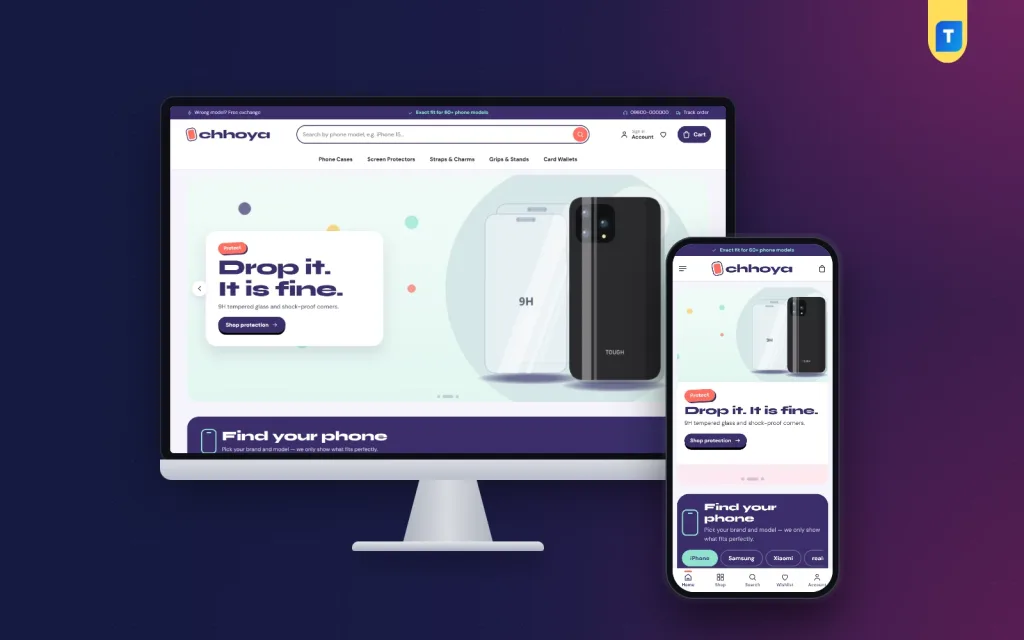
In the live demo, a grape top strip carries short exchange and exact-fit messages beside a support line and a Track order link. The search box invites shoppers to type their phone model, and the header holds an account link, a wishlist heart and a grape Cart button above the five department links.

The hero slider uses a white card with a tilted sticker kicker. In the screenshot, a Protect slide pairs tempered glass and a tough case with a Shop protection button, set on a mint background with confetti dots. Right below it sits Find your phone on a deep grape panel, which is the core of the theme.
Find your phone, then your case
Shoppers tap a brand tab, such as iPhone, Samsung or Xiaomi, and see a tile for each model. Each tile opens everything tagged for that model and shows how many items fit. You add one line per model in Theme Options, so when a new phone launches, your shop can be ready the same afternoon. This is exactly where your model list from the planning stage goes to work.

Cards that say fits, and Pick your vibe
Product cards sit on candy-coloured photo wells. A fits chip lists the models each case is made for, followed by the rating, colour dots and a chunky coral pill button, so fit is visible at a glance. For style shoppers, the Pick your vibe block shows round finish swatches for marble, floral, crystal clear, vegan leather, glitter and pastel matte, each opening its own product tag.
On phones the header keeps to menu, logo and cart, cards stay compact, and the mobile screenshot shows a bottom bar with Home, Shop, Search, Wishlist and Account. The homepage carries 24 blocks, 14 on by default and ten in reserve, including Fresh drops, Bestsellers in tabs, Drop deals with a countdown and stock bars, Shop by price, Case notes from your posts and a promise strip covering exact fit, delivery, COD and returns.
Checkout, Payments and Courier for Small Orders
Chhoya runs on the bundled Themeve Commerce plugin, installed in one click from Chhoya, Setup. Sign in opens in a popup and checkout fits on one page, so a small impulse buy never meets a long form. Buyers pay by bKash, Nagad, SSLCommerz, cash on delivery or manual payment, and Steadfast and Pathao courier deliver. An order tracking page and an Order placed popup round it off.
For small orders, delivery cost can match the price of the case itself, so encourage bundles. Suggest glass with every case and a strap or grip as an add-on, and consider free delivery above a basket size that makes sense for you. Coupons, a wishlist, invoices, back-in-stock, SMS, OTP and Telegram alerts are included, and the demo has Delivery, Exchange and Our Stores pages ready to edit.
Cash on delivery is common for cases, and refusals hurt more on small orders because the courier charge is a bigger share. Confirm orders by a quick call or message, and keep a note of numbers that refuse often. Facebook Pixel with the Conversion API helps you see which ads bring real buyers, so you can move budget toward designs that actually sell.
Setting Up Your Phone Case Store
Chhoya needs WordPress 6.0 or newer and PHP 7.4 or higher, and it is tested up to WordPress 7.1. Go to Appearance, Themes, Add New, Upload Theme, pick the zip and activate. Install Themeve Commerce from Chhoya, Setup, then activate your licence in Chhoya, License with the key from My Account, Licenses on Themeve. The WordPress documentation helps if menus or tags are new to you.
Run Chhoya, Demo Import to build a full phone-case store: 36 products from 6 invented brands, with cases for iPhone, Galaxy, Redmi and more, tempered and privacy glass, straps, grips, stands and card wallets, plus the phone finder, vibe swatches, Case notes posts, menus and every page. Replace the samples with your own photos. The demo dashboard shows where model lines and tags are set.
In Chhoya, Theme Options, add your phone models and vibes, then choose a palette: Coral & grape, Bubblegum, Ocean pop, Lime or Mono, or set each colour yourself. Font pairs are Syne with DM Sans, Fredoka with Nunito, DM Sans and Outfit. Mono suits a cleaner, grown-up shop, while Bubblegum leans sweeter. A settings search, export, reset and a sticky save bar keep long edits tidy.
Mistakes Case Sellers Make Online
The most expensive mistake is loose model tagging. Tagging a case for a whole phone family when it fits only one model guarantees returns. Tag exactly, and when in doubt, leave it out. The second mistake is studio-only photos. Show each finish in daylight and on a hand. The third is a slow, cluttered homepage; a mobile accessories website should get a buyer from model to case in seconds.
Sellers also forget search. People type their exact model plus the word case, so put model names in product titles and write short Case notes on care and fit. Google's Search Central documentation explains how pages are found. Finally, do not wait weeks after a phone launch to add its model line. Being early is half the advantage a case shop has.
Frequently Asked Questions
How do shoppers find cases for their exact phone?
In the Find your phone block they tap a brand tab, then their model tile. The tile opens every product tagged for that model and shows how many items fit, and the fits chip on each card confirms it again before they add to cart.
How do I add a new phone model?
Add one line for the model in Chhoya, Theme Options, and tag the matching products with it. The new tile appears in Find your phone, so you can be ready for a launch without touching any code.
Can I sell chargers and power banks too?
Chhoya focuses on cases, glass, straps, grips, stands and card wallets. If your mobile accessories website will lean on chargers, cables and power banks, look at Shokti – Tech Accessories WordPress Theme, which is made for that range.
Can I make the store look less playful?
Yes. Switch to the Mono palette or set your own colours, and pick a calmer font pair such as DM Sans or Outfit in Theme Options. The fit tools stay exactly the same.
Final Thoughts
Selling phone cases online comes down to three things: exact fit, an easy way to browse by style, and a checkout short enough for an impulse buy. Build a clean model list, tag carefully, bundle glass and add-ons, and confirm cash on delivery orders. If you want a mobile accessories website that answers the fit question before buyers even scroll, start with Chhoya – Phone Case Shop WordPress Theme.