Running an online electronics store in Bangladesh is a different job from selling clothes or groceries. Buyers compare specs, ask about warranty, worry about fake units and often want to pay in instalments. This guide is for gadget shop owners, Facebook sellers who are ready for a proper website, and freelancers who build stores for tech clients. It covers planning the range, presenting specs, choosing a dark premium look and setting up payments and couriers.
As the working example we use Dhrubo – Dark Gadget Store WordPress Theme, a charcoal theme made for shops that sell smartphones, earbuds, headphones, smartwatches, chargers, power banks, laptops, tablets, consoles, smart home devices and creator gear. We start with the business side, because a theme only helps once you know what your store needs to say to its buyers.
What Makes an Online Electronics Store Feel Premium
Premium is not only about expensive stock. It is about the buyer feeling safe. Clear product photos, honest specs, a visible warranty policy and a quick way to reach a real person all build that feeling. Big showrooms in shopping malls win trust with glass counters and good lighting. An online electronics store has to win the same trust through its layout, its wording and how fast its pages open on a phone.
The second part of premium is focus. A crowded homepage with forty banners shouting about discounts looks like a bargain stall. A calmer page with one strong hero, a few chosen categories and tidy product rows tells visitors that you pick what you sell with care. Consistency matters too: the same photo style and spec order on every product makes the shop feel like one brand.
Planning Your Range Before You Build
Before you build an online electronics store, write a short list of categories that match how people shop for gadgets. Most buyers think in groups such as smartphones, audio, wearables, power and charging, laptops and tablets, gaming, smart home and camera gear. Keep the top level to eight or ten groups and put the detail one step down, like 5G phones and budget phones under smartphones. That same structure later becomes your menu, your Facebook catalogue and your ad sets.
Specs that answer questions
For every product, decide the five or six specs a buyer really checks. For a phone that might be display size, chipset, RAM and storage, camera and battery. For earbuds it is battery life, noise cancelling, Bluetooth version and the charging case. Write them in the same order every time. When specs are consistent, people can compare quickly, and your inbox gets fewer messages asking the same thing again and again.
Warranty, EMI and official stock
Write your warranty rules down before launch: which items carry brand warranty, which carry shop warranty, how long each lasts and where a buyer brings a faulty unit. If you offer EMI through bank cards, note the banks and the months you support. Say clearly whether stock is official or imported. Buyers ask these things in the very first message, so a gadget store website that answers them on the product page saves time for everyone.
Why a Dark Design Suits a Gadget Store Website
Most electronics are black, grey or silver, and they look sharper against a deep background than against plain white. A charcoal header and hero make earbuds, laptops and smartwatch straps stand out, much like the dark display walls inside a phone showroom. A darker look also signals quality stock rather than cheap cables, which matters for an online electronics store where a single order is often a phone or a laptop.
Dark design carries one risk, and that is poor readability. If grey text sits on a black background, people squint and leave. The answer is strong contrast for text and one bright accent colour for prices, buttons and badges, so the eye always knows where to go. In Dhrubo, prices, buttons and ribbons take the accent colour, and the demo places its featured categories on a light panel, which gives the page a rest between darker blocks.
Inside Dhrubo: What the Demo Homepage Shows
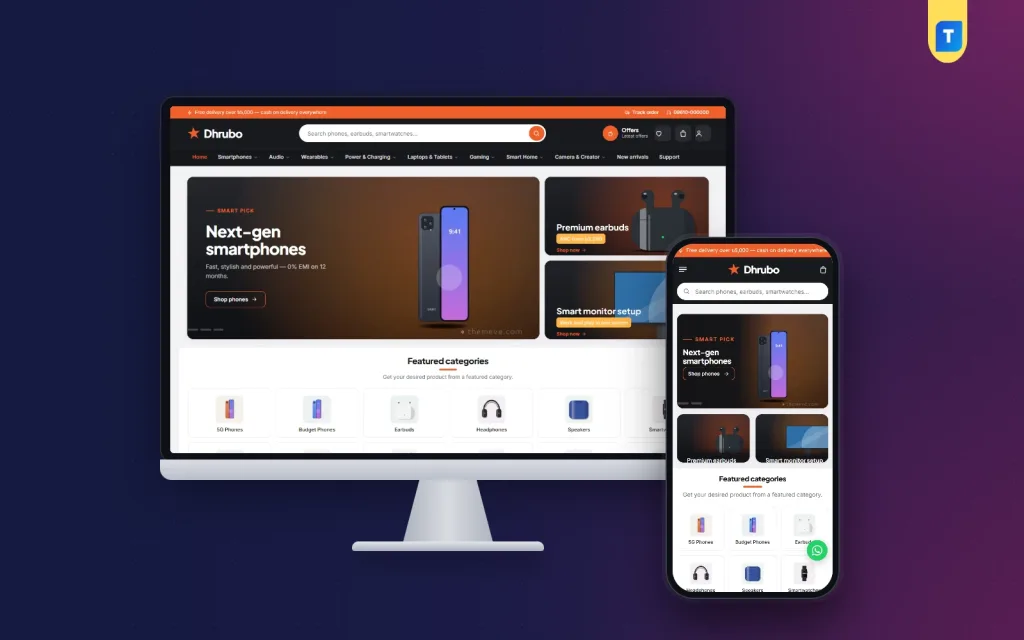
The Dhrubo demo opens with a thin orange strip for a delivery message, a Track order link and a phone number. Below it sits a charcoal header with a star logo, a wide rounded search box and quick buttons for Offers, wishlist, cart and account. A category menu then runs from Smartphones, Audio and Wearables through Power & Charging, Laptops & Tablets, Gaming, Smart Home and Camera & Creator, ending with New arrivals and Support.

In the theme, each category in that row opens picture tiles of its sub-categories, so someone heading for audio sees earbuds, headphones and speakers as images instead of a text list. The demo hero pairs a Next-gen smartphones slide with side banners for premium earbuds and a smart monitor setup. A Featured categories grid follows, with picture tiles for 5G phones, budget phones, earbuds, headphones, speakers and smartwatches, and each tile can show how many products the category holds.
Smart combos for chargers, cables and cases
The block many gadget sellers will enjoy most is Smart combos. It shows up to three ready bundles, each made of two or three products, along with the combined total and the amount the buyer saves. One button puts the whole bundle in the cart. A phone with its charger and cable is the obvious pairing, but earbuds with a power bank or a tablet with a case work just as well, and you can swap bundles for Eid gifts or the start of a university term.
Fifteen blocks you can move
Dhrubo has 15 homepage blocks, and each one can be switched off or dragged to a new spot, with arrow buttons for editing from a phone. Besides the slider, categories and combos, you get seven product rows with a title, a View all link and sliding cards, a flash sale with a countdown, two wide banners for a launch or brand week, a Shop by brand logo row and a Latest products grid with Load more.
Product Pages, Compare and the Mobile View
Product cards show key specs, a savings ribbon on discounted items, a compare button and Add to cart, so a buyer can see battery or storage before tapping. On the product page, specs are grouped into tidy sections with warranty and EMI details beside them. Reviews sit inside a fold, and a popup invites the first review when a product has none yet. A separate Compare page sets two items side by side, which helps a buyer choosing between two pairs of headphones.

On a phone, the demo header becomes a menu icon, the star logo and the cart, with the search bar directly underneath. The two side banners drop below the slider, and the category tiles settle into three columns. Product cards turn compact too, which matters because most of your buyers will browse during a commute or a lunch break. A round WhatsApp button also sits in the corner of the demo, so treat it as something shown in the demo rather than a promised feature.
Setting Up Your Online Electronics Store With Dhrubo
Dhrubo needs WordPress 6.0 or newer and PHP 7.4 or higher, and it is tested up to WordPress 7.1. Upload the zip under Appearance, Themes, Add New, Upload Theme and activate it. Then open Dhrubo, Setup and install Themeve Commerce in one click. This bundled plugin runs the cart, checkout, payments, couriers and orders. Finally, activate your licence under Dhrubo, License with the key from My Account, Licenses on Themeve, so updates arrive in your dashboard.
Run Dhrubo, Demo Import to load the sample store: 34 products from 7 invented brands, dark banners, smart combos, grouped specs, menus and every page, including Gadget Guides, Shipping Information, Return & Exchange, Warranty Policy and Track Order. Every brand and picture is a placeholder, so set aside a weekend to replace them with your own photos, real specs and real warranty terms. If WordPress is new to you, the WordPress documentation explains pages, menus and media.
Next, open Dhrubo, Theme Options. Homepage layout comes first, and each block, the header and menu, product cards, the product page and the footer have their own settings. Pick one of five palettes, Ember, Electric, Lime, Crimson or Violet, or set each colour by hand, then choose a font pair such as Plus Jakarta Sans with Inter or Sora with Inter. A settings search, export and import, reset and a sticky save bar help on long editing days.
Before you decide, spend a few minutes in the live demo on your own phone, then open the demo dashboard to see where products, orders and theme settings live. Add a combo to the cart, open a product page and walk through checkout as a customer would. Ten minutes of hands-on testing tells you more about whether the layout fits your stock than any feature list can.
Payments, Delivery and Promotion in Bangladesh
Checkout in Dhrubo is a single page, with sign in and registration in a popup and an Order placed popup at the end. Buyers can pay with bKash, Nagad, SSLCommerz, cash on delivery or manual payment. Parcels go out through Steadfast or Pathao courier, and customers follow them on the Track Order page. Wishlist, coupons, invoices, offers, back-in-stock and returns are part of the package as well.
Electronics carry more risk than most goods, so an online electronics store needs firm habits. Call to confirm cash on delivery orders above a set value, ask for a small advance by mobile payment on costly items, and seal every box with a sticker so buyers can see it was not opened. Record a short packing video for phones and laptops. These steps cut fake orders and warranty arguments, and Dhrubo's SMS, OTP and Telegram new-order alerts help you react quickly.
For promotion, Facebook is still the main channel for gadget sellers here. Dhrubo includes Facebook Pixel and the Conversion API, so you can see which ads lead to real orders. Send ads to a category or a combo instead of the homepage, post honest unboxing videos, and use the flash sale countdown for a weekend drop. Short Bangla captions with clear model names usually get more replies than long English copy.
Common Mistakes When Selling Gadgets Online
The first mistake is copying specs and photos from other sites. Buyers notice, and search engines see the duplicate text. Write your own short descriptions and shoot at least one real photo of each box. The second is hiding warranty terms until after the sale, which turns small faults into angry reviews. The third is ignoring stock: an online electronics store that shows sold-out phones as available loses trust fast.
Another common error is choosing a theme for its demo photos instead of its structure. Picture your own range inside it. Many owners also never test checkout on a cheap Android phone using mobile data, so do it before launch. Google's Search Central documentation is a good free guide to product page basics such as titles and descriptions.
Frequently Asked Questions
Is a dark theme hard to read on phones?
Not when it is built with contrast in mind. In Dhrubo the text stays clear on the charcoal background, and the accent colour picks out prices and buttons. The theme is fully responsive, with compact product cards and a header of menu, logo and cart on small screens, so shoppers can browse comfortably on the bus.
Can I show warranty and EMI for every gadget?
Yes. Product pages show grouped specs with warranty and EMI details beside them, and the demo includes a Warranty Policy page. You still decide the real terms and the banks you work with, so write them carefully and keep the wording the same across similar products.
Do I need a separate shop plugin?
No. Themeve Commerce comes bundled and installs from Dhrubo, Setup in one click. It covers the cart, checkout, payments, couriers and orders, so you do not have to stitch a shop together from several plugins that each need their own updates and settings.
Is there a lighter alternative to the dark look?
Yes. If you prefer a bright, white gadget shop with a gadget finder, look at Jhalak – Gadget Shop WordPress Theme. For a more playful smart-home layout, compare Chomok – Smart Gadget Shop WordPress Theme. Dhrubo is the pick when you want a premium, showroom-style dark storefront.
Final Thoughts
A successful online electronics store rests on trust: clear specs, honest warranty terms, sensible payment options and parcels that arrive sealed and on time. Good design supports all of that by making your stock look as good as it really is. If you want a dark, showroom-style gadget store website with bundles, spec cards and local payments ready to go, start with Dhrubo – Dark Gadget Store WordPress Theme and build your first product rows this week.