A shoe website template lives or dies on three things: sizes, colours and checkout. Get the size information wrong and every second parcel comes back for exchange. Hide the colour options and buyers message you instead of ordering. Make checkout slow and parents ordering school shoes on a lunch break simply give up. This guide is for Bangladeshi shoe shop owners, footwear brands and kids' shoe specialists planning their first proper online store.
Shoes are one of the hardest products to sell online because fit is personal. A buyer who wears a 42 in one brand may need a 43 in another, and children's feet change size every few months. Yet shoes are also bought often, by every member of the family, which makes a good online shop very valuable once you solve the fit problem. Most of that solving happens in how your website presents each pair.
In this guide we use Kadam – Shoe Store WordPress Theme as the example. It is a sporty theme in cool grey, graphite and tangerine for shops that sell to men, women, boys, girls, little kids and seniors who need comfort shoes. We will look at each of the three needs in turn, then at setup, payments and the mistakes to avoid.
Why Sizes Matter Most in a Shoe Website Template
Wrong sizes mean exchanges, and exchanges eat your profit. Each one costs two courier trips, packing time and often a disappointed customer who does not order again. In Bangladesh the problem is bigger because brands use different size systems: some imported pairs use EU sizes, some UK, some US, and local makers sometimes use their own numbering. Buyers are rarely sure which number they need.
The best fix is to stop asking buyers to guess. Ask them to measure their foot length in centimetres at home, then show them the matching size in every system you sell. Put the available size range on each product card so nobody opens a shoe that does not come in their size. Finally, publish a simple exchange policy so buyers know what happens if the fit is still wrong.
How Kadam handles size
Kadam attacks size from three sides. Its size finder lets a buyer slide to their foot length in centimetres and see the EU, UK and US size, with links to men, women or kids that you set in Theme Options. Square product cards show an EU size range chip plus quick sizes. Size guides are switched on for products, and the demo includes a Size Exchange page that you fill with your own rules.
Showing Colours and Styles Clearly
After size, colour is the next question. A buyer who likes a sneaker wants to know straight away whether it comes in black for school or white for weekends. If the colour options are buried, they send a message and wait, and many never come back. Show colour choices on the product card itself, photograph every colour separately and name colours plainly, such as navy or tan, rather than vague names nobody searches for.
Style is just as important. Shoe buyers usually know the type they want before they know the brand: sneakers, sandals, formal shoes, school shoes. Your shop should let them jump straight to that type. Grouping by who the shoe is for helps too, because a grandmother looking for soft walking shoes should not have to scroll past football boots to find them.

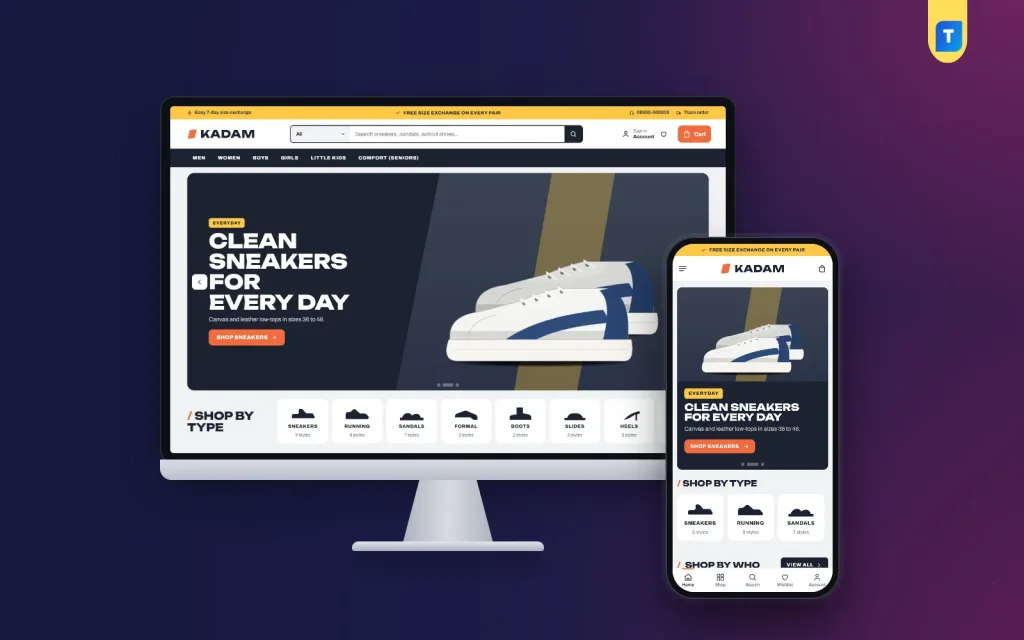
In Kadam, square cards show colour swatches next to the size chip and a bold price, so buyers see colour and size at a glance. Shop by type is a rail of shoe silhouettes for sneakers, running, sandals, formal, boots, slides, heels and school, and in the demo each tile also shows how many styles it holds. Shop by who has tiles for men, women, kids and seniors, and Made for offers activity cards for running, office, school and rainy days.
The demo menu sits on a dark band with Men, Women, Boys, Girls, Little Kids and Comfort (Seniors), under a search bar with a category picker. The hero slider uses bold slides with a giant outline word; the slide in the screenshot promotes clean everyday sneakers in canvas and leather. A bright top bar in the demo carries short notes about size exchange, a helpline and a Track order link, which you rewrite with your own policy.
A Fast Checkout for Busy Buyers
Many shoe orders in Bangladesh are placed on phones in a spare five minutes. Every extra step between choosing a pair and confirming the order loses buyers. A good checkout fits on one page, asks only for what you need to deliver, offers the payment methods people actually use and confirms the order clearly so nobody wonders whether it went through.
Kadam keeps the buying path short. A popup lets buyers sign in or register without leaving the page. Checkout is one page with an Order placed popup, and every parcel shows up on the Track Order page. Reviews stay folded until someone opens them, with a popup asking for the first review. For sizes that sell out, the wishlist and back-in-stock keep the pair within reach until it returns.
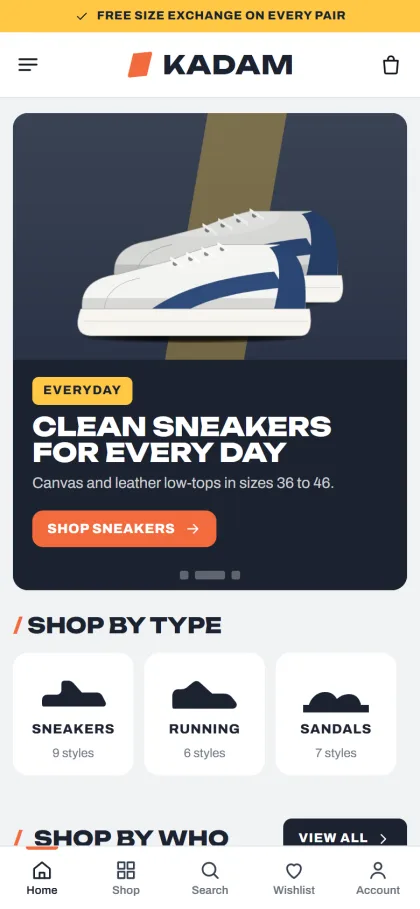
On phones, the header shrinks to menu, logo and cart, and cards stay compact at two per row with the size chip still easy to read. The mobile screenshot of the demo also shows a bottom bar with Home, Shop, Search, Wishlist and Account, and the Shop by type tiles sit right under the slider, so a parent can tap School and start choosing within seconds.
Setting Up Your Shoe Store Step by Step
Kadam runs on WordPress 6.0 or newer and PHP 7.4 or newer, tested up to 7.1. Upload the theme in Appearance, Themes, Add New, Upload Theme and click Activate. Open Kadam, Setup to install the bundled Themeve Commerce plugin with one click, then enter the license key from My Account, Licenses in Kadam, License. The WordPress documentation is useful if you have not worked with menus and pages before.
Run Kadam, Demo Import to add 41 sample pairs from 6 brands in sizes from EU 20 to 45, with shoe types, size guides, journal posts, menus and every page: About, Contact, Delivery, FAQ, Journal, Size Exchange, Track Order, Wishlist, Our Stores, Terms and Privacy Policy. Brand names and artwork are invented, so add your own pairs, photos and size details before launch.
In Kadam, Theme Options you set the shoe types for the silhouette rail and the size-finder links, and pick one of five palettes, Tangerine & graphite, Electric blue, Forest, Cherry or Mono, with one of four font choices led by Unbounded and Archivo. The homepage has 24 blocks, 14 on in the demo, which you can drag into any order. A settings search, sticky save bar, reset and export or import make editing safe.
Before you commit, try the live demo on your phone. Use the size finder with your own foot length, open a shoe, check the size chip and swatches, and walk through checkout. Then explore the demo dashboard to see where products and orders sit. A short test like this shows whether a shoe website template really fits your daily work.
How to Sell Shoes Online in Bangladesh
In the dashboard, orders live under Shop. Buyers pay with bKash, Nagad, SSLCommerz, cash on delivery or manual payment, and parcels go out with Steadfast or Pathao courier. Coupons, invoices, SMS and OTP, and Telegram order alerts are all part of Themeve Commerce. Cash on delivery will be popular, so confirm orders by phone and double-check the size with the buyer before booking the courier.
Knowing how to sell shoes online also means planning your seasons. School shoes sell before the new school year, sandals and slides before summer and Eid, and boots and closed shoes as winter arrives. Prepare stock and photos a few weeks ahead. Kadam has Facebook Pixel with the Conversion API, so you can see which Facebook ads bring real orders, and a tangerine Flash sale band with a countdown for short offers.
On Facebook and Instagram, show shoes being worn, not only on a white background. A short video of someone walking in a sandal answers more questions than five photos. Always include the size range and colours in the caption and link to the product page. Ask happy customers to say whether the size ran true, because that one line in a review reassures the next buyer.
Common Mistakes When Choosing a Shoe Website Template
The first mistake is picking a general fashion theme that has no space for size ranges, so buyers must open every product to check. The second is mixing size systems without explanation, which guarantees exchanges. The third is uploading one photo per shoe and listing colours only in the text. Each of these turns simple orders into long inbox conversations.
Other mistakes include no written exchange policy, slow checkout with too many fields, and never testing the shop on a cheap phone with mobile data. Many sellers also ignore older buyers, though comfort shoes for seniors are a steady seller. Choose a template that groups by who, shows sizes on cards and keeps checkout short, and these problems shrink quickly.
Frequently Asked Questions
How does the Kadam size finder work?
The buyer slides to their foot length in centimetres and sees the matching EU, UK and US size. Links below take them to men, women or kids, and you set those links in Kadam, Theme Options so they point to the right sections of your shop.
Is Kadam suitable for a kids' shoe shop?
Yes. The demo covers boys, girls and little kids alongside adults, with sizes starting from EU 20. School shoes have their own tile in the Shop by type rail, which suits parents shopping before term begins.
What if I mainly sell formal leather shoes?
Then compare Pothik – Leather Shoe WordPress Theme, which is made for formal leather footwear. Kadam is the better fit for a family store selling sneakers, sandals, school shoes and comfort pairs across every age.
Final Thoughts
Selling shoes online works when buyers can trust the size, see every colour and finish checkout in a minute. Plan your size data, photograph each colour, write a fair exchange policy and keep the buying path short. If you run a family footwear shop and want a store built around those three needs, start with Kadam – Shoe Store WordPress Theme and help every customer take the right step.