A software key store sells the licences people need to get their work done: operating systems, office suites, PDF editors, accounting packages and developer tools. This guide is for Bangladeshi resellers, computer shop owners and freelancers who want to sell those keys online to offices and individuals. We look at who buys, how to price team orders, what paperwork companies expect, and how to set up payments and delivery without spending the whole day in Messenger.
Selling work software is different from selling games or streaming plans. Your buyer is often an accountant, an office manager or a freelancer with a client deadline. They care less about flashy banners and more about three plain questions: is the licence genuine, how many devices does it cover, and can I get a proper invoice? A shop that answers those questions on the page will close sales that a chat-only seller keeps losing to slow replies.
As the working example we use Kaaj – Office Software WordPress Theme, a theme built for exactly this kind of shop. It has role-based work kits, a team licence calculator tied to volume coupon codes, and product pages that list platform, validity and devices up front. First, though, we cover the business side, because no theme can fix a confused product list or unclear licence terms.
Who Buys From a Software Key Store in Bangladesh
Most orders come from four kinds of buyer. Students need an operating system and an office suite for assignments, usually one licence at a time and on a tight budget. Freelancers want a full set of tools on a new laptop, often PDF and design utilities alongside an office suite. Accounts offices and small firms buy several seats of accounting and office software together, and developers look for editors, utilities and build tools.
Each group asks different questions. A student asks if the key works on a home laptop. A freelancer wants everything installed before Monday. An office manager needs a quote for ten or twelve seats and a VAT invoice for the accounts file. If your software key store treats all of them the same way, with one long product grid and a phone number, you will spend hours writing quotes by hand and still lose the bigger team orders to whoever replies first.
Planning Your Range Before You Open
Start with the brands you can supply legally and reliably. Work only with authorised distributors or the software makers' own reseller programmes, and keep records of where each key comes from. Cheap grey-market keys that get blocked a month later destroy trust faster than any price war. Office buyers remember who sold them a dead licence.
Group products the way people work
Sort your catalogue by job rather than by brand: operating systems, office and documents, accounting and business, developer tools, utilities and bundles. That is close to how the Kaaj demo menu is arranged, and it matches how buyers think. Within each group, write down for every product the platform, how long the licence lasts, how many devices it covers and how delivery works. Those four facts answer most questions before a buyer ever opens a chat.
Decide your team pricing early
Offices rarely buy one seat. Decide in advance what a five-seat, ten-seat and fifteen-seat order looks like, and turn those tiers into real coupon codes rather than promises in chat. Fixed tiers make your pricing fair and predictable, so an office in Motijheel gets the same deal as one in Agrabad. They also let a buyer work out the cost alone, which is exactly what a busy office manager wants.
How to Sell Software Online to Offices and Freelancers
Knowing how to sell software online mostly comes down to removing the back-and-forth. Every message a buyer has to send before paying is a chance for them to go elsewhere. Put licence facts on the product page, show team prices without a quote request, offer the payment methods people already use, and explain clearly what happens after payment. Then handle refunds and replacements with a written policy instead of case-by-case arguments in chat.
Paperwork matters more here than in most online shops. Many offices in Bangladesh cannot pay a supplier without an invoice for their records, and companies registered for VAT will ask for a VAT invoice. If the key and the invoice arrive together by email, you remove a step that would otherwise need a separate message or a printed bill. That small detail is often what wins repeat business from a firm that buys every year.
How Kaaj Sets Up a Software Key Store
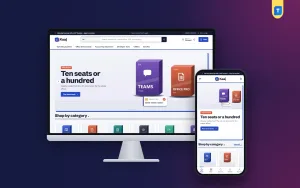
Kaaj is designed like a clean office desk: paper-white pages, a cobalt line under a white header, tomato accents, offset shadows and price tables ruled like a ledger. The homepage is made of 17 blocks, and each one can be switched off or moved by dragging, or with arrows on a phone. It opens with desk slides, followed by box tiles for each category, the work kit, and best sellers tabbed by category.

In the demo, the top bar talks about genuine licences with a VAT invoice and team prices, and the search box suggests things like operating systems, office suites, PDF tools and accounting. Under the menu, the first slide speaks straight to offices with a Plan team seats button. These demo texts are yours to replace, but they set a plain, practical tone for people who buy software for work.
Work kits by role
The Your work kit block has tabs for a student, a freelancer, an accounts office and a developer. Each tab is a checklist of the software that role needs. As the buyer ticks or unticks items, a live kit total updates, and one button adds every ticked item to the cart. A new freelancer can set up a whole laptop's worth of software in one order instead of hunting product by product through your categories.
Team licences with volume codes
The Team licences block is the part offices will like most. The buyer picks a product, slides the number of seats and watches the total change. The block shows which volume code the order qualifies for, using real TEAM5, TEAM10 and TEAM15 coupons, and how far the order is from the next one. One button adds that number of seats to the cart, so a quote that used to take a day of messages now takes a minute.
Further down the page, New versions shows two rows of the latest releases, and Licence deals runs a countdown with stock bars for short offers. Shop by system splits the range into four cards, one for each kind of system you sell for. Three department blocks each carry a banner and eight products, and a promise strip closes the page.
Product pages that answer licence questions
Every product page starts with quick facts for platform, validity, devices, licence and delivery, then explains how delivery works. Reviews sit in a fold, with a popup inviting the first one. Keys and a VAT invoice go out by email, and checkout is online with no address to fill in, because there is nothing to post. Sign in and register open in a popup, and an Order placed popup confirms each purchase on screen.
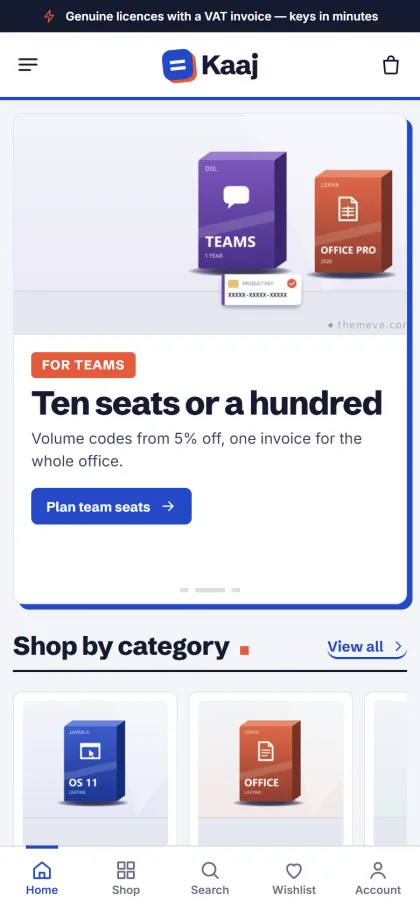
On phones, product cards go compact so the price ledgers stay readable, and the header becomes menu, logo and cart. The demo also shows a bottom bar with Home, Shop, Search, Wishlist and Account. A wishlist, one-page checkout, and Facebook Pixel with the Conversion API are ready, which matters because most buyers in Bangladesh will find you through a Facebook post and open your shop on a phone first.
Setting Up Your Software Key Store Step by Step
Kaaj needs WordPress 6.0 or newer and PHP 7.4 or higher, and it is tested up to WordPress 7.1. Upload the zip under Appearance, Themes, Add New, Upload Theme, then activate it. Open Kaaj, Setup and install the bundled Themeve Commerce plugin in one click; it runs the cart, checkout, payments, coupons, invoices and the Track Order page. Then activate your license under Kaaj, License with the details from My Account, Licenses in your Themeve account.
Next, run Kaaj, Demo Import once. It adds 21 sample products from 7 invented makers across operating systems, office, PDF, accounting, developer tools, utilities and bundles, along with the work kits, team licences, work guides, menus and every page. Pages include How Delivery Works, Replacement & Refund, Work Guides, Our Stores and Track Order. All brands and artwork are samples, so swap them for the real products you are authorised to sell.
Finally, open Kaaj, Theme Options. Here you set your work kits and team seats, choose one of five palettes (Cobalt desk, Teal ledger, Plum office, Charcoal or Olive) and one of four font pairs, and drag the homepage blocks into order. A search box finds any setting, a sticky save bar keeps the button close, and settings can be exported, imported or reset. The WordPress documentation covers menus, pages and users if WordPress is new to you.
Before you buy, open the live demo on your phone and on a computer. Try a work kit, then slide the team seats to see how the total and the volume code change. After that, look around the demo dashboard to see where products, orders and theme settings sit.
Payments, Delivery and Trust in Bangladesh
Themeve Commerce in Kaaj takes bKash, Nagad, SSLCommerz and manual payment. Mobile wallets are what most individual buyers use, while offices often prefer a card through SSLCommerz or a manual bank transfer they can record. New-order alerts reach you on Telegram, and SMS and OTP are available for customer messages, so you can confirm payment and send the key quickly, even when you are away from your desk.
Trust is the real product in a software key store. Write a clear Replacement & Refund page that says what happens if a key fails to activate, and stick to it. Tell buyers exactly how delivery works and which email address the key will come from. Keep a record of every key sold against each order number. When an office comes back in a year to renew ten seats, that history saves both of you time and confusion.
For marketing, Facebook remains the main channel. Use the built-in Pixel and Conversion API to measure which posts and ads lead to orders, and point ads at a work kit or team licence section rather than the bare homepage. Short guides, shown in the Work guides block, bring search traffic and prove you know your products.
Common Mistakes to Avoid
The biggest mistake is selling keys you cannot trace. If a licence is cracked, shared or bought from an unknown source, it will eventually stop working, and your name goes down with it. Never offer cracked or pirated software, however often someone asks for it. The second mistake is hiding licence terms: buyers should know before paying whether a key is for one device or five, and for one year or longer.
Other common problems are quoting team prices by hand in chat, forgetting invoices for companies, and ignoring the phone experience. If every office order needs a custom quote, you cap your own growth. Fixed volume coupons, a seat slider and an invoice by email solve those in one go. Finally, test the full buying path yourself, from product page to key delivery, before you spend a single taka on ads.
Frequently Asked Questions
Do I need a developer to run Kaaj?
No. You install the theme, run Kaaj, Setup for the plugin, import the demo in one click, and change colours, fonts, kits and block order in Theme Options. The dashboard works on a phone too, and homepage blocks can be re-ordered there with arrows instead of dragging.
How do the team discounts work?
In the Team licences block, the buyer picks a product and slides the seat count. The total, the volume code the order qualifies for (TEAM5, TEAM10 or TEAM15) and the gap to the next discount all update as they slide, and one button adds the seats to the cart.
What if I sell a much wider mix of software?
Kaaj is built around office and work tools, with role kits and team seats at its centre. If your shop carries a broad mix of software licences for every kind of buyer, compare it with Chabi, which is aimed at a wider range.
Final Thoughts
A successful software key store in Bangladesh rests on genuine licences, clear terms, fair team pricing and paperwork that offices can file. Get those right and the buyers who need ten seats will come back every year. If you want a shop that does the adding up for your customers, with role-based kits, a seat slider and invoices by email, start with Kaaj – Office Software WordPress Theme and build your range around it.