A student management system is the software a school uses to keep admissions, attendance, fees and results in one place instead of in a dozen registers and spreadsheets. This guide is for head teachers, school owners, office managers and committee members in Bangladesh who run schools from Play to Class Ten. We walk through the yearly cycle of a school office, what to plan before going digital, and how one Bangla system handles each part of that cycle.
Every school office knows the rush. In December and January the admission forms pile up. Every morning someone has to collect attendance from each section. On the first of every month fee bills go out, and before every exam the office prints admit cards and later spends nights on tabulation. Parents call to ask about dues, results and absences. Without a central system, the same information is written three or four times by different people.
As a working example we use the School Management Software – Website, Dashboard & Parent Portal, a standalone Laravel web app that runs on your own hosting and domain. The Themeve team installs it for you. It is built for Bangladeshi schools, with Bangla class and subject names, Bangladesh GPA rules and local SMS and payment companies, and it has seventeen working modules for the office, the classroom and the accounts desk.
What a School Office Handles Every Year
It helps to see the school year as four loops. Admission happens once a year but is intense. Attendance happens every single day. Fees run monthly. Exams and results come two or three times a year. Each loop touches different people: the receptionist and principal for admission, class teachers for attendance, the accountant for fees, and every subject teacher for marks. A good system lets each person do their own part without waiting for anyone else.
Parents sit at the end of every loop. They want to know if the application was accepted, whether their child reached school today, what is due this month and what grade came out. When answers depend on someone in the office being free to check a register, parents get frustrated and the office gets interrupted all day. Giving families their own view of the records is one of the biggest wins of going digital.
Planning Before You Choose a Student Management System
Start with people, not software. List the roles in your school and who fills them. The example software has eight built-in roles: Super Admin, Admin, Principal, Accountant, Receptionist, Teacher, Parent and Student, and you can create your own roles with permissions for each action. Decide early who may edit marks, who may take money and who may only view, because a student management system is only as safe as its permissions.

Next, prepare your data. Write down your classes, sections, subjects, fee heads and the current student list with guardian phone numbers. Students can be imported from a CSV template, so a clean spreadsheet saves days of typing. Finally, check the technical side: this software needs PHP 8.2 or newer, MySQL or MariaDB, SSL, cron and terminal access on your hosting. Ask your hosting company before you buy, so installation goes smoothly.
Online Admission and Student Records
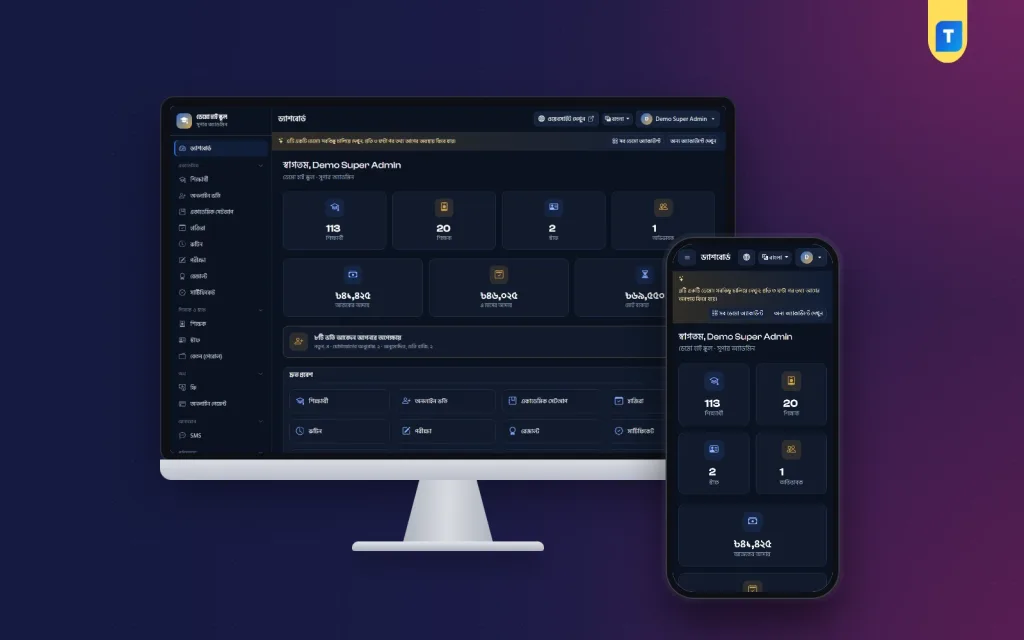
Admission is where first impressions are made. With this system, families apply on the school website with a photo and documents, get an application number by SMS and can check their status later. A blank printable A4 form is also available for families who prefer paper. The dashboard in the screenshot shows pending admission requests right on the home screen, so the office never forgets an application.
The office can approve an application, ask the family to make contact, or reject it, and every step can send an SMS. One click on Admit creates the student with a Student ID, roll number, ID card and, if you want, parent and student logins. Student profiles hold guardian details, blood group, photo and status. ID cards are made automatically with a QR verification code on the back, and you can print a single card or a whole class at nine per A4 page.
Daily Attendance and a Clash-Free Routine
Attendance is the habit that makes or breaks a student management system, because it happens every day. Good student attendance software has to be quick for teachers and useful for parents. Here, teachers mark Present, Absent, Late or Leave for their own sections. The guardian of an absent student gets an SMS, never twice in one day, and parents see an attendance calendar for their child.

The screenshot shows the daily summary screen, with tabs for taking attendance, the daily summary and the monthly register. Each section from Play and Nursery up to the higher classes is listed with its number of students, present, absent and leave counts, the attendance percentage and a button to take attendance. The head teacher can see at a glance which sections have not been marked yet and follow up before the first period ends.
The class routine works alongside attendance. It uses bell periods, breaks and room numbers for each section. Before saving, the software checks for clashes, so a teacher can never be placed in two classes at once. Anyone who has built a routine by hand on chart paper knows how easy that mistake is to make, and how much confusion it causes in the first week of a new term.
Exams, GPA Results and Certificates
Exams can have written, MCQ and practical parts, with full and pass marks for every subject. Teachers enter marks only for their own subjects, and class teachers cover their whole section, so nobody waits for one person to type everything. Results follow Bangladesh GPA rules: A+ from 80%, GPA 0.00 for a fail in any compulsory subject, and extra points from the optional fourth subject above 2.
You get a tabulation sheet with merit positions and printable marksheets for one student or a whole section. Published results appear in the parent and student portal, in the website result lookup and in a result SMS with the GPA. Merit and pass certificates come in 16 ready designs, download as PDF and carry a QR code that opens a verification page, which helps when another school or employer wants to check a certificate.
Fees, Online Payments and Payroll
Fee collection is where most schools lose time and money. Set fee heads and a fee structure for each class, and the system creates monthly bills on the 1st. Discounts, waivers and part payments are supported, and every receipt prints in two copies. Due SMS go out from the dues list or as daily automatic reminders, and each payment sends the guardian an SMS, so there is less arguing about what was paid and when.

Parents can pay online through the bKash Payment Gateway, through SSLCommerz with card, bKash, Nagad, Rocket or bank, or by manual Send Money with a TrxID that the office approves. Each gateway payment is verified before the receipt is made. The fees screenshot shows a notice of online payments waiting for checking, a six-month collection chart and a split of this month's income by bKash, cash and Nagad. You can learn more about the wallets themselves on the bKash and Nagad websites.
Staff are covered too. Teachers and staff get full HR profiles and their own ID cards. Payroll builds a monthly salary sheet with allowances and deductions, prints payslips and sends a salary SMS. Keeping salary in the same system as fees means the principal and committee can review both collections and payroll from one dashboard.
School Website and Portals for Families
The school also gets a public website with more than 20 pages, including notices, news, events, gallery, achievements and contact. It has Bangla and English versions, five colour presets and a phone-friendly layout, all managed from the dashboard. Visitors can look up results by class, section and roll or by Student ID, which takes pressure off the office on result day.
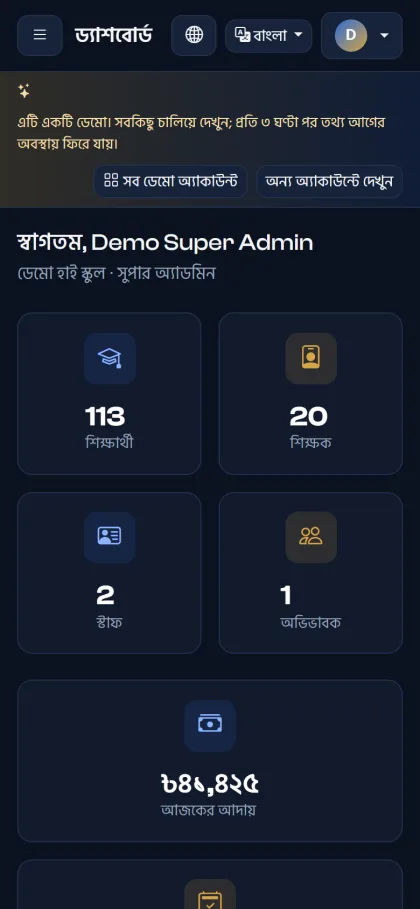
Parents use one login for all their children to see dues, results, attendance, routine, ID cards and certificates, and to pay fees online. Teachers see today's classes, their routine and their payslips. As the mobile screenshot shows, the dashboard itself fits a phone screen, which matters in a country where most people, including busy principals, check things on their phones first.
SMS, Security and Daily Backup
SMS is how most parents in Bangladesh actually receive school news. You pick your SMS company in the dashboard: BulkSMSBD, Alpha SMS, Greenweb, ElitBuzz or any other HTTP API. Seven automatic SMS, from absent and fee due to result published and salary paid, each have an on and off switch and an editable template, so you control the tone and the cost.
An activity log records who did what, and gateway and SMS keys are stored encrypted. A daily backup zips the database and uploaded files, keeps the last seven copies and can also send a copy to the school's own Google Drive. For a school, losing a year of results or fee records would be a disaster, so check these backups now and then rather than assuming they work.
Getting Started: Demo, Installation and the First Term
Before buying, open the live demo of the school website, then use the demo login page to sign in with one click as any of six roles, from super admin to student. The demo resets every three hours. Ask your accountant, a class teacher and a parent to try their own roles, because their comfort will decide whether the system is used.
You get a lifetime single licence for one school and one domain, with updates while the licence is active. You buy your own hosting and domain, and the Themeve team installs the software with the licence activated. Ongoing help comes through a monthly paid support plan. Roll out in stages: classes and students first, then attendance, then fees, then exams. If you also run a madrasah, compare the Madrasa Management Software – Website, Admin & Parent App.
Common Mistakes When Schools Go Digital
The most common mistake is switching everything on in the middle of a busy term. Start at the beginning of a session or after exams, when the office has breathing room. The second is entering messy data: wrong guardian numbers mean absent SMS go to the wrong person. The third is sharing one admin login among several people, which makes the activity log useless and leaves nobody accountable for mistakes.
Another mistake is ignoring parents. Even the best student attendance software adds little value if families never log in. Hold a short parents meeting, show them the portal on a phone, and explain how SMS alerts and online payment work. Finally, keep hosting, domain, SSL and support renewed on time. A student management system that goes offline on result day undoes months of goodwill.
Frequently Asked Questions
Is this student management system made for Bangladeshi schools?
Yes. It is built for schools from Play to Class Ten, with Bangla class and subject names, Bangladesh GPA rules and local SMS and payment companies. The dashboard runs in Bangla, and the school website has Bangla and English versions.
Does it work as student attendance software with SMS alerts?
Teachers mark Present, Absent, Late or Leave for their sections, and the guardian of an absent student gets an SMS, never twice in one day. Parents also see an attendance calendar, and the office sees a daily summary and a monthly register.
Which online payment methods can parents use?
Parents can pay through the bKash Payment Gateway, through SSLCommerz with card, bKash, Nagad, Rocket or bank, or by manual Send Money with a TrxID that the office approves. Gateway payments are verified before a receipt is made.
What hosting does the software need?
It needs PHP 8.2 or newer, MySQL or MariaDB, SSL, cron and terminal access. You buy your own hosting and domain, and the Themeve team installs the software for you with the licence activated.
Final Thoughts
A school runs on routines: admission each year, attendance each day, fees each month and results each term. When those routines live in one place, teachers spend less time on paperwork and parents get answers without calling the office. Plan your roles and data, test every role in the demo, and roll out step by step. To see the full feature list, visit the School Management Software – Website, Dashboard & Parent Portal.