Do your customers keep asking whether they should take a personal or a shared plan, and when their video editor runs out? Then a subscription website template built for creative apps will save you hours each week. This guide is for Bangladeshi resellers who sell monthly plans for design suites, video editors, photo apps and music tools, and for freelancers who set up such shops for clients. We cover planning, renewals, payments and the mistakes that cost repeat buyers.
Creative buyers are a special crowd. Many are students learning design, YouTubers editing their first reels, or small agencies juggling several client projects. They buy for a month or two, renew when work comes in, and compare sellers in Facebook groups. Their questions repeat endlessly: which plan, which account type, how many devices, how fast does it arrive, and what happens at the end of the month. A good shop answers all of that on the page.
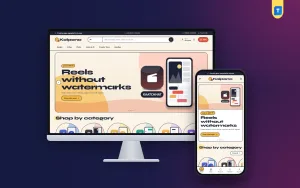
We use Kolpona – Creative Subscription WordPress Theme as the example throughout. It is designed like a paper-cut collage, with cream paper, colour blobs, thick ink outlines and sticker badges, and it has two blocks made for the two questions creative buyers ask most. Before we look at those, it helps to plan the shop itself.
What a Creative Subscription Shop Really Sells
On the surface you sell app access. In practice you sell certainty: the buyer wants to know the plan will work on their laptop, last the full term and be renewed on time. A subscription shop lives on renewals, so the first sale matters less than the third and fourth. Every design choice on the site should make the next renewal easier, from clear plan facts to reminders that arrive before a deadline, not after it.
Your catalogue usually falls into a few groups: design tools, video editors, photo apps, audio and AI tools, creator utilities and bundles for beginners. Within each, the same app may come as a personal account that belongs to one buyer or a shared seat on an account used by a few people. Before you list anything, check each app maker's terms for resale and sharing, and only offer what those terms allow.
Planning Your Plans, Prices and Policies
Write the same facts for every plan
For each product, note the platform, the account type, the number of devices, the validity and how delivery works. Keep the wording identical across products so buyers can compare at a glance. If a shared seat cannot change the password or install on more than one device, say so plainly. Hidden limits are the main reason for angry messages and one-star reviews in this trade.
Decide what happens at renewal
Write a short renewal policy before launch. Will the same login continue, or does the buyer get new details each month? How many days before expiry should they pay? What if a renewal arrives late? Clear answers reduce support work and stop buyers drifting to another seller who simply replied first. Put the policy on your delivery page and repeat the key points on each product page.
How to Sell Subscriptions Online Without Endless Chat
Learning how to sell subscriptions online is mostly about turning chat questions into page content. If a buyer can compare account types, see what each includes, know the end date and pay with a wallet they already use, they rarely need to message you at all. That frees your time for delivery and for the few buyers who truly need help, such as an agency setting up several seats at once.
A subscription website template also needs a short checkout. Nobody wants to type a home address for a video editor plan. Fewer fields means fewer abandoned carts, especially on phones and mobile data. Delivery should be just as quick and predictable, with the same channel every time, so buyers know where to look for their login details once they have paid.
Kolpona as a Subscription Website Template for Creative Apps
Kolpona means imagination, and the design leans into it. Headings are set in Syne with DM Sans for body text, and wavy section edges give the shop the feel of a scrapbook left open on a studio desk. The homepage is built from 17 blocks, each of which can be switched off or moved, so you can lead with whatever sells best this month.

In the demo, the menu reads Design, Video, Photo, Audio & AI, Creator Tools and Bundles, and the search box invites people to look for design, video, photo, music and AI tools. The first slide promotes video editors under a Cut it, ship it sticker with a Shop video apps button, next to a sample app called Kaatchhat. Below, Shop by category shows each department as a colour blob tile.
Personal or shared?
This block puts the two account types side by side for each app. Tabs switch between apps, and each side shows what the buyer gets, the monthly price and its own button. A freelancer who needs a plan for one month of client work can choose the cheaper shared seat, while someone who wants a login of their own takes personal. Both options sit in plain view, so nobody messages you just to compare.
When does it end?
Shoppers choose an app, a plan and a start date. The block shows the last day of the subscription and saves a calendar reminder for three days before it ends. That reminder works for both sides: the buyer has time to renew, and they are reminded to come back to your shop rather than search for a new seller. For a renewal business, this one block may be worth more than any banner.
The rest of the homepage
After the categories, Creators' favourites sorts popular apps into tabs, Fresh tools lays out new products in two rows, and Creator deals adds a countdown with stock bars for short offers. Three department blocks each pair a banner with eight products. Make something offers four cards that point people towards the work they want to do, followed by Shop by budget, Trending now, Top rated, App makers, Creator notes and a promise strip.

On a phone, the header keeps menu, logo and cart, product cards turn compact, and the collage stays fully responsive. The demo also shows a bottom bar with Home, Shop, Search, Wishlist and Account. Each product page opens with quick facts for platform, account type, devices, validity and delivery, then explains how delivery works. Reviews sit in a fold, with a popup inviting the first buyer to write one.
Setting Up the Shop Step by Step
Kolpona needs WordPress 6.0 or newer and PHP 7.4 or higher, and it is tested up to WordPress 7.1. Upload the zip in Appearance, Themes, Add New, Upload Theme, and activate it. Then open Kolpona, Setup and install the bundled Themeve Commerce plugin in one click. Activate your license in Kolpona, License using the details from My Account, Licenses in your Themeve account, so updates reach your site.
Run Kolpona, Demo Import to bring in 21 sample subscriptions from 6 invented makers, with personal-or-shared plans, the renewal date tool, creator notes, menus and every page, including How Delivery Works, FAQ, Track Order, Wishlist and the policy pages. Replace the sample apps with the ones you are allowed to sell, and rewrite the delivery page with your own renewal policy.
Everything else lives in Kolpona, Theme Options, and the dashboard works on a phone. Pick one of five palettes (Paper cut, Bubblegum, Mint pop, Grape or Tomato) or set each colour yourself, and choose one of four font pairs. A settings search, a sticky save bar, and export, import and reset are all there. If WordPress itself is new to you, the WordPress documentation explains pages, menus and users.
Take a few minutes in the live demo before you decide. Switch tabs in Personal or shared, pick a start date in When does it end, and walk through checkout on your own phone. Then open the demo dashboard to see where products, orders and the block settings sit.
Payments and Delivery for Bangladeshi Buyers
Themeve Commerce takes bKash, Nagad, SSLCommerz and manual payment, so buyers can pay the way they already do. Checkout is online on a single page with no address fields, plans reach the buyer by email and WhatsApp, and an Order placed popup confirms the order straight away. Coupons, invoices and an order tracking page are included.
For the back office, a Telegram alert arrives for every new order, and SMS and OTP are ready for customer messages. That matters when payments come in late at night and buyers expect their editor to work before a morning deadline. Facebook Pixel with the Conversion API is built in, so you can see which reels and posts in creator groups actually lead to paid plans.
Mistakes That Cost You Renewals
The most expensive mistake is unclear account terms. If a buyer thought they were getting a personal login and received a shared seat, you lose that customer and probably a few of their friends. Selling access the app maker does not permit is just as risky, because accounts can be closed without warning. Stick to what you can deliver legally, and describe it honestly on every product page.
Other mistakes are forgetting renewals, mixing too many plan lengths, and treating the homepage as a price list. A subscription website template with a renewal reminder and a clear account comparison solves the first and keeps the page friendly. Keep plan lengths simple, test the checkout yourself on mobile data, and answer reviews quickly, since creative buyers read them carefully before choosing a seller.
Frequently Asked Questions
Do I need to code to set up Kolpona?
No. Blocks, colours, fonts and texts are all set in Kolpona, Theme Options, and the demo import builds the pages in one click. On a phone you re-order homepage blocks with arrows instead of dragging, so small changes are possible even away from your computer.
Will buyers have to type an address at checkout?
No. Checkout is online and has no address fields, because nothing is posted. Plans are delivered by email and WhatsApp, and the How Delivery Works page lets you explain the steps in your own words, including your renewal policy.
Which theme suits plans with monthly, 3-month and yearly options?
If you sell many apps with several plan lengths, look at Megh – AI Subscription Store WordPress Theme. Kolpona fits shops built around creative tools, where the personal or shared choice and renewal dates matter most.
Final Thoughts
Creative app plans are a renewal business: clear account facts, honest terms, quick delivery and a reminder before the end date keep buyers coming back. Choose a subscription website template that does that explaining for you, and spend your time on delivery and support. If your shop sells design, video, photo and audio tools, start with Kolpona – Creative Subscription WordPress Theme and build your first shelf of plans around it.