Running an electronics ecommerce website for home appliances is a different job from selling small gadgets or clothes. An AC, a fridge or a washing machine is a family decision, often planned for weeks and paid for in instalments. This guide is for appliance dealers, showroom owners adding online sales and freelancers who manage stores for them in Bangladesh. It covers the daily work behind such a site: answering buyer questions, planning the seasons, handling delivery and keeping after-sales calm.
Big-ticket buyers ask the same three questions again and again: what are the specs, what is the warranty, and how much per month? A shop that answers those on the page itself saves hours of phone calls each week. A shop that hides them behind a Call for details button loses the buyer to whoever answered first, even if that competitor is more expensive.
As our example we use Bijli – Electronics and Appliance WordPress Theme, a bright theme for shops that sell ACs, TVs, fridges, washing machines, fans, rice cookers, kitchen helpers and LED lights. The operating advice applies to any appliance store, so start with the business side and then see how the theme supports it.
How Appliance Buyers Shop Online
Selling a 1.5-ton AC is not like selling a T-shirt. People compare, calculate and come back two or three times before they pay. Often one family member researches on a phone at night, shows the shortlist to others at dinner and returns to order a few days later. Your site has to keep that shortlist alive between visits and make each return trip quick.
They also think in rooms and budgets rather than model numbers. A buyer wants a fridge that fits the kitchen corner, a TV for a small bedroom or a fan for a hot shop floor. Monthly cost matters as much as the full price for many households, and installation is a worry for ACs and wall-mounted TVs. An electronics ecommerce website that speaks this language feels like a helpful showroom rather than a price list.
The Daily Work Behind an Electronics Ecommerce Website
Most of the effort in an appliance store happens after launch. Products change every season, prices move with the dollar rate, and every order involves more coordination than a parcel of clothes. Building a routine early keeps the store accurate and keeps your team from answering the same questions all day.
Keep specs and stock honest
Spend time on product data. For each model, list the three specs buyers care about most, such as capacity, energy use and screen size, plus warranty length. Update stock daily, because nothing hurts more than a buyer who waited a week for EMI approval only to hear the model is gone. One person should own this list, so it never falls between staff.
Answer the money question early
Show the monthly cost wherever you can, but only advertise instalment plans you can actually deliver through your bank or card partners. Write the conditions on a separate page in plain words: which cards, how many months, and any charges. Clear terms reduce failed orders and angry calls when a buyer discovers a condition at the last step.
Plan delivery and installation
Bulky items need a delivery plan of their own. Decide which areas you deliver to with your own van, which go by courier and which need pickup. For ACs, book installation slots and tell the buyer the date before dispatch. Photograph each unit and its serial number before it leaves the warehouse, so warranty and damage questions can be settled quickly later.
Planning the Appliance Year
Appliance demand follows the calendar more than most trades. Fans, coolers and ACs rise sharply in the hot months, and load-shedding headlines push sales of rechargeable fans and lights. TVs and fridges often climb before Eid and during wedding season, when families buy gifts or set up new homes. Plan banners, stock and staff for these peaks a month ahead, and keep quieter months for clearing old models and writing buying guides.
Write those buying guides on your own blog: which AC size suits which room, how to choose a fridge for a family of five, why inverter models cost more but use less power. Guides answer the questions that keep buyers from ordering, and they bring search visitors who are already close to buying. Link each guide to the matching category page so readers can go straight to the products.
How Bijli Supports an Appliance Shop
Bijli answers the specs, warranty and monthly cost questions on every product card. Each card shows the brand and name, up to three key specs taken from the product's key features, the rating and price, an EMI from monthly price and a small warranty pill. A Compare button sits on every card and product page, and shoppers can line up to four products side by side on the Compare page.

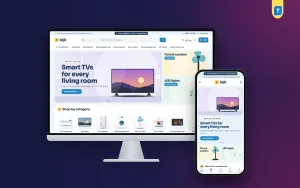
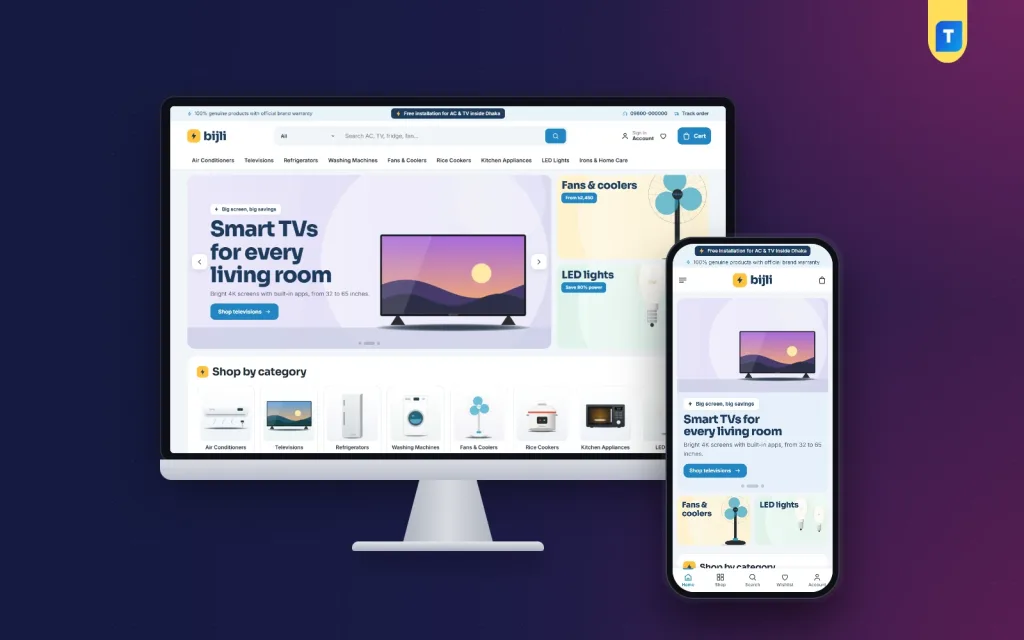
The desktop screenshot shows a store organised by appliance type. The top strip in the demo mentions genuine products with brand warranty, free AC and TV installation inside Dhaka, a hotline and a Track order link; treat those as sample promises to replace with your own. The menu runs from Air Conditioners and Televisions to Rice Cookers, LED Lights and Irons & Home Care. The hero slide promotes smart TVs for every living room, with fan and LED light banners beside it and picture tiles for each category below.
On the product page, a key specs box shows warranty, EMI and compare together, and the full specifications table is open by default. The EMI calculator block on the homepage turns a price and a number of months into a monthly amount, so buyers can drag the price, pick a plan and see the figure straight away. Reviews sit in a fold, and a popup asks for the first review when an item has none.
Homepage blocks for every season
Bijli has 23 homepage blocks, each one switchable and movable. Power deals adds a countdown with stock bars, and Beat the heat pairs a banner with fans and coolers for summer. Shop by budget and Shop by room help families narrow choices, Brand of the month gives one brand the stage, and Buying guides pulls in your latest three posts. An Our promise block covers genuine products and free installation, so set it to match what you really offer.
The Store on a Phone
The family member doing the research is usually on a phone, so the mobile view decides whether the shortlist survives. Test the demo on your own handset: open a category, compare two fridges and walk to checkout. Every extra tap is a chance for the buyer to get distracted by a message or a call.

In the mobile screenshot the two promise lines sit stacked at the very top, the header keeps to a menu icon, the logo and a bag, and the TV image sits above its headline and Shop televisions button. The fan and LED light banners share one row, and Shop by category starts below. The demo also shows a bottom bar with Home, Shop, Search, Wishlist and Account. Product cards stay compact, so a long list of fans is easy to scroll.
Setting Up Bijli
Upload the Bijli zip under Appearance, Themes, Add New, Upload Theme and activate it. Install the bundled Themeve Commerce plugin from Bijli, Setup in one click, then activate your licence under Bijli, License with the key from My Account, Licenses. Bijli needs WordPress 6.0 or newer and PHP 7.4 or newer; the WordPress documentation covers pages, menus and users if you need a refresher.
Run Bijli, Demo Import to load 47 appliances from 6 brands, buying guide posts, menus and pages such as Compare Products, EMI Plans, Delivery & Installation, Warranty & Returns and Our Stores. Brand names and artwork are invented, so replace them before launch. In Bijli, Theme Options, choose from five palettes, Sky & navy, Teal, Indigo, Graphite & orange and Mint, and four font pairs. Explore the live demo and the demo dashboard before you decide.
Payments, Delivery and Orders
Checkout is one page, with sign-in through a popup and a wishlist for the shortlist. Buyers pay by bKash, Nagad, SSLCommerz, cash on delivery or manual payment, and Steadfast or Pathao courier handles parcels. An Order placed popup confirms each order and the Track Order page shows progress. Coupons, invoices, SMS and OTP and Telegram alerts for new orders are included, along with size guides, back-in-stock, offers, returns and a store locator.
For an online electronics store, cash on delivery on a large appliance needs care. Confirm by phone, consider a booking advance by mobile payment, and agree with the buyer on who carries the unit upstairs. Send an invoice with every order, since buyers keep it for warranty claims. Facebook Pixel with the Conversion API shows which ads bring real orders, so you can move budget to the posts that work during each peak.
Common Mistakes in Appliance Ecommerce
The first mistake is copying spec sheets without checking them. A wrong capacity or a missing warranty detail turns into a return that costs far more than the profit on the sale. The second is promising installation or instalments you cannot deliver everywhere. Be specific about areas and conditions instead. Third, many shops leave the summer homepage running in December. Rotate your banners and blocks with the seasons.
Sellers also underestimate after-sales. A buyer whose AC drips water in week two will judge your electronics ecommerce website by how fast you reply, not by its design. Keep a service contact on every invoice, log complaints in one place and follow up after each fix. Handled well, after-sales turns into the reviews that sell your next hundred units.
Frequently Asked Questions
Can buyers compare more than two appliances?
Yes. In Bijli every card and product page has a Compare button, and shoppers can place up to four products side by side on the Compare page. That suits families choosing between several fridge or washing machine models at once.
Where does the EMI from price appear?
Bijli shows an EMI from monthly price on product cards and in the key specs box on the product page. The homepage EMI calculator also turns any price and number of months into a monthly amount. Set the figures to match the plans your bank partners actually offer.
Which theme suits a softer showroom look?
If you like spec cards but want a calmer, boutique feel, look at Taranga – Home Electronics WordPress Theme. If your catalogue leans towards laptops, accessories and gadgets, Tech Bazer – Electronics Store WordPress Theme fits better. Bijli suits a bright appliance megastore.
Can I rearrange the homepage from my phone?
Yes. Homepage layout in Bijli, Theme Options lets you switch blocks on or off and drag them into order, and on a phone small arrows move them instead. That makes a quick seasonal change possible even when you are away from the showroom.
Final Thoughts
A successful electronics ecommerce website for appliances runs on honest specs, clear monthly costs, careful delivery and quick after-sales, all planned around the seasons. Get those habits right and the site becomes your busiest branch. If you sell ACs, TVs, fridges and fans and want a store that answers the big questions on every card, start with Bijli – Electronics and Appliance WordPress Theme.