 −38%
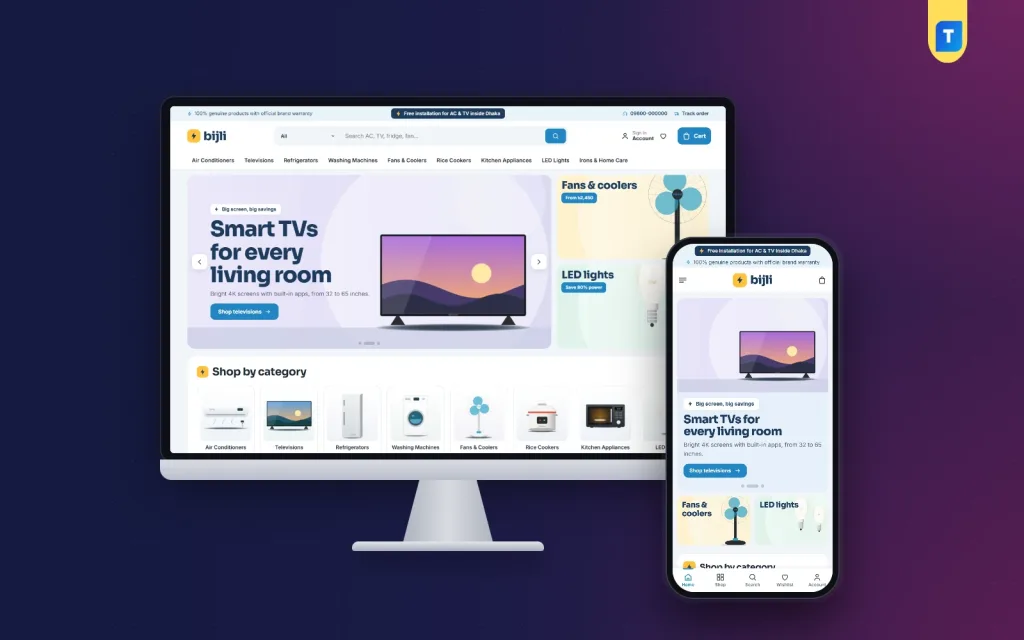
Bijli – Gadget Shop WordPress Theme
✦ Key features
- 23 homepage blocks you can switch and re-order
- Spec cards with warranty pill and EMI price
- Compare up to four products side by side
- EMI calculator block on the homepage
- Power deals with countdown and stock bars
- Shop by need, room and budget
- Five colour palettes and four font pairs
- English and Bangla switch
- Demo with 47 appliances from 6 brands
- Login popup and one-page checkout
- bKash, Nagad, SSLCommerz and cash on delivery
- Steadfast and Pathao courier with order tracking
Overview
Bijli is a gadget shop WordPress theme for sellers of ACs, TVs, fridges, fans and small electronics. It shows specs, warranty and EMI price on every card, with four-way compare and 23 homepage blocks.
Bijli is a gadget shop WordPress theme built for sellers of big and small electronics: ACs, TVs, fridges, washing machines, fans, rice cookers, kitchen helpers and LED lights. Buyers of these items ask the same three questions. What are the specs, what is the warranty, and how much per month? Bijli answers all three on every product card.
The theme comes with Themeve Commerce, our own shop plugin, so you do not need WooCommerce. You get spec cards, an EMI calculator, four-way product compare, power deals with countdowns and 23 homepage blocks you can switch and re-order. The look is calm sky blue with sunny yellow, and you can change it from the dashboard.
Who can use this gadget shop WordPress theme
Bijli is not limited to one product group. It suits any business that sells goods with specifications, brands and a warranty.
The demo sells home appliances, but the layout works for any shop where people compare, calculate and come back before they pay.
- Home appliance megastores
- AC, TV and fridge dealers
- Small gadget and accessory shops
- Fan, cooler and lighting sellers
- Kitchen equipment and cookware stores
- Mobile and computer shops that offer instalments
- Lighting, wiring and electrical goods sellers
- Solar, battery and power backup dealers
- Brand showrooms and authorised dealers
- Multi-brand electronics retailers
Selling a 1.5-ton AC is not like selling a T-shirt. Shoppers compare models, check the warranty and work out the monthly payment, often two or three times. Bijli is laid out for that slower, more careful buyer.
Spec cards, EMI price and four-way compare
On every product card
- Brand and product name first
- Up to three key specs, taken from the product's key features
- Rating and price
- An EMI from monthly price
- A small warranty pill
- A Compare button
On the product page
- A key specs box that shows the warranty, EMI and compare together
- The full specifications table, open by default
- Reviews inside a fold
- A popup that asks for the first review when nobody has written one yet
Compare page
Shoppers can line up to four products side by side on the Compare page. Choosing between two fridges stops being a guessing game, and the buyer stays on your site instead of opening three other tabs.
An EMI calculator on the homepage
Instalment buying is normal for fridges, ACs and TVs. A buyer who sees the full price may leave. A buyer who sees the monthly price may stay.
The EMI calculator block turns a price and a number of months into a monthly amount. Buyers drag the price, pick a plan and see the figure straight away. For a gadget shop WordPress theme that sells costly items, this is often the moment a "maybe later" turns into an order.
Homepage with 23 blocks you control
Each block can be switched off or dragged into a new order. On a phone, small arrows move them instead. These are the blocks appliance shops lean on most.
- Hero slider with bright studio slides
- Quick finds: six popular searches with links
- Shop by need: four colour cards
- Power deals with a countdown and stock bars
- Beat the heat: a banner with fans and coolers
- Shop by budget
- Shop by room
- Brand of the month: one brand and its products on stage
- EMI calculator
- Three department blocks, each with a banner and eight products
- Buying guides, showing your latest three posts
- New arrivals
- Best sellers, in tabs by category
- Trending this week
- Highly rated
- Brand logos
- Promo cards
- An Our promise block for genuine products and free installation
- A big Recommended for you grid with a Load more button
- A promise strip for fast delivery, EMI, installation and warranty
Other front-end features
Account, checkout and tracking
- Sign in and register in a popup, without leaving the page
- Wishlist
- One-page checkout
- An Order placed popup after purchase
- A Track Order page that shows progress
Language and phone layout
- An English and Bangla switch
- Phone header with menu, logo and cart
- Compact product cards, so a long list of fans stays easy to scroll
Shop by need, room and budget
Many buyers do not know the model they want. They know the room, the budget or the problem. Shop by need gives them four colour cards to start from. Shop by room and Shop by budget narrow the list further. A family that wants to cool a bedroom under a set price can reach the right products in two taps, and your staff do not need to answer the same question on the phone again and again.
Ready-made pages
- Compare Products
- Our Stores
- Delivery and Installation
- EMI Plans
- Warranty and Returns
Speed and light pages
This is what the code shows. The theme loads one stylesheet and one script file of its own on the shop pages. Optional shop features are modules, so you pay for only what you switch on. Compact cards on phones keep scrolling light. A shop with fifty fans and forty TVs has many cards on one page, so small cards matter more than they sound.
Back-end options of the gadget shop WordPress theme
Theme settings are under Bijli, Theme Options. The shop is under the Store menu. Neither needs code.
Bijli, Theme Options
- Homepage layout: switch blocks on or off and drag them into order
- Settings for every block, further down the page
- Five colour palettes: Sky and navy, Teal, Indigo, Graphite and orange, Mint
- Every colour can also be set by hand
- Four font pairs: Sora with Inter, Manrope, Outfit with Inter, and Plus Jakarta Sans
- Product cards section, which controls how products look in every grid and sliding row
- Header and menu
- Product page
- Footer and contact details
- A search box to find any setting by name
- A sticky save bar
- Settings export and reset
Store menu: orders and products
- Sales overview for today, the last seven days and the month
- Orders with a status and a printable invoice
- A payments box for advances, dues and refunds
- Incomplete Orders list
- Full-page product editor with options that keep their own price, stock, SKU and photo
- The product's key features, which feed the three specs shown on each card
- Categories, brands and tags
- Coupons
Payments and delivery
- bKash, Nagad, SSLCommerz, cash on delivery and manual payment
- Manual Send Money with a transaction ID
- Delivery charge by district
- Steadfast and Pathao booking from the order screen
- A COD money screen for what the courier owes you
Alerts, customers and marketing
- SMS and OTP messages
- New-order alerts on Telegram
- Fake order protection for cash-on-delivery orders
- Back-in-stock alerts, offers, returns and a store locator, all switched on
- Customer list that groups buyers as new, repeat, VIP, inactive or risky
- Facebook Pixel with the Conversion API
- Google Analytics 4 and Google Tag Manager
- SEO settings and product feeds
- Optional modules such as bulk orders, loyalty points, flash sale and pre-orders
How it helps you sell electronics and appliances
A good gadget shop WordPress theme should shorten the road from a question to a purchase. Here is how Bijli does that.
- Show the monthly price early, so a big number does not scare buyers away
- Show the warranty on the card, so trust comes before the click
- Run a summer campaign with Beat the heat and Power deals
- Let buyers narrow down by room, need or budget
- Use Brand of the month for a supplier's promotion
- Publish buying guides and use the Buying guides block to bring in search visitors
- Keep the Warranty and Returns page current, so buyers can read the terms before they pay
- Offer installation details on Delivery and Installation, so fewer calls reach your counter
Whether you start an electronics appliance ecommerce website WordPress theme project for one shop or a chain, the same blocks apply. A second shop owner can use the same electronics appliance ecommerce website WordPress theme with a different set of brands and a different colour palette, and the site will still look like their own.
Setup in a few steps
- Upload and activate the theme on WordPress 6.0 or newer with PHP 7.4 or newer.
- Install Themeve Commerce from Bijli, Setup.
- Activate your licence under Bijli, License.
- Run Bijli, Demo Import.
- Pick a palette and a font pair.
- Switch and re-order the homepage blocks.
- Replace the demo products and brands with your own stock.
The demo has 47 appliances from 6 invented brands, with specs, warranty, buying guides, menus and every page. The artwork and brand names are invented and ready to replace. The theme is tested up to WordPress 7.1.
Why choose it over a plain template
A plain template gives you a header, a grid and a footer. It does not know what a warranty pill is, or why a shopper wants four fridges side by side. This gadget shop WordPress theme was built around those habits and ships with the shop engine as well.
- Specs, warranty and EMI sit on the card, not buried in a tab
- Four-way compare is built in
- The EMI calculator needs no extra plugin
- Local payments and couriers come in the package
- Homepage blocks are movable on phone and desktop
If you want a softer boutique look, or a size picker and running-cost calculator, other Themeve themes cover that. For a busy, honest gadget shop WordPress theme, Bijli keeps the focus on facts.
What is included
- Bijli theme files
- Themeve Commerce shop plugin
- One-click demo content
- Documentation
- Six months of support and lifetime updates through your Themeve account
You can see Bijli working on the live demo, and browse more ready-made designs in our WordPress themes collection.
Reviews
0.0
Write a review
★★★★★
0 reviews from buyersNo reviews yet — be the first to share your experience after buying.
Frequently Asked Questions
01Is this gadget shop WordPress theme only for home appliances?
No. It suits any shop that sells goods with specs, brands and a warranty, such as electronics, gadgets, kitchen equipment, lighting and power backup. The appliance demo is only an example.
02Can I run Bijli without any coding?
Yes. Homepage blocks, colours, fonts, cards, header and footer are all set in Bijli, Theme Options, with switches, drag and drop and pickers.
03Do I have to buy the shop plugin separately?
No. Themeve Commerce is bundled and installs in one click from Bijli, Setup. It runs the cart, checkout, payments, couriers and orders, so you do not need WooCommerce.
04How does product compare work?
Every card and product page has a Compare button. Shoppers can place up to four products side by side on the Compare page.
05Where does the EMI from price come from?
Bijli shows an EMI from monthly price on product cards and in the key specs box on the product page. The homepage EMI calculator turns any price and number of months into a monthly amount.
06Which payments and couriers are supported?
bKash, Nagad, SSLCommerz, cash on delivery and manual payment, with Steadfast and Pathao for delivery. Customers follow their parcel on the Track Order page.
07Is it a good electronics appliance ecommerce website WordPress theme for a small shop?
Yes. You can switch off blocks you do not need, and compact product cards keep the site light on phones. A small shop can start with a few blocks and add more later.
08What is included in the demo?
47 appliances from 6 invented brands, posts for the buying guides block, menus and every page, including Compare Products, EMI Plans, Delivery and Installation and Our Stores.
Delivery & Support
1Place your orderAdd to cart, sign in and pay with bKash or Rocket.
2Payment verified automaticallyEnter your Transaction ID — the payment is matched automatically, usually within seconds.
3Get your productYour license key and download appear in My Account → Licenses.
- Secure automatic payment verification
- Delivery to your account & e-mail
- Friendly WhatsApp support
Refund Policy
This policy applies to every product in our store.
You get a refund when the product does not work as described and we cannot fix it, when your license will not activate your website, or when a manually delivered product is late and you cancel before delivery. A working license, or a single license already used on a live domain, is not refundable. Approved refunds go back to the number you paid from within one working day, minus the Send Money charge.
More items
View all →You may also like
−38%
 −41%
 −27%
 −15%
