Choosing an electronics website template is harder than it looks, because a gadget shop has needs that a clothing or grocery theme never thinks about. This checklist is for computer and gadget sellers in Bangladesh, Facebook-based phone accessory shops moving to their own site, and freelancers who build stores for them. It explains what the template must handle, why each part matters to buyers, and how to test a theme before you commit.
Electronics buyers behave differently from most online shoppers. They usually arrive knowing a model and a budget. They open three tabs to compare, ask about warranty, and check whether a branch nearby has stock before travelling across town. A template that only shows pretty product grids leaves all of those questions to your phone line, and your phone line will not scale when orders grow.
Throughout the guide we test each point against Tech Bazer – Electronics Store WordPress Theme, a theme for shops selling computers, accessories and everyday gadgets. Use the checklist on any theme you are considering, though, because the questions matter more than the answer to any single one.
Why Gadget Shops Need a Specialist Template
A typical gadget shop carries hundreds of items across many departments: laptops, monitors, routers, power banks, earbuds, cameras, gaming gear and small appliances. Each department splits again into sub-categories and brands. A general store theme with one flat category list makes buyers scroll forever. A good electronics website template treats navigation as the main feature, not an afterthought.
Prices also move quickly. New models arrive, old stock needs clearing and flash deals bring traffic. The template has to make time-limited offers easy to run without a developer each time. Finally, trust is everything in this trade. Buyers worry about fake products, missing warranty cards and parcels that never arrive, so your site must answer those fears clearly before checkout.
The Electronics Website Template Checklist
Work through these points with the live demo of any theme open on your phone and your computer. If a point is missing, ask yourself whether you can live without it or whether you will end up adding plugins and paying for custom work later. Each extra plugin is another thing to update and another place where something can break.
Deep categories and a visible category bar
Can a buyer reach Networking, then Routers, then a brand, in two or three taps? Look for a header category bar, sub-category support and brand pages. Check that the search box sits where people expect it, at the top and wide enough to type a model number. On a phone, the menu should open quickly and the search should not hide behind three icons.
Deals that run on a schedule
Gadget sellers live on flash sales, weekend offers and campaign days. A good template lets you set a countdown that starts and stops on its own, plus a page that collects every discounted product in one place. Without that, someone has to remember to remove an expired offer at midnight, and expired offers that stay online make a shop look careless.
Compare, wishlist and reviews
Buyers rarely pick a laptop or a monitor on the first visit. They save a few, compare specs and come back. A compare page, a wishlist and reviews on the product page keep them on your site instead of sending them to a competitor's page to check details.
Branches, payments and delivery
If you have more than one counter, a store locator and an Our Stores page help walk-in buyers. For online orders, local buyers expect bKash, Nagad, card payment and cash on delivery, plus a courier service they recognise and a way to track the parcel. Missing any of these turns a ready buyer into a phone call or a lost sale.
How Tech Bazer Answers the Checklist
Tech Bazer is built around the buyer who knows a model and a budget. Its one-click demo is a full computer and gadget shop with more than 60 products in 12 categories and 28 sub-categories, plus brands, banners, a logo, menus and info pages. You start with a working online electronics store and replace the samples, rather than staring at an empty page.

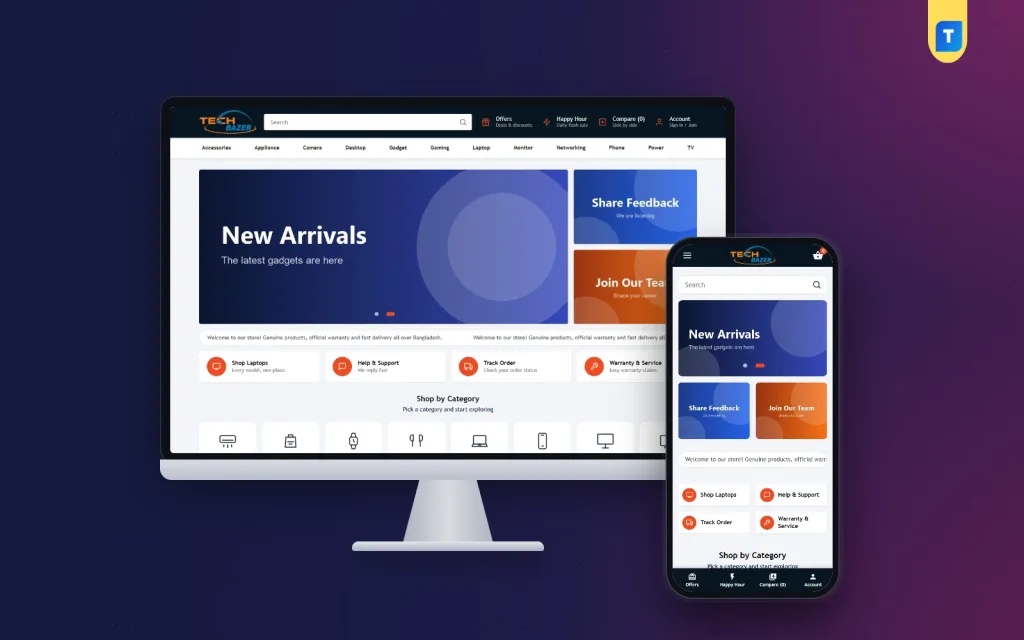
The desktop screenshot shows how navigation comes first. The dark header holds the logo, a wide search box and shortcuts for Offers, Happy Hour, Compare and Account. Underneath, a category bar runs from Accessories through Appliance, Camera, Desktop, Gadget, Gaming, Laptop, Monitor, Networking, Phone and Power to TV. The demo also shows a scrolling welcome line about genuine products and delivery, four quick-link cards for laptops, support, order tracking and warranty service, and a Shop by Category row of icons.
That category bar comes from your own menu. Fill the Category Menu under Tech Bazer, Menus with the departments you want, or leave it empty and it shows your product categories on its own. Below the header, a banner slider sits beside side banners, and four quick-link cards follow. Leave a card title empty and that card simply hides, which keeps the layout tidy when you only need three.
Happy Hour and the Offers page
Happy Hour covers the scheduled-deals point on the checklist in two ways. Daily mode repeats a deal every day between a start and an end time; leave the start empty and it runs all day while the timer counts down. One-time mode runs a campaign between two dates, shows Starts in before it opens and your ended message afterwards. The Offers page adds its own banner, ten discounted products and a See All Products button, a natural landing page for Facebook ads.
Compare, wishlist and branches
Buyers sign in through a login popup, save items to a wishlist and open the Compare page to weigh models. Reviews sit in a fold on the product page, and a popup invites the first review. The store locator is switched on and the demo includes an Our Stores page, so customers can find your nearest branch. The demo also has Brands, Career, Online Delivery and Contact Us pages ready to edit.
The Mobile Check
Most Bangladeshi buyers will meet your online electronics store on a phone, often on mobile data. Open the demo on your own handset, search for a product, add it to the cart and walk through checkout. If any step feels slow or crowded, it will feel worse to a customer on a bus. This single test tells you more than any feature list.

In the mobile screenshot the header shrinks to a menu icon, the logo and a cart with a counter. A full-width search bar sits directly below, so a buyer can type a model number straight away. The New Arrivals slide comes next, the two side banners sit side by side, and the quick-link cards form a two-by-two grid. The demo also shows a bottom bar with Offers, Happy Hour, Compare and Account. Product cards turn compact so more items fit on one screen.
The slider can use a separate phone image too. Desktop slides are 1290 by 540 pixels, the optional phone version is 760 by 388 pixels, and side banners are 500 by 400 pixels with the text in the middle. Give those sizes to your designer once and every campaign banner will fit without cropping a product in half.
Setting Up Tech Bazer
Upload the theme zip under Appearance, Themes, Add New, Upload Theme and activate it. Open Tech Bazer, Setup and install the bundled Themeve Commerce plugin in one click; orders and store settings then sit under the Store menu in your dashboard. Activate your licence under Tech Bazer, License with the key from My Account, Licenses. The theme needs WordPress 6.0 or newer and PHP 7.4 or newer, and the WordPress documentation explains menus and pages if you are new.
Next, run Tech Bazer, Demo Import, then work through Tech Bazer, Theme Options: Happy Hour, Offers Page, colours, Header, Home banners, Home quick links, Home sections, Blog, and Footer & Contact. Footer & Contact details also fill the Contact Us page, so you type your phone number and address once. All demo artwork and brand names are samples, ready for your own stock. Try the live demo first, then look around the demo dashboard.
Payments, Couriers and Trust for Gadget Sellers
Tech Bazer takes payment through bKash, Nagad, SSLCommerz, cash on delivery or manual payment, with Steadfast or Pathao courier for delivery. Checkout fits on one page, an Order placed popup confirms the order, and the Track Order page lets customers check progress without phoning you. Coupons, invoices, SMS and OTP, Telegram new-order alerts, offers and back-in-stock come with the bundled plugin.
For high-value items such as laptops and monitors, many shops ask for a partial advance by mobile payment before shipping on cash on delivery, because a refused parcel costs both ways. Pack electronics in their original box inside a second carton, photograph the serial number before sealing, and include the invoice. These habits settle most warranty and damage disputes before they turn into arguments in your Facebook comments.
Write your warranty and return terms in plain words on the Refund and Return Policy page, and only promise what your supplier actually honours. Use the blog's pinned Feature Articles for buying guides, such as choosing a router for a flat or a laptop for university, and link them from your ads. The Facebook Pixel with Conversion API shows which posts and ads bring real orders.
Mistakes When Picking an Electronics Website Template
The most common mistake is choosing a theme for its demo banners. Glossy pictures make every template look good. Instead, imagine your real catalogue inside it: your 300 products, your long model names and your mixed-quality photos from suppliers. Another mistake is ignoring the phone header. If search hides behind an icon on mobile, gadget buyers who type model numbers will struggle.
Sellers also forget scheduled deals and end up running flash sales by hand, or launch without delivery, warranty and return pages. Some pick a theme that needs a paid page builder and several add-ons just to show a countdown. A focused electronics website template that already includes deals, compare, branches and local payments saves both money and late nights.
Frequently Asked Questions
Do I need coding skills to run Tech Bazer?
No. Banners, Happy Hour, quick links, the footer and colours are set in Tech Bazer, Theme Options, and menus are managed in Tech Bazer, Menus. You can launch a new campaign or change a banner yourself, without waiting for a developer.
Can I pin my best buying guide on the blog?
Yes. Tick Stick to the top of the blog while editing a post and it appears in Feature Articles at the front. That is handy for evergreen guides about choosing laptops, monitors or routers that you want every visitor to see.
What if I sell more home appliances than gadgets?
Then look at Bijli – Electronics and Appliance WordPress Theme, which is laid out for ACs, TVs, fridges and fans. For a calmer look aimed at families furnishing a home, compare Taranga – Home Electronics WordPress Theme. Tech Bazer fits best when computers and gadgets lead.
How do updates reach my site?
Activate the licence from your Themeve account under Tech Bazer, License, and updates arrive through your dashboard. Keep WordPress itself updated too, since the theme is tested up to WordPress 7.1 and needs at least version 6.0. Take a backup before every major update.
Final Thoughts
The right electronics website template puts categories, deals, compare, branches and local payments in front of a buyer who already knows what they want. Use the checklist above on any theme you consider, and test it on a real phone before deciding. If your shop sells computers, accessories and everyday gadgets and you want a ready online electronics store with Happy Hour built in, start with Tech Bazer – Electronics Store WordPress Theme.