A customer messages your page at midnight: which earbuds are best for gym use under a certain budget? If you sell trending gadgets, you get that question a hundred times a month. A gadget store website can answer it for you, day and night, if it is planned around how gadget buyers really shop. This guide is for mobile and accessories sellers, young tech entrepreneurs and freelancers who build shops for them in Bangladesh.
We will cover how to choose what to stock, how to present specs so buyers can decide, how to handle EMI, payments and courier delivery, and the mistakes that make new tech shops look untrustworthy. Along the way we use Jhalak – Gadget Shop WordPress Theme as the working example, because it was built for exactly this kind of buyer: the one who reads spec sheets for fun and the one who just wants someone to say this one.
The main idea is simple. Gadget customers rarely start with a model name. They start with a job, such as editing video, gaming after work or a laptop for university, and then a budget. A plain grid of products makes them do all the sorting. A good store does the sorting for them, and that is what turns browsing into orders.
What Makes Trending Gadgets a Good Online Business
Trending gadgets move fast. A new earbud model, a smartwatch with a bigger screen or a phone with a better camera can sell out within weeks of launch, then fade as the next one arrives. That speed rewards shops that list quickly and explain clearly. Facebook posts help with reach, but posts vanish from the feed. A gadget store website keeps every model, spec and review in one searchable place, so last month's post still makes sales today.
Gadgets are also light and easy to ship. Earbuds, power banks, smartwatches and phones fit in a courier pouch, which keeps delivery simple compared with fridges or furniture. The challenge is trust. Buyers worry about fakes, grey imports and dead units. A clean site with clear warranty lines, real photos and honest specs answers those worries before they turn into an abandoned cart.
Planning a Gadget Store Website Before Launch
Start by choosing your lanes. You do not need every category on day one. Many successful shops begin with phones, audio and smartwatches, then add laptops, tablets, cameras and gaming gear as they learn what sells. Write down eight or fewer top-level categories. The demo menu, for example, reads Phones, Laptops & Monitors, Tablets, Audio, Smartwatches, Cameras, Gaming & Home Cinema and Accessories, which is a sensible shape for a mid-sized shop.
Tag products by use, not only by type
Next, make a list of uses: gaming, photography, study, travel, fitness, work from home. Tag each product with every use that honestly fits. This small habit pays off later, because filters and finders can only be as good as your tags. A laptop tagged for gaming and for editing can now appear for two different kinds of buyer, instead of hiding in a long list of laptops.
Prepare spec sheets and variants
For each product, prepare a short spec sheet with the same lines every time: display, processor, memory, storage, battery, camera, warranty. Note which models come in storage and colour variants and what each variant costs. Buyers in Bangladesh compare carefully, and one missing spec line can send them to a rival page. Finally, write your warranty, returns and delivery pages, because those are the pages a nervous first-time buyer reads before paying.
How Jhalak Turns a Product Grid Into a Gadget Advisor
Jhalak is a gadget shop theme for stores selling phones, laptops, monitors, tablets, audio, smartwatches, cameras, gaming gear and accessories. Its default look is graphite, indigo and mint with Space Grotesk headings. In the live demo, a dark strip at the top carries a warranty and EMI message beside a support line and a Track order link, and the header pairs a category dropdown with a wide search, an account link, a wishlist heart and a mint cart button.

The hero slider shows studio-lit launches behind a glass text panel. In the screenshot, three phones stand on podiums under a headline for flagship phones with a Shop phones button. Right below it is the part that matters most for trending gadgets: the Find your gadget block, labelled Three taps in the demo, with a match counter on the right.
Find your gadget in three taps
The finder asks three things: which category, what it will be used for, and the budget. A shopper picks a category tab, taps a use chip and moves the budget slider, and up to six matches appear instantly. You choose the categories in Theme Options, and the use chips come from your own product tags. This is where the tagging work from your planning stage pays off directly.
Compare side by side, only the differences
The Compare side by side block lines up real spec sheets row by row. You build ready-made comparisons in Theme Options, for example two flagship phones or three ultrabooks. An Only show differences switch then hides every row that matches, so the buyer sees only what separates the models. For a shop that gets the which one is better question daily, this block saves a lot of chat time.
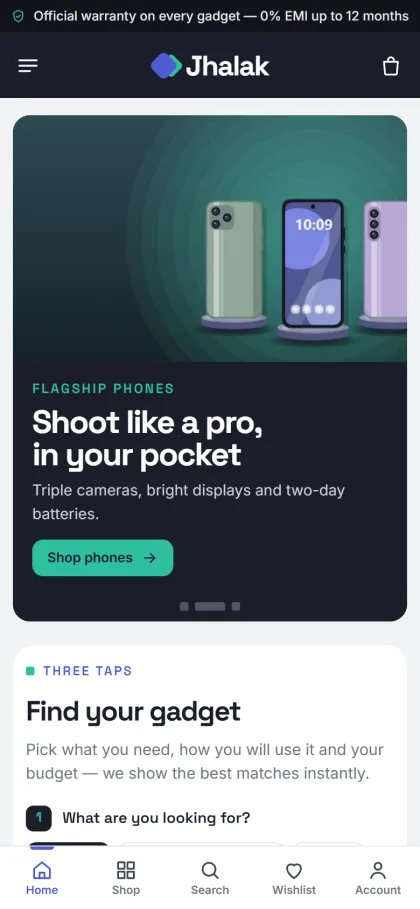
On phones the header shrinks to menu, logo and cart, and cards stay compact. The mobile screenshot also shows a bottom navigation bar with Home, Shop, Search, Wishlist and Account, plus the finder with its first question, What are you looking for. Product cards are crisp and white with a spec line under the name, and storage and colour variants carry stepped prices, so a bigger model shows its own price the moment someone picks it.
Product Pages That Close the Sale
A gadget buyer wants to inspect before buying. Jhalak's product page starts with studio, dark-studio, desk and close-up photos, then key-spec tiles near the top. One box holds the warranty and a 0% EMI line, and a delivery date tells buyers when the parcel will arrive. Reviews sit in a fold, with a popup inviting the first review when none exist yet, which helps a new shop collect social proof.
The homepage has 24 blocks, 17 on by default and seven extra ones waiting. Beyond the finder and comparisons, you get Shop by category on podium tiles, Just launched with two rows of new arrivals, Flash deals with a countdown and stock bars, Made for you lifestyle cards, Shop by budget, Trending now, Top rated, three department blocks, Official brands, Tech guides and a promise strip for official warranty, EMI, delivery and returns. Blocks can be dragged into order, or moved with arrows on a phone.
Setting Up the Gadget Website Template
Jhalak needs WordPress 6.0 or newer and PHP 7.4 or higher, and it is tested up to WordPress 7.1. Upload it under Appearance, Themes, Add New, Upload Theme, then activate. Open Jhalak, Setup to install Themeve Commerce, which comes bundled, and activate your licence under Jhalak, License with the key from My Account, Licenses on Themeve. If WordPress itself is new to you, the WordPress documentation explains themes, menus and pages.
Run Jhalak, Demo Import to load the full store: 37 products from 7 invented brands, covering phones, laptops, monitors, tablets, headphones, earbuds, speakers, smartwatches, cameras, consoles, projectors and accessories, with spec sheets, the finder, ready comparisons, tech guides, menus and every page, including Our Stores. Replace every brand and picture with your own stock. A quick look around the demo dashboard shows where each setting lives.
Then open Theme Options, which also works on a phone, handy when you are standing at the counter. Pick one of five palettes, Indigo & mint, Electric blue, Graphite & lime, Violet or Ocean, and one of four font pairs. A gadget website template is only a starting point; your photos, specs and tags are what make it feel like your shop, so give those the most time.
Payments, Delivery and Promotion in Bangladesh
Checkout is a single page closed by an Order placed popup, and sign in opens in a popup so nobody loses their cart halfway. Buyers can pay with bKash, Nagad, SSLCommerz, cash on delivery or manual payment. Parcels go out with Steadfast or Pathao courier, and a Track Order page lets buyers follow them. Coupons, a wishlist, invoices, SMS, OTP and new-order alerts on Telegram are included.
For trending gadgets, speed of reply matters as much as price. When a Telegram alert arrives, confirm cash on delivery orders by phone within the hour, especially for phones and smartwatches, which attract fake orders. For high-value items, ask for a small advance by bKash or Nagad. Pack earbuds and watches in rigid boxes, because a crushed box reads as a used product to many buyers.
Most gadget sales in Bangladesh still start on Facebook. Jhalak supports Facebook Pixel with the Conversion API, so you can see which ads bring buyers rather than just likes. Point launch ads at a product page or a comparison, not the homepage. Post short unboxing videos in Bangla, link them to the product, and use Flash deals on the site for launch week to give people a reason to order now.
Mistakes New Gadget Shops Make
The biggest mistake is copying spec sheets from random sites without checking them. One wrong battery or storage figure brings returns and bad reviews. The second is listing grey-market and official units side by side with no label. Say clearly which warranty each item carries. The third is a homepage full of sliders and no way to filter by need, which is exactly the problem a finder solves.
Another common slip is ignoring search engines. Put the full model name in the product title and the first line of the description, and write a short tech guide for each popular comparison. Google's Search Central documentation explains how product pages get found. Finally, keep the hero slider fresh. A gadget store website still promoting last year's launch tells buyers the shop is not keeping up.
Frequently Asked Questions
How does the gadget finder choose products?
Shoppers pick a category, a use and a budget, and up to six matching products appear instantly. You set the categories in Theme Options, and the uses come from your product tags. Tag products carefully and the finder becomes your best salesperson, even at night.
Can I build my own comparisons?
Yes. You list the products for each comparison in Theme Options, and Jhalak lines up their spec lines row by row. Shoppers can switch on Only show differences to hide matching rows and focus on what really separates two models.
Which theme suits a bigger electronics shop or a smart-home range?
If you also sell ACs, TVs and fridges across many departments, look at Jontro – Electronics Marketplace WordPress Theme. If your focus is smart home gadgets and wearables, compare Chomok – Smart Gadget Shop WordPress Theme. Jhalak fits a sharp, spec-led shop for trending gadgets.
Are the demo brands real?
No. Every brand and picture in the demo is an invented sample. Use the demo to see how the store fits together, then replace the products, photos and specs with your own before you go live.
Final Thoughts
A gadget store website works when it thinks like a helpful shop assistant: ask what the buyer needs, show a few good matches, explain the differences honestly and deliver on time. Plan your categories and tags, write clean specs, set up trusted payments and keep your launches fresh. If you want a store that already includes a finder and side-by-side comparisons, start with Jhalak – Gadget Shop WordPress Theme and open your shop for trending gadgets.