Plenty of book lovers in Bangladesh dream of their own shop, and this guide explains how to start an online bookstore without renting a room on Nilkhet or Banglabazar. It is written for readers turned sellers, small publishers, students who already resell books on Facebook and freelancers who build shops for clients. We cover choosing what to sell, finding stock, listing titles properly, taking payment and getting parcels to readers across the country.
Books are a good first product for an online business. They do not expire, they rarely break in transit, and a reader who likes your choices comes back again and again. The hard part is not the selling itself but being found among bigger sellers and helping each visitor pick the right title quickly. A thoughtful catalogue and a calm, easy shop front solve much of that.
Our example shop front is Pata – Bookshop WordPress Theme, made for sellers of fiction, mystery and thrillers, poetry, history and ideas, self-help and kids books. It looks like a quiet corner of a good library, in library green and mustard with paper-cream pages and tall covers. We come back to it after the planning, because the business decisions matter more than any design.
Is Selling Books Online Worth It in Bangladesh?
Reading habits here are stronger than many people think. Students need textbooks, guide books and admission prep every year. Families buy story books for children before every school holiday. The February book fair in Dhaka shows how many people will queue for a new novel or a poetry collection. Yet readers in Rajshahi, Sylhet or a small upazila town often cannot visit the fair or a big bookstore, and that gap is where an online seller fits.
Gifts are another steady source of orders. Books are a common present for birthdays, Eid and weddings, and buyers like a parcel that arrives neatly wrapped with a short note. If you can offer that, you are no longer competing only on discount. You are selling a small, reliable experience, and people pay for reliability when the gift has to arrive on a fixed date.
How to Start an Online Bookstore: The Planning Decisions
Before you design anything, settle a handful of questions on paper. Which readers will you serve? Where will the books come from? How will you store, pack and send them? How will people pay? Each answer shapes your categories, your homepage and your daily routine, so a few honest hours here save months of guesswork later.
Pick a shelf you know well
A general store that stocks everything competes with the biggest sellers on their own ground. A focused shelf is easier to own. Translated thrillers, children's picture books, Bangla poetry, self-help and money books, or history and ideas are all workable niches. Choose the one you actually read, because your recommendations will sound real and your Facebook posts will be easier to write.
Find reliable stock
Most new sellers start by buying from publishers and distributors in Banglabazar and Nilkhet, keeping a small stock of the titles they expect to sell fast and ordering the rest on demand. Agree on return terms for unsold copies where you can. Keep a simple sheet of every title with author, publisher, format, stock count and your buying cost, and update it each week. Out-of-stock titles that still show as available are one of the quickest ways to lose a reader's trust.
Plan packing and delivery
Books bend at the corners and get damp in the monsoon. Use a stiff card or bubble wrap layer, then a plastic sleeve, then the outer wrap. Decide early which courier you will use inside and outside Dhaka, and write your delivery charges and timelines on a public page. Clear rules here prevent most complaints before they start.
What Makes a Good Bookshop Website
People rarely open a bookshop knowing the exact title. They want something gripping for a long bus ride, or a gentle story before bed. A good bookshop website copies the helpful assistant who asks what mood you are in. It also shows plenty of covers, makes search by title, author and publisher easy, and puts the delivery date and payment choices where a nervous first-time buyer can see them.
Two other details matter for books. First, formats: the same title may come as paperback and hardcover, and it is cleaner to show both on one page than to list them as separate products. Second, publishers: many Bangladeshi readers follow particular publishing houses, so showing publisher logos and letting people browse by publisher is genuinely useful, not decoration.
How Pata Turns a Catalogue Into a Reading Room
Pata was built around the moment of choosing. The Find your next read block sorts books by mood, with five tabs: thrilling, heart-warming, thoughtful, funny and curious. Next to the tabs sits a reading-pace picker. A shopper chooses how much they read in a day, and each book shows about how many days it will take, which makes a thick novel feel far less scary.
Read the first page is the other special block. It opens a book on a paper page so shoppers can see how it begins, much as they would flip open a copy in a real shop. If the opening lines hook them, one button adds the book to the bag. For a new seller without a name yet, letting the writing speak is a strong way to win the first order.
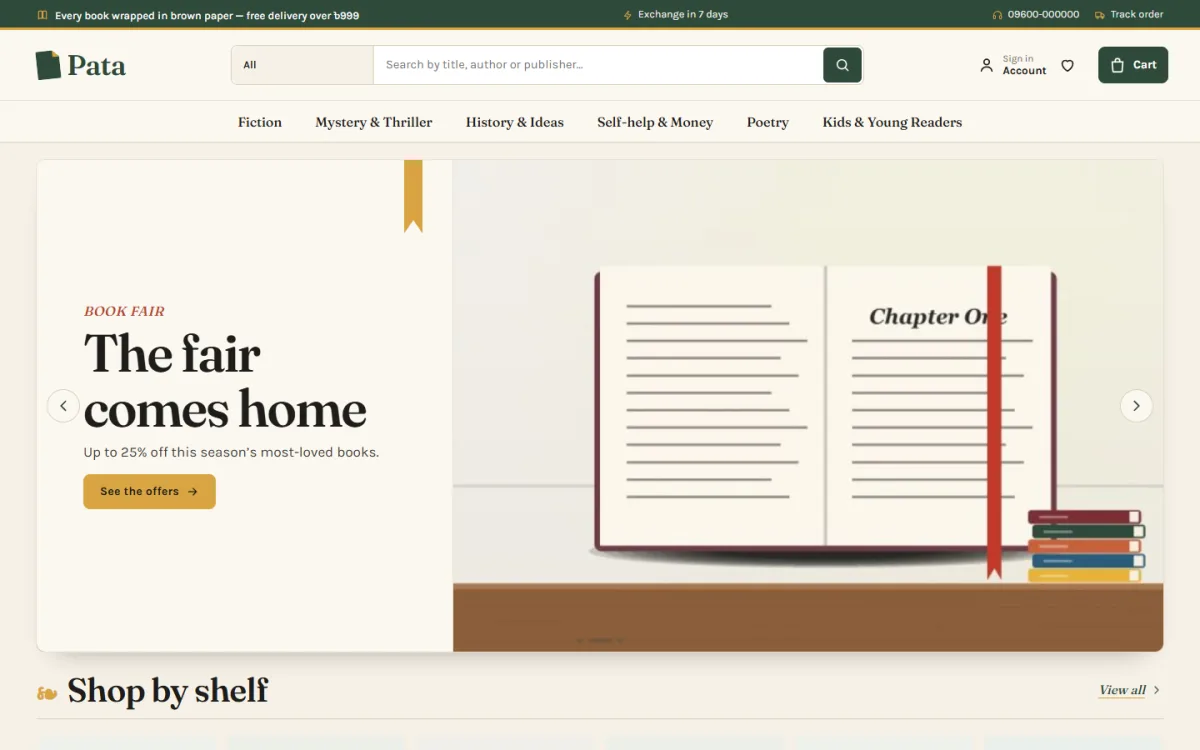
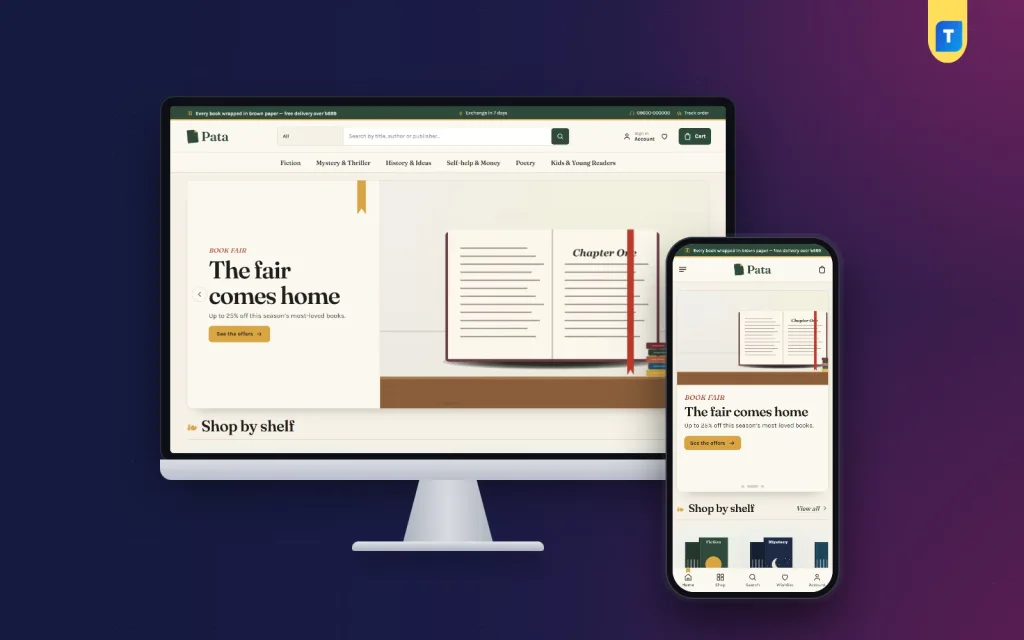
On a computer, the demo opens with a dark green top bar that mentions brown-paper wrapping, a seven-day exchange line, a hotline and a Track order link, all shown in the demo as sample text for you to replace. The search box asks for a title, author or publisher. The main menu reads Fiction, Mystery & Thriller, History & Ideas, Self-help & Money, Poetry and Kids & Young Readers. The hero slide is a Book fair offer with an open Chapter One page, a red ribbon and a stack of books, followed by the Shop by shelf row.
The rest of the homepage
Pata has 24 homepage blocks. Switch any of them off and drag the rest into order, or use arrow buttons on a phone. Shop by shelf gives each category a tile, New arrivals shows two rows of new books, and Bestsellers splits top titles into tabs. Book fair offers runs a countdown with stock bars, three department blocks each hold a banner and eight books, and a publishers logo row, Reading room posts and a promise strip round off the page.
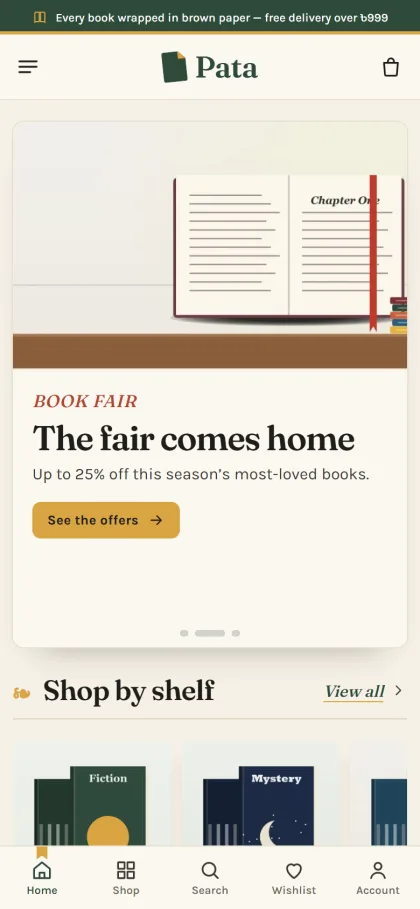
The phone view is where most of your orders will come from. In the screenshot the header folds down to a menu icon, the logo and the bag, the open-book picture sits above the headline, and the Shop by shelf row shows Fiction and Mystery covers side by side. The demo also has a bottom bar with Home, Shop, Search, Wishlist and Account. Product cards stay compact so more covers fit on one screen.
Setting Up the Store
Upload the Pata zip under Appearance, Themes, Add New, Upload Theme and activate it. Then go to Pata, Setup and install the bundled Themeve Commerce plugin in one click; it runs the cart, a one-page checkout, payments and courier delivery. Add the licence key from My Account, Licenses into Pata, License so updates arrive through your Themeve account. Pata needs WordPress 6.0 or newer and PHP 7.4 or newer, and the WordPress documentation covers the basics of pages and menus.
Run Pata, Demo Import to load the Bookshop demo with 27 books from 4 publishers, the mood finder, the first-page reader, Reading Room posts, menus and pages such as About, Delivery, FAQ, Returns & Exchange, Our Stores and Track Order. Covers and publisher names are invented, so replace them with your own titles. Set paperback and hardcover as formats, and add publishers as brands with their logos.
Then choose a look in Pata, Theme Options. Five palettes are ready, Library green, Oxblood, Ink blue, Paperback and Slate, along with four font choices led by Fraunces with Karla. The options dashboard also works on a phone. Before you commit, spend some time in the live demo as a reader would, then open the demo dashboard to see where books and orders live under the Shop menu.
Payments, Couriers and Book Fair Season
Checkout in Pata is a single page with bKash, Nagad, SSLCommerz, cash on delivery and manual payment, and an Order placed popup confirms each order. Steadfast and Pathao courier handle delivery, every book page shows a delivery date, and the Track Order page lets readers follow the parcel. Coupons, invoices, SMS and OTP, Telegram alerts for new orders and back-in-stock come with the bundled plugin.
Cash on delivery will be popular, especially for students. For large orders, such as a full set of admission guides or a school's library list, ask for a small advance by mobile payment or confirm by phone first. Batch your packing once or twice a day and hand parcels to the courier at a fixed time, so your delivery promises stay realistic.
February deserves its own plan. Many readers wait for the book fair, so prepare a list of new releases from your publishers, set up a Book fair offers countdown and post daily picks on Facebook with Bangla captions. The Facebook Pixel and Conversion API support helps you see which posts and ads brought real orders. Short videos of you opening a parcel or reading a first paragraph aloud often do better than a plain cover photo.
Mistakes New Booksellers Make
The first is listing hundreds of titles with no descriptions, poor cover photos and wrong author spellings. A reader who sees careless listings assumes careless packing too. Start smaller and list every book properly, with author, publisher, format and a few honest lines about who will enjoy it. The second mistake is ignoring stock: nothing annoys a buyer more than paying for a book and then hearing it is not available.
Other common problems are hidden delivery charges, no exchange rule for damaged copies, and a homepage that never changes. Readers return to see what is new, so move fresh arrivals to the top each week and refresh your Reading room posts. If you are unsure how to start an online bookstore on a tight budget, remember that a small, well-kept shelf beats a large, messy one every time.
Frequently Asked Questions
Do I need a warehouse to begin?
No. Many sellers start from home with a shelf of fast-moving titles and order the rest from publishers when a reader buys. Keep your stock sheet accurate, mark slow titles honestly and grow your storage only when orders show you need it.
Can readers preview a book before buying?
Yes, in Pata. The Read the first page block opens a book on a paper page with its opening lines, and one button adds it to the bag. It is a simple way to show the writing itself instead of relying only on the cover and a short blurb.
Can I sell paperback and hardcover editions together?
Yes. Paperback and hardcover work as formats of the same book, so one page carries both and the reviews stay together. Publishers are set up as brands with their own logos, which helps readers who follow a particular publishing house.
Does Themeve have themes for other niche shops?
Yes. If you or a partner sell skin care, Tushar – Winter Care WordPress Theme is built for lotions and lip care, and Kuasha – Luxury Skincare WordPress Theme suits a slower, premium brand. For printed books, Pata remains the closest fit.
Final Thoughts
Learning how to start an online bookstore comes down to a clear shelf, honest listings, careful packing and payment options readers trust. Get those right and the shop grows by word of mouth, one satisfied reader at a time. If you want a bookshop website that helps people choose by mood and read the first page before they buy, start with Pata – Bookshop WordPress Theme and have your shelves ready before the next book fair.