A multi vendor marketplace website looks simple from the outside: many sellers, one shop, one checkout. Running one in Bangladesh is a different story. You are part shopkeeper, part landlord and part referee, keeping sellers honest, buyers happy and couriers moving. This guide is for entrepreneurs who want to bring local brands and shops under one roof, for traders who already supply several sellers, and for freelancers asked to build that kind of store.
We will look at the daily work behind a marketplace: choosing a model, signing sellers, setting quality rules, paying sellers on time, and planning the vouchers and sale days that bring buyers back. Most of that work happens off the website, so it deserves as much planning as the design itself. A good-looking homepage cannot rescue a marketplace whose sellers ship late.
For the store itself we use Ganj – Multi-Seller Marketplace WordPress Theme as the example. Ganj means market town, and the design feels like one on sale day: bright and busy in tangerine, navy and mint, with seller store cards, Mall badges, collectable voucher tickets, a flash-sale timer and the seller name on every product.
What Running a Multi Vendor Marketplace Website Involves
A marketplace is not one shop with a long product list. Shoppers come back because of the stores inside it: the gadget seller they trust, the beauty brand with easy returns, the grocery stall with fair prices. Your job is to make those stores visible, keep their listings tidy and stand behind every order, because the buyer sees your name on the receipt, not the seller's.
That means four jobs run side by side. You recruit and vet sellers, you control how products are listed, you handle payments and delivery, and you settle money with each seller. Add customer service and marketing on top. A small team can manage this for a few sellers and a few hundred products, but it needs written rules from the first day, or every problem becomes a phone argument.
Choose Your Model Before You Choose a Theme
There are two common ways to run a multi vendor ecommerce website. In a self-service marketplace, sellers get their own logins, upload products, see their orders and receive payouts after you take a commission. In a managed marketplace, you list the products on behalf of each seller, take the orders yourself and settle with sellers outside the website, usually weekly or after delivery.
Managed marketplaces are often the smarter start in Bangladesh. Many small sellers are not comfortable managing a dashboard, product photos vary wildly in quality, and you keep full control over prices, descriptions and stock. Ganj is built for this managed model. Sellers appear as stores inside your one shop, which you run from a single dashboard menu called Shop; the theme does not add separate seller logins or payout tools.
If you want sellers to sign up, upload products and see their own sales from day one, look at a theme with a seller module instead, such as Cartapp – Multi-Vendor Marketplace WordPress Theme. Decide this early, because switching models after launch means retraining every seller and rewriting your agreements.
Signing and Managing Sellers in Bangladesh
Put the deal in writing
Every seller should sign a short agreement covering your commission or margin, how often you pay out, who pays for returns and failed deliveries, how fast they must hand parcels to the courier, and what happens if a product turns out to be fake. Keep it in plain Bangla or English, one or two pages long. Sellers respect clear terms, and you will refer back to them more often than you expect.
Set listing standards
Decide on photo size, background, product title format and the details each listing must carry, such as size, warranty and material. Since you list products yourself in a managed model, ask sellers for a simple sheet with these fields plus clean photos. Consistent listings make the whole multi vendor marketplace website look trustworthy, even when the sellers behind it range from a big brand to a home business.
Settle money on a fixed schedule
Late payment is the fastest way to lose good sellers. Pick a schedule, for example every week for orders that were delivered and not returned, and stick to it. Keep a simple ledger per seller and send a statement with each payment. Mobile banking such as bKash or a bank transfer works for most small sellers, and a clear statement prevents most disputes before they start.
How Ganj Gives Every Seller a Stall
Ganj puts stores up front. The Shop by store block lists each seller as a card with its logo, a Mall badge, a live rating, items sold, product count and return days, so a shopper can judge a store before opening a single product. The Mall badge helps bigger official sellers stand out, and an Official stores block adds a row of their logos further down the homepage.
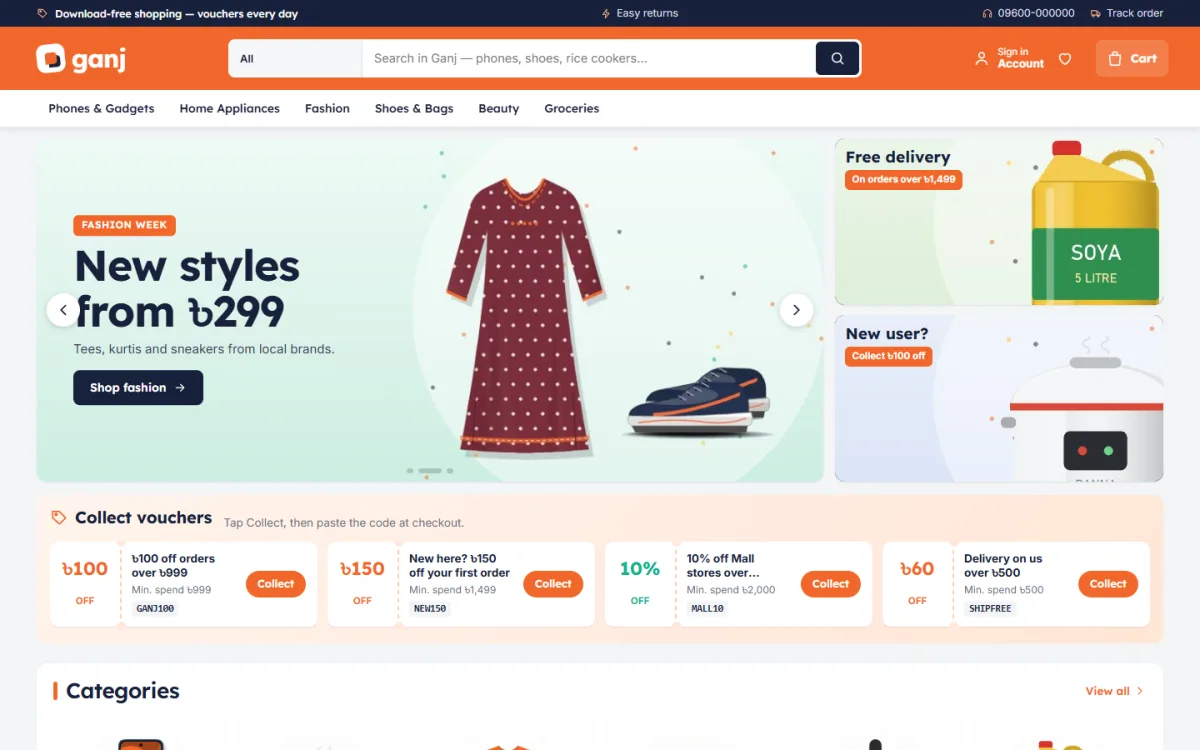
In the desktop screenshot, an orange header holds the logo, a search bar for phones, shoes and rice cookers, sign in, wishlist and cart. Below it, the menu lists Phones & Gadgets, Home Appliances, Fashion, Shoes & Bags, Beauty and Groceries. A fashion week slide sits beside two offer cards shown in the demo, one for free delivery and one for new users, followed by a strip of voucher tickets and the categories grid.
Vouchers people actually collect
Collect vouchers shows your public store coupons as tear-off tickets. A shopper taps Collect, the code is copied, and they paste it at checkout. Pair it with the Flash sale block, which runs a countdown with stock bars, and the offer cards beside the hero slider. Together they make the homepage feel like a campaign day rather than a catalogue, which is exactly the mood a marketplace needs during Eid or a mega sale.
24 blocks to arrange your market
The homepage holds 24 blocks. Turn off what you do not need and drag the rest into order, or use the arrows on a phone. After the slider and vouchers come an icon grid of categories, Just for you, Best sellers in category tabs and Under a price tiles for budget shoppers. Three department blocks each carry a banner and eight products, followed by Shop by need, Trending now, Top rated, Buying guides and a promise strip.
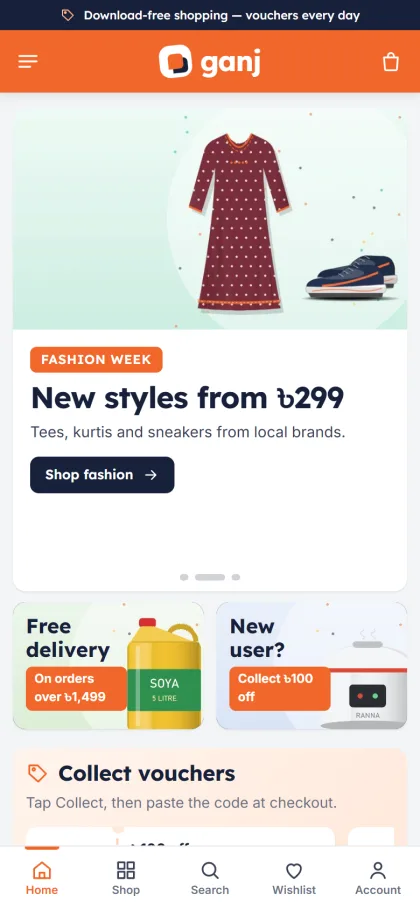
Phone shoppers, who will be most of your visitors, get a header with menu, logo and cart and compact product cards that fit more items on screen. The mobile screenshot shows the offer cards side by side under the slider, the vouchers strip and a bottom bar with Home, Shop, Search, Wishlist and Account. Each product page names the seller and shows a delivery date, so buyers know who they are buying from and when it will arrive.
Setting Up the Store Step by Step
Upload the Ganj zip through Appearance, Themes, Add New, Upload Theme and activate it. Go to Ganj, Setup and install the bundled Themeve Commerce plugin in one click; it brings the cart, checkout, coupons, invoices, wishlist, back-in-stock alerts and order tracking. Enter the license key from My Account, Licenses in Ganj, License to receive updates. The WordPress documentation helps if menus and pages are new to you.
Then load the Marketplace demo from Ganj, Demo Import. It brings 29 products from 7 invented sellers across phones and gadgets, appliances, fashion, beauty, shoes and bags, and groceries, together with vouchers, seller stores, buying guides, menus and pages such as About Ganj, Delivery, FAQ, Our Stores, Returns & Refunds and Track Order. Replace each sample seller with a real partner as you sign them.
Ganj, Theme Options holds every setting, with separate groups for vouchers, stores, categories and the flash sale. Pick one of five palettes, Tangerine, Berry, Ocean, Leaf or Sunflower, or set colours by hand, and choose fonts such as Lexend with Inter, Rubik, Manrope or DM Sans. Ganj needs WordPress 6.0 and PHP 7.4 or newer and is tested up to WordPress 7.1. Try the live demo as a shopper, then open the demo dashboard to see the admin side.
Payments, Delivery and Campaign Days
Checkout is a single page. Customers pay with bKash, Nagad, SSLCommerz, cash on delivery or manual payment, then see an Order placed popup. Steadfast and Pathao courier handle delivery, and the Track Order page lets buyers check progress without calling you. New-order alerts can reach you on Telegram, which helps when orders for several sellers arrive at once.
Delivery is where marketplaces win or lose. Ask sellers to pack and hand over parcels within an agreed time, or collect from them on a fixed route if they are nearby. Group orders from the same seller into one parcel where you can. For cash on delivery, confirm bigger orders by phone first, because a refused parcel costs you the courier fee in both directions and annoys the seller too.
Marketplaces grow on campaigns. Plan a calendar around Eid, Pohela Boishakh, winter and month-end salary days, and agree discounts with sellers early. Ganj includes the Facebook Pixel and the Conversion API, so you can track which ads lead to orders. Promote one seller or one department per ad, use the voucher tickets as the hook, and switch the flash sale off the moment the offer ends.
Mistakes New Marketplace Owners Make
The first mistake is signing too many sellers too fast. Twenty sellers with messy listings and slow dispatch hurt you more than five reliable ones. Start small, learn the work, then grow. The second is promising delivery times that sellers cannot meet. Every late parcel is blamed on the marketplace, not on the seller, so build in a margin and keep your promise realistic.
Other common mistakes include vague return rules, paying sellers late, letting fake or copied products slip through and treating the homepage as a fixed design. Rotate which sellers and departments get the spotlight, retire expired vouchers and check the site on a budget Android phone before every big campaign. A multi vendor marketplace website lives on repeat visits, so give people something new to see each week.
Frequently Asked Questions
Do sellers get their own dashboards in Ganj?
No. Ganj gives your store the look and shopping flow of a marketplace, with sellers shown as stores inside your one shop. You run everything from the Shop menu and settle with sellers yourself, which suits a managed marketplace where you control listings and quality.
How do the voucher tickets work?
Your public coupons appear as tear-off tickets on the homepage. A shopper taps Collect, the code is copied, and they paste it at checkout. It turns a plain coupon list into something people enjoy tapping during a sale, and it works well for seller-funded offers on campaign days.
What if I only want to sell gadgets from my own stock?
Then a marketplace is more than you need. A single-shop theme such as Chomok – Smart Gadget Shop WordPress Theme or Jhalak – Gadget Shop WordPress Theme keeps the focus on your own products without seller cards and store badges.
Which payments and couriers does it support?
bKash, Nagad, SSLCommerz, cash on delivery and manual payment, with delivery through Steadfast or Pathao courier and a Track Order page for buyers. SMS and OTP are part of the bundled store plugin as well. Calling to confirm larger cash orders is still a good habit.
Final Thoughts
A successful multi vendor ecommerce website in Bangladesh rests on dependable sellers, clear listing rules, payouts on schedule and delivery people can trust. The website should make those sellers visible and make buying from them feel like a busy, friendly market. If a managed marketplace is the model you want, start your multi vendor marketplace website with Ganj – Multi-Seller Marketplace WordPress Theme and give every seller a proper stall.