 −27%
Kobji – Landing Page Website Templates
✦ Key features
- Numbered feature hotspots on the product photo
- Colour picker that swaps the picture
- 16 sections to hide or re-order
- Graphite hero with lime order buttons
- Order form with COD, bKash and Nagad
- Package cards and a form picker
- Offer line with a countdown
- Review wall and comparison blocks
- Sticky order bar and floating WhatsApp button
- Any page can sell any product
- 4 palettes and 3 font choices
- Themeve Commerce store plugin bundled
- Steadfast and Pathao couriers
- Facebook Pixel and Conversion API
Overview
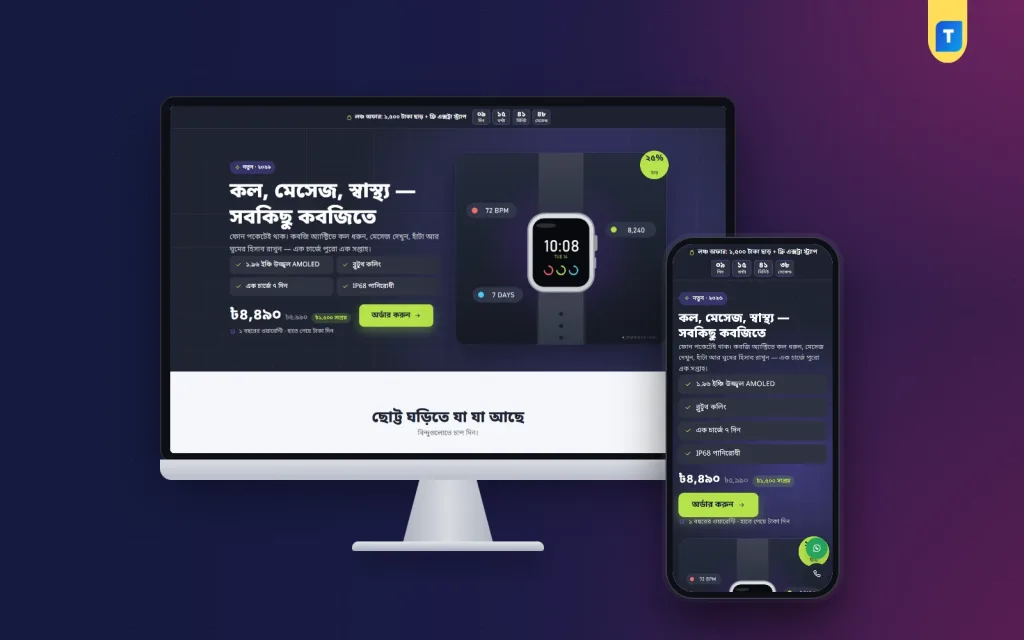
Kobji is one of the landing page website templates for gadget sellers. This WordPress theme has tap-to-open hotspots, a strap colour picker, 16 sections you can re-order and a built-in order form with cash on delivery, bKash and Nagad.
Kobji is one of the few landing page website templates made for gadget sellers who run ads for a single product. It is a WordPress theme with tap-to-open feature hotspots, a strap colour picker that swaps the photo, and a built-in order form for cash on delivery, bKash and Nagad.
The buyer lands on one long page with no site header or footer. They read about the watch, pick a colour and order from the form inside the page. You change the text, the offer and the sections from the normal WordPress page editor, so a second gadget needs a new page and not a new site.
Who can use Kobji
The demo sells a smartwatch, but Kobji is not limited to watches. Any page can be turned into a landing page for any product. It suits anyone who pushes one item with Facebook or Google ads.
- A gadget seller with a smartwatch, a fitness band or earbuds.
- A shop that runs a launch campaign for one new arrival.
- A reseller who tests a product with a small ad budget before stocking more.
- A brand with a hero product, such as a power bank, a speaker or a trimmer.
- A freelancer or agency building one order page per product for clients.
Compared with other landing page website templates, Kobji is aimed at sellers, not at general business pages. Each section exists to move a buyer from the ad to the order form. It works as a single product ecommerce website template that you can fill in within one afternoon, because the layout and the order flow are already decided.
Kobji needs WordPress 6.0 or newer and PHP 7.4 or newer. It is tested up to WordPress 7.1.
Why gadget ads need landing page website templates like this
A smartwatch ad gets clicks fast. Buyers drop off when they arrive in a busy shop full of other products. A single product ecommerce website template keeps them on the one watch you advertised.
Every scroll in Kobji answers one question. What does it do? What colours are there? What is in the box? How does it compare? How much is delivery? When the questions are answered in order, the order button is the next natural step.
Speed and weight
Ad traffic is mostly mobile, and mobile buyers leave slow pages. The public side of Kobji stays light.
- The front end does not load jQuery. The theme script is plain JavaScript.
- The landing page has its own small style and script files.
- Google Fonts can be switched off if you prefer system fonts.
- The layout is built for small screens first.
Front-end features of the landing page
The page has 16 sections: hero, hotspots, problem and answer, benefits, strap colours, specifications, photos, comparison, video, packages, review wall, steps, delivery charges, warranty, FAQ and the order form. This is what the buyer sees.
Two interactive blocks for the product
- Feature hotspots. Numbered dots sit on the product picture. When a buyer taps a dot, a short note opens that explains the part. You might mark the screen, the side button or the sensor on the back. On a phone this works better than a long list of specs.
- Colour picker. Each package that has its own picture becomes a swatch. Tapping a swatch changes the photo to that strap colour, and one button picks the same colour in the order form. The demo watch comes in four strap colours.
Selling and proof blocks
- A graphite poster hero with a violet glow, thin grid lines and lime order buttons.
- Problem and answer, and a benefits block.
- A specifications table and a photo section.
- A comparison block for showing how your product differs from cheaper options.
- A video section for an unboxing or a review.
- Package cards for different bundles.
- A review wall that gathers buyer feedback in one block.
- Steps, delivery charges and a warranty section where you explain your warranty or replacement terms in plain words.
- FAQ and the order form at the end.
Offer line and countdown
An offer line with a countdown suits a launch price or a flash weekend sale. You write the offer text and set the end time from the page editor.
Order form
- Fields for name, mobile, address and district.
- A package and colour picker inside the form. The price and the delivery charge update live when the buyer switches.
- Cash on delivery, or bKash and Nagad Send Money to your own numbers.
Phone helpers
- A sticky order bar that appears after the hero and stays until the form is on screen.
- A floating WhatsApp button and a call button for quick questions about battery or warranty.
Back-end options for landing page website templates in WordPress
You do not edit code. Content lives in the page editor, design lives in Theme Options, and orders live under Shop.
The Landing page box in Pages
When you edit a page, a "Landing page" box appears. It controls:
- The product the page sells.
- Every line of text on the page.
- An on and off switch for each of the 16 sections.
- Controls to change the position of each section.
- The offer line and its countdown.
- Your hotline and WhatsApp numbers.
Have a strong unboxing video? Move it near the top. Not ready with a comparison? Hide it until you are.
Kobji → Theme Options
- Four palettes: Night lime, Ocean, Coral sport and Mono. You can also set each colour by hand.
- Three font choices: Noto Sans Bengali, Anek Bangla with Hind Siliguri, or Mina with Hind Siliguri.
- A switch to turn Google Fonts off.
- Search, reset, settings export and import, and a sticky save bar.
- A Live Customizer in the Kobji menu for quick visual changes.
Kobji → Setup and License
- Install the bundled Themeve Commerce plugin in one click.
- Enter your license key to receive updates.
- Run Demo Import to load the sample page and product.
The store plugin behind the page
Themeve Commerce comes bundled with Kobji. You do not need WooCommerce, a payment plugin or a courier plugin. Orders appear under Shop in your dashboard.
- Orders. Each order has a status and a printable invoice. Incomplete Orders lists people who started the checkout and did not finish.
- Products. Strap colours and bundles are product variations, each with a price, stock and photo.
- Payments. Cash on delivery, bKash and Nagad Send Money with a transaction ID, and card payment through SSLCommerz.
- Delivery. A delivery charge for each district.
- Couriers. Send orders to Steadfast or Pathao from the order screen.
- Alerts and SMS. Telegram alerts for new orders, SMS updates and OTP codes.
- Fake order protection. Phone verification for suspicious cash on delivery orders.
- Coupons and tracking. Discount codes and an order tracking page.
- Reports. A sales overview, a transactions list and a customer list.
- Ad tracking. Facebook Pixel and the Conversion API.
With the Pixel and Conversion API connected, your ad account learns which campaigns led to real orders. You can cut weak ads early and spend more on the ones that sell.
How Kobji helps you sell
Good landing page website templates should save you time and lift orders. Here is where Kobji helps.
- Fewer drop-offs. There is no menu and no footer to click away to.
- Fewer questions in the inbox. Hotspots, the comparison and the delivery section answer the usual ones.
- Easy tests. Duplicate the page, change the headline or the photo, and run both against each other in your ads.
- Quick launches. A new gadget means a new page, a new product and a new offer, not a new website.
- Clear costs. Delivery charges are shown on the page, so the buyer is not surprised at the door.
- Trust. A clear warranty, real reviews and a visible delivery charge reduce hesitation at the form.
Set it up in six steps
You do not need a developer. If you can edit a page and upload photos, you can finish the setup yourself. Most sellers need only a few hours to replace the demo text and pictures.
- Upload the theme zip in Appearance → Themes and activate it.
- Open Kobji → Setup and install Themeve Commerce.
- Enter your license key in Kobji → License.
- Run Demo Import. It loads the sample product, the landing page as your front page, and the policy pages.
- Edit the page in Pages. Replace the photos, text, packages and prices.
- Add your bKash and Nagad numbers in the store payment settings and use the page link in your ad.
The demo is a sample page. All artwork and brand names are samples, so use your own product shots, ideally on a real wrist.
Why choose Kobji over a plain template
A plain page template gives you blocks and leaves the store to you. You must add a form, connect payments, build delivery charges and find a courier link. Kobji is a selling page with the store already behind it.
- The sections are made for one product with a clear buying path.
- Hotspots and the colour picker are built in, not a separate plugin.
- The order form, payments and courier tools are already connected.
- Sections can be hidden or re-ordered without code.
- Bangla font choices are part of the theme.
Among landing page website templates, many stop at a pretty page. Kobji also handles the order, the invoice and the ad report. If you later want a full store for many gadgets, a multi-product theme is the better choice, and Chomok is one such theme.
What is included
- The Kobji theme files (PHP, CSS and JavaScript).
- The Themeve Commerce plugin.
- Demo content with product photos and reviews, plus policy pages for privacy, terms, and returns and replacement.
- Order tracking, checkout and thank-you pages.
- Documentation, available after purchase.
- A license key, lifetime updates and six months of support.
One product, one page and a clear path to the order button. That is what Kobji is for.
You can see Kobji working on the live demo, and browse more ready-made designs in our WordPress themes collection.
Reviews
0.0
Write a review
★★★★★
0 reviews from buyersNo reviews yet — be the first to share your experience after buying.
Frequently Asked Questions
01Are these landing page website templates only for smartwatches?
No. Kobji is set up for a smartwatch, but any page can become a landing page for any product, such as earbuds or a fitness band.
02What makes Kobji different from other landing page website templates?
It has hotspots, a colour picker and the order flow built in. Orders, invoices, couriers and ad tracking sit in the same dashboard.
03How do the feature hotspots work?
Numbered dots sit on the product picture. When a buyer taps one, it opens a short note on what that part does.
04What does the colour picker change?
Each package with its own picture becomes a swatch. Tapping it swaps the photo and picks that colour in the order form.
05Which payment options does the form have?
Cash on delivery, and bKash and Nagad Send Money to your own numbers.
06Can I remove the comparison or video section?
Yes. Each of the 16 sections can be switched off or moved in the Landing page box.
07Does the store plugin come with the theme?
Yes. Themeve Commerce is bundled and installs from Kobji, Setup in one click.
Delivery & Support
1Place your orderAdd to cart, sign in and pay with bKash or Rocket.
2Payment verified automaticallyEnter your Transaction ID — the payment is matched automatically, usually within seconds.
3Get your productYour license key and download appear in My Account → Licenses.
- Secure automatic payment verification
- Delivery to your account & e-mail
- Friendly WhatsApp support
Refund Policy
This policy applies to every product in our store.
You get a refund when the product does not work as described and we cannot fix it, when your license will not activate your website, or when a manually delivered product is late and you cancel before delivery. A working license, or a single license already used on a live domain, is not refundable. Approved refunds go back to the number you paid from within one working day, minus the Send Money charge.
More items
View all →You may also like
−27%
 −27%
 −15%
 −34%
