When a big cricket series starts or a new Bangla drama drops, households all over Bangladesh suddenly want a streaming plan, and they want it tonight. A streaming website template gives an OTT reseller a proper shop for that rush, instead of a Facebook inbox full of the same five questions. This guide is for resellers of movie, series, music, sports and kids plans, and for freelancers who build these shops. It covers what buyers need, how to plan family offers and how to run payments and delivery.
OTT buyers rarely shop alone. A father buys for the whole family, four friends split a sports plan for the season, students in a hostel room share an ad-free video plan. So the real question is seldom which service is best. It is how many of us can share this, and what does each person pay? A shop that answers that clearly turns a long group chat into one quick order.
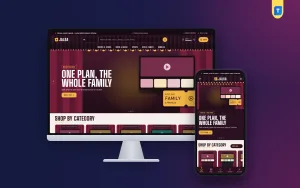
Our example is Jalsa – Streaming Subscription WordPress Theme. It is dressed like an old cinema hall, with wine-red curtains, marquee bulbs, gold accents and ticket-stub product cards, and it includes a block that works out each person's share of a family plan. We start with the business, then look at how the theme handles it.
Why OTT Resellers Need More Than a Facebook Page
A Facebook page is fine for the first fifty orders. After that, the same questions arrive every hour: which plan has the football, how many screens, can my brother in Sylhet use it, when will I get the login? Each answer takes a few minutes, and buyers who wait too long simply order from the next page in the group. A website puts the answers in front of every visitor at once, at any hour.
A site also builds trust. Many buyers have been burned by sellers who vanished after taking payment. A shop built on a proper subscription website template, with plan facts, a delivery page, an order tracking page and real reviews looks like a business that will still be there next month, which is exactly when the renewal is due. For a reseller, that renewal is where the profit sits, so trust pays twice.
Planning Plans, Genres and Family Offers
Sell only what you can legally resell
Before anything else, check the terms of every service you plan to carry. Work through official reseller or partner routes, sell plans the provider allows to be resold, and avoid account sharing schemes that break those rules. Plans that are cut off halfway through a season will cost you more in refunds and reputation than they ever earned. Honest stock is the base of a lasting shop.
Think in households and moods
Group your range the way people watch: movies and series, video and music, sports, kids and family, and bundles. Then plan family and duo offers carefully, showing the full plan price and what each person pays. Viewers also shop by mood: a cricket fan, a K-drama binger and a parent looking for cartoons want different things. Labelling plans by what they carry helps more than listing technical features.
What a Good Streaming Website Template Should Do
The first job of a streaming website template is to make shared plans simple. Show each person's share, the solo price for comparison and the saving over a year, and buyers can decide on the sofa in a minute. The second job is discovery: help a viewer go from I want sports tonight to the plan that carries it. The third is speed, with a short checkout on a phone and clear delivery.
Any subscription website template can list products, but OTT shops have their own needs. There is nothing to post, so the checkout should not ask for an address. Each plan page should state the platform, the plan, the devices, the account type and how delivery works. And because most buyers arrive from Facebook on a phone, the design must hold up on a small screen without losing its character.
Inside Jalsa: A Cinema Hall for Your Plans
Jalsa sets its titles in condensed uppercase Big Shoulders Display with Inter for body text, and the homepage runs on 17 blocks you can switch off or re-order. Cinema hero slides open the page, ticket tiles show your categories, Most watched sorts popular plans into tabs, and New on Jalsa shows the latest arrivals in two rows. Premiere offers adds a countdown with stock bars for short deals.
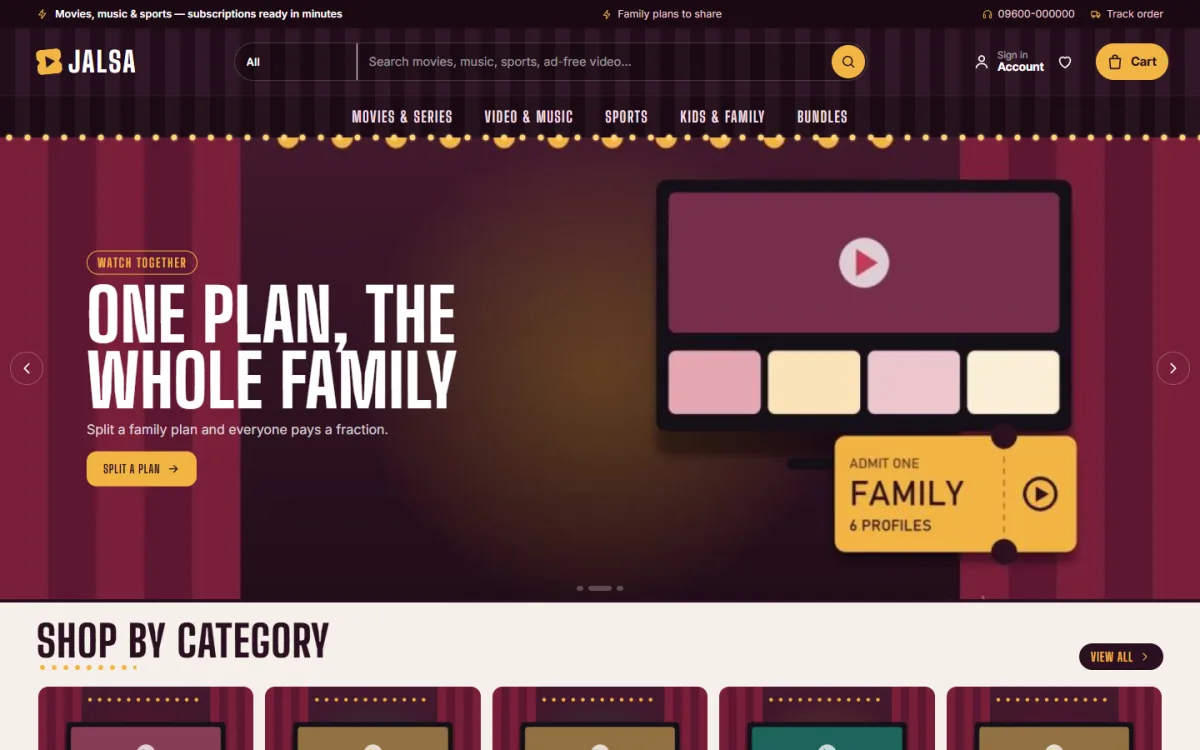
In the demo, the menu lists Movies & Series, Video & Music, Sports, Kids & Family and Bundles, framed by a row of marquee bulbs. The first slide carries a Watch together label, the line One plan, the whole family and a Split a plan button, beside an illustrated screen and an admit-one ticket. Further down, the categories appear as small cinema screens behind striped curtains.
Split with family
This is the block that sells shared plans. Shoppers pick a family or duo plan, then slide how many people will share it. Each person's monthly share, the solo price and the yearly saving update live as the slider moves, and a row of cinema seats lights up, one seat per person. It turns a price table into something a parent can show the children and settle in a minute. You choose the plans for it in Theme Options.
Tonight's mood
A row of genre chips covers movies, drama, sports, ad-free videos, music and kids. Tap one and a line describes what is on, with the services that carry it. It helps the viewer who knows what they want to watch on Friday night but not which plan covers it, which is a very common question in OTT groups.
The remaining blocks fill out the page. Three department blocks each place a banner beside eight products, Watch on gives four cards, Shop by budget uses price tiles, Trending now slides sideways and Top rated lists the best-reviewed plans. Services shows the logos you carry, Watch guides brings in your latest three posts, and a promise strip ends the page.

On phones the header shrinks to menu, logo and cart, product cards turn compact, and the cinema look stays fully responsive. The demo also shows a bottom bar with Home, Shop, Search, Wishlist and Account. Every plan page shows quick facts for platform, plan, devices, account and delivery, followed by a short note on how delivery works, with reviews folding open below.
Setup, Payments and Delivery
Jalsa needs WordPress 6.0 or newer and PHP 7.4 or higher, and it is tested up to WordPress 7.1. Upload the zip in Appearance, Themes, Add New, Upload Theme, and activate it. Open Jalsa, Setup to install Themeve Commerce, which comes bundled, in one click, then activate your license under Jalsa, License using My Account, Licenses on your Themeve account. The WordPress documentation helps with pages and menus.
Next, use Jalsa, Demo Import to load 21 sample plans from 6 invented services, with the family split, Tonight's mood, watch guides, menus and every page, including Watch Guides, FAQ, Track Order and the policy pages. Then open Jalsa, Theme Options to choose your plans, moods, palette and block order. Five palettes come ready (Velvet, Midnight, Emerald, Popcorn and Neon night) along with four font pairs.
Payments run through bKash, Nagad, SSLCommerz and manual payment. Checkout is a single online page with no address, an Order placed popup confirms the order, and the How Delivery Works page tells buyers what happens next in your words. Sign in and register open in a popup, buyers can save plans to a wishlist, and the order tracking page shows where each order stands.
On the business side, coupons pair well with premiere offers, invoices are built in, SMS and OTP are ready, new orders ping you on Telegram, and Facebook Pixel with the Conversion API reports sales back to your ads. Try the live demo on your phone, slide the family split, and then look through the demo dashboard to see where plans and orders are managed.
Marketing Tips for Bangladeshi Viewers
Plan your calendar around what people watch. Cricket series, football tournaments, Eid releases and new drama seasons all bring sudden demand, so prepare offers and posts a week early. Use short videos or reels that show the family split in action, and send ads to that block rather than to the homepage. Answer comments quickly in Bangla, since a friendly, fast reply in the group often decides who gets the order.
Keep a simple renewal routine. Note each buyer's end date, send a polite reminder a few days before it, and offer the same plan again with one link. Use Watch guides to post short articles on topics like which plan carries a tournament or how to watch on a TV, which also helps with search; Google's Search documentation explains the basics of being found.
Mistakes OTT Resellers Make
The first mistake is promising more than the plan delivers: more screens, more devices or channels that a plan does not carry. Each broken promise becomes a refund and a bad review. The second is unclear family pricing, where buyers only learn the real cost of each share after paying. A streaming website template with live per-person shares fixes that before checkout, which saves arguments later.
Other mistakes include slow delivery on busy match nights, no written refund policy and a desktop-first design that looks broken on a phone. Prepare for peak nights, write your policies before you launch, and test your shop on a cheap Android phone over mobile data. If the checkout feels slow to you, it will feel slower to a buyer waiting for kick-off.
Frequently Asked Questions
Does checkout ask for a delivery address?
No. Checkout is online with no address, because there is nothing to post. The How Delivery Works page explains to buyers how their plan reaches them, so you can describe your own process there in plain words.
Can I change the colours and fonts?
Yes. Choose one of the five palettes or set each colour yourself, then pick a font pair such as Big Shoulders Display with Inter or Bebas Neue with Roboto in Jalsa, Theme Options. Google Fonts loading can be switched off as well.
What if I sell game top-ups instead of streaming plans?
Then a shop built for games is a better fit. Look at Khela – Game Top-Up WordPress Theme, which is designed around top-ups. Jalsa is aimed at movie, series, music, sports and family plans.
Final Thoughts
An OTT reselling business wins on honest plans, clear family pricing, fast delivery and steady renewals. The right streaming website template carries most of that load, so your evenings go to delivery rather than repeating prices in chat. If your customers watch together, start with Jalsa – Streaming Subscription WordPress Theme and let them work out who pays what before the first episode begins.