A developer portfolio template has one job: prove that you ship working software. Clients cannot read your code, and most of them will never open your GitHub. They want to see live projects, understand what you built and know how to start working with you. This guide is for web and app developers, DevOps engineers and technical freelancers in Bangladesh who take contract work from local companies or clients abroad and want a site that does the first sales conversation for them.
Many developers rely on a LinkedIn profile, a GitHub link and a CV. Those help, but they leave a non-technical founder guessing. A list of frameworks does not say whether you can deliver a booking system on time, and a green contribution graph does not explain what a product does. A focused site that presents real projects as short stories, with stack, timeline and results, closes that gap far better.
We use Akkhor – Developer Portfolio WordPress Theme as the worked example. It opens dark, talks through a terminal and lets visitors jump anywhere with a command palette. It is a personal website with no shop attached. First, though, let us plan what your site should prove.
Why Real Projects Beat a List of Skills
Clients hire outcomes, not keywords. Laravel, React or Docker on a skills list tells a client what you know, but a project page tells them what you can do with it: a clinic booking app that cut phone calls, an API that serves a delivery fleet, or an internal dashboard that saved a team hours each week. When the outcome is clear, the stack becomes proof rather than jargon.
Real projects also filter your leads. A visitor who sees SaaS and API case studies and contacts you is likely to want similar work, which is easier to quote and deliver. If your site only lists skills, you attract every kind of request, including the jobs you do not want. Choosing a developer portfolio template that puts projects first is therefore a business decision, not only a design one.
What to Put in a Web Developer Portfolio
A strong web developer portfolio usually has five parts: an intro that says what you build and for whom, a set of projects, your tech stack grouped clearly, services and pricing, and an easy way to get in touch. Add testimonials, a short process and a few blog posts once the basics are in place. Each part answers one question a client has before hiring a freelancer they have never met.
Choosing the projects
Pick six to eight projects that match the work you want next. Mix types if you can, such as a SaaS product, an API, a mobile app and a client website, but drop anything you would not want to build again. Live links matter. A working URL is the most convincing thing on the page, so keep demo deployments running or record a short screen video when a project is offline.
Writing each case study
Keep the structure simple and repeatable. Start with a facts row: client, year, stack, timeline and a live link. Then write one headline result, a short section on what you built and why you chose that approach, and a link to the next project. Avoid pasting code. A clear sentence such as moved image processing to a queue so uploads stopped timing out explains your skill to both technical and non-technical readers.
Handling private and NDA work
Much good work sits behind company logins or contracts. Ask clients whether you may mention them, and if not, describe the project without names: an inventory system for a garment exporter, for example. Use blurred or redrawn screenshots and focus on the problem, your role and the result. Honest, anonymous case studies still build trust, as long as you never claim work you did not do.
How Akkhor Turns a Developer Portfolio Template Into a Working Site
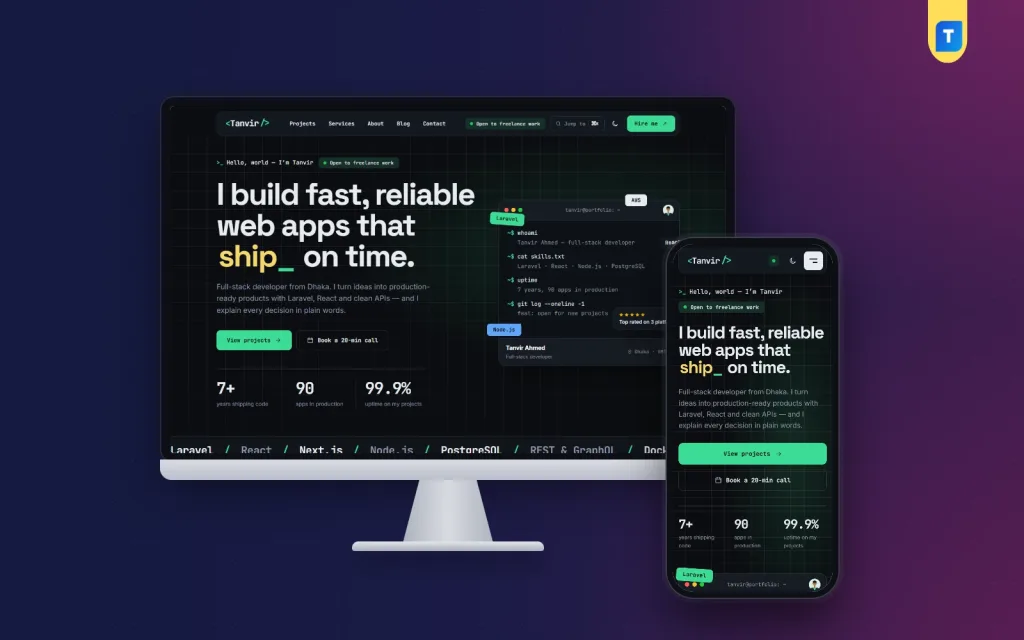
The Akkhor demo loads in dark mode over a faint grid. The rounded header holds a name-style logo in code brackets, menu links for Projects, Services, About, Blog and Contact, an Open to freelance work status, a Jump to button with the command shortcut, a moon switch for the light look and a green Hire me button. Pressing Ctrl and K, or Command and K on a Mac, opens a palette that finds any page, section or project.

The intro starts with a hello world style greeting, then a large headline with one highlighted word followed by a blinking cursor. Beside it, a terminal window shows commands such as whoami and a skills file, with small floating stack chips around it in the demo. The commands and their output are lines you type in Theme Options, and they type themselves out on the page. Under the headline come View projects and Book a call buttons, a few key numbers and a moving line of technologies.
Thirteen blocks for a developer's story
Akkhor's homepage has 13 blocks that can each be switched off or dragged into a new order, with arrows on a phone. After the intro come client logos and projects with type filters. The tech stack block groups your tools by area in a tidy table. Services lists four offers with price and deliverables, Process shows four steps with timing, and About adds your photo, story, skill bars, tools and a contribution activity grid.
Pricing covers hourly, fixed and retainer options with one highlighted, which suits developers who take both projects and ongoing support. Client reviews run in a slider, then an FAQ, the three latest blog posts and a closing contact band finish the page. Writing the odd technical blog post helps here, because those three cards show visitors that you think clearly and keep learning.
Projects that read like case studies
Each project is a post in the Work category, and its sub-categories become the filters on the homepage. Hover a card and the cursor shows View. Inside, the case study opens with a facts row covering stack, timeline and a live link, then the headline result, a what I built section and a link to the next project. You fill client, year and result in each post's Project details box, and the newest project always appears first.
Turning Interest Into Clear Leads
The project estimator lets a visitor choose a project type, extras and a deadline, then shows a price range, from 10% under to 20% over your base price, along with a timeline. Send this to me opens the contact form with those choices already filled in. The form has chips for project type and budget, an email copy button and a booking link, and every message is kept under Akkhor, Enquiries, so leads never vanish into spam.
A shortcode places the same form on any page, which is handy if you write a blog post about a service and want a contact box at the end. The live clock in the footer shows your local time. For a developer in Dhaka working with clients in Europe or North America, that small clock quietly explains why replies arrive overnight.
Dark Mode, Palettes and the Phone View
Developers spend their day in dark editors, and Akkhor's dark default feels familiar to technical clients. Anyone who prefers a bright page can flip the switch in the header. Five palettes are ready, Terminal mint, Electric blue, Synthwave, Amber and Ruby, and each can be adjusted colour by colour. Six font pairs are included, among them JetBrains Mono with Inter for a code feel and an all-sans Outfit option.

On a phone, the demo header shrinks to the code-style logo, a green status dot, the moon switch and a menu button. The greeting, status pill and headline stack neatly, the two buttons stretch to full width, and the three key numbers sit in a row. The terminal window moves below the numbers, so visitors see the pitch first and the playful part second. Akkhor is mobile-first and fully responsive.
Setting Up Akkhor Step by Step
Akkhor needs WordPress 6.0 or newer and PHP 7.4 or higher, and it is tested up to WordPress 7.1. Upload the zip in Appearance, Themes, Add New, Upload Theme and click Activate. Open Akkhor, Setup and install the bundled Themeve Commerce engine in one click; in the dashboard it is labelled Site engine, and there is no store to configure. Then enter your licence key under Akkhor, License, using the details from My Account, Licenses on Themeve.
Run Akkhor, Demo Import to build the full sample site: 8 case studies, including SaaS, API and mobile work, 6 blog posts, the tech stack, services, pricing, estimator prices, reviews, the FAQ, the contact form, menus and every page. Every name and picture is a sample. Then open Akkhor, Theme Options to set your terminal lines, stack, pricing, palette, fonts and block order. Menus live in Akkhor, Menus, and the WordPress documentation covers posts and categories if you need a refresher.
Before you commit, open the live demo, press the command shortcut, run the estimator and read one case study on your phone. Then browse the demo dashboard to see where projects, enquiries and theme options sit. A quick test shows whether the structure matches how you like to present your work.
Advice for Developers in Bangladesh Selling Abroad
Write in plain, confident English and keep sentences short; many clients read your site on a phone between meetings. Mention your time zone and your usual overlap hours with Europe or the US. Offer at least one low-risk way to start, such as a paid discovery call or a small fixed-price task, which the hourly, fixed and retainer pricing block makes easy to present.
Link your site from your GitHub profile, LinkedIn headline and any marketplace profile where the rules allow it. Publish one short technical post a month about a real problem you solved. Over time, your web developer portfolio becomes the single link you send to every prospect, and the estimator plus the enquiry form handle much of the back-and-forth that used to fill your messages.
Common Mistakes With Developer Portfolios
The most common mistake is a site that is all style and no proof: animations everywhere, but no live links or results. Another is listing twenty technologies with equal weight, which makes you look unfocused. Group your stack by area and lead with what you use daily. Developers also forget to update their site, leaving a two-year-old project at the top while their best recent work sits unmentioned.
Finally, do not ignore the basics that you would fix for any client. Compress images, give each case study a clear title and description, and check that the site loads quickly on mobile data. Google's Search Central documentation covers the essentials. A developer portfolio template only helps if the content inside it is current, honest and easy to scan.
Frequently Asked Questions
Can visitors see Akkhor in a light look?
Yes. The site opens dark by default, and the switch in the header changes it to light for anyone who prefers that. Dark stays the default, so first-time visitors always meet the look you designed for, while readers who prefer light pages can still switch.
What does the command palette find?
Pages, homepage sections and projects. Visitors press Ctrl and K, or Command and K, or click the Jump to button in the header, then type a few letters to go straight there. Technical clients tend to notice and enjoy this small touch.
Does Akkhor include an online store?
No. Akkhor is a personal portfolio website for showing projects, services and pricing and for collecting enquiries. The bundled engine appears as Site engine in the dashboard, and there is no shop to set up or manage, so your time goes into projects and writing.
Is there a version for designers or engineering firms?
If you work more with pixels than code, look at Rupkar – Designer Portfolio WordPress Theme, the designer sister theme. For a site for an engineering or industrial company, try Bhitti – Industrial Corporate WordPress Theme. Akkhor remains the best fit for a solo developer.
Final Thoughts
Clients hire developers who can show finished work, explain it simply and make the first step easy. Pick a handful of real projects, write them up as short case studies, group your stack, be clear about pricing and give people one obvious way to reach you. If you want a dark, terminal-style developer portfolio template that does all of this out of the box, start with Akkhor – Developer Portfolio WordPress Theme and publish your first three case studies this week.