 −12%
−12%
 −25%
−25%
✦ Key features
- Dark by default with a light switch
- ⌘K command palette for pages and projects
- Terminal intro that types itself out
- 13 homepage blocks to switch and re-order
- Tech stack table grouped by area
- Contribution activity grid in the about block
- Hourly, fixed and retainer pricing packages
- Project estimator with price range and timeline
- Case studies with stack, timeline and live link
- Contact form with project-type and budget chips
- 5 color palettes and 6 font pairs
- One-click demo of a full-stack developer
Overview
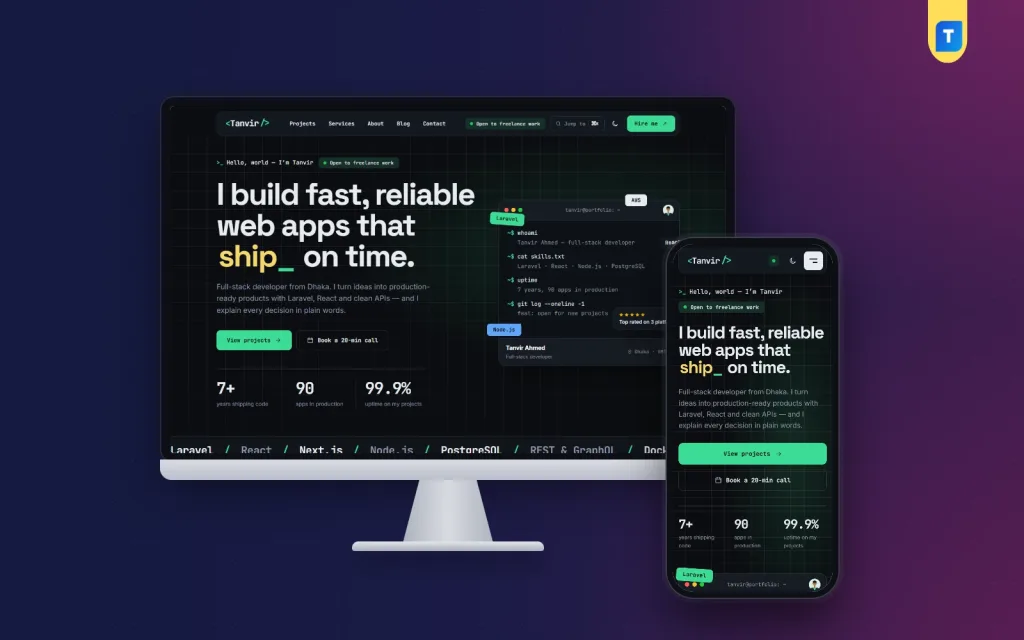
Akkhor is a developer portfolio WordPress theme that opens dark, with a ⌘K command palette, a terminal intro that types itself out, case studies, a tech stack table and a project estimator.
Akkhor is a developer portfolio WordPress theme for web and app developers, DevOps engineers and technical freelancers. It opens dark, talks through a terminal and lets visitors jump anywhere with ⌘K, so a client gets a feel for how you work before reading a word about it. It is a personal website, with no shop attached.
Akkhor means “a letter, a character”. The demo is a freelance full-stack developer with case studies, a tech stack, pricing and a blog, all ready to swap for your own.
Built for people who ship code
Clients hiring a developer want to see things that work, the stack behind them and a clear way to start. Akkhor is arranged around exactly that: projects, tools, prices and a contact form that asks the right questions.
It suits a solo full-stack freelancer, a mobile app builder or a DevOps engineer who takes contract work.
Dark by default, with a ⌘K command palette
The site loads in dark mode, and a switch in the header turns on the light look for anyone who prefers it. Five palettes come ready: Terminal mint, Electric blue, Synthwave, Amber and Ruby.
The rounded header holds a <name/> logo, an “Open to freelance work” status, a “Jump to ⌘K” button and a “Hire me” button.
Press Ctrl + K or ⌘ + K and the command palette opens. Type a few letters to find any page, section or project and jump straight to it. Developers notice small touches like this.
A terminal in the hero
The intro sets a headline with a blinking highlighted word beside a terminal window. The commands and their output are lines you type in Theme Options, and on the page they type themselves out one by one.
Under the headline sit stack chips and a few key numbers, followed by a moving line of technologies. It is a quick way to say “I build with these” without a wall of text.
A developer portfolio WordPress theme with 13 homepage blocks
The homepage has 13 blocks, and each one can be switched off or dragged into a new order. On a phone, arrows do the moving.
After the intro come client logos and your projects with type filters. The tech stack block groups your tools by area in a tidy table, so a client reads your whole toolkit in seconds.
Services lists four offers with price and deliverables, and Process shows four steps with timing. The about block adds your photo, story, skill bars, tools and a contribution activity grid.
Pricing covers hourly, fixed and retainer options with one highlighted. Client reviews run in a slider, then an FAQ, the three latest blog posts and a closing contact band finish the page.
Projects that read like case studies
Each project is a post in the Work category, and its sub-categories become the filters on the homepage. Hover a card and the cursor shows “View”.
Inside, the case study opens with a facts row covering the stack, timeline and a live link. Then comes the headline result, a “what I built” section and a link to the next project.
Fill the client, year and result in the “Project details” box of each post. The newest project always appears first.
An estimator and a form that sort out leads
The project estimator lets visitors choose a project type, extras and a deadline. Akkhor answers with a price range, from 10% under to 20% over your base price, and a timeline.
“Send this to me” opens the contact form with those choices already filled in. The form itself has chips for project type and budget, an email copy button and a booking link.
Every message is kept under Akkhor → Enquiries. The [akkhor_contact] shortcode puts the same form on any page, and a live clock in the footer shows clients your local time.
Customize the developer portfolio WordPress theme without code
Akkhor → Theme Options starts with the homepage layout, then moves through design, each homepage block and your contact details. Search, a sticky save bar, reset and export or import are built in, and a Live Customizer sits in the same menu.
Six font pairs are included. JetBrains Mono with Inter gives a code feel, and there are also Space Grotesk with Inter, Bricolage Grotesque with Inter, Syne with DM Sans, the editorial Fraunces with Inter and an all-sans Outfit option.
Any palette can be adjusted color by color. Menus live in Akkhor → Menus: a main menu, footer links and legal links.
Setup and what the demo includes
The theme runs on the bundled Themeve Commerce plugin, installed from Akkhor → Setup in one click. In the dashboard it is labelled Site engine, and there is no store to configure.
One click on Demo Import builds the full developer site: 8 case studies, among them SaaS, API and mobile work, 6 blog posts, the tech stack, services, pricing, estimator prices, reviews, the FAQ, the contact form, menus and every page. Every name and picture is a sample.
This developer portfolio WordPress theme needs WordPress 6.0+ and PHP 7.4+, and it is tested up to WordPress 7.1. It is mobile-first and fully responsive.
Work more with pixels than with code? Rupkar is the designer sister theme. Building a site for an engineering firm instead? Try Bhitti.
Akkhor is a developer portfolio WordPress theme that feels like your own tools: dark, quick to move around and straight to the point.
Reviews
0.0
Write a review
★★★★★
0 reviews from buyersNo reviews yet — be the first to share your experience after buying.
Frequently Asked Questions
01Can visitors see Akkhor in a light look?
Yes. The site opens dark by default, and the switch in the header changes it to light for anyone who prefers that.
02What does the ⌘K command palette find?
Pages, homepage sections and projects. Visitors press Ctrl + K or ⌘ + K, or click “Jump to ⌘K” in the header, then type to jump there.
03How do I change the terminal commands in the intro?
Type the commands and their output in Akkhor → Theme Options. On the page they type themselves out in the terminal window.
04Does Akkhor include an online store?
No. Akkhor is a personal portfolio website for showing projects, services and pricing and for collecting enquiries.
05Is the Themeve Commerce plugin included?
Yes, it is bundled. Akkhor → Setup installs it in one click, and it appears in the dashboard as Site engine.
06How do projects and their filters work?
Each project is a post in the Work category, and its sub-categories become the homepage filters. Add the client, year and result in the post’s “Project details” box.
07What happens after someone uses the estimator?
They see a price range and timeline for their choices. “Send this to me” opens the contact form with the brief filled in, and the message is kept under Akkhor → Enquiries.
08What comes with the demo import?
A sample full-stack developer with 8 case studies, 6 blog posts, a tech stack, services, pricing, estimator prices, reviews, FAQ, contact form, menus and every page.
Delivery & Support
1Place your orderAdd to cart, sign in and pay with bKash, Nagad or Rocket.
2Payment verified automaticallyEnter your Transaction ID — the payment is matched automatically, usually within seconds.
3Get your productYour license key and download appear in My Account → Licenses.
- Secure automatic payment verification
- Delivery to your account & e-mail
- Friendly WhatsApp support
Refund Policy
This policy applies to every product in our store.
You get a refund when the product does not work as described and we cannot fix it, when your license will not activate your website, or when a manually delivered product is late and you cancel before delivery. A working license, or a single license already used on a live domain, is not refundable. Approved refunds go back to the number you paid from within one working day, minus the Send Money charge.
More items
View all →You may also like
−12%
 −25%
−25%
Laravel Project
School Management Software – Website, Dashboard & Parent Portal
৳15,000
৳20,000Save 25%
 −20%
−20%
 −20%
−20%
