Picking a fashion WordPress theme is one of the first real decisions when you take a Bangladeshi clothing shop online. This guide is for boutique owners, Facebook page sellers who want their own site, and freelancers who build stores for clothing brands. We cover what a clothing shop needs from its theme, how to plan collections and sizes, and how to set up payments and courier delivery that local buyers trust.
Many clothing sellers in Bangladesh start on Facebook and Instagram. That works until orders grow. Then questions about sizes, colours and stock fill the inbox, and good photos disappear down the feed within a day. A proper fashion website keeps every product, size chart and policy in one place, takes orders around the clock, and gives your brand a home that you control instead of a social media feed.
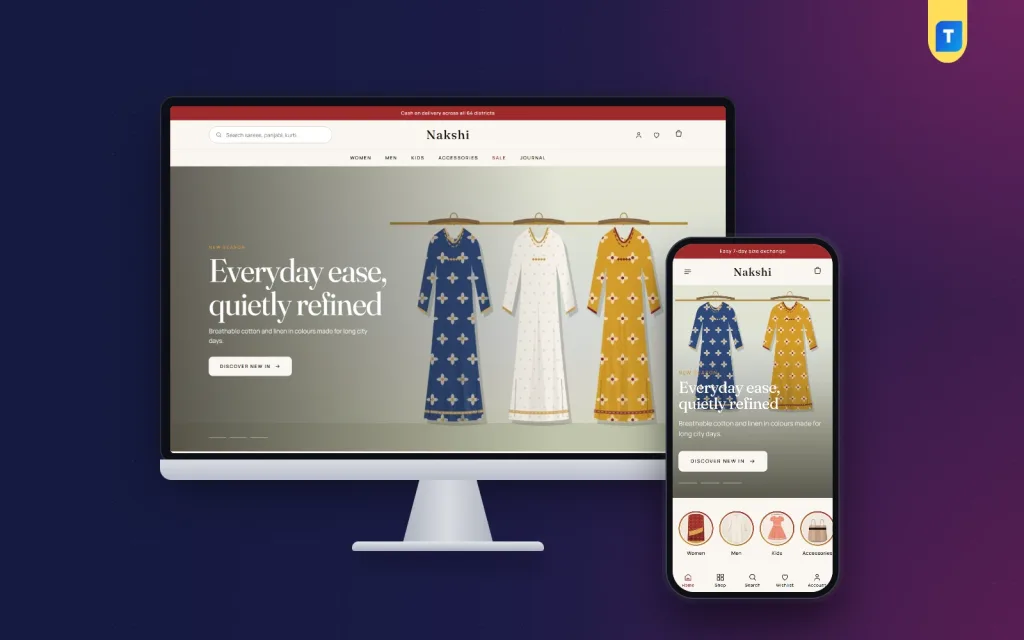
Throughout this guide we use Nakshi – Fashion Store WordPress Theme as the example. It is an editorial theme for clothing brands that sell sarees, three-piece sets, kurtis, panjabi, kidswear and accessories, with a shoppable lookbook, occasion tabs, size guides and a checkout built for phones first. First, though, comes the planning, because a theme only works well when you know what you want it to show.
What a Clothing Shop Needs From a Fashion WordPress Theme
Clothes are bought with the eyes. A buyer scrolling on a phone decides in a second whether a saree or a panjabi looks right, so the theme must give photos real space and keep text short. A layout that treats every product like a line in a spreadsheet makes even beautiful pieces look cheap. Look for large images, clean product cards and pages that let a new collection feel like a launch rather than a list.
Sizes and colours are the second big need. Many returns in fashion come from the wrong size, so the theme should show size and colour choices clearly on every product and offer a size guide close to the buy button. Third, shoppers in Bangladesh think in occasions: Eid, Pohela Boishakh, Puja, weddings and winter. A store that groups products by occasion helps buyers find the right outfit faster and spend less time searching.
Finally, the checkout has to suit local habits. Many buyers want cash on delivery, while others prefer bKash or Nagad. They want to know the delivery charge and when the parcel will arrive, and they like being able to track an order without calling you. A fashion WordPress theme that cannot handle these basics will lose sales, however good its homepage looks in the demo.
Planning Your Fashion Website Before You Build
Start with your categories. Keep them close to how customers think, such as Women, Men, Kids and Accessories, with sub-groups like sarees, kurtis, three-piece sets and panjabi. Then list your occasions for the year and mark the dates of your big campaigns, especially the two Eids and Boishakh. Planning the calendar early lets you shoot photos, write product copy and prepare stock before the rush starts and the courier queues get long.
Photos, sizes and product details
Shoot every product on the same background with the same light, and include at least one close-up of the fabric and one full-length shot. Write down your real measurements for each size and keep one size chart per product type, because a kurti and a panjabi are not cut the same way. Note the fabric, the type of work and care instructions. These details answer questions before they ever reach your inbox.
Policies that build trust
Buyers in Bangladesh worry about two things: will the product look like the photo, and what happens if it does not fit? Write clear pages for shipping and delivery, exchange and returns, and your store address if you have a shop. Mention delivery areas and the usual charge inside and outside Dhaka. Honest, simple policies turn a first-time visitor into a buyer far more often than a big discount banner does.
How Nakshi Handles a Clothing Store
Nakshi is a fashion WordPress theme made for labels that sell a story, not just stock. It reads like a fashion magazine but works like a shop. The homepage is built from 15 blocks, and each one can be switched off or moved, by dragging or with arrows, under Home Layout. You get a full-width hero slider with your text on the left and the model on the right, category circles and a Just landed row for new pieces.
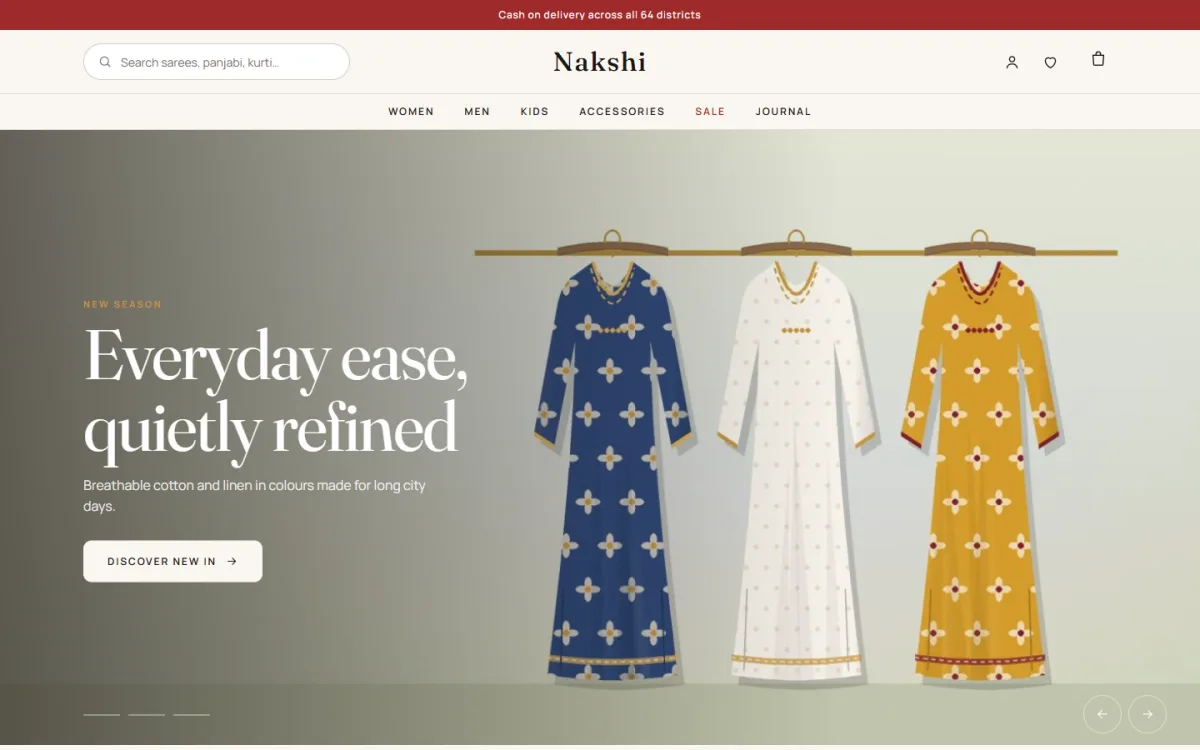
Further down, a collections mosaic sets five category tiles in a magazine grid, with the first one large. Women and Men banners cover your two main departments, and a product spotlight shows one piece big with photos, price, sizes and an add-to-bag button. Three product rows, On sale now, Most loved and Top rated, sit alongside a campaign countdown, customer reviews, a promise strip and journal posts. The reviews block uses real reviews from your product pages and stays hidden until the first one arrives.
A lookbook shoppers can buy from
The lookbook is the part most clothing brands will enjoy. You upload one styled photo and add dots on the outfit. Each dot is a simple line with a left percentage, a top percentage and a product ID or slug. When a shopper taps the dot on a kurti, they land on that kurti. There is no page builder and no code involved, so you can refresh the lookbook every season in a few minutes.
Occasion tabs and campaigns that end on time
Occasion tabs pull products by product tag. Eid, Boishakh, Wedding or Everyday are simply tags you add under Products, Tags, and the tab fills itself. The campaign countdown is a wide banner for Eid, Boishakh, Puja or a flash sale. Once the end date passes, the whole banner hides itself, so an old offer never stays on your homepage by mistake. Leave the end date empty and only the timer hides.
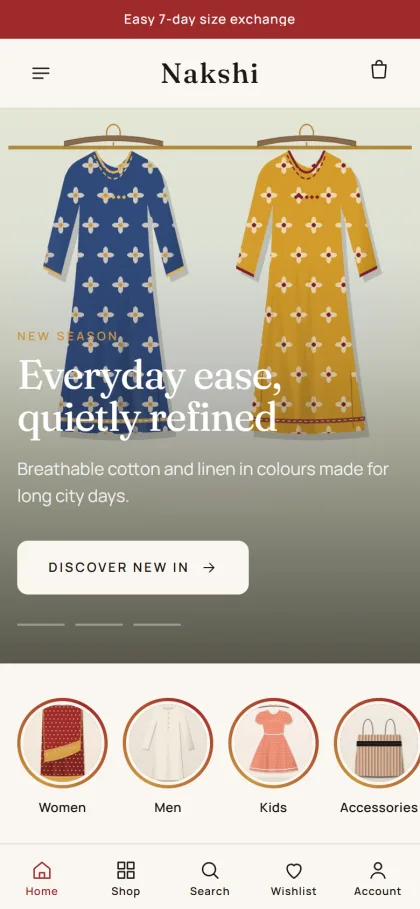
On phones, the header shows the menu, logo and cart, and product cards stay compact so a customer sees more of the collection per scroll. Shoppers can sign in through a login popup and keep browsing, pick a size and colour, save pieces to a wishlist and read reviews tucked into a fold. If a product has no reviews yet, a popup invites the first one, which helps a new store collect social proof.
Setting Up Your Fashion WordPress Theme Step by Step
Nakshi 1.2.0 works on WordPress 6.0 and above with PHP 7.4 or higher, and has been checked up to WordPress 7.1. Upload the theme under Appearance, Themes, Add New, Upload Theme, and activate it. Then open Nakshi, Setup and install Themeve Commerce in one click. It comes bundled and handles the cart, checkout, payments, delivery and the order tracking page. Add the licence key from your Themeve account under Nakshi, License, so updates arrive through your account.
Next, run Nakshi, Demo Import to load the Fashion House demo. It brings 40 products with sizes and colours, size guides, occasion tags, the lookbook, a campaign banner, journal posts, menus and every page, including Our Story, Size Guide, Shipping & Delivery, Exchange & Returns, Our Stores, Journal, Track Order and Wishlist. All sample names and artwork are invented, so replace them with your own products and photos before you launch.
Then shape the look in Nakshi, Theme Options, or in the Live Customizer if you like to watch changes as you go. Pick one of six colour sets, maroon, emerald, indigo, rose, saffron or charcoal, and fine-tune any colour while lines, muted text and tints follow on their own. You can also turn off Google Fonts and export or import settings. The WordPress documentation helps if menus and pages are new to you.
Before you buy, it is worth spending ten minutes in the live demo on your own phone, then opening the demo dashboard to see where products and orders sit under the Shop menu. Try the lookbook dots, switch occasion tabs and walk through checkout as a buyer would. That short test tells you more about daily use than any list of features ever can.
Payments, Delivery and Selling in Bangladesh
Checkout in Nakshi is a single page followed by an Order placed confirmation, and every order gets an invoice and a tracking page. Buyers can pay with bKash, Nagad, SSLCommerz, cash on delivery or manual payment, and parcels can go out through Steadfast or Pathao courier. Coupons, offers, back-in-stock and returns are ready to switch on whenever your shop needs them.
Cash on delivery is still what many first-time buyers choose, but it also brings fake orders and returned parcels. A simple habit helps: call or message to confirm larger COD orders before you hand them to the courier, and ask for a small advance by mobile payment on custom or high-value pieces. On the admin side, new-order alerts can reach you on Telegram, while SMS and OTP help with customer messages.
Facebook is where most fashion brands in Bangladesh find buyers. Nakshi has Facebook Pixel and the Conversion API built in, so your ad campaigns can measure who visited and who bought. Send ads to a collection or lookbook page instead of the homepage, post new arrivals with size details, and answer comments quickly. Bangla captions with clear product names usually work well, and they make your page feel local and personal.
Common Mistakes When Choosing a Fashion WordPress Theme
The most common mistake is judging a theme by its demo photos. Professional model shots make every design look good. Instead, imagine your own photos, your own product names and your real number of products inside it. Another mistake is picking a general multipurpose theme and then adding separate plugins for size charts, lookbooks, couriers and payments one by one. Each extra plugin is another thing to update and another chance of a conflict.
Sellers also forget the phone. Most Bangladeshi shoppers will never see your site on a computer, so test the product page, cart and checkout on a real mobile using mobile data. Other mistakes include no size guide, unclear return rules and old Eid offers that stay up weeks after Eid. A fashion WordPress theme with a self-hiding campaign banner and built-in size guides removes two of those problems at once.
Frequently Asked Questions
Can I run Nakshi without any coding?
Yes. Every block, colour and menu is set from Nakshi, Theme Options or the Live Customizer. Even the lookbook dots are plain lines of numbers and a product slug, so you can update the homepage for a new season without hiring a developer for each small change.
Is the Themeve Commerce plugin part of the package?
Yes. It is bundled and installs in one click from Nakshi, Setup. Cart, checkout, payments, delivery and the tracking page all come from it, so the full buying path, from the first tap to the delivery update, is handled in one place inside your dashboard.
Will the demo content look like my store?
The demo gives you 40 sample products, a lookbook, journal posts and every page, so you can see how a finished store hangs together. All artwork and names are invented, so you replace them with your own photos, product names, prices and policies before going live.
Is there a theme for family or T-shirt brands?
If your shop sells clothing for the whole family, look at Shobar – Family Clothing WordPress Theme. If you run a printed T-shirt label, compare Chhap – T-Shirt Brand WordPress Theme. Nakshi suits labels with an editorial, collection-led style built around seasons and occasions.
Final Thoughts
A clothing shop succeeds online with clear photos, honest sizes, simple policies, payment choices buyers trust and reliable courier delivery. Your fashion website should support all of that without getting in the way. If you sell sarees, kurtis, panjabi or a full family collection and want a store that reads like a fashion magazine, start with Nakshi – Fashion Store WordPress Theme and build your first seasonal collection around it.