 −34%
Ujjal – Tech Store Website Templates (Home Appliance WordPress Theme)
✦ Key features
- Size picker for AC, fridge, TV and washer
- Running-cost calculator with inverter saving
- Capacity chip on every product card
- At-home photos, key-spec tiles and 0% EMI line
- 24 homepage blocks, switch and drag to order
- Five palettes and four font pairs
- Theme Options dashboard works on phones
- One-page checkout and login popup
- bKash, Nagad, SSLCommerz and cash on delivery
- Steadfast and Pathao courier with order tracking
- Themeve Commerce store plugin included
- One-click demo with 30 products
Overview
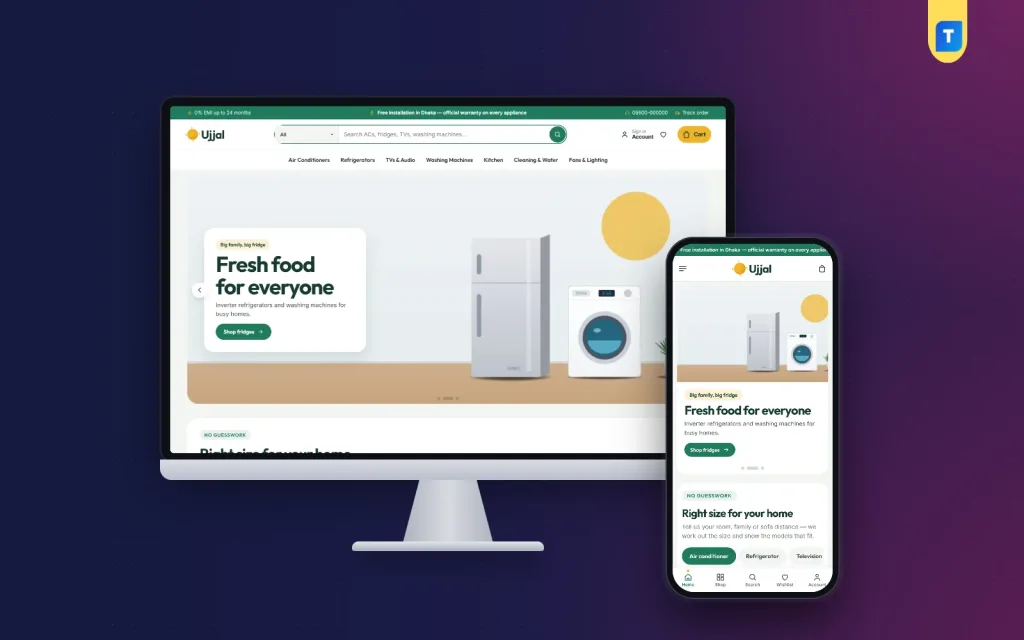
Ujjal is one of the tech store website templates built for appliance shops. It has a size picker, a running-cost calculator, 24 homepage blocks, one-page checkout, bKash and Nagad payments, and Steadfast and Pathao courier tools.
Ujjal is one of the few tech store website templates built for shops that sell big, expensive things people worry about before they buy. Air conditioners, refrigerators, televisions and washing machines all need a decision about size, running cost and warranty. Ujjal puts those answers on the homepage, so the shopper reaches checkout already sure.
If your phone rings every day with "Which AC do I need for a 12 by 14 room?", this theme was made for you. It is a complete home appliances ecommerce website for WordPress, with the store plugin, payments and courier tools included. You do not need to buy anything else to start selling.
Who can use Ujjal: tech store website templates for many shops
The demo is a home appliance store, but the structure fits many kinds of shops. Any seller whose customers ask about capacity, power use and delivery will find the blocks useful. You can run it for:
- Air conditioner, fridge and TV showrooms
- Washing machine and kitchen appliance dealers
- Fan, light and electrical goods shops
- Electronics and gadget retailers
- Multi-brand dealers who also install what they sell
- Small shops that want to move from Facebook orders to their own website
Among tech store website templates it is unusual in one way: the blocks help with buying decisions, not only with display. You change the products, photos and text. The layout, tools and dashboard stay the same.
Light code, quick pages
A heavy shop loses customers on a mobile connection, and many tech store website templates are bulky. Ujjal keeps its code small and checks only what it needs.
- One stylesheet of about 127 KB and one script of about 29 KB on the front end
- The front-end script does not depend on jQuery
- Images are loaded lazily, so a long homepage does not download every photo at once
- Google Fonts can be switched off, and the theme then uses fast system fonts
- Blocks you turn off are not drawn at all
Front-end features that set it apart from other tech store website templates
Right size for your home picker
This is the block most shoppers remember. It has four tabs, each with a slider, a recommended size and the models that match.
- AC tab: room size gives the ton
- Refrigerator tab: family size gives the litres
- TV tab: sofa distance gives the screen inches
- Washing machine tab: family size gives the kilograms
The capacities come from each product. In the theme options you choose which of the four tabs appear. A mother buying her first fridge for a family of five sees a clear answer and a short list instead of forty models.
Running-cost calculator
Electricity bills worry people, most of all in summer. The calculator lets a shopper pick an appliance, set the hours per day and enter the tariff. It then shows the units used and the monthly bill.
It also compares an inverter model with a regular one and shows the saving per month and per year. You set the appliance list and the default tariff in Theme Options.
Header, menu and search
- Top bar with up to three offer messages and a hotline number
- Main menu with mega panels that can show a picture for each category
- Login popup, so shoppers sign in without leaving the page
- Cart and wishlist icons in the header
Product cards
- Rounded white cards with a capacity chip such as "1.5 ton" or "7 kg"
- Add to cart button at the bottom of every card
- Compact card layout on phones
- Switches in Theme Options to show or hide card details
Product page
- Studio, at-home and close-up photos, so buyers see the appliance in a real room
- Key-spec tiles beside the photos
- Warranty and a 0% EMI line shown together
- Expected delivery date near the buy button
- Reviews inside a fold, with a popup to write the first review
- Wishlist and back-in-stock alerts
24 homepage blocks
Seventeen blocks are on by default. Seven more are kept in reserve. You can switch any block off or drag it into a new place. On a phone, arrows do the moving, so you can edit from your shop floor.
- Hero slider with bright home scenes and a text card
- Right size for your home and the running-cost calculator
- Shop by category with round icon tiles
- New arrivals and Best sellers in tabs
- Hot deals with a countdown and stock bars
- Shop by room, with four room cards
- Shop by budget, Trending now and Top rated
- Three department blocks, each with a banner and eight products
- Our brands, Home tips and a promise strip for free installation, warranty, EMI and returns
The reserve blocks are Our promise, Quick links, Four cards, Banner + row, Promo cards, Brand spotlight and More to explore. Before Eid you might lift Hot deals to the top. In June, when AC questions peak, move the size picker up.
Cart, checkout and tracking
- One-page checkout
- An "Order placed" popup after every order
- Track Order page for buyers
- Coupons and printable invoices
- Bottom bar on phones for fast movement
Footer
The footer holds menus, contact details and payment icons. It has its own settings in Theme Options.
Back-end options in Theme Options
Everything lives in one place: Ujjal, then Theme Options. The screen works properly on a phone. No code is needed.
Look and layout
- Five palettes: Emerald and sun, Sky, Tangerine, Teal and Charcoal
- Each colour can also be set by hand with a colour picker
- Four font pairs: Outfit with Inter, Plus Jakarta Sans, Figtree or DM Sans
- Homepage layout screen with switch and drag-and-drop order
- Settings for the header, product cards, product page and footer
Appliance tools
- Which size picker tabs appear
- The appliances and the electricity tariff used by the cost calculator
Working tools
- Settings search to find an option fast
- Sticky save bar
- Reset and settings export and import, useful when you build several shops
- Live Customizer preview if you prefer it
Store dashboard: Themeve Commerce
Ujjal runs on Themeve Commerce, our own store plugin. It comes in the package and installs in one click. You do not need WooCommerce, a payment plugin or a courier plugin.
Orders and sales overview
- Dashboard with today's sales, the last seven days, the month so far and orders waiting for you
- Two-week sales chart
- Order statuses and printable invoices
- Payments box for advances, remaining dues and refunds
- Incomplete Orders list of people who began checkout and left
Products
- Full-page product editor
- Variations with their own price, stock, SKU and photo, such as a fridge in two colours
- Separate menus for categories, brands and tags
Payments
- Cash on delivery
- bKash and Nagad payment, and card payment through SSLCommerz
- Manual Send Money for bKash, Nagad, Rocket and Upay with a transaction ID
- Optional advance on cash on delivery, as a fixed amount, the delivery charge or a percentage
Delivery and couriers
- Delivery charge per district
- Extra zones for areas you cover with your own van
- Send orders to Steadfast or Pathao from the order screen
- Courier automation setting
- COD money screen that shows what the courier still owes you, with a payment sheet import
Customers and accounts
- Sign in or register by password, by a code sent to the phone, or with Google or Facebook
- Account page with orders, delivery tracking, wishlist and exchange or return requests
- Customer list that groups buyers as new, repeat, VIP, inactive or risky
Alerts, SMS and fraud checks
- New-order alerts by email, Telegram or WhatsApp
- SMS order updates and an automatic review request after delivery
- Phone verification by OTP
- Fake order protection for suspicious cash-on-delivery orders
- SMS campaigns for past buyers
Marketing and reports
- Facebook Pixel with the Conversion API
- Google Analytics 4 and Google Tag Manager
- Product feeds for Facebook and Google shopping
- SEO settings for descriptions, sharing previews and Google product rich results
- Transactions screen with every payment and refund and monthly totals
Optional modules
You switch on only what you use, so the shop stays light.
- Pre-orders and Delivery Date and Time
- Bulk Order and Corporate Quotes
- Reseller and Wholesale Prices
- Combo and Bundle Offers, Flash Sale and Upsell and Cross-sell
- Loyalty Points with refer a friend, and an Affiliate Program
- Recently Viewed, Back in Stock Alerts and Exchange and Returns
- Store Locations, Sales and Signup popups, and a Marketplace module
- Support tickets, testimonials and offers, each with its own menu
- REST API with signed webhooks for developers
How it helps you sell appliances
A home appliances ecommerce website works best when it answers questions before the buyer asks.
Appliances are bought slowly. People compare, ask family and wait for a sale. A good website shortens that path.
- The size picker replaces many phone calls, so your staff answer fewer basic questions.
- The cost calculator turns "inverter is expensive" into "inverter saves money", with a number.
- The warranty and EMI line sits where the buyer decides.
- Combo offers let you sell a TV with a soundbar, or an AC with installation.
- Advance payment on cash on delivery cuts fake orders on costly items.
- Delivery date and courier tracking reduce "where is my parcel" calls.
Set up in six steps
- Install the theme in WordPress 6.0 or newer with PHP 7.4 or newer.
- Activate it, then open Ujjal, then Setup, and install Themeve Commerce in one click.
- Import the demo in one click if you want a ready layout.
- Pick a palette and a font pair in Theme Options.
- Replace the demo products with your own photos, prices and capacities.
- Turn on the payment methods and the courier you use, then place a test order.
The demo has 30 products from six invented brands, with spec sheets, home tips posts, menus and pages such as Delivery and Installation, Warranty and Returns and Our Stores. Treat it as a starting sample.
Why choose Ujjal over plain tech store website templates
- A plain template gives you a blank shop. Ujjal gives you the size picker and cost calculator that appliance buyers need.
- Payments and couriers for Bangladesh are part of the package, not extra plugins to find and test.
- One store plugin means fewer updates and fewer conflicts.
- The home appliance shop is only the demo. Every block can be renamed and reused for another product range.
- Your homepage can change with the season without a developer.
Compared with generic tech store website templates, the difference is in the details above. If you only need a simple shop with a few products, a basic template may be enough. If you sell items that need advice, Ujjal saves real time.
What is included
- Ujjal theme files (PHP, CSS and JavaScript)
- Themeve Commerce plugin
- One-click demo content
- Documentation
- Free updates and six months of support
It works with Gutenberg, Facebook Pixel, bKash, Nagad, SSLCommerz, Steadfast and Pathao, and is tested up to WordPress 7.1.
You can see Ujjal working on the live demo, and browse more ready-made designs in our WordPress themes collection.
Reviews
0.0
Write a review
★★★★★
0 reviews from buyersNo reviews yet — be the first to share your experience after buying.
Frequently Asked Questions
01Which tech store website templates suit an AC and fridge shop?
Ujjal is built for that. It has a right-size picker for ACs, fridges, TVs and washing machines, plus a running-cost calculator.
02Can I use these tech store website templates for other electronics?
Yes. The demo is home appliances, but the blocks, cards and store tools work for gadgets, fans, lights and other electronics.
03How does the size picker decide the right model?
Each tab uses a slider: room size for ACs, family size for fridges and washers, sofa distance for TVs. It shows the size and the matching products.
04Can I set my own electricity tariff?
Yes. You set the appliances and the tariff in Theme Options. Shoppers then see units, the monthly bill and the inverter saving.
05Is the store plugin included?
Yes. Themeve Commerce comes in the package and installs in one click. WooCommerce is not needed.
06Which payments and couriers work?
bKash, Nagad, SSLCommerz, cash on delivery and manual Send Money. Orders can go to Steadfast or Pathao.
07Do I need coding skills?
No. Blocks, colours, fonts and cards are all changed in Theme Options, which also works on a phone.
Delivery & Support
1Place your orderAdd to cart, sign in and pay with bKash or Rocket.
2Payment verified automaticallyEnter your Transaction ID — the payment is matched automatically, usually within seconds.
3Get your productYour license key and download appear in My Account → Licenses.
- Secure automatic payment verification
- Delivery to your account & e-mail
- Friendly WhatsApp support
Refund Policy
This policy applies to every product in our store.
You get a refund when the product does not work as described and we cannot fix it, when your license will not activate your website, or when a manually delivered product is late and you cancel before delivery. A working license, or a single license already used on a live domain, is not refundable. Approved refunds go back to the number you paid from within one working day, minus the Send Money charge.
More items
View all →You may also like
−34%
 −20%
 −34%
 −23%
