 −38%
−38%
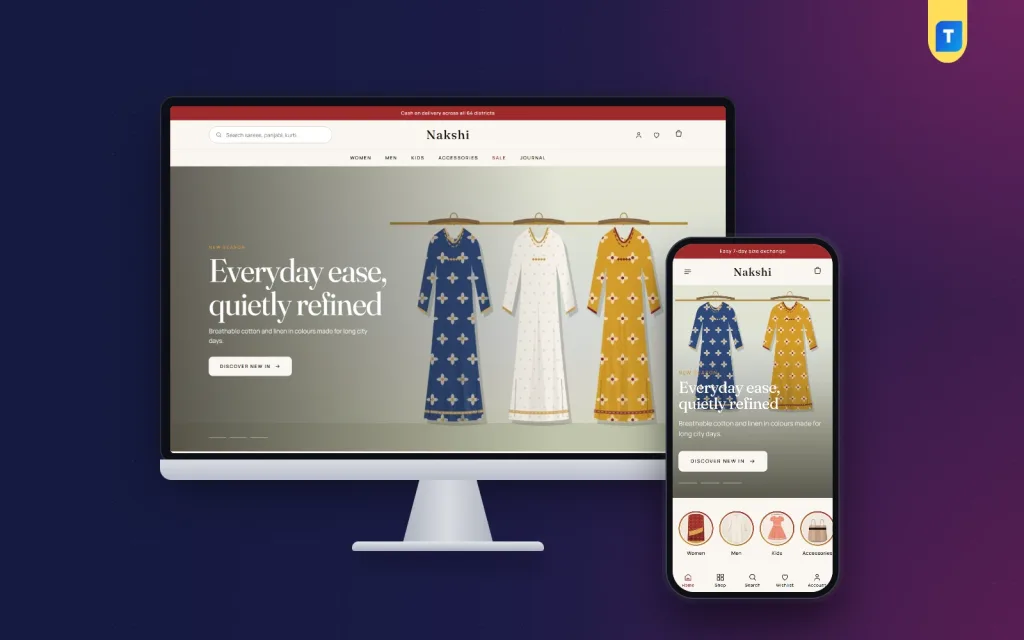
Nakshi – Fashion Store WordPress Theme
✦ Key features
- 15 homepage blocks to hide or reorder
- Shoppable lookbook with dots on the outfit
- Occasion tabs driven by product tags
- Campaign banner that hides after the end date
- Collections mosaic with five tiles
- Six colour sets, from maroon to charcoal
- One-click demo with 40 products and size guides
- Sign in and register in a popup
- bKash, Nagad, SSLCommerz and cash on delivery
- Steadfast and Pathao courier with order tracking
- Themeve Commerce plugin included
- Telegram alerts, SMS and Facebook Pixel
Overview
Nakshi is a fashion store WordPress theme for clothing brands. It has 15 homepage blocks, a shoppable lookbook, occasion tabs, size guides and a one-page checkout with bKash, Nagad and courier tracking, all in one package.
Nakshi is a fashion store WordPress theme for clothing brands that want their shop to look like a magazine and work like a till. It has a shoppable lookbook, occasion tabs, size guides and a checkout that is planned for phones first. You install it, import the demo in one click, add your own pictures and start selling.
The theme comes with Themeve Commerce, our own shop plugin. Cart, checkout, bKash and Nagad payment, courier booking and order tracking are all inside the package. You do not need WooCommerce or a stack of extra plugins to take your first order.
Who can use this fashion store WordPress theme
The demo store is a fashion house with women, men, kids and accessories. That is only an example. Any shop that sells clothes or things worn with clothes can use the same pages. A few common cases:
- Saree, three-piece and kurti boutiques that sell by season
- Panjabi and menswear labels
- Kidswear and baby clothing shops
- Handloom and local craft brands that need room for big pictures
- Shoe, bag, jewellery and scarf stores
- Facebook-page sellers who want a proper website of their own
- Small chains that list a few showrooms on an Our Stores page
It suits brands that sell a story as well as stock. If your photos, colours and collections are what make people choose you, the layout gives them space. If you only compete on a low price, a plainer theme may be enough.
Light pages that open quickly on a phone
Most fashion buyers in Bangladesh browse on a phone, often on a mobile connection. The theme is written with that in mind. Its code is plain PHP, one stylesheet and one script file. The script on the front of the site does not need jQuery. Heavy page builders are not used at all, so there is nothing extra to load before your first photo appears.
- One CSS file and one JS file for the whole front end
- No page builder and no slider plugin
- Google Fonts can be switched off in Theme Options if you prefer system fonts
- Compact product cards, so more of the collection shows per scroll
Front-end features of this fashion store WordPress theme
Header, menu and mobile layout
- A main menu plus two footer menus, Shop and Help
- If the main menu is empty, your product categories fill it for you
- On phones the header shows only the menu button, the logo and the cart
- Product cards stay compact on small screens
- Sign in and register open in a popup, so the shopper keeps their place
Fifteen homepage blocks
The homepage is built from 15 blocks. You can hide any block and move it with drag and drop, or with arrow buttons if you work from a phone. Under Home Layout, each block has an Edit link that jumps to its settings.
- Hero slider with full-width slides, your text on one side and the model on the other
- Category circles
- Just landed row for new pieces
- Collections mosaic with five category tiles in a magazine grid, the first one large
- Women and Men banners for your two main departments
- Occasion tabs that switch the products below them
- Product spotlight with photos, price, sizes and an add-to-bag button
- Shoppable lookbook
- On sale now, Most loved and Top rated product rows
- Campaign countdown banner
- Customer reviews taken from real product reviews
- Promise strip
- Journal posts
A lookbook customers can shop
Upload one styled photo and add dots on the outfit. Each dot is one simple line: left percent, top percent, then a product ID or slug. A shopper taps the dot on a kurti and lands on that kurti. You do not need a page builder or any code.
Occasion tabs that follow your tags
The tabs pull products by product tag. Eid, Boishakh, Wedding or Everyday are just tags you add under Products, Tags. When a new season comes, add a tag and a tab and the block fills itself.
Campaigns that end on time
The campaign countdown is a wide banner for Eid, Puja, Boishakh or a flash sale. If you leave out the end date, the timer stays hidden. Once the end date passes, the whole banner hides itself, so an old offer never stays up by mistake.
Product page and shopping tools
- Size and colour choices on each product
- Size guides, switched on by default
- Wishlist
- Reviews inside a fold, with a popup that invites the first review
- One-page checkout that ends with an Order placed popup
- A Track Order page, so buyers can follow the parcel
- Invoice for every order
Back-end options for your fashion store WordPress theme
Every setting sits under Nakshi, Theme Options, or in the Live Customizer if you like to watch changes as you make them. Settings are grouped into Design, Site, Home page and Shop.
Design and layout
- Six colour sets: maroon, emerald, indigo, rose, saffron and charcoal
- Fine control of every single colour; lines, muted text and tints follow on their own
- Typography and layout settings
- Header, product card, shop page, product page and footer settings
- Footer and contact details
Tools for the settings themselves
- Search box to find any setting
- Reset to defaults
- Export and import of your settings
- Switch to turn Google Fonts off
Running the shop from the dashboard
Products and orders live under a menu called Shop. The Themeve Commerce plugin gives a fashion shop these tools.
Sales and orders
The store dashboard shows today's sales, the last seven days, the month so far and the orders waiting for you, with a two-week sales chart. Each order has a status, a printable invoice and a payments box for advances, dues and refunds. Incomplete Orders lists people who began checkout and left, which is a good list to call after a launch.
Products with sizes and colours
A full-page product editor lets you add a piece with several sizes and colours. Each option keeps its own price, stock, SKU and photo. Categories, brands and tags have their own menus. Occasion tags double as the source for your homepage tabs.
Payments
- Cash on delivery
- bKash and Nagad payment
- Card payment through SSLCommerz
- Manual Send Money for bKash, Nagad, Rocket and Upay, with a transaction ID
- An advance on cash on delivery, as a fixed amount, the delivery charge or a percentage, which cuts down fake orders
Delivery and courier
Set a delivery charge for each district. Send orders to Steadfast or Pathao from the order screen. The COD money screen shows which delivered orders the courier still owes you for.
Customer accounts
Buyers can sign in by password, by a code sent to their phone, or with Google or Facebook. Their account shows orders, delivery progress and the wishlist, and they can send an exchange or return request from it.
Alerts, SMS and protection
- New-order alerts by email, Telegram or WhatsApp
- SMS updates for customers and an automatic review request after delivery
- Phone verification by OTP
- Fake order protection for suspicious cash-on-delivery orders
- SMS campaigns to past buyers when a sale starts
Marketing and reports
- Facebook Pixel with the Conversion API
- Google Analytics 4 and Google Tag Manager
- Product feeds for Facebook and Google shopping
- SEO settings for descriptions, sharing previews and Google product rich results
- Transactions screen with monthly totals
- Customer list grouped as new, repeat, VIP, inactive or risky
Optional modules
Modules keep the plugin light. You switch on only what you use, from one screen.
- Coupons and offers
- Pre-orders for a collection that is still being stitched
- Delivery date and time
- Bulk orders and corporate quotes, for uniforms and gifts
- Reseller and wholesale prices
- Combo and bundle offers
- Flash sale
- Loyalty points with refer a friend
- Upsell and cross-sell
- Recently viewed products
- Back in stock alerts
- Exchange and returns
- Store locations
- Sales and signup popups
- Affiliate program with commissions
- Marketplace module
Support tickets, testimonials and offers have their own menus. Developers also get a REST API with signed webhooks.
How it helps you sell clothes
A good fashion store WordPress theme should save you time every week, not just look nice on launch day. Here is how the parts work together in daily use.
- Run a launch. Add the new pieces, tag them with the occasion, put the best look in the lookbook and set the campaign date. The homepage updates itself.
- Cut returns. Size guides and clear size choices help buyers pick the right fit the first time.
- Recover lost carts. Check Incomplete Orders and send a message to people who left at checkout.
- Take orders from social pages. Share product links on Facebook and track the results with the Pixel.
- Keep stock honest. Each size and colour has its own stock count, so you do not sell what you cannot ship.
Because the fashion ecommerce website runs on one plugin, you learn one dashboard. Staff who pack parcels see orders and invoices. A fashion ecommerce website is easier to manage when every task has one clear screen. You see sales, customers and money owed by the courier.
Set up in a few steps
- Install the theme and activate it in WordPress.
- Open Nakshi, Setup, and install the bundled Themeve Commerce plugin in one click.
- Activate your licence under Nakshi, License.
- Run the one-click demo import to get products, pages, menus and sample content.
- Choose one of the six colour sets and adjust fonts.
- Replace the demo products with your own photos, prices and sizes.
- Switch on your payment methods and set delivery charges.
- Hide the homepage blocks you do not need and put the rest in order.
Why choose it over a plain template
A plain template gives you a nice front page and leaves the shop to you. You then add plugins for cart, payment, courier, SMS and tracking, and hope they get along. Nakshi puts the front end and the shop engine in one package. The pages were designed with the plugin, so the cart, popups and tracking page match the rest of the site.
- Payment methods people in Bangladesh actually use are included
- Two local couriers are connected from the order screen
- Fashion-specific blocks such as the lookbook and occasion tabs are ready
- No page builder licence to buy
- Settings are in one place, with search, reset, export and import
It is also honest about what it does not do. This fashion store WordPress theme is made for a clothing and accessories shop. For a store with a very different catalogue, you can still use it, but the fashion blocks will mean less to you.
What is included
- Nakshi theme, version 1.2.0
- Themeve Commerce plugin, installed from the Setup page
- One-click demo content: 40 products with sizes and colours, size guides, occasion tags, a lookbook, a campaign banner, journal posts, menus and every page
- Pages for Our Story, Size Guide, Shipping and Delivery, Exchange and Returns, Our Stores, Journal, Track Order and Wishlist
- Documentation
- Updates through your Themeve account, with support for 6 months
It needs WordPress 6.0 or higher and PHP 7.4 or higher, and has been tested up to WordPress 7.1. The demo store is called Nakshi Fashion House. Every name and picture in it is a sample for you to replace.
If you sell mostly sarees and handloom, look at Tanti. If you sell women's wear only, Ura is a close cousin. For a full clothing label with a story to tell, Nakshi is the fashion store WordPress theme to start with.
You can see Nakshi working on the live demo, and browse more ready-made designs in our WordPress themes collection.
Reviews
0.0
Write a review
★★★★★
0 reviews from buyersNo reviews yet — be the first to share your experience after buying.
Frequently Asked Questions
01What is the best fashion store WordPress theme for a clothing brand with big photos?
Nakshi is made for that. It has a hero slider, a collections mosaic and a shoppable lookbook that give photos room, plus size guides and a phone-first checkout.
02Can I use this fashion store WordPress theme for shoes, bags or kidswear?
Yes. The demo shows clothes, but any shop that sells items worn with clothes can use the same blocks. Rename categories and replace the products.
03Do I need WooCommerce?
No. Themeve Commerce is included and installs in one click from the Setup page. It runs the cart, checkout, payments and tracking.
04How do the occasion tabs choose products?
Each tab shows products with a tag you pick. Tag Eid pieces with eid and point the Eid tab at that tag.
05What happens to the campaign banner when the sale ends?
After the end date the whole banner hides itself. If you leave the end date empty, the banner stays but the timer is hidden.
06Which payments and couriers work?
bKash, Nagad, SSLCommerz, manual Send Money and cash on delivery. Parcels can go out with Steadfast or Pathao.
07Can I build a fashion ecommerce website without coding?
Yes. Every block, colour and menu is set from Theme Options or the Live Customizer. Lookbook dots are plain lines of numbers and a product slug.
Delivery & Support
1Place your orderAdd to cart, sign in and pay with bKash, Nagad or Rocket.
2Payment verified automaticallyEnter your Transaction ID — the payment is matched automatically, usually within seconds.
3Get your productYour license key and download appear in My Account → Licenses.
- Secure automatic payment verification
- Delivery to your account & e-mail
- Friendly WhatsApp support
Refund Policy
This policy applies to every product in our store.
You get a refund when the product does not work as described and we cannot fix it, when your license will not activate your website, or when a manually delivered product is late and you cancel before delivery. A working license, or a single license already used on a live domain, is not refundable. Approved refunds go back to the number you paid from within one working day, minus the Send Money charge.
More items
View all →You may also like
−38%
 −27%
−27%
 −29%
−29%
Grocery
Mouchak – Grocery Website Template WordPress for Honey & Healthy Food
৳2,500
৳3,500Save −29%
 −25%
−25%
