 −14%
−14%
Shobar – Family Clothing WordPress Theme
 −20%
−20%
✦ Key features
- Dress the whole family planner with total
- Match the family on every product page
- Three price tiers as tabs
- Shop by need: plus sizes, elders, school, winter
- Who-it-is-for chip on every card
- Four photo angles, fit meter, delivery date
- 24 homepage blocks, 17 on by default
- Phone-friendly Theme Options dashboard
- 37-product demo with matching family sets
- bKash, Nagad, SSLCommerz and cash on delivery
- Steadfast and Pathao courier with order tracking
- Sign in and register in a popup
Overview
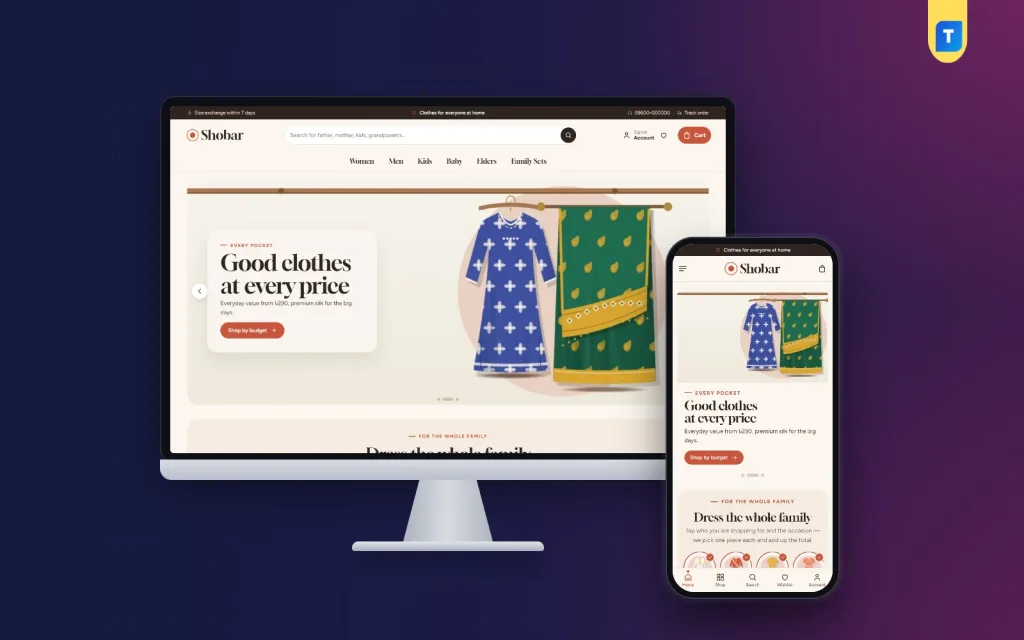
Shobar is a warm family clothing WordPress theme with a Dress the whole family planner, three price tiers, matching family sets and Match the family on every product page.
Shobar means “for everyone”, and this family clothing WordPress theme is made for shops that dress three generations: father, mother, son, daughter, baby and grandparents. It covers Eid, weddings, every day and winter, at every budget. Terracotta, sage and cream with Gloock headings give the store a homely, trusted feel, like the family tailor down the road.
Shopping for the whole family, made calmer
Buying clothes for six people is a list, not a single purchase. Most stores make that hard. Shobar is a family clothing WordPress theme that starts from the list.Dress the whole family
The planner shows member chips for father, mother, son, daughter, baby, grandpa and grandma, plus occasion tabs. A shopper taps who they are buying for and the occasion. The page then shows one best-selling pick for each person, with the total for everyone chosen. Members and occasions are simple product tags, set in Theme Options. Tag your products once and the planner fills itself. In a family clothing WordPress theme, this is the block that turns a browse into a basket.Match the family on every product
On each product page, “Match the family” shows pieces for the same occasion for the other members. A mother looking at her Eid three-piece sees the matching panjabi for her husband and frocks for her daughter, right there.Prices for every pocket
Families shop on a budget, and the budget changes by occasion. The “Every pocket” block shows three price tiers as tabs: everyday value, smart picks and premium. Each tab has a short note and eight best sellers in that range. You choose the names and limits in Theme Options. A “Matching family sets” block adds a banner with sets, and “Shop by need” gives four cards for plus sizes, elders, school and winter. Those four needs come up again and again at any family counter.Seventeen blocks on, seven in reserve
The family clothing WordPress theme has 24 homepage blocks; 17 are on after import. Turn any of them off, or drag them into a new order. On phones, arrows move them. The hero slider has wide slides and a warm text card, and the dress the whole family and every pocket blocks are on from the start. Shop by category uses round tiles, while new arrivals fill two rows. For every occasion brings four occasion cards, and family favourites sit in tabs by department. Three departments and matching family sets are on too, along with weekly deals with a countdown and stock bars. Shop by need, loved by families, our makers, family notes and a promise strip complete the seventeen. In reserve: our promise, quick links, promo cards, a trending row, brand spotlight, shop by price and a “more to explore” grid.The product page and the checkout
Every card has a cream photo well, a who-it-is-for chip such as “Father · M–3XL” or “Baby · 0–24 m”, serif prices and a soft outline Add to cart. On phones the cards are compact, and the header keeps to menu, logo and cart. The product page shows four angles (front, back, folded and close-up), the size guide beside the sizes, a fit meter and a delivery date. Reviews sit in a fold, with a popup inviting the first review. Sign in and register open in a popup. Shoppers can keep a wishlist, pay on a one-page checkout and see an “Order placed” popup, then follow the parcel on the Track Order page.Payments and delivery
This family clothing theme runs on the Themeve Commerce plugin, installed for you. It accepts bKash, Nagad, SSLCommerz, cash on delivery and manual payment, ships with Steadfast or Pathao courier, and adds coupons, invoices, SMS and OTP, Telegram alerts for new orders and Facebook Pixel with the Conversion API. Orders appear under Shop in the dashboard.Make the family clothing WordPress theme your own
Shobar → Theme Options opens with Homepage layout, then Colors, Typography & style, Header & menu, Product cards, the hero slider, a section for the family planner, price tiers and sets, product sections, Product page and Footer & contact. If you update the shop from your phone, the dashboard is ready for it. Save and Sections sit in a bottom bar, the section list slides up as a sheet, and previous and next buttons step through settings. Choose a palette (Terracotta & sage, Indigo & marigold, Rose & olive, Teal & sand or Cocoa) or set each colour yourself. Font pairs: Gloock with Figtree, Lora with Figtree, DM Serif Display with DM Sans, or Nunito. Search, export, reset and Google Fonts on or off are all there.Inside the download
Inside the download you will find Shobar with Setup, Theme Options, Live Customizer, Menus, Demo Import and License, plus Themeve Commerce, installed in one click from Shobar → Setup. The “Shobar — Family Clothing House” demo holds 37 products from 6 makers plus matching family sets, menus and pages like Family Notes, Exchange and Our Stores. All maker names are invented samples, and the theme is for WordPress 6.0 and up (tested up to 7.1) with PHP 7.4+. Running a bigger store with six departments? Poshak is built for that scale. Focused on Eid and wedding season? See Mela. For a family shop that knows every customer by name, Shobar is the family clothing theme that feels like home.Reviews
0.0
Write a review
★★★★★
0 reviews from buyersNo reviews yet — be the first to share your experience after buying.
Frequently Asked Questions
01How does the family planner choose products?
Members and occasions are product tags. When a shopper picks people and an occasion, the planner shows one best-selling tagged piece for each person and the total.
02Can I rename the three price tiers?
Yes. The tier names and price limits are set in Shobar → Theme Options. The demo uses everyday value, smart picks and premium.
03What does “Match the family” on the product page show?
Pieces for the same occasion meant for the other family members, so a shopper can complete the family look from one page.
04Do you include grandparents and babies?
Yes. The planner has chips for grandpa, grandma and baby, and “Shop by need” has a card for elders.
05Which payments can I accept?
bKash, Nagad, SSLCommerz, cash on delivery and manual payment. Orders ship with Steadfast or Pathao courier.
06Is the store plugin part of the theme?
Yes. Themeve Commerce is bundled and installs from Shobar → Setup with one click.
07Can I edit settings from my mobile?
Yes. Theme Options has a phone layout with a bottom bar for Sections and Save, a section sheet and previous and next buttons.
08Will I need to write code?
No. Everything from homepage order to colours, fonts and footer is set in Theme Options, and the logo goes in Appearance → Customize → Site Identity.
Delivery & Support
1Place your orderAdd to cart, sign in and pay with bKash, Nagad or Rocket.
2Payment verified automaticallyEnter your Transaction ID — the payment is matched automatically, usually within seconds.
3Get your productYour license key and download appear in My Account → Licenses.
- Secure automatic payment verification
- Delivery to your account & e-mail
- Friendly WhatsApp support
Refund Policy
This policy applies to every product in our store.
You get a refund when the product does not work as described and we cannot fix it, when your license will not activate your website, or when a manually delivered product is late and you cancel before delivery. A working license, or a single license already used on a live domain, is not refundable. Approved refunds go back to the number you paid from within one working day, minus the Send Money charge.
More items
View all →