Running a family clothing store online is a different job from selling for one type of customer. On a single order, a mother may want a three-piece for herself, a panjabi for her husband, a frock for her daughter, a romper for the baby and something warm for her own mother. This guide is for Bangladeshi shop owners who already dress whole families at a local counter and want to do the same on the web, and for freelancers who build such shops.
The good news is that family buyers spend more per order and come back every season. The hard part is keeping a wide range in order: sizes from 0 to 24 months up to 3XL, budgets from everyday to wedding wear, and occasions that change through the year. Below we look at how to organise that range, how to price it, how to deliver it, and how a theme built for families helps you run it day to day.
The example we use is Shobar – Family Clothing WordPress Theme. Shobar means for everyone, and the theme is made for shops that dress three generations: father, mother, son, daughter, baby and grandparents, for Eid, weddings, every day and winter. First, the groundwork that any family shop needs before it opens its doors online.
What Makes a Family Clothing Store Different
A family buyer does not shop for an item. They shop for a list. Before Eid, that list might have six names on it, each with a different size and budget. A store that makes them search six times, in six categories, wears them out long before checkout. The more you can show pieces for several people together, the bigger and easier each order becomes.
Age groups also bring their own questions. Parents ask about soft fabric and easy buttons for babies, school-going children need durable pieces in standard colours, and elders often want looser cuts, plus sizes and modest designs. A family clothing store that answers these questions on the right pages earns trust from every generation in the house, and that trust is what brings the next Eid order.
Planning a Range for Every Age and Budget
Departments that match the household
Organise the shop the way families think: Women, Men, Kids, Baby and Elders, with a separate place for family sets. Inside each department, keep sub-groups short, such as panjabi, shirts and pants for men or frocks and tops for girls. Write size charts per department, because a baby size runs in months and an adult size in letters. Mark each product clearly with who it is for so nobody orders a teen size for a toddler.
Three budgets, not one
Families stretch their money differently for different occasions. The same parents who buy budget everyday wear for the children may spend more on a wedding outfit. Plan three price bands, such as everyday value, a middle range and premium, and stock each department in all three. That way a buyer always finds something for every family member within the amount they planned to spend.
An occasion calendar
Mark the two Eids, Pohela Boishakh, puja, the wedding months, school reopening and winter on your calendar. Each season needs stock across all ages, so order fabric and finished pieces early. Matching sets for parents and children sell especially well before Eid, and winter brings demand for shawls and warm pieces for elders.
Running a Family Clothing Store Online With Shobar
Shobar uses terracotta, sage and cream with Gloock headings, which gives the store a homely, trusted feel. Its main tool is a planner called Dress the whole family. It shows member chips for father, mother, son, daughter, baby, grandpa and grandma, plus occasion tabs. A shopper taps who they are buying for and the occasion, and the page shows one best-selling pick for each person, with the total for everyone chosen.
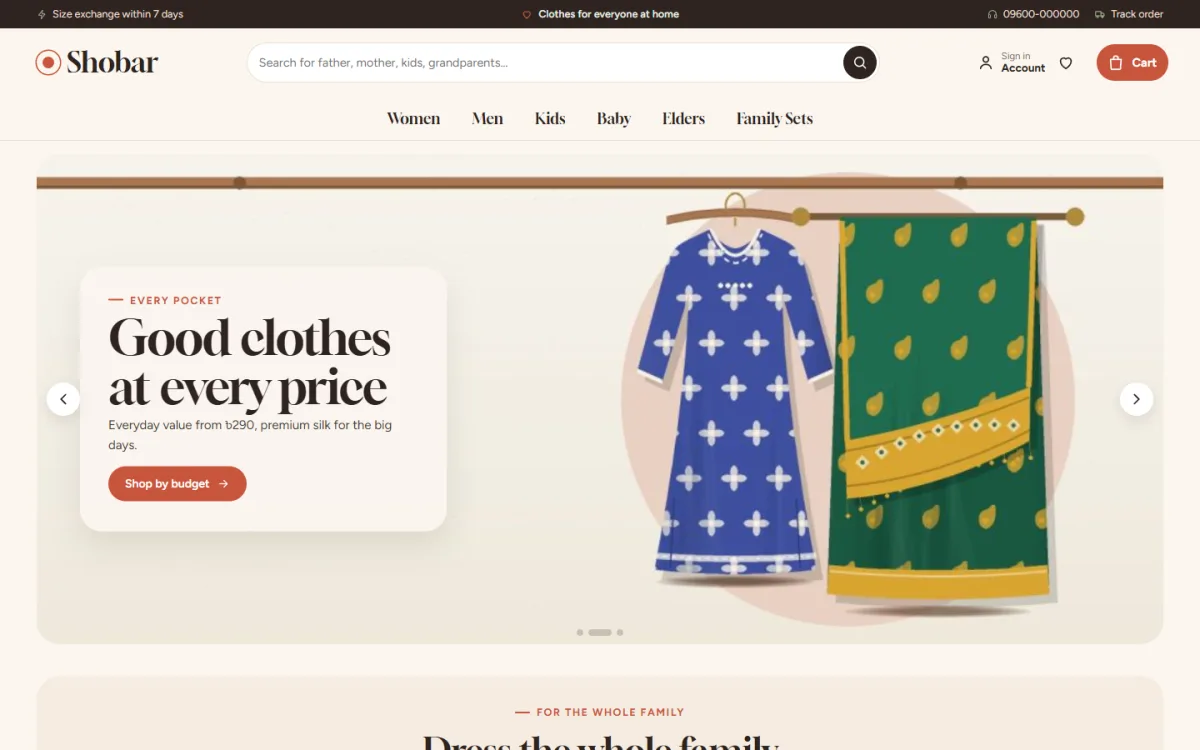
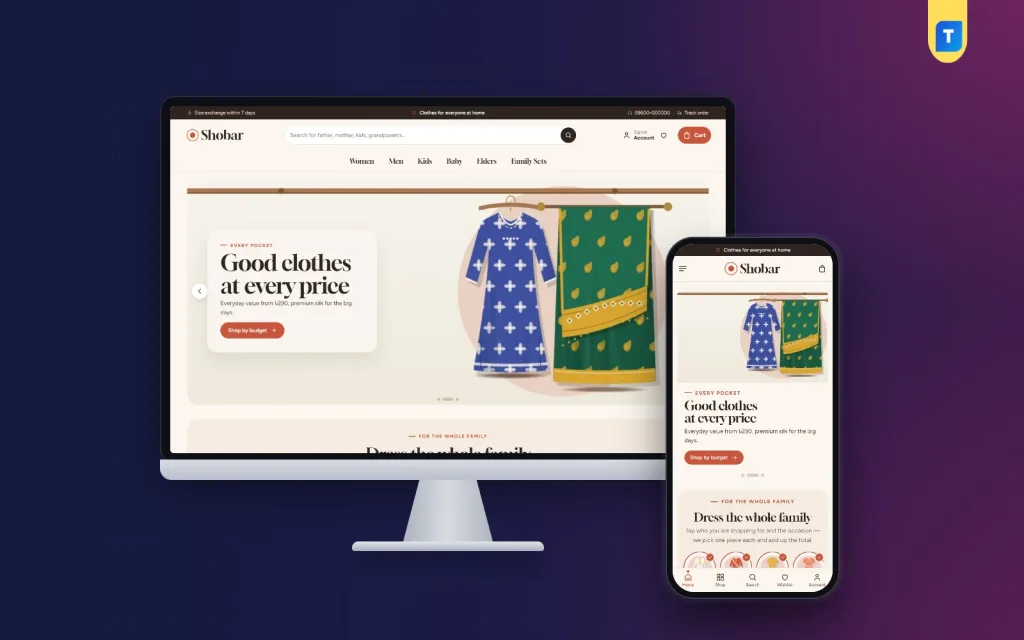
The desktop screenshot shows how the demo greets a family buyer. The search box suggests father, mother, kids and grandparents, and the menu reads Women, Men, Kids, Baby, Elders and Family Sets. The hero slide, labelled every pocket, shows garments hanging on a wooden rail beside a Shop by budget button, and the Dress the whole family block begins just below it.
Behind the planner, members and occasions are simple product tags set in Theme Options. Tag your products once and the planner fills itself. On every product page, Match the family shows pieces for the same occasion for the other members, so a mother looking at her Eid three-piece also sees a matching panjabi for her husband and a frock for her daughter.
Price tiers, family sets and shop by need
The Every pocket block shows three price tiers as tabs: everyday value, smart picks and premium. Each tab has a short note and eight best sellers in that range, and you choose the names and limits yourself. A Matching family sets block adds a banner with sets, and Shop by need offers four cards for plus sizes, elders, school and winter. These four needs come up again and again at any family counter.
Product Cards, Pages and the Phone View
Every card has a cream photo well, a who-it-is-for chip such as Father with M to 3XL or Baby with 0 to 24 months, serif prices and a soft outline Add to cart. The product page shows four angles (front, back, folded and close-up), the size guide beside the sizes, a fit meter and a delivery date. Reviews sit in a fold, with a popup inviting the first review when a product has none yet.
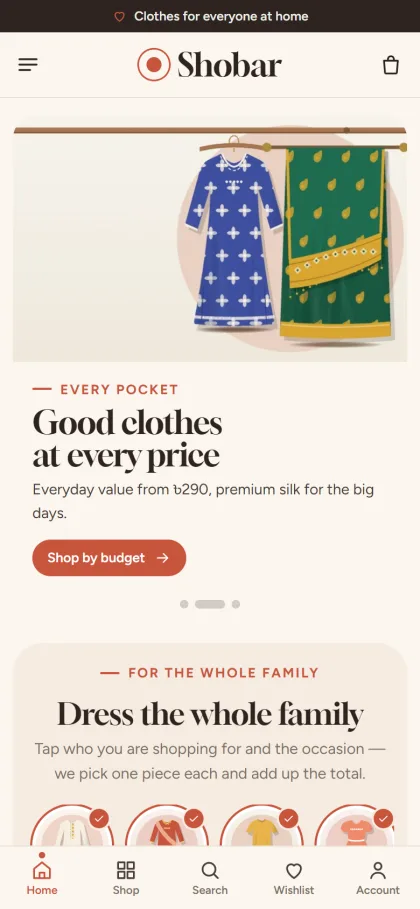
On phones, cards stay compact and the header keeps to menu, logo and cart. The mobile screenshot of the demo shows the planner with round member pictures ticked as selected, and a bottom bar with Home, Shop, Search, Wishlist and Account. Shoppers sign in from a popup, keep a wishlist, pay on a one-page checkout, see an Order placed popup and then follow the parcel on the Track Order page.
Owners who update their shop from a phone are covered too. In Theme Options on a phone, Save and Sections sit in a bottom bar, the section list slides up as a sheet, and previous and next buttons step through settings. For a busy shopkeeper who checks orders between customers at the counter, that matters more than it sounds.
Setting Up and Customising the Shop
Shobar is for WordPress 6.0 and up, tested up to 7.1, with PHP 7.4 or newer. Add the theme via Appearance, Themes, Add New, Upload Theme, then activate it. Open Shobar, Setup to install the bundled Themeve Commerce plugin in one click, and add your licence from your Themeve account in Shobar, License. The WordPress documentation helps with menus, pages and the logo in Site Identity.
Load the Family Clothing House demo from Shobar, Demo Import. It holds 37 products from 6 makers plus matching family sets, menus and pages like Family Notes, Exchange and Our Stores. All maker names are invented samples, so swap them for your own suppliers or your own label. Then set family members, occasions, price tiers and the palette in Theme Options. Palettes include Terracotta and sage, Indigo and marigold, Rose and olive, Teal and sand, and Cocoa.
The homepage has 24 blocks, and 17 are on after import, including round category tiles, new arrivals, four occasion cards, family favourites in department tabs, three departments and weekly deals with a countdown and stock bars. Turn any of them off or drag them into a new order. Before buying, try the planner in the live demo and look through the demo dashboard where orders appear under Shop.
Payments, Delivery and Daily Running
Shobar runs on the Themeve Commerce plugin. It accepts bKash, Nagad, SSLCommerz, cash on delivery and manual payment, ships with Steadfast or Pathao courier, and adds coupons, invoices, SMS and OTP, Telegram alerts for new orders and Facebook Pixel with the Conversion API. For a family shop, Telegram alerts are handy during Eid week, when orders arrive late at night.
Family orders are often large, which raises the risk with cash on delivery. Call to confirm orders with many items, and consider asking for the delivery charge in advance. Pack each family member's pieces in a separate bag with a name label, so the parcel opens neatly at home. Keep an exchange process that is simple, because with six sizes in one order, at least one may need changing.
On Facebook, show whole families in your photos and posts. A picture of parents and children in matching Eid sets does more than six separate product photos. Send ads to the family sets page or a single occasion rather than the homepage, and write captions that mention who each piece is for. Many parents read Bangla captions more comfortably, so keep both languages in mind.
Mistakes Family Shops Should Avoid
The biggest mistake is running out of the in-between sizes. Children grow fast, and a missing age band loses the whole family order, not just one item. Keep a small buffer in every size, especially before Eid. Another mistake is mixing all ages in one long product list without clear labels, which leaves parents guessing who a piece is for.
Owners also forget elders and plus sizes, even though these buyers are often the most loyal once they find clothes that fit. Finally, do not launch with every homepage block switched on and demo products still visible. Start with the planner, the price tiers and the family sets, then add more as your range grows and you have real photos to fill each section.
Frequently Asked Questions
How does the family planner choose products?
Members and occasions are product tags. When a shopper picks people and an occasion, the planner shows one best-selling tagged piece for each person and the total. The more carefully you tag new stock, the better the suggestions become for every family that visits.
Can I rename the three price tiers?
Yes. The tier names and price limits are set in Shobar, Theme Options. The demo uses everyday value, smart picks and premium, but you can match the names to how your own customers describe their budgets.
Does a family clothing store online need a separate kids theme?
No. Shobar covers babies, children, parents and grandparents in one shop. If you mainly sell everyday basics, compare Shohoj – Basics Clothing WordPress Theme, and for an editorial fashion label see Nakshi – Fashion Store WordPress Theme.
A Shop That Dresses the Whole House
A successful family clothing store online works like the trusted tailor down the road: it knows every member of the household, has something for every budget and gets the Eid order right first time. Plan your departments, sizes, price bands and seasons, then give families a quick way to shop together. To bring that counter to the web, start with Shobar – Family Clothing WordPress Theme and set up your first family planner.