A good pharmacy website template can turn the medical store on your corner into a shop your regular customers also use from their sofa. This guide is for family chemists who know their customers by name, second-generation owners taking over a parent's shop, and freelancers who set up stores for them. It covers what to prepare, which features actually help a local pharmacy, and how to run deliveries and payments without losing the personal touch.
Neighbourhood pharmacies already have something big online stores struggle to build: trust. The uncle who collects the same blood pressure tablets every month, the young mother picking up ORS and baby syrup, the son who orders for parents living alone. Going online should keep those people close, not replace them with a cold catalogue. Done well, a website simply makes the next visit easier.
Our example is Sustho – Family Pharmacy WordPress Theme, made for exactly this kind of shop. It is warm rather than clinical, with honest prices, a tool for comparing companies' versions of the same generic and a monthly refill calculator. Before we look inside it, let us think about what your shop needs.
Why a Neighbourhood Medical Store Should Go Online
A medical store website saves your regular customers a trip and saves you a phone line full of the same questions. Elderly customers on long-term diabetes or heart medicines can reorder without standing in a queue. Busy parents can check whether a baby syrup is in stock before leaving home. Family members living in another city or abroad can order for parents and know the shop that will deliver.
The rules stay the same as at your counter. Keep your drug licence valid, have a registered pharmacist check prescriptions, and never send prescription-only medicines without a valid prescription. Rules for online sales can change, so check with the Directorate General of Drug Administration or a lawyer before launch. A website is only an extra door into your shop, and the same standards apply on both sides of it.
What to Look For in a Pharmacy Website Template
For a local chemist, the right pharmacy website template does a few things very well rather than many things badly. It shows the generic name beside every brand, handles different strengths and pack sizes, marks prescription items clearly and adds a medical disclaimer to product pages. It should look friendly on a cheap phone, load quickly on mobile data and make reordering a regular medicine simple for older customers.
Price clarity matters too. Customers often ask which company's paracetamol or metformin costs less, and the honest answer builds loyalty. A template that can lay out the same generic from several companies with a price per unit turns that counter conversation into something people can check themselves, any time of day, without calling you.
Preparing Your Shop Before Going Online
Start with your regulars' medicines
Do not try to upload your whole shelf in week one. Begin with the medicines your regular customers buy every month, such as common diabetes, blood pressure, heart and stomach medicines, plus everyday items like ORS, baby care and vitamins. These products bring repeat orders and teach you how online ordering fits into your counter routine before the catalogue grows.
Tidy your stock list
For each product, write the brand, generic name, company, form, strength, pack size and whether it needs a prescription. Note the units per pack so the site can show a price per unit. If your stock list lives in an old notebook or a billing program, this is a good moment to clean it up, because the same data will serve both your counter and your website.
Decide your delivery area
A neighbourhood pharmacy shines nearby. Decide which roads or areas your own delivery person can reach quickly, and use a courier only for non-urgent items further away. Set clear order cut-off times, explain what happens on Fridays and holidays, and write it all on your delivery page so customers know what to expect before they order.
How Sustho Fits a Family Chemist
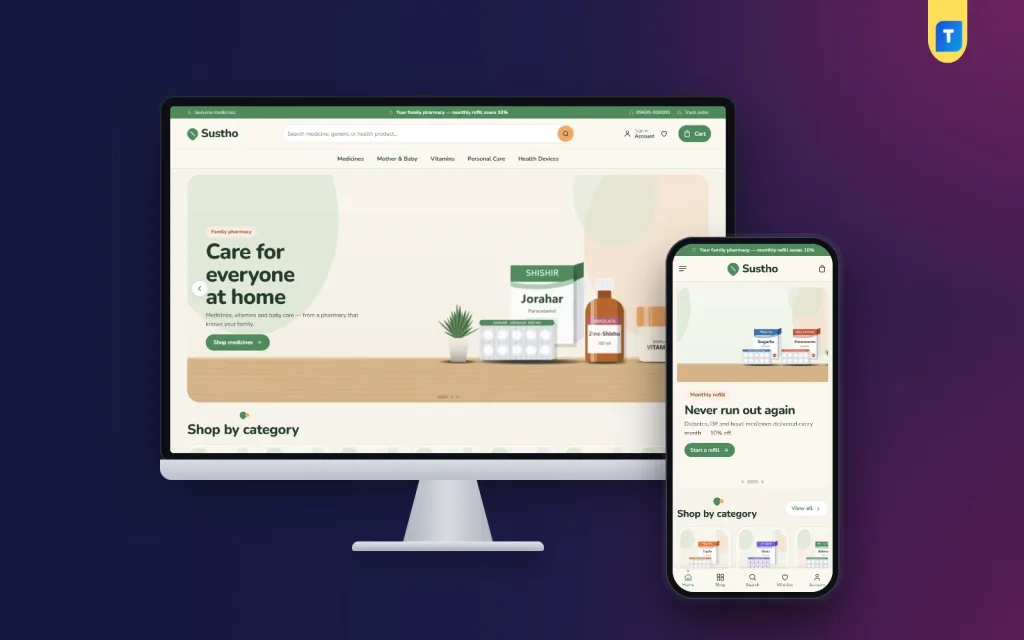
Sustho feels like the shop around the corner. Sage, peach and cream set the tone, Nunito keeps the type soft and readable, and product photos sit on wooden shelves like the real counter. Categories appear as shelf tiles and the footer ends with a gentle curve. The demo is a family pharmacy with 30 products from 6 companies, from paracetamol, omeprazole, cetirizine, metformin and amlodipine to baby syrups, ORS, vitamins, personal care and home devices.

The desktop screenshot of the demo opens with a green top bar of short notes, a phone number and a Track order link; treat that wording as sample text and write your own. The search box asks for a medicine, generic or health product, and the menu reads Medicines, Mother & Baby, Vitamins, Personal Care and Health Devices. The hero, labelled Family pharmacy, shows invented medicine packs on a wooden counter with a Shop medicines button, followed by Shop by category.
Same medicine, better price
This block answers the question regulars ask most. You set generic names as tabs in Theme Options, and every company's tablet or capsule version appears with its pack price and price per unit, cheapest first. The lowest one wears a Best value badge. The block only lays out prices; each product page still carries its own prescription notice and medical disclaimer, so the choice stays with the customer and their prescriber.
Monthly refill
A shopper picks a regular medicine, chooses once, twice or three times a day, and sees how many tablets and packs that adds up to each month, the bill, and the saving from your refill discount. Only products you tag as regular medicines appear, and you set the discount yourself in Theme Options. Customers see the monthly cost before they ever pick up the phone.

The mobile screenshot shows a slide built around refills: Never run out again, for diabetes, BP and heart medicines, with a Start a refill button. Below it, Shop by category tiles show sample medicine packs, some with small Rx marks. The header keeps menu, logo and cart, and a bottom bar shown in the demo offers Home, Shop, Search, Wishlist and Account. Any discount figure on a slide is your own choice to set.
Product pages that respect the rules
Medicines come in strength and pack variations with stepped prices. Rx medicines get a prescription notice, and a facts card shows the generic, company, form and price per unit. A medical disclaimer and an expected delivery date sit there too. Reviews live in a fold with a popup for the first one, and a wishlist keeps items a customer plans to buy next time.
Payments, Delivery and Keeping the Counter in Sync
Checkout fits on one page. Customers sign in or register in a popup, then pay with bKash, Nagad, SSLCommerz, cash on delivery or manual payment. An Order placed popup confirms the order, and the Track Order page shows its progress. For a local shop, cash on delivery and mobile payment will cover most orders, especially from older customers.
The bundled Themeve Commerce plugin handles Steadfast and Pathao courier, coupons and invoices from the Shop menu in your dashboard. SMS and OTP are built in, and new-order alerts arrive on Telegram, so whoever is at the counter can pack the order straight away. Back-in-stock alerts help when a regular medicine runs out, but only if you update stock the moment the last box leaves the shelf.
Setting Up Sustho Step by Step
Sustho needs WordPress 6.0 or newer and PHP 7.4 or newer, tested up to WordPress 7.1. Head to Appearance, Themes, Add New, Upload Theme, pick the Sustho zip and activate it. Open Sustho, Setup to install the bundled plugin in one click, then activate your license in Sustho, License using your Themeve account details. The WordPress documentation helps if menus and pages are new to you.
Import the Family Pharmacy demo from Sustho, Demo Import. It adds 30 products, family health posts, menus and every page, including Delivery, Returns & Refund, FAQ, Our Stores and Track Order. The companies and pictures are invented, so swap in your real stock. In Sustho, Theme Options set your generic tabs, refill discount and colours. Of the 24 homepage blocks, 17 are on by default; drag them into order, or use arrows on a phone.
Five palettes, Sage & peach, Ocean & sand, Rose, Olive and Charcoal, and four font pairs are included. Try the live demo on your own phone, then look through the demo admin to see where orders and products are kept. The demo promise strip says genuine, pharmacist, refill and delivery; rewrite it so it only promises what your shop really does.
Mistakes Local Chemists Make Online
The first mistake is letting the website and the counter drift apart, so the site shows stock you sold yesterday. The second is skipping prescription checks for online orders because the customer is a familiar face. Others include unclear delivery areas, no generic names and a refill discount that is advertised but never applied at checkout. A medical store website earns trust slowly and loses it quickly, so check orders carefully every day.
Frequently Asked Questions
Is a pharmacy website template enough for a small local shop?
Yes, as long as it is built for pharmacies. Sustho already handles generic names, strengths, Rx marks, disclaimers, price compare and refills, and its bundled plugin covers checkout and couriers. Your job is to add accurate products, write honest policies and keep stock up to date.
What does the Monthly refill block calculate?
For a regular medicine and a dose of once, twice or three times a day, it shows tablets and packs per month, the bill and the saving from the refill discount you set. Only products you tag as regular medicines appear, so you stay in control of what is offered.
Can I make the store look more formal?
Yes. Switch to the Charcoal or Ocean & sand palette, set your own colours, or choose the DM Sans or Figtree font pair. The layout stays the same, so you can try a few looks in an afternoon and keep the one that best matches your signboard.
What if I want a clinical store with a symptom finder?
Then look at Arogya – Online Pharmacy WordPress Theme, a cooler, clinical store with a symptom finder and prescription ordering steps. Sustho is the warmer choice for neighbourhood chemists whose business rests on regular family customers, monthly refills and honest prices.
Bringing Your Counter Online
Your neighbourhood shop already has the hardest part, which is trust. A pharmacy website template should protect it with clear prices, honest prescription rules, easy refills and reliable local delivery. Start small with your regulars' medicines, keep stock in sync and answer every message quickly. When you are ready, set up Sustho – Family Pharmacy WordPress Theme and put your own shelves online.