−14%
−14%
Bazer Pro – Grocery Store WordPress Theme
✦ Key features
- Own store plugin, no WooCommerce needed
- One-page checkout with district and thana
- Delivery charge set by area
- bKash and Nagad direct API
- SSLCommerz, cash on delivery, manual TrxID
- Steadfast and Pathao booking
- SMS OTP and fake order blocking
- Incomplete checkout capture
- Product Studio full-page editor
- Live search and instant filters
- Slide-in cart with suggestions
- Flash sale, mega menu and Offer Zone
- One-click demo import
Overview
Bazer Pro is a grocery store WordPress theme with its own store plugin. It gives you a one-page checkout, local payments, courier booking, fake order protection and a full-page product editor, with no WooCommerce needed.
Bazer Pro is a grocery store WordPress theme for shops that sell food and daily needs online. It comes with its own store plugin, Themeve Commerce, so the cart, checkout, payments and courier booking all work without WooCommerce or any extra add-on.
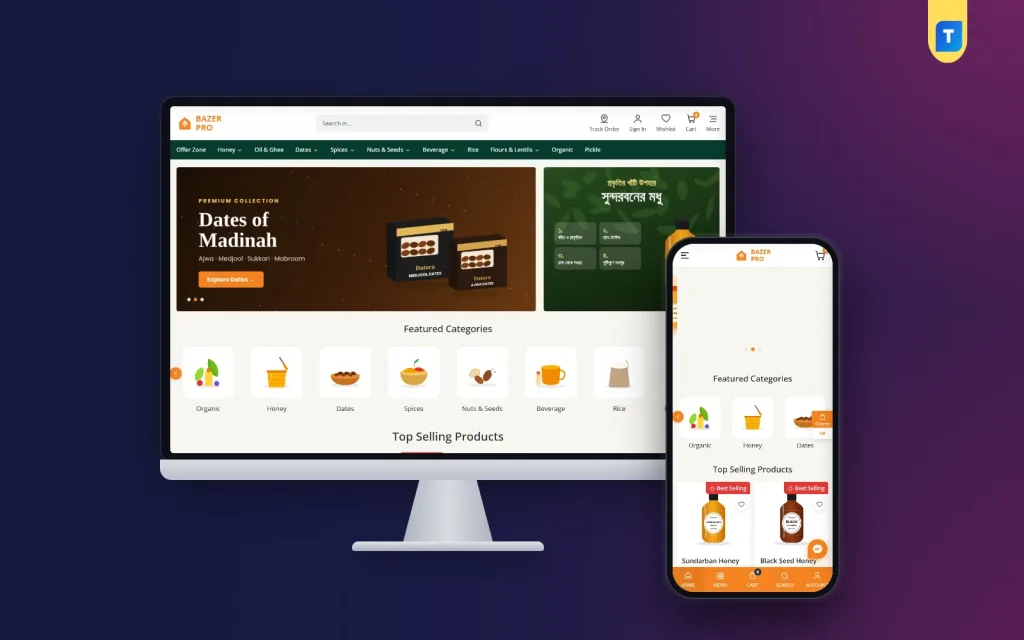
The demo shows an organic shop with honey, dates and spices, but that is only a sample. You can use the theme for a neighbourhood grocer, a dry-food seller, a sweets and snacks shop or a larger store with many departments. Replace the demo products with your own and the site is yours.
Who can use this grocery store WordPress theme
Bazer Pro suits any shop that sells packed goods by weight, size or count. Some examples:
- Organic and natural food shops: honey, ghee, dates, nuts, seeds and cold-pressed oil.
- Neighbourhood grocers and supershops that want to take orders online.
- Spice, rice, flour and lentil sellers with many pack sizes.
- Pickle, sweets, snacks and tea sellers.
- Home-based food brands that sell through Facebook and want their own website.
- Multi-category stores that need a mega menu and an Offer Zone.
- Agencies that build shop sites for local clients and need a ready base.
It also works as a supermarket website template for a bigger store. The mega menu, brand slider and department rows cope with hundreds of products without looking crowded.
If you only need a catalogue with a call button, you can use it that way too. Switch on the payment and courier tools later when you are ready to sell.
Light pages that load quickly on a phone
Most food buyers in Bangladesh shop on a phone, often on a slow connection. A heavy theme costs you orders. Bazer Pro is built to stay light, and that is the first thing a good grocery store WordPress theme should do.
- The front end runs on plain vanilla JavaScript. It does not load jQuery.
- Live search, shop filters and the slide-in cart update parts of the page without a full reload.
- Pages use a small set of theme files rather than a stack of builder add-ons.
- The layout is made for both desktop and mobile, not stretched from one to the other.
Front-end features of this grocery store WordPress theme
Header, menu and search
- Live search that shows matching products while the customer types.
- A mega menu that opens the full category tree, so deep catalogues stay easy to browse.
- An Offer Zone page that gathers every discount in one place.
- On phones, a bottom navigation bar and a floating cart keep the basics one tap away.
Homepage blocks
The demo homepage is built from sections you can use, change or drop:
- Hero slider for your main offers.
- Featured Categories carousel with round pictures.
- Top Selling Products row.
- Our Brands slider.
- Product rows for any group you like, such as honey, dates, cooking essentials or certified organic items.
- Flash Sale block with a countdown timer.
- Just For You grid with a Load More button.
- Customer testimonials.
Shop pages and product cards
- Filters for category, price range, brand and badges, with results that update instantly.
- An add-to-cart stepper on every card, so a buyer can pick two jars without opening the product.
- Badges such as Best Selling, New Arrival and Hot Deal.
- Size and weight options, handy when one product comes in 250 g, 500 g and 1 kg packs.
- Customer reviews with photos, which help new buyers trust an unfamiliar brand.
- WhatsApp and Call for Order buttons for people who prefer to talk first.
- A wishlist to keep favourites ready for the next order.
Cart and checkout
- A slide-in cart with You May Also Like suggestions, an easy way to add spices to a honey order.
- One-page checkout asking for name, phone, address, district and thana.
- Delivery charge worked out on its own for Inside Dhaka, Dhaka Sub Area and Outside Dhaka.
- Promo codes shown on the page, ready to apply with one tap.
- A Place Order button that stays pinned on mobile.
- An Order Placed confirmation and a tracking page with a timeline and order summary.
- A Pay Remaining Amount button on the tracking page for online payment after ordering.
Customer account
- Orders, tracking, addresses, wishlist, coupons and support tickets in one account area.
- Sign in with a mobile OTP, an email OTP, Google or Facebook.
Back-end options in the WordPress dashboard
Themeve Commerce is installed with one click and adds a Shop area to your dashboard. Everything below is managed there, with no code.
Sales overview and orders
- Store dashboard with today's sales, the last seven days, the month so far and orders waiting for you, plus a two-week sales chart.
- Order screens with statuses and printable invoices.
- A payments box on each order that records advances, remaining dues and refunds.
- Incomplete Orders: checkouts saved as soon as a phone number is typed, so your team can call and close the sale.
Product Studio
Products are added in Product Studio, a full-page editor.
- Drag-and-drop images.
- Size and weight options, each with its own price, stock and SKU.
- A live product-card preview, so you see the card before it goes live.
- An SEO preview and a readiness score that shows what is still missing.
- Separate menus for categories, brands and tags.
Payments
- Cash on delivery, with an optional advance as a fixed amount, the delivery charge or a percentage.
- bKash and Nagad through their direct API.
- SSLCommerz for cards, mobile banking and net banking.
- Manual Send Money for bKash, Nagad, Rocket and Upay, matched by transaction ID.
- A Transactions screen listing every payment and refund with monthly totals.
Delivery and courier
- Delivery charge per district, plus extra zones for areas you serve with your own rider.
- Booking with Steadfast or Pathao straight from the order screen, with a courier automation setting.
- The tracking link is shared with the customer, who can follow the parcel alone.
- A COD money screen showing what the courier still owes you, with import of their payment sheet.
Fake order protection and alerts
- SMS OTP phone verification.
- Order limits per phone number.
- Block lists for phone numbers and IP addresses.
- New-order alerts by email, Telegram or WhatsApp.
- SMS updates to customers, an automatic review request after delivery and SMS campaigns to past buyers.
Marketing, SEO and customers
- Coupons with public promo codes, flash-sale countdowns and product badges.
- Facebook Pixel with Conversion API, Google Analytics 4, Google Tag Manager and product feeds for Facebook and Google.
- SEO settings for descriptions, sharing previews and Google product rich results.
- A customer list that groups buyers as new, repeat, VIP, inactive or risky.
- Menus for support tickets, testimonials and offers.
Optional modules
A Modules screen lets you switch on only what you use, which keeps the shop light.
- Pre-orders and Delivery Date and Time.
- Bulk Order and Corporate Quotes.
- Reseller and Wholesale Prices.
- Combo and Bundle Offers, Flash Sale, Upsell and Cross-sell.
- Loyalty Points with refer a friend, and an Affiliate Program.
- Recently Viewed, Back in Stock Alerts, Exchange and Returns.
- Store Locations, Sales and Signup popups, and a Marketplace module.
- A REST API with signed webhooks for developers.
How a grocery store WordPress theme helps you sell more
Food shoppers reorder. They buy the same honey every month and compare weights before they pay. The theme puts best sellers, categories and reviews near the top, and the cart stepper makes a repeat order quick.
The checkout is built for local delivery. Asking for district and thana sets the right charge before the buyer pays, so there are fewer arguments by phone later. Cash on delivery with an advance cuts fake orders, and the saved incomplete checkouts give your team a call list every morning.
Weights are a daily job in a food shop. With size options and the live card preview, you can list a spice in four pack sizes in a few minutes and see how it will look.
Set up in a few steps
- Install the theme in WordPress and activate it.
- Add Themeve Commerce with one click from the setup screen.
- Activate your licence to receive updates inside the dashboard.
- Run the one-click demo importer to load the sample shop.
- Set your logo, colours and delivery charges.
- Delete the sample items and add your own products in Product Studio.
- Turn on your payment methods and connect Steadfast or Pathao.
Why choose it over a plain template
A simple supermarket website template gives you a design and little else. You then add a shop plugin, a payment plugin, a courier plugin and an SMS plugin, and hope they work together. Each one needs updates and can clash with the others.
Bazer Pro puts those parts in one package built for this theme. The design and the store logic are made together, so the cart, the filters and the checkout match the layout. The Themeve Commerce plugin runs only with Themeve themes, so it cannot be mixed with an unrelated design by mistake.
- One package instead of five plugins from five authors.
- Local payments and couriers already built in.
- Fake order tools and incomplete order capture included.
- A live preview in the product editor.
- Updates delivered inside the WordPress dashboard for licensed customers.
Requirements
- WordPress 6.0 or newer.
- PHP 7.4 or newer.
- Tested with recent WordPress releases.
What is included
- The Bazer Pro 1.4.0 theme files.
- The Themeve Commerce plugin.
- A one-click demo with sample products, pages and menus.
- Documentation to follow during setup.
- Automatic updates for licensed customers.
A supermarket website template is only useful if the owner can run it alone. Bazer Pro keeps daily work in plain screens: add a product, check an order, print an invoice, book a courier. Most owners learn it in an afternoon, and the documentation covers the rest.
The theme also helps with the small habits that build a food brand. Put your certificate or sourcing story on a page, show photo reviews on the product, and keep the Offer Zone fresh each week. Buyers who see the same shop doing these things start to trust it.
If you want a different look for your food shop, Themeve also sells two other grocery themes, Tazaa and Mudi. Bazer Pro is the grocery store WordPress theme for a broad catalogue with a strong offer section and a courier-ready checkout.
You can see Bazer Pro working on the live demo, and browse more ready-made designs in our WordPress themes collection.
Reviews
0.0
Write a review
★★★★★
0 reviews from buyersNo reviews yet — be the first to share your experience after buying.
Frequently Asked Questions
01Is Bazer Pro a good grocery store WordPress theme if I do not sell organic food?
Yes. The demo shows organic honey, dates and spices, but you can sell rice, snacks, tea, household goods or any packed product.
02Can I use this grocery store WordPress theme without WooCommerce?
Yes. The Themeve Commerce plugin handles products, cart, checkout, orders, coupons, payments and courier booking.
03Can I use the Themeve Commerce plugin with another theme?
No. The theme and the plugin are made to work together with Themeve themes.
04How is the delivery charge worked out?
Checkout asks for district and thana and sets the charge for Inside Dhaka, Dhaka Sub Area or Outside Dhaka.
05Which payment methods can customers use?
Cash on delivery, bKash and Nagad through direct API, SSLCommerz, and manual bKash, Nagad, Rocket or Upay with a transaction ID.
06How does it help with fake orders?
You can verify phone numbers with SMS OTP, limit orders per number and block numbers or IP addresses. Incomplete checkouts are saved for follow-up calls.
07How do I add products with weights and sizes?
Use Product Studio. It has size and weight options, drag-and-drop images, a live card preview and an SEO preview.
08How do updates arrive?
Licensed customers get updates inside the WordPress dashboard.
Delivery & Support
1Place your orderAdd to cart, sign in and pay with bKash, Nagad or Rocket.
2Payment verified automaticallyEnter your Transaction ID — the payment is matched automatically, usually within seconds.
3Get your productYour license key and download appear in My Account → Licenses.
- Secure automatic payment verification
- Delivery to your account & e-mail
- Friendly WhatsApp support
Refund Policy
This policy applies to every product in our store.
You get a refund when the product does not work as described and we cannot fix it, when your license will not activate your website, or when a manually delivered product is late and you cancel before delivery. A working license, or a single license already used on a live domain, is not refundable. Approved refunds go back to the number you paid from within one working day, minus the Send Money charge.
More items
View all →