 −40%
−40%
 −42%
−42%
✦ Key features
- Web installer in cPanel, no terminal or SSH
- Lab worklist from sample collection to delivery
- Barcode tube labels for every bill
- H/L flags with male and female ranges
- Pathologist verification before any report is ready
- A4 reports with a QR authenticity check
- Report-ready SMS and online report download
- Imaging templates from X-ray to MRI
- Referral commission statements and payout vouchers
- Doctor chambers, serials and Bangla prescriptions
- Pharmacy POS, accounts and 9 printable reports
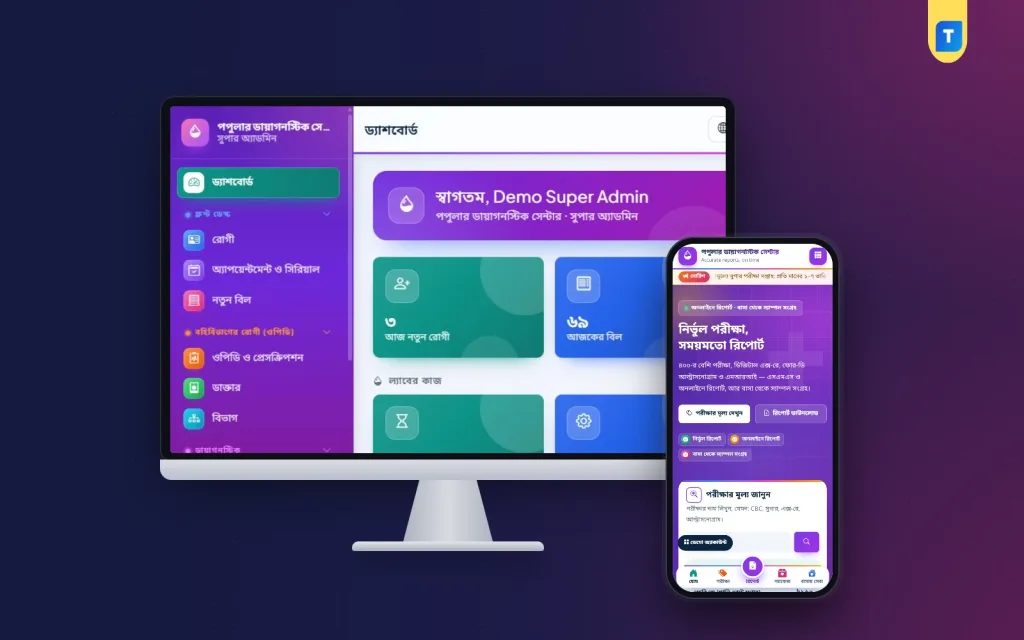
- Violet mobile-first website with a Download report button
Overview
Diagnostic center software for pathology labs and imaging centers: barcode tube labels, pathologist-verified reports with QR, report-ready SMS, online download and referral commission.
This diagnostic center software follows every test from the counter to the patient's phone: the bill, the barcode label, result entry, the pathologist's sign-off and a report the patient can download. It is the Diagnostic Centre version of our Laravel medical software, running on your own hosting and domain in Bangla and English.
It suits pathology labs, imaging centers and diagnostic centers that also host doctor chambers. You get 16 modules on top of the always-on core, and no inpatient screens for staff to skip past.
Diagnostic center software built around the sample
Most complaints at a diagnostic center come from three places: a mixed-up sample, a report that left without a signature, and a patient who calls five times to ask if it is ready.
Every test sits on a lab worklist with tabs for waiting, collected, processing, verify, ready, delivered and cancelled. The collection room, the lab bench and the front desk see the same list, so nobody walks across the floor to ask where a sample is.
From the front desk to the collection room
A patient is registered once and gets an ID-card size patient card with a QR code that holds the patient number. The bill takes tests from your price list, with discount, VAT, part payment, dues, refunds and a printed money receipt.
A discount needs a permission and a reason, and every one is logged. Once the bill is made, the lab prints barcode tube labels; tests that share a tube share one label.
Results, verification and reports patients trust
Technicians enter results against normal ranges that can differ for men and women. A value outside the range gets an H or L flag, and the patient's previous result is shown beside the new one, which helps catch a typing slip before it reaches a doctor.
No report is ready until the pathologist verifies it. They approve it or send it back, and the verifier's name prints on the A4 report together with a QR code. Scanning that code confirms the report is genuine but never shows the results.
After verification the patient gets a report-ready SMS with a link, or downloads the report from your website with the bill number and mobile number. Your counter stops being a report queue.
Imaging, doctor chambers and referral commission
Imaging covers X-ray, ultrasound, Doppler, ECG, echo, CT, MRI, mammography and endoscopy. Report templates fill in the findings and impression, then the report is approved and prints on A4 with the same QR check and online download.
Many centers also rent rooms to consultants. Doctors get weekly chamber schedules and serials, a waiting-room TV can show the queue, and advised tests on a Bangla or English prescription become an unpaid bill at your counter.
Referral commission is set per service as a percent or fixed amount, or per referrer, and can count only fully paid bills. Each referrer gets a statement, and every payout prints as a voucher.
Pharmacy, accounts and staff in one diagnostic center software
If you keep a medicine counter, the pharmacy POS sells by barcode scan, takes stock from the batch that expires first and never sells expired medicine. Expiry alerts come at 30, 60 and 90 days.
Accounts keeps a cash book, vouchers and a daily closing sheet to print and sign. Nine reports, including Test-wise Count & Revenue and Due List with Ageing, print or download as CSV. Staff get QR ID cards, attendance, leave and payroll with payslips.
A website made for a diagnostic center
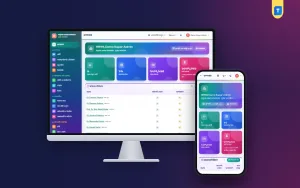
Your diagnostic center software also runs a public website built for phones first, in violet and magenta with diagonal shapes and outline icons. The header button says Download report, and the raised middle button on the phone's bottom bar opens the report page.
The home page shows tests, how it works, home sample collection, health packages, report download, imaging, the Tests & Prices list, a section for referring doctors and more. Search engines see it marked as a diagnostic lab.
Patients book serials online and get an SMS. In the patient portal they see reports and bills and pay through the bKash payment gateway, SSLCommerz or a send-money TrxID that your counter approves.
Getting the diagnostic center software running
Web installer, no SSH
Upload the zip in cPanel File Manager, extract it, move the files into your domain folder and create an empty database in the MySQL Database Wizard. Open your domain and the installer at /install starts by itself, with Diagnostic Centre already selected.
It checks the server, then asks for your center's details, the database, the Super Admin and the license key on one page. Press Install now and add the cron line it shows. You need PHP 8.2 or newer, MySQL or MariaDB and SSL.
License and upgrades
The license key for your diagnostic center software is in My Account → Licenses on themeve.com; enter it in the installer or later on Dashboard → License. Each license is tied to one domain.
A key works only for this product. A key from another product shows "This key belongs to a different product" and the site stays locked. If your center grows, buy the license of the bigger product and all your data is kept.
The same system also comes as Hospital Management Software and Clinic Management Software.
Currency, time zone and date format are in Settings, and Bangla can be switched off for an English-only system. Before you buy, open the live demo with one-click demo logins on the /demo page; the data resets every 3 hours.
Give your counter, lab bench and patients one shared record with this diagnostic center software.
Reviews
0.0
Write a review
★★★★★
0 reviews from buyersNo reviews yet — be the first to share your experience after buying.
Frequently Asked Questions
01Do I need SSH or a developer to install it?
No. Upload the zip in cPanel File Manager, create an empty database and open your domain. The web installer checks the server and sets up your center, the database and the Super Admin in the browser; you only add one cron line at the end.
02Can I use a license key from the Hospital or Clinic version?
No. A key works only for its own product, so a key from another product shows "This key belongs to a different product" and the site stays locked. Each license is also tied to one domain.
03Is there anything for admitted patients?
No. This version is made for tests, reports and outpatient work, so it has no inpatient modules. If you later need them, buy the license of the Clinic or Hospital product and all your data is kept.
04How do patients receive their reports?
After the pathologist verifies a report, the patient gets an SMS with a link. They can also download it on your website with the bill number and mobile number, or from the patient portal.
05Can we track what we owe referring doctors?
Yes. Set commission per service or per referrer, choose whether only fully paid bills count, and print a statement and a payout voucher for each doctor or agent.
06Which SMS companies does it work with?
BulkSMSBD, Alpha SMS, Greenweb and ElitBuzz are built in, and any other company can be added with a custom URL. You need your own SMS account.
07Can patients pay online?
Yes, inside the patient portal. They can pay bills through the bKash payment gateway, SSLCommerz or a send-money TrxID that your staff approve. Gateways need your own merchant account.
08Can I try it before buying?
Yes. The diagnostic center demo has one-click demo logins on the /demo page for roles from Super Admin to patient, and the data resets every 3 hours.
Delivery & Support
1Place your orderAdd to cart, sign in and pay with bKash, Nagad or Rocket.
2Payment verified automaticallyEnter your Transaction ID — the payment is matched automatically, usually within seconds.
3Get your productYour license key and download appear in My Account → Licenses.
- Secure automatic payment verification
- Delivery to your account & e-mail
- Friendly WhatsApp support
Refund Policy
This policy applies to every product in our store.
You get a refund when the product does not work as described and we cannot fix it, when your license will not activate your website, or when a manually delivered product is late and you cancel before delivery. A working license, or a single license already used on a live domain, is not refundable. Approved refunds go back to the number you paid from within one working day, minus the Send Money charge.
More items
View all →You may also like
−40%
 −52%
−52%
 −25%
−25%
Laravel Project
School Management Software – Website, Dashboard & Parent Portal
৳15,000
৳20,000Save 25%
 −48%
−48%
