 −25%
−25%
Laravel Project
School Management Software – Website, Dashboard & Parent Portal
৳15,000
৳20,000Save 25%
 −36%
−36%
✦ Key features
AdSense Blog CMS is a Laravel blog CMS for publishers who want a fast, clean blog in English or Bangla with the pages, settings and SEO basics that an AdSense review looks at already in place. You write in Markdown, the editor scores every post out of 100, and the dashboard shows how ready the whole site is.
It runs on your own hosting and domain as a standalone web app, not a WordPress plugin, so there are no themes or plugins to keep in line.
It suits bloggers and small publishing teams in Bangladesh and abroad. Write in English for readers in the US and UK, or switch the website language to Bangla in Settings: every public button, label and date then shows in Bangla, and the SEO score reads Bangla keywords too.
If you plan a niche site with a few categories, regular how-to guides and display ads, this is the job it was made for. The demo is Spare Space Garden, a small-space gardening blog with 71 articles.
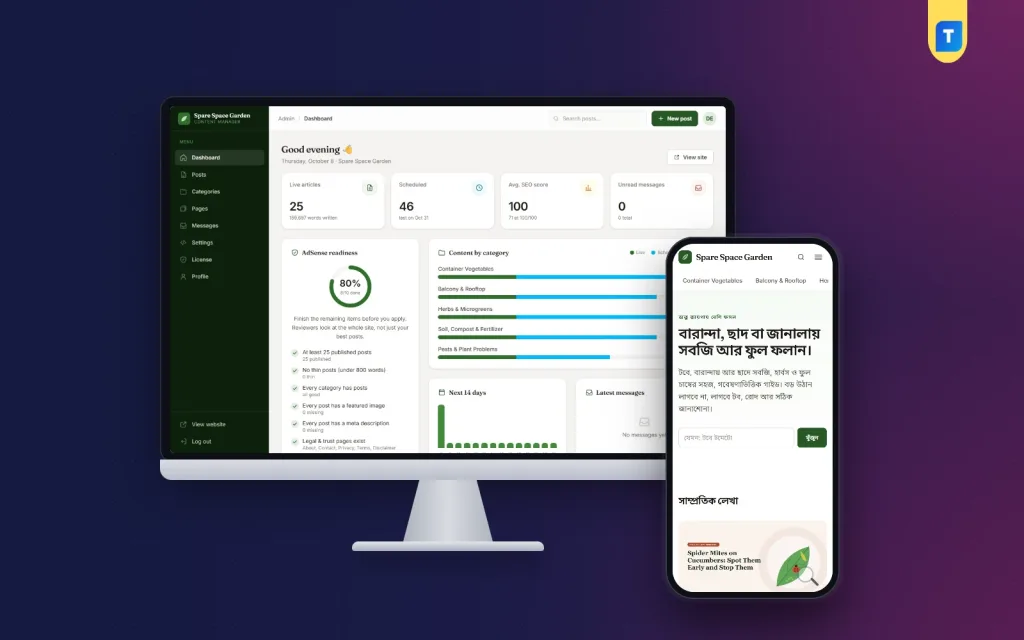
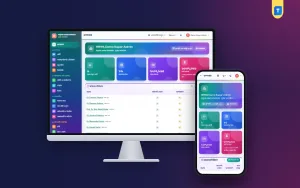
The dashboard opens with four cards: live articles and words written, scheduled posts, the average SEO score and unread messages. Beside them, a progress ring shows how many of ten readiness checks your site passes.
The checks cover at least 25 published posts, no post under 800 words, posts in every category, a featured image and meta description on every post, the five trust and legal pages, an author bio, a real site e-mail, production mode and a connected publisher ID.
It is a self-check of the technical and page items reviewers look at. Approval still depends on your content and on Google's own review, and no software can promise it.
A category chart and a 14-day bar chart show what is live and what goes live next.
Posts are written in Markdown with a live word count. Headings, lists, tip boxes, links and tables all work, and the Insert image button uploads a picture, converts it to WebP and drops the Markdown into your text.
Each post has a focus keyword, a meta title and meta description with character counters, a featured image with alt text, a category and a publish date. Pick a future date and the post waits, then goes live on its own.
After saving, the SEO panel runs 17 checks: the keyword in the title, slug, introduction and a subheading, length, keyword use, image alt text, internal and outbound links, and a keyword no other post uses. The score is the share of checks passed.
URLs stay clean: /category/post-slug for articles, fixed addresses for the about, contact and legal pages, and an author page for each writer. Every page gets its own title, meta description, canonical link and Open Graph tags.
Structured data is added for the website, the organisation, each blog post with its breadcrumb trail, the about page and author profiles. The sitemap.xml, robots.txt, ads.txt and RSS feed are generated for you.
Articles get a table of contents when they have three or more sections, and images load lazily. A link to a post that is not live yet shows as plain text until it publishes, so readers never land on a missing page.
On the server, php artisan site:audit crawls every public page of the Laravel blog CMS and reports broken links, missing ALT text, heading order, duplicate titles and pages left out of the sitemap.
Paste your publisher ID in Settings and the site adds the AdSense account meta tag, the AdSense script and the ads.txt line. You can also write your own ads.txt text and add a Search Console verification code.
Manual ad units get six places, each with its own switch: under the article title, two spots inside the text after the paragraph numbers you choose, the end of the article, the home page and the category page. Auto ads set in AdSense work without them.
Ads are hidden while you are signed in, so your own visits never count. Header, body-start and footer code boxes take Analytics, a consent tool or other tags.
About Us, Contact Us, Privacy Policy, Terms and Conditions and Disclaimer are ready after install, in English or in Bangla when the site language is Bangla. Your site name and e-mail fill in by themselves.
The contact form has a hidden spam trap and a rate limit. Messages wait in the admin, a copy reaches your inbox once mail is set up, and ones older than 24 months are removed. Settings also hold the site name, tagline, description, home page headline and text, and links to Pinterest, Instagram, Facebook and YouTube.
The design is mobile first, built with Tailwind, with self-hosted fonts and no popups. On a phone the menu opens as a full-height side drawer, and the admin of the Laravel blog CMS works on a phone too.
Prefer a Bangla news portal on WordPress? See Best Bangla News Theme.
You need PHP 8.3 or newer, MySQL or MariaDB, an HTTPS domain, terminal access once for the install commands, and a cron job. Point the domain to the public folder, or upload to the domain folder and let the included .htaccess do it. Composer and npm are not needed.
Activate your licence key from your Themeve account in Admin → License.
Need a Laravel system for a school instead? See our School Management Software. For your next niche site, start writing on this Laravel blog CMS.
No reviews yet — be the first to share your experience after buying.
No. It is a standalone Laravel web app with its own admin, installed on your own hosting and domain.
No tool can promise that. It covers the technical and page checklist Google's reviewers look at, but approval depends on your content and Google's review. AdSense is a trademark of Google, and Themeve is not affiliated with Google.
Yes. Choose বাংলা as the website language in Settings → Site and the public buttons, labels and dates show in Bangla, with a bundled Bangla font. The SEO score reads Bangla keywords; the admin panel stays in English.
Not for daily writing. You need terminal access once to run the install commands and a cron job, or a developer who can do that for you.
Enter your publisher ID in Settings → AdSense for the account tag, script and ads.txt. Paste ad unit code in Settings → Ad placements, or turn on Auto ads in your AdSense account.
Yes. Set the status to Published with a future publish date and the post goes live by itself. Times follow the time zone you set in .env, for example Asia/Dhaka.
Activate your licence key from your Themeve account in Admin → License. A live domain needs an active licence, while localhost and .test addresses run free for testing.
Yes. Spare Space Garden, a small-space gardening blog with 71 articles, is built with this CMS and is the demo site.
You get a refund when the product does not work as described and we cannot fix it, when your license will not activate your website, or when a manually delivered product is late and you cancel before delivery. A working license, or a single license already used on a live domain, is not refundable. Approved refunds go back to the number you paid from within one working day, minus the Send Money charge.
−25%
 −52%
−52%
 −42%
−42%
 −48%
−48%
