 −50%
−50%
Checkout Builder – WooCommerce Checkout Field Editor
 −50%
−50%
✦ Key features
- Delivery instructions field on checkout
- Reference / note field on checkout
- Both fields validated on order
- Saved with every order
- Shown on the order screen
- Same fields on the Themeve Commerce checkout
- Works on the WooCommerce classic checkout
- No setup beyond activation
- Helps couriers find described addresses
- Room for gift messages and references
Overview
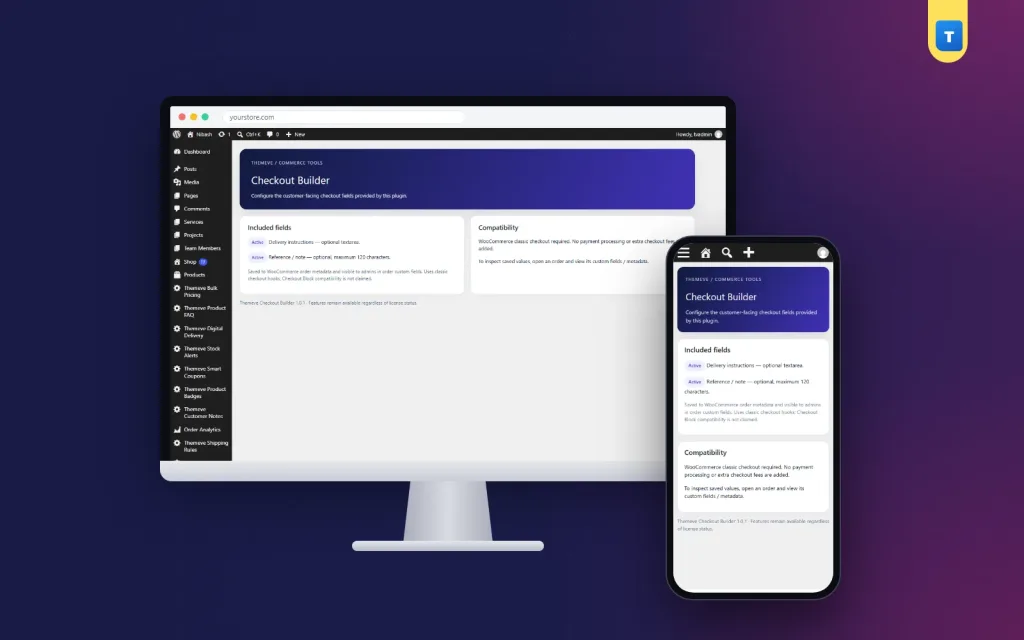
Checkout Builder is a simple WooCommerce checkout field editor add-on that puts Delivery instructions and Reference / note fields on your checkout and saves them with every order.
Checkout Builder is a simple WooCommerce checkout field editor add-on for shops that need two extra answers from every buyer: how to deliver the parcel, and any reference the buyer wants to give. It adds a Delivery instructions field and a Reference / note field to your checkout and saves both with the order.
It works on the WooCommerce classic checkout and on the Themeve Commerce checkout.
Why two small fields make a big difference
In Bangladesh, many addresses are described rather than numbered. Near the mosque, third floor, blue gate. Behind the school, ask for the tailor shop. Couriers rely on these details, and when they are missing, parcels come back marked address not found.
A clear Delivery instructions field gives buyers a proper place for these details, instead of squeezing them into the address line or forgetting them completely.
The Delivery instructions field
Buyers can write landmarks, a preferred delivery time, a second contact person or a note such as call before coming. The text is checked when the order is placed and saved with the order.
Your team sees it on the order screen and can copy it onto the courier booking, so the rider gets the same instructions the buyer wrote.
The Reference / note field
The second field holds anything else the buyer wants you to know. Some write the name of the person who recommended your shop. Some add a gift message. Office buyers often add a purchase reference for their accounts team.
Like the first field, it is validated and saved with the order, so nothing gets lost between the checkout and the packing table.
On Themeve Commerce
On Themeve Commerce stores, the same two fields are added to its checkout and saved with each order, so your process stays the same whichever shop system you use.
What this WooCommerce checkout field editor add-on is, and is not
Checkout Builder adds two fixed, ready-made fields. It is not a drag-and-drop form builder and it does not let you design new fields from scratch. For most small shops, these two fields cover what is missing from the standard checkout.
On WooCommerce, the fields appear on the classic checkout, not on the block checkout. Many themes still use the classic checkout, and switching to it is a simple WooCommerce setting.
A quick example
A furniture shop delivers sofas to apartment buildings. Buyers now write lift available, fourth floor or call the guard first in the Delivery instructions field. The packing team prints those notes on the delivery slip, and the delivery team arrives prepared instead of calling the buyer from the street.
Who uses these fields most
Fashion and gift shops use the note for gift messages and the name of the person receiving the parcel. Grocery shops use delivery instructions for preferred delivery times, because nobody wants frozen food left at a locked gate. Electronics shops use the reference note for warranty names or office purchase numbers.
Shops outside Dhaka find the instructions field most useful of all. Riders in smaller towns often work from landmarks, and a buyer who writes opposite the high school, ask for Rahim saves the rider a phone call and saves you a return.
Training your team
Make one simple rule: whoever books the courier copies the delivery instructions into the courier's remarks box. With this WooCommerce checkout field editor add-on, the buyer's words travel from the checkout to the rider without being retyped from memory or lost on a sticky note.
How it fits with other tools
A shorter, clearer checkout means fewer people leave halfway. If some still do, Abandoned Cart Recovery saves the email they typed so you can follow up. To decide when cash on delivery is offered, Smart Checkout Rules can hide COD by order total or district.
For background on WooCommerce checkout types and fields, see the WooCommerce documentation.
Licence, updates and setup
Checkout Builder needs an active Themeve licence key. Without it, the fields are not added and only the lock screen and License screen open. Enter the key from My Account › Licenses and the fields appear on your checkout. Updates arrive in Dashboard › Updates while the licence is active.
After activation, open your checkout page in a private window and place a test order with something in both fields. Open the order in your admin and you will see the instructions and the note saved with it.
That is all a small shop usually needs from a WooCommerce checkout field editor: the right questions on the checkout, and the answers where your team can read them.
Reviews
0.0
Write a review
★★★★★
0 reviews from buyersNo reviews yet — be the first to share your experience after buying.
Frequently Asked Questions
01Can I create my own new fields?
No. Checkout Builder adds two fixed fields, Delivery instructions and Reference / note. It is not a drag-and-drop form builder.
02Does it work on the WooCommerce block checkout?
No. On WooCommerce the fields appear on the classic checkout. Switching to the classic checkout is a simple WooCommerce setting.
03Where do I see what the buyer wrote?
On the order screen. Both fields are saved with the order.
04Does it work on Themeve Commerce?
Yes. The same two fields are added to the Themeve Commerce checkout and saved with the order.
05Are the fields checked before the order is placed?
Yes. Both fields are validated when the order is placed.
06Is there anything to configure?
No. Once the licence is active, the fields appear on your checkout.
07Does it need a licence?
Yes. Without an active Themeve licence key the fields are not added and only the lock and License screens open.
Delivery & Support
1Place your orderAdd to cart, sign in and pay with bKash, Nagad or Rocket.
2Payment verified automaticallyEnter your Transaction ID — the payment is matched automatically, usually within seconds.
3Get your productYour license key and download appear in My Account → Licenses.
- Secure automatic payment verification
- Delivery to your account & e-mail
- Friendly WhatsApp support
Refund Policy
This policy applies to every product in our store.
You get a refund when the product does not work as described and we cannot fix it, when your license will not activate your website, or when a manually delivered product is late and you cancel before delivery. A working license, or a single license already used on a live domain, is not refundable. Approved refunds go back to the number you paid from within one working day, minus the Send Money charge.
More items
View all →