 −29%
−29%
Breaking News WordPress Theme – Online News Website Template
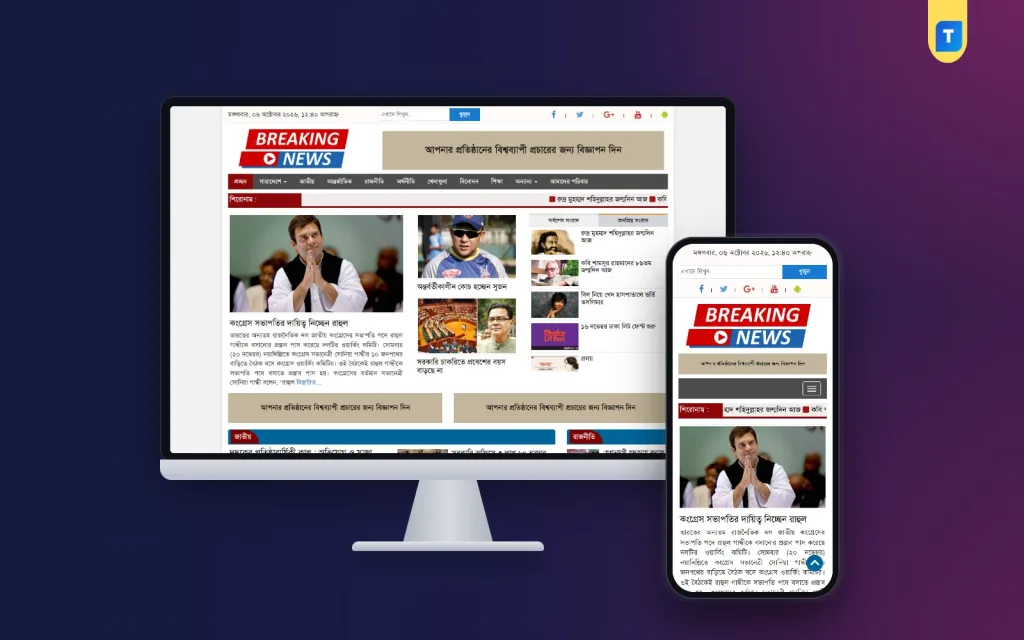
✦ Key features
- Layout for breaking and live news
- Bangla and English content
- Seven homepage widget areas
- Main sidebar widget area
- Top, middle and bottom article areas
- Single-page sidebar
- Five post formats: image, gallery, video, quote, aside
- Category, archive, date and search pages
- AdSense-friendly placements
- Responsive on phone and desktop
- Logo and footer customisation
- Unlimited domain use
Overview
Breaking News is an online news website template for fast-moving political, sports, entertainment and live news. It supports Bangla and English, has seven homepage widget areas and AdSense-friendly placements, and works on unlimited domains.
This online news website template is made for sites that publish fast: political updates, sports, entertainment, viral stories and live coverage. It supports Bangla and English content, works on phones and has places for AdSense ads. You buy it once and can use it on unlimited domains.
Speed of publishing is the point here. When a story breaks, your editor should be able to write it, attach a picture and see it on the homepage in minutes. The layout is built for that kind of urgency. Headlines are easy to spot and the page does not hide new stories behind clutter.
Who can use this online news website template
Any publisher who needs a fast-moving news layout can use it. Typical users are:
- New digital news brands that start from zero
- Existing news sites that want a cleaner, faster design
- Political and current affairs portals
- Sports news and match update sites
- Entertainment and viral news pages
- Local news sites that cover live events
- Agencies and freelancers who build news sites for clients
The demo is only a sample. You change the categories and the posts to fit your own topic. The unlimited licence means one purchase covers all your own domains.
What a breaking news site needs
Breaking news is different from a weekly magazine. The page must be updated many times a day and still look tidy. Look for these points in any theme:
- New stories that appear on top without extra work
- Clear headlines with a picture
- A layout that stays light on a busy day
- Ad spaces that do not cover the story
- Support for Bangla and English posts
- A dashboard that an editor can use under pressure
This online news website template is arranged around these points. The sections below show what you get in the front end and in the dashboard.
Front-end features of the online news website template
Homepage
The homepage is built from widget areas. There are seven numbered widget areas for homepage blocks, so you decide which sections show and in which order. A news site can have a block for politics, a block for sports and a block for entertainment, each filled by a category.
- Seven homepage widget areas
- A main sidebar widget area
- Featured images cropped to a standard news size
- Clear headlines with date and category
Article page
The story page has widget areas at the top, in the middle and at the bottom of the article, plus a single-page sidebar. You can use them for ads, related stories or a Facebook box.
- Top area above the story
- Middle area inside the reading flow
- Bottom area after the story
- Sidebar for the latest or popular list
Post formats
The theme supports aside, gallery, quote, image and video post formats. A video report, a photo story and a short quote can each have their own look. That helps a live coverage site, where stories are of different kinds.
Archive, search and date pages
The theme includes category and archive pages, a search page and a date page. Readers can look up an old story by topic, keyword or day.
Mobile layout
The theme is mobile-friendly and responsive. News readers use a phone in most cases, so check the live preview on your own phone before you buy.
Back-end options for your editors
You manage everything from the normal WordPress dashboard.
Widgets
All the widget areas above are managed under Appearance, Widgets. Place a list of posts, an ad code or a text block in any area and save. No file editing is needed.
Menus
The theme registers menu locations for the header and other areas. Build the menus from the WordPress menu screen and link your categories.
Writing and publishing
- Write posts in the standard WordPress editor
- Pick a category and a featured picture
- Choose a post format for photo and video stories
- Schedule a post for later
- Edit a story after it is live, for example to add new facts
Customisation
You can customise the look from the WordPress dashboard, add your logo and edit the footer. You do not need to write code.
Ads and income
The theme is AdSense-optimised, and its widget areas give you many places for ad units. Put a banner under the main block, another in the middle of the story and one at the end. Check each placement on a phone.
- Use fewer, better-placed ads rather than many small ones
- Keep the headline and the first paragraph free of ads
- Check your ad code after every change
AdSense approval is decided by Google. It depends on your content, your policy pages and the traffic you build. A clean theme helps, but it cannot decide that for you.
Speed
Slow pages lose readers on a busy news day.
A news site gets bursts of visitors when a story is shared. The theme keeps the layout simple so pages open quickly. Speed also depends on your host, your pictures and your plugins. Use a reliable server and compress images before upload. We do not quote speed scores, because every site is different.
A newspaper magazine theme for features too
Many buyers want a newspaper magazine theme that also handles long features. This theme can do both. Use fast blocks for breaking stories and a separate category for features and interviews. Use the gallery and video formats for photo essays.
The same newspaper magazine theme can also work for a news blog with fewer posts a day. Show fewer blocks and keep the look clean.
Running a live news desk with an online news website template
Take a small desk with three people. One reporter sends a short update from the field. The editor checks it, adds a picture and publishes. A third person keeps the homepage blocks fresh and moves ads when needed. With the widget areas, each person knows where to work.
- Publish short updates first, then edit them with more facts
- Use one category per topic so the blocks fill themselves
- Keep one person in charge of the homepage order
- Remove old sample posts from the demo
Planning before you launch
A theme gives you the frame. The result still depends on how you plan the work. A few hours of preparation make the first week much easier, and they save you from changing the homepage again and again.
Choose your sections
Pick the categories you can update daily. Start with four to six. An empty block on a news homepage looks worse than no block.
Decide how you will cover live events
Many news sites cover a match, an election day or a public event as it happens. Decide in advance which category will carry the live updates and who will write them. Use the video and image formats for clips and photos from the field. After the event, edit the story into a clear final report so new readers get the full picture.
Prepare your brand
Have your logo ready in a clear format. Choose one main colour and keep the rest quiet. Calm colours look more trusted on a news site.
Add the standard pages
- About us and the names of your editors
- Contact page
- Privacy policy
- Editorial and corrections policy
Add these pages on the first day, before you apply for ads. They show readers and advertisers that real people stand behind the news.
Write your first stories
Publish at least ten real stories with pictures before you announce the site. Remove the sample posts that come with the demo. A new site with real work on it earns trust faster.
Bangla and English together
The theme supports Bangla and English content. A site can publish in one language or in both. Many local brands write the main news in Bangla and add English summaries for readers abroad. Keep the category names short in both languages, so the menu stays tidy on a phone.
Setup steps
- Pay and download the zip from your account.
- Upload it under Appearance, Themes, Add New.
- Activate the theme.
- Create categories and menus.
- Add your logo and footer text.
- Fill the homepage widget areas.
- Add your ad codes to the single-page widget areas.
- Publish real stories and test the site on a phone.
Why choose it over a general template
A general blog template shows posts in a list. You then add plugins and custom code to make it behave like a news site. This online news website template starts from the news layout, with widget areas for the homepage and the article page already in place.
- Built for fast-moving news
- Seven homepage widget areas and three article areas
- Five post formats
- Bangla and English support
- Unlimited licence, no yearly renewal
- Friendly WhatsApp support
What is included
- Theme zip file, ready to install
- Homepage, category, archive, date, search and article templates
- Widget areas for the homepage, sidebar and article page
- Post formats for image, gallery, video, quote and aside
- AdSense-friendly placements
- Responsive layout
- Unlimited domain use
- WhatsApp support
Check the preview before you choose this online news website template
Open the live preview on your phone and on a computer. Look at the homepage, one category and one story page. If you have a question, send it on WhatsApp and we will answer it plainly.
Breaking News WordPress Theme is built on the WordPress standards, and you can browse more of our WordPress themes.
Reviews
0.0
Write a review
★★★★★
0 reviews from buyersNo reviews yet — be the first to share your experience after buying.
Frequently Asked Questions
01Is this online news website template good for breaking news?
Yes. It is built for fast-moving news such as politics, sports, entertainment and live coverage, with widget areas you can reorder without code.
02Can I use this online news website template on more than one domain?
Yes. The purchase includes an unlimited licence for your own domains.
03Does it support Bangla?
Yes. It supports both Bangla and English content.
04Where can I place ads?
Use the homepage widget areas, the sidebar and the top, middle and bottom areas of the article page. Check each placement on a phone.
05Which post formats are supported?
Aside, gallery, quote, image and video.
06Do I need coding skills?
No. Widgets, menus, logo and footer are managed from the WordPress dashboard.
07Can it work as a magazine too?
Yes. Use one category for features and interviews, and the gallery and video formats for photo essays.
Delivery & Support
1Place your orderAdd to cart, sign in and pay with bKash, Nagad or Rocket.
2Payment verified automaticallyEnter your Transaction ID — the payment is matched automatically, usually within seconds.
3Get your productYour download and details appear in My Account and your e-mail.
- Secure automatic payment verification
- Delivery to your account & e-mail
- Friendly WhatsApp support
Refund Policy
This policy applies to every product in our store.
You get a refund when the product does not work as described and we cannot fix it, when your license will not activate your website, or when a manually delivered product is late and you cancel before delivery. A working license, or a single license already used on a live domain, is not refundable. Approved refunds go back to the number you paid from within one working day, minus the Send Money charge.
More items
View all →You may also like
−29%
 −25%
−25%
 −27%
−27%
 −27%
−27%
