Choosing a clothing store website template is the quickest way to put plain tees, polos, pants and hoodies in front of buyers without hiring a developer to build a shop from scratch. This article is for small Bangladeshi sellers who make or source everyday basics, for garment workers turning surplus into a brand, and for freelancers setting up such stores for clients. It covers what a basics shop has to get right, how to plan the range, and how one theme handles the job.
Basics look easy to sell, and that is the trap. A white tee from you looks much like a white tee from fifty other pages. What wins the order is not a flashy design but fewer doubts: the right size first time, a fair price that is easy to compare, quick delivery and an exchange promise that holds. A good template is mostly about removing those doubts at each step.
Our example here is Shohoj – Basics Clothing WordPress Theme. Shohoj means simple, and the theme is made for shops selling tees, polos, shirts, pants, hoodies, caps and bags, plus multi-packs. Its central idea is helping every buyer pick the right size. We will come to its features after the groundwork, because a template only works once your range and policies are clear.
How to Start a Clothing Brand Built on Basics
If you are wondering how to start a clothing brand with little money, basics are a sensible entry. Fabric and patterns are simple, colours repeat from season to season, and unsold stock does not go out of fashion the way festive wear does. The hard part is standing out. Pick one thing you will be known for, such as a heavier cotton, a better collar, a fit that suits local body shapes, or honest pricing on packs.
Keep the first range small. Six products in four colours and five sizes already means 120 stock lines to track. Start with the pieces you can restock quickly from a factory or workshop you trust, and add hoodies or caps only once tees and polos sell steadily. A small, always-in-stock range beats a large one with half the sizes missing, because nothing loses a buyer faster than a sold-out M.
Write down your fit before you write any code
Measure every size of every product: chest, length, shoulder and sleeve for tops, waist, inseam and length for pants. Note whether a tee is slim or relaxed. These numbers feed your size guide and your product pages, and they matter more for basics than for any other clothing. A buyer ordering a plain tee knows exactly what they want. If it fits, they will come back for three more.
What a Clothing Store Website Template Must Get Right
For a basics shop, three things matter above the rest. First, sizing must be visible and simple, because wrong sizes mean returns and a second courier trip you pay for. Second, products must be quick to add, since a buyer picking five tees will not open five pages. Third, packs and bundles should be clear, because basics sell well in threes and the saving should be obvious without a calculator.
After that come the usual shop needs: a clean menu by product type, a search box, a phone-first layout and a checkout that offers the payment options Bangladeshi buyers actually use. Look for a template that puts these jobs on the homepage rather than burying them in plugins you have to find and configure yourself.
Inside Shohoj: Size Finder, Packs and Quick-Add Cards
Shohoj uses white and sand with soft blue and navy, set in the Onest font, so it looks clean and practical. The headline feature is a Find your size helper on the homepage. A shopper enters height, weight and how they like the fit, and the helper suggests a size from S to XXL. That size is remembered in the shopper's browser and highlighted on every product card they see afterwards, so there is no need to guess again on each page.
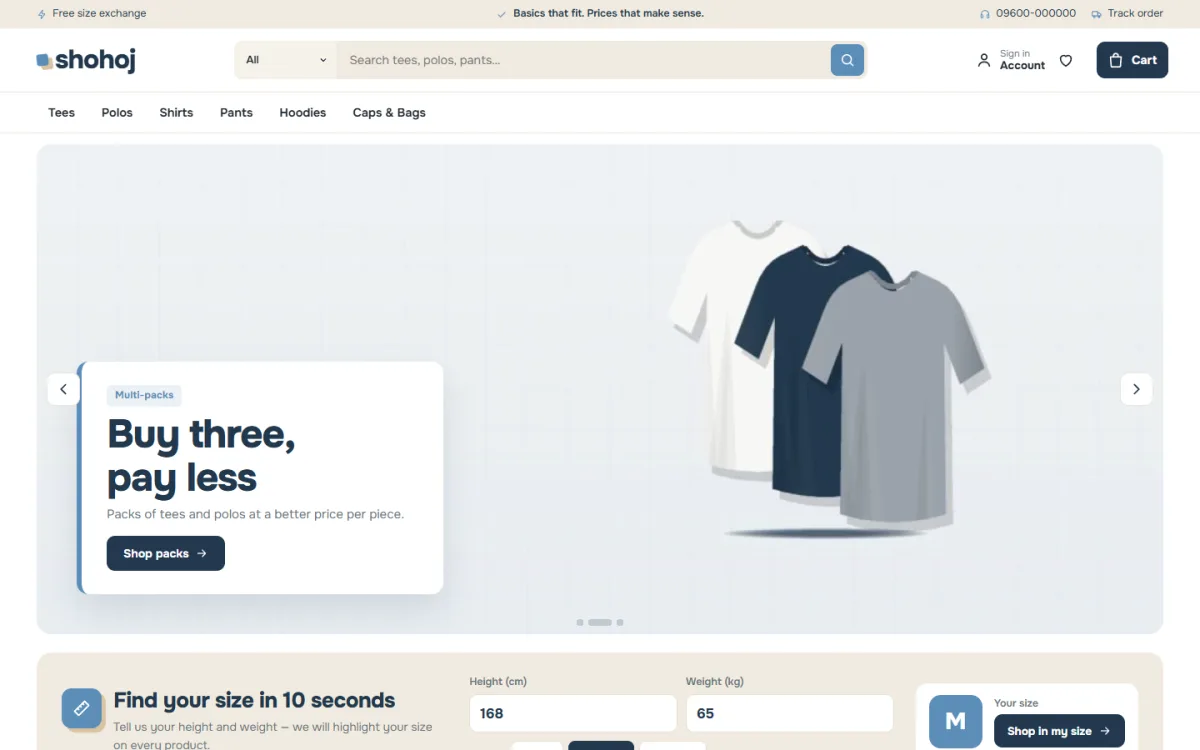
The desktop screenshot shows the demo layout. A thin top bar carries short messages, the search box suggests tees, polos and pants, and the menu runs Tees, Polos, Shirts, Pants, Hoodies and Caps and Bags. The first slide in the demo promotes multi-packs with a stack of three tees, and directly below sits the size helper, titled Find your size in 10 seconds, with height and weight boxes and a Shop in my size button.
Multi-packs priced per piece
The multi-pack row shows each pack with its price per piece, so a buyer sees the saving straight away. Place it right under the size finder and a shopper goes from asking about their size to adding a pack in two scrolls. If packs are a small part of your sales, move the block further down. The demo includes 4 multi-packs among its 36 pieces from 6 lines, and every line and brand name is invented.
Cards made for quick adding
Product cards are flat and clear. A size row is always visible on the photo, and tapping a size adds the item to the cart. There is a second picture on hover, colour swatches and clear prices. Together with the size finder, the shopper's own size stands out on every card, which makes building a cart of five basics fast. Size guides for tops and pants back this up on the product page.
The Shop on a Phone
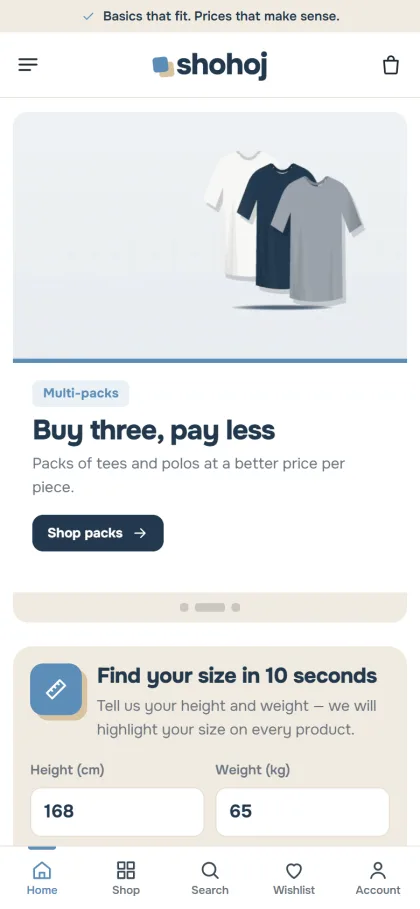
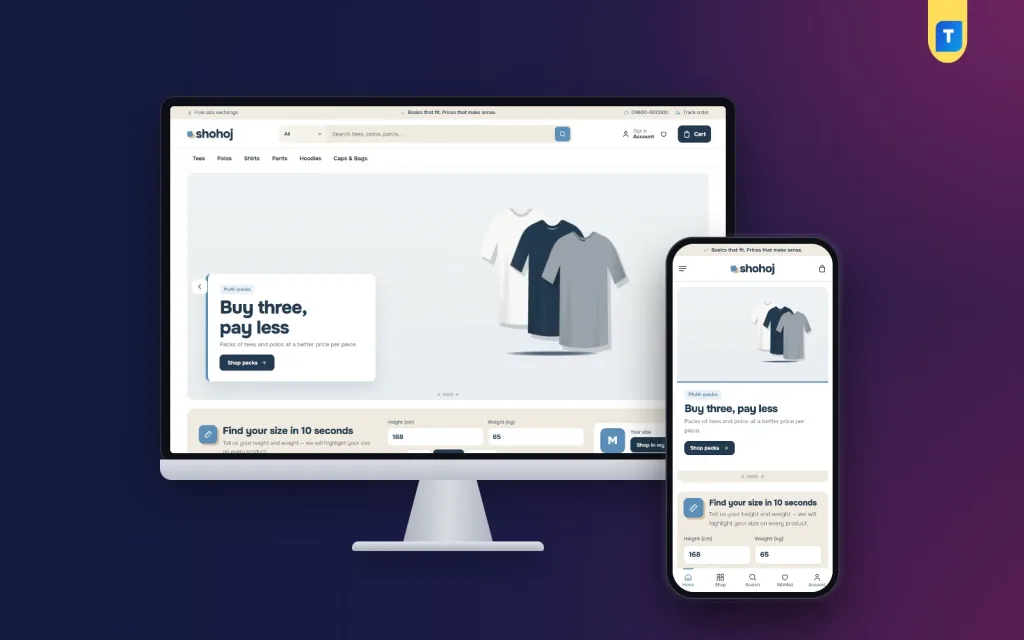
On phones, Shohoj keeps cards compact so two fit side by side, and the header carries only the menu, logo and cart. The mobile screenshot of the demo shows the pack slide with its picture above the text, the size finder close beneath it, and a bottom bar with Home, Shop, Search, Wishlist and Account. For a basics buyer who often reorders, that short path from the homepage to the right size counts for a lot.
The homepage has 24 blocks in total. Fourteen are on after the demo import, including shop by category in square tiles, new this week, most bought in category tabs, two departments with eight pieces each, wear it for, and price drop with a countdown and stock bars. Shop by price, our lines, simple notes and a promise strip covering delivery, exchange, COD and fair prices finish the default set. Ten more wait switched off, and any block can be dragged into place.
Launching the Store in Five Steps
Shohoj works with WordPress 6.0 and above, tested up to 7.1, on PHP 7.4 or newer. Step one is to upload the zip in Appearance, Themes, Add New, Upload Theme, and activate it. Step two is to open Shohoj, Setup and install Themeve Commerce in one click, since it comes bundled. Step three is to add the licence from your Themeve account in Shohoj, License, which is how updates reach you.
Step four is the Everyday Basics demo in Shohoj, Demo Import. It adds 36 pieces, menus and pages such as Notes, Exchange, Delivery and Track Order. Step five happens in Shohoj, Theme Options, where you edit the size finder and pack texts and pick a palette: Soft blue and sand, Olive, Charcoal, Terracotta or Teal. Fonts are single families, Onest, Manrope, Figtree or DM Sans. The WordPress documentation covers menus and pages if you are new.
Before you commit, open the live demo on your phone, enter your own height and weight in the size helper and watch your size light up on the cards. Then look through the demo admin to see where orders sit under Shop. A few minutes there tells you whether the template matches how you plan to work every day.
Payments, Delivery and Exchanges in Bangladesh
Shohoj runs on the Themeve Commerce plugin. Buyers can pay with bKash, Nagad, SSLCommerz, cash on delivery or manual payment, and parcels go with Steadfast or Pathao courier. Every order ends with an Order placed popup, and the Track Order page follows it to the door. Coupons, invoices, SMS and OTP are built in, new-order alerts land on Telegram, and Facebook Pixel works with the Conversion API.
For basics, an exchange policy is your strongest selling point. The demo's top bar shows a free size exchange message, but only promise what you can afford. Decide who pays the return courier, how many days a buyer has, and whether the tag must still be on. Write it once on your Exchange page and repeat it in short on the product page. Clear rules stop arguments in the inbox before they start.
Cash on delivery remains popular, yet fake orders hurt small sellers most. Confirm larger COD orders by phone, and offer a small reward, such as free delivery, for paying by mobile wallet. When you run Facebook ads, send people to a single category or pack page rather than the homepage, and show the price per piece in the ad itself.
Common Mistakes With Basics Shops
A frequent mistake is launching with too many products and too few sizes in stock. Another is copying the size chart of a big brand instead of measuring your own garments. Some sellers also leave the demo text and pictures in place, or switch on every homepage block at once, which makes a simple shop feel crowded. A clothing store website template works best when you remove what you do not need.
The other big mistake is weak product photos. Basics need flat lays and on-body shots in daylight, the same angle for every colour, and one close-up of the fabric and stitching. Buyers cannot touch the cotton, so the photo and the fabric weight in grams have to do that job. Without them, your fair price looks like any other cheap tee online.
Frequently Asked Questions
How does the size finder choose a size?
The shopper enters height, weight and how they like the fit. The helper suggests a size from S to XXL, saves it in their browser and highlights it on every product card. Keep your own size chart accurate, because the size guide on each product page backs up that first suggestion.
Can I sell three tees as one pack?
Yes. The multi-packs block shows each pack with its price per piece, and the demo has 4 packs you can study before creating your own. Packs work well for socks, vests and plain tees that buyers replace often.
Do I need coding skills for this clothing store website template?
No. You upload the theme, install the plugin from Setup, import the demo and change the rest in Shohoj, Theme Options. Search finds any setting quickly, a sticky bar saves your changes, and you can export a backup before trying something new.
Is there a theme for handloom or family clothing instead?
Yes. For sarees and handwoven pieces, see Tanti – Saree and Handloom WordPress Theme. For a shop that dresses parents and children together, look at Shobar – Family Clothing WordPress Theme.
Keep It Simple and Open Your Shop
Knowing how to start a clothing brand is mostly about discipline: a small range, honest sizes, fair pack prices, clear exchanges and steady stock. The right clothing store website template makes those habits visible to every buyer. If your shelves hold tees, polos, pants and hoodies and you want fewer size returns, open your store with Shohoj – Basics Clothing WordPress Theme and list your first pack this week.