A department store website lets a shop that dresses the whole family sell to customers far beyond its own market street. This guide is for Bangladeshi owners of family clothing shops, from a two-floor store in a district town to a busy outlet in Dhaka, and for freelancers who build stores for them. We look at how a family shop differs from a boutique, how to organise departments and age groups online, and how to run payments and delivery without chaos.
Family clothing shops are a big part of Bangladeshi retail. One visit can cover a saree for a mother, a panjabi for a father, school shirts for two children, a frock for the baby and a warm shawl for a grandparent. Taking that experience online is harder than it looks, because buyers arrive looking for a person, a category or a price, and often all three at once.
To keep this practical, we use Poshak – Family Department Store WordPress Theme as the working example. It is made for shops that dress everyone in the house: babies, kids, teens, women, men and elders, with sarees, three-pieces, kurtis, panjabi, shirts, lungi, hoodies, frocks, onesies, school wear, shawls and cardigans all in one store. Planning comes first, though.
What Makes a Family Clothing Store Different Online
A boutique sells a look. A family clothing store sells convenience: everything in one trip, at prices families can manage. Online, that convenience only works if buyers can reach the right shelf in two or three taps. A store with hundreds of products and a single long Shop page feels like a crowded godown, and buyers leave before they find the kids section.
The second difference is the question buyers ask. In a boutique it is usually what size. In a family store it is first for whom. A father shopping for his son's school uniform does not care about the women's new arrivals. A daughter buying a shawl for her mother wants to see pieces for elders, not teen hoodies. Your store must answer who each product is for before anything else.
Planning a Department Store Website Before You Build
Start with departments. Most family shops fit into six: women, men, teens, kids, baby and elders. Under each, list the sub-categories you really stock, such as sarees, three-pieces and kurtis for women, or panjabi, shirts and lungi for men. Do not create a sub-category for five products. It is better to have fewer, fuller shelves than a long menu of half-empty pages that make the store look thin.
Think in age groups as well as departments
Kids' clothing is bought by age, not by S, M or L. Decide your age steps early, for example 0 to 2, 3 to 5, 6 to 9, 10 to 13, teens and adults, and tag every product with its range. Do the same for elders. Older buyers and their children often struggle to find soft, easy pieces online, so a clear place for them gives your department store website an edge over general fashion pages.
Prepare sizes, photos and stock counts
A large catalogue needs a routine. Photograph every piece on the same background, from the front, back and close up, and fold-shots work well for shirts and three-pieces. Keep one size chart per product type. Count stock before you go live and update it weekly, because nothing annoys a family more than ordering five items and hearing two are out of stock after they paid.
Write delivery and exchange rules for families
Family orders are larger and more mixed, so exchange requests are more likely. Write a clear Exchange and Returns page: how many days, which items can be swapped, and who pays delivery. If you have more than one branch, list them on a stores page so local buyers can visit. Clear rules make a first-time buyer much more comfortable placing a big family order.
How Poshak Runs a Department Store Website
Poshak is built for exactly this job. Cobalt, black and sun yellow with Archivo type make it loud, clear and easy to scan, which suits a busy family store. It has 24 homepage blocks, 18 of them on after the demo import, because department stores sell by showing a lot. Every block can still be switched off and dragged into a new order in Homepage layout, and phones use arrow buttons.

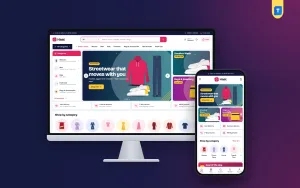
The demo shows the idea clearly. A black top bar reads one store for the whole family, with an exchange note, a hotline and Track order. The search box hints at sarees, panjabi, kids wear and sweaters, and a blue menu lists Women, Men, Teens, Kids, Baby and Elders 60+. The hero slider carries a big slide and two side promos, here for office and campus wear and for 60+ comfort.
Shop by department and Dress every age
The Shop by department hub shows one big tile per department: women, men, teens, kids, baby and 60+. Each tile has its photo, an item count and sub-category chips, so a parent can tap kids and then the school wear chip. The Dress every age ladder runs from 0 to 2 up to 60+, and each step has its own picture, range and product tag, set in Theme Options.
Cards that answer for whom
Every product card carries a who-it-is-for label, such as Ages 2 to 13, 0 to 24 months or S to XXL. The photo sits in a grey well, with quick sizes and a bold black Add to cart button. The product page shows four angles, front, back, folded and close-up, with the size guide beside the size buttons, a fit meter that says whether a piece runs small, true to size or large, and a delivery date.
Offers, occasions and the rest of the homepage
Popular categories appear in square tiles, and Just landed shows two rows of the newest pieces. Flash sale runs a countdown with stock bars, Something for every pocket pairs price tiles with products, and Shop by occasion adds four occasion cards. Best sellers sit in tabs by department, followed by three department blocks, promo cards, trending and highly rated rows, your labels, Style notes and a promise strip.
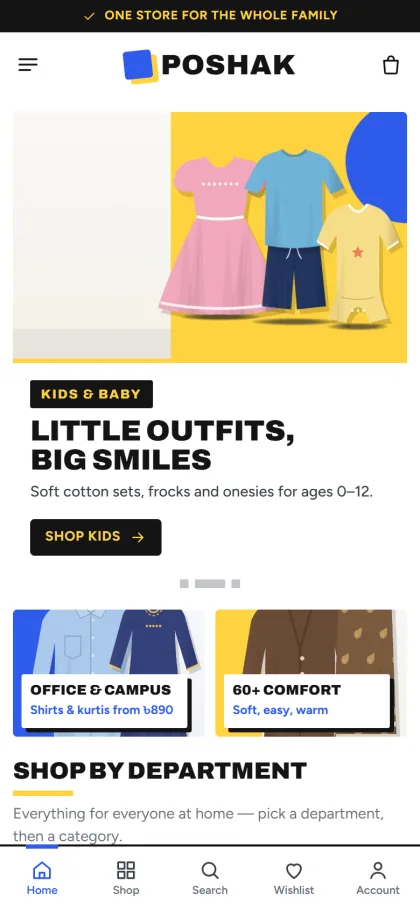
On phones, product cards stay compact under a simple menu, logo and cart header, and the demo adds a bottom bar for Home, Shop, Search, Wishlist and Account. Poshak's Theme Options are also built for phones: a bottom bar with Sections and Save, the section list as a sheet, and previous and next buttons. That helps an owner who updates the store between customers at the counter.
Setting Up the Store Step by Step
Poshak requires WordPress 6.0 or newer, tested up to 7.1, and PHP 7.4 or newer. Upload it in Appearance, Themes, Add New, Upload Theme, then activate it. Open Poshak, Setup and install Themeve Commerce in one click, since it ships with the theme. Add your licence key from your Themeve account in Poshak, License. If you are new to WordPress, keep the WordPress documentation open for menus and pages.
Then run Poshak, Demo Import. The Family Department Store demo brings 43 products from 6 labels, plus menus and pages including Exchange and Returns, Style Notes and Track Order. All labels and pictures are invented samples, so the best routine is to replace one department at a time with your own photos, names and prices, starting with the department that sells most in your physical shop.
Next, set departments, the age ladder, palette and fonts in Poshak, Theme Options. Five palettes come ready: Cobalt and sun, Scarlet, Emerald, Plum and peach, and Black and gold, and each colour can be set by hand. Four font pairs include Archivo with Figtree and Barlow Condensed with Barlow. Setting search, export and import, and reset are there, and Google Fonts can be switched off. No developer is needed for any of this.
Before buying, browse the live demo as a parent would: find a school shirt through the kids department, check an age step, then walk through checkout. After that, look inside the demo dashboard to see the Shop menu and the Theme Options layout, ideally on your own phone, since that is where you may manage the store most days.
Payments, Delivery and Promotion in Bangladesh
Themeve Commerce adds the Shop menu to your dashboard and handles the full order flow. Sign in and register open in a popup, shoppers keep a wishlist, and reviews sit in a fold with a popup that invites the first review. Checkout fits on one page and ends with an Order placed popup, and every parcel can be followed on the Track Order page. Offers, returns, size guides and a store locator are switched on.
Buyers pay with bKash, Nagad, SSLCommerz, cash on delivery or manual payment, and parcels are booked with Steadfast or Pathao courier. Coupons and invoices are included. Family orders are often large, so for COD orders above a certain value, a short confirmation call before booking the courier is worth the time. It cuts fake orders and saves the cost of a full parcel coming back.
Promotion for a family clothing store follows the calendar: Eid, Pohela Boishakh, Puja, school reopening and winter. Poshak includes Facebook Pixel with the Conversion API, so you can track which ads bring real orders. Send school-season ads to the kids department and winter ads to shawls and cardigans, rather than to the homepage. Telegram alerts for new orders, SMS and OTP keep you and your buyers in touch.
Common Mistakes When Moving a Family Shop Online
The most common mistake is uploading the whole shop at once with poor photos and missing sizes. It is better to launch with two or three strong departments and add the rest month by month. Another mistake is ignoring age ranges, so a parent has to open every kids' product to see whether it fits a six-year-old. A department store website lives or dies by how quickly buyers find the right person's shelf.
Owners also forget elders, skip stock updates during Eid, and leave flash sales running after they end. Some keep every homepage block switched on even when they have nothing to fill it, which makes the page feel empty. Switch off what you do not need. Finally, test the full journey on a low-cost phone with mobile data, because that is how many family buyers in Bangladesh will shop.
Frequently Asked Questions
Can I change the six departments?
Yes. The departments block has its own settings in Poshak, Theme Options, where you choose the tiles and their sub-category chips. A shop without a baby range, for example, can simply drop that tile and give the space to another department.
Is a department store website too busy for a small shop?
Not if you shape it. In Poshak, 18 of the 24 blocks are on after import, but any of them can be switched off or moved in Homepage layout. A small family shop can start with departments, age steps, new arrivals and best sellers, then add more blocks as the range grows.
Which payment methods and couriers are included?
bKash, Nagad, SSLCommerz, cash on delivery and manual payment are supported, with Steadfast and Pathao courier for delivery. All of it runs through the bundled Themeve Commerce plugin, so orders, payments and courier bookings sit together under the Shop menu in your dashboard.
Is there a theme for a shop that sells mainly denim or panjabi?
Yes. A jeans-focused shop may prefer Neel – Denim Store WordPress Theme, with its fit finder and wash guide. A store built around panjabi, especially for Eid, can look at Parbon – Panjabi Shop WordPress Theme. Poshak suits shops that dress every age.
Final Thoughts
Taking a family shop online is about order and trust. Group your range by department and age, show who each piece is for, keep sizes and stock honest, and offer the payments and couriers your buyers already use. Launch with your strongest departments and grow from there. For a Bangladeshi store that wants to dress every member of the family from one homepage, Poshak – Family Department Store WordPress Theme is a solid place to begin.