When your shop sells sarees, panjabi, kidswear, shoes and bags all at once, picking a fashion ecommerce theme becomes a business decision, not just a design choice. This guide is for owners of large clothing shops, multi-brand outlets and growing Facebook sellers in Bangladesh who want to move a big catalogue online. We look at how to plan departments, what shoppers need to find items quickly, how to handle sale days and delivery, and which mistakes to avoid.
A small boutique with forty products can live happily on a quiet, simple homepage. A store with several hundred items cannot. Customers arrive with a rough idea, such as an Eid panjabi or school shoes for a child, and they leave if they cannot reach that item in a couple of taps. Big stores also run more offers, carry more brands and handle more orders every day, so every part of the site has to work harder.
As a working example we use Haat – Fashion Megastore WordPress Theme, made for big clothing shops and multi-brand marketplaces. Its design is bold and busy on purpose, because a megastore needs search, deals and categories in plain sight. We come back to its features after the planning part, because the theme only helps once your catalogue structure is clear.
What Makes a Large Clothing Store Different
The first difference is navigation. In a big catalogue, the homepage is less a shop window and more a map. Shoppers need a way into women's wear, men's wear, kids, footwear and accessories straight away, plus a search box that understands what they type. If they have to scroll through endless product grids to find one department, most of them simply go back to Facebook and message a competitor.
The second difference is rhythm. A large store lives by seasons and events: Pohela Boishakh, Eid, winter, school opening and wedding season. Each brings its own collection and its own deals. Your homepage has to change often, sometimes weekly, without a developer. The third difference is volume. More orders mean more payments to check, more parcels to book with couriers and more customers asking where their order is.
Planning Your Catalogue Before You Build
Start with departments, not products. Most Bangladeshi clothing stores can work with five or six main departments, such as women, men, kids, footwear and bags and accessories, with clear subcategories underneath. Women might hold sarees, three-piece and kurtis; men might hold panjabi, shirts and t-shirts. Keep names in the words your customers actually use, and avoid creating a category for just two products.
Next, plan your product data. Every item needs clear photos on a plain background, the fabric, the size chart, the colour options and a short description. Decide how you will name products so that search works, for example including the type and the fabric in every title. If you carry several brands, list them and decide which ones deserve extra homepage space. A clean structure on paper saves weeks of fixing later.
Finally, plan operations. Who checks new orders, who confirms them by phone, who packs and who books the courier? Which payment methods will you offer, and how will you handle returns and exchanges? A clothing ecommerce website runs on these routines as much as on its design. Writing them down before launch means your first big sale day feels busy rather than chaotic.
What a Fashion Ecommerce Theme Needs for a Big Catalogue
With the plan ready, you can judge themes properly. For a large store, look for a prominent search box that can be limited to one category, a menu that opens the full category list from any page, and a homepage built from blocks you can reorder as seasons change. Deals need a way to create urgency, and price-conscious shoppers need a way to browse by budget rather than by style alone.
Equally important is what happens after the product page. A good fashion ecommerce theme for Bangladesh should support the payment methods people actually use, connect with local couriers, let customers track their own orders and give your team fast alerts when an order arrives. Mobile matters most of all, since nearly all of your Facebook and Instagram traffic will land on phones.
How Haat Handles a Megastore Homepage
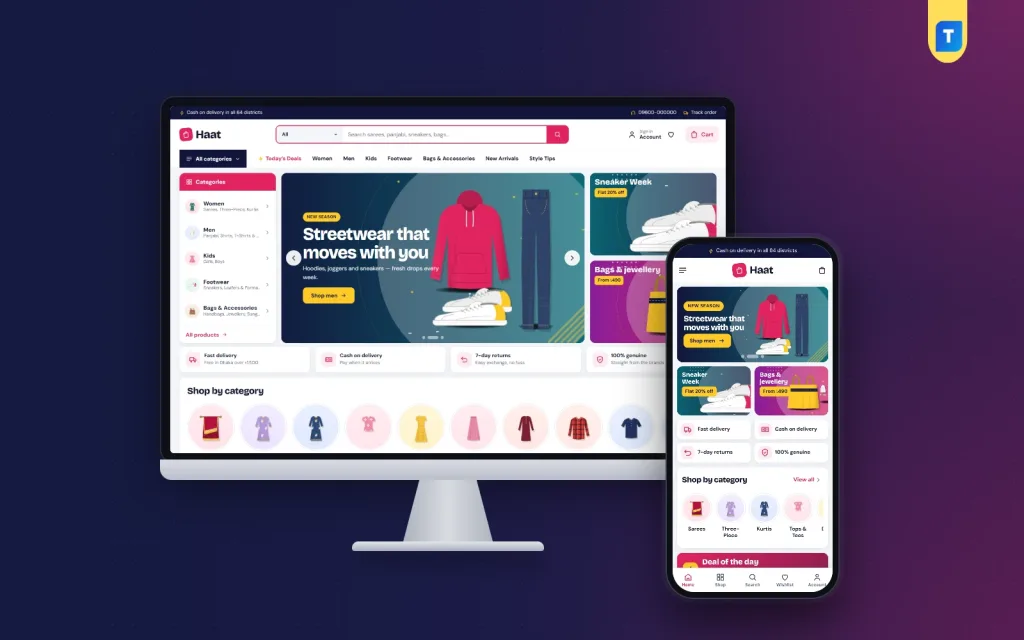
Haat answers the navigation problem right at the top. The header puts a big search box with a category picker front and centre, next to account, wishlist and cart icons. An All categories menu opens the full list, so no department is more than one click away. In the desktop screenshot you can see the search bar, the menu with Today's Deals, Women, Men, Kids, Footwear, Bags and Accessories, New Arrivals and Style Tips, and a category panel beside the hero slider.
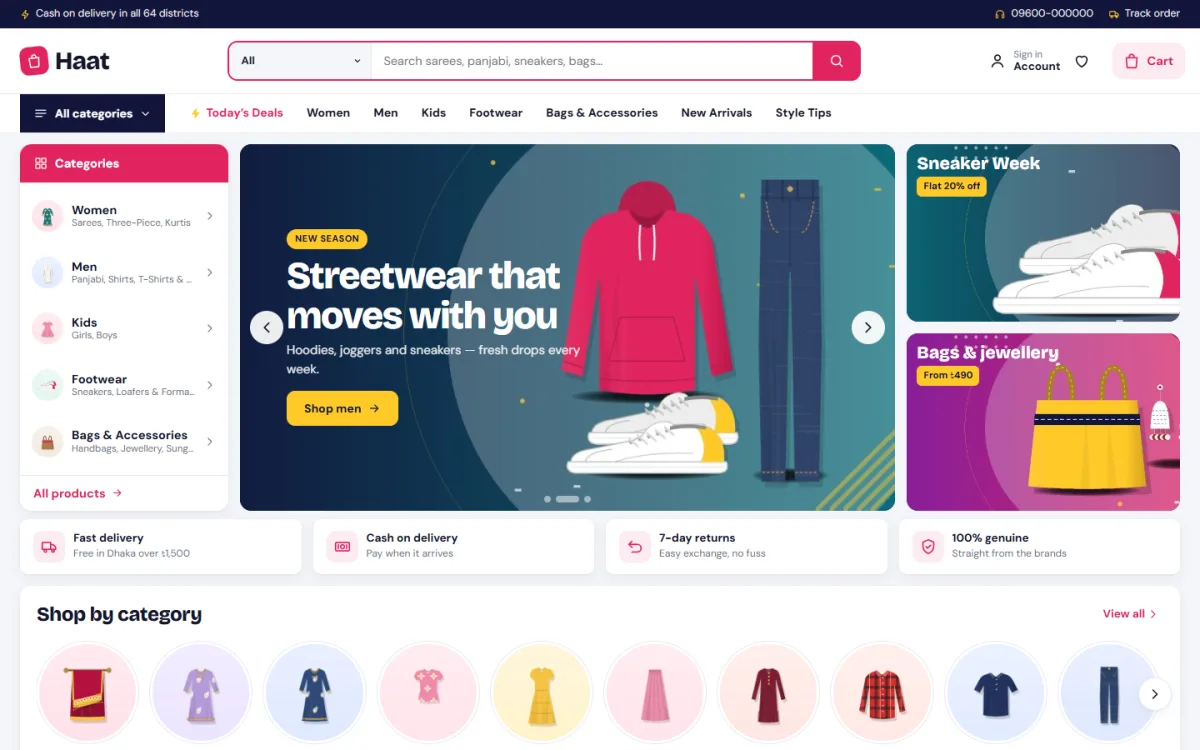
The homepage is built from 17 blocks. Under Homepage layout you show or hide any block and drag it into place, and on a phone, arrows move a block up or down. Each block has its own settings. The hero slider comes with side promos and the category list, a service strip covers delivery, COD, returns and genuine products, and category icons show round category pictures, as the Shop by category row in the screenshot shows.
Deals, budget shopping and brands
Deal of the day pairs a countdown with stock bars, so shoppers see both the time left and how fast an item is going, which works well on big sale days. The budget store gives price-first shoppers tiles to tap, with matching products below. Bestsellers by category uses tabs with 12 products each, and three department blocks each hold one banner plus eight products. For multi-brand stores, a Top brands logo row and a Brand spotlight block let you feature one label for a week and then swap it.
Other blocks fill out the page: three promo banners in one row, two rows of new arrivals, Trending now, Top rated, a large Just for you grid with a Load more button, and Style tips, which shows your latest three blog posts. Style tips is a useful spot for content such as how to choose an Eid panjabi, which brings search visitors and gives shoppers ideas.
From Cart to Courier
Haat runs on Themeve Commerce, a store plugin that is bundled and installed during setup. A login popup handles sign-in and registration on the spot. On the product page, reviews sit in a fold, and a popup invites the very first review. Wishlist and coupons are there for repeat shoppers, and size guides, back-in-stock, offers and returns are already active.
Checkout takes one page and ends with an Order placed popup. Payment choices cover bKash, Nagad and SSLCommerz, plus cash on delivery and manual payment. Steadfast and Pathao courier handle shipping, and a Track Order page lets buyers check delivery status themselves, which cuts down on where-is-my-parcel messages. New orders can be sent to Telegram, SMS and OTP help with customer contact, invoices are ready for every order, and the Facebook Pixel with Conversion API keeps ad data flowing.
Shopping on a Phone
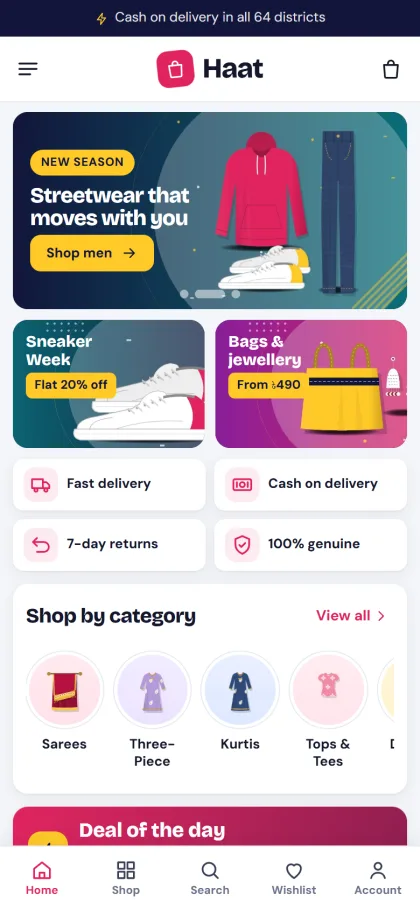
Most of your customers will browse from a phone, often straight from a Facebook ad. On small screens Haat uses a three-part header with menu, logo and cart, and tighter product cards that fit more items on each screen. The whole layout is responsive. The mobile screenshot also shows a bottom bar with Home, Shop, Search, Wishlist and Account, so the main actions stay within thumb reach.
Test your own store on a budget Android phone over mobile data before you run ads. Open a category, search for an item, add it to the cart and go through checkout. If any step feels slow or confusing on your own phone, it will feel worse to a customer who has never seen your shop before. Fix the photos and text first, since those are usually the heaviest parts of a clothing ecommerce website.
Setting Up Your Store Step by Step
Haat needs WordPress 6.0 or higher and PHP 7.4 or higher, and is tested to WordPress 7.1. Upload the theme under Appearance, Themes, Add New, Upload Theme, and activate it. Then open Haat, Setup to install Themeve Commerce in one click, enter the license key from your Themeve account under Haat, License, and use Haat, Demo Import to load the Fashion Megastore demo. The WordPress documentation helps if you are new to themes and menus.
The demo loads 62 products from 8 brands across women, men, kids, footwear and accessories, along with the hero slider, category icons, deal of the day, brand logos, department blocks, style tips, menus and pages such as About, Help Center, Delivery Info, Returns and Refunds, Size Guide, Our Stores, Style Tips and Track Order. Every picture and brand name is a sample, so replace them with your own before launch. Try it first on the live demo and the demo dashboard.
To match your brand, open Haat, Theme Options. You get groups for the homepage, colours, type, header, product cards, hero, deals and promos, product rows, product page and footer, and the Customizer holds the same options for live preview. Five palettes come ready, Magenta, Ocean, Tangerine, Forest and Violet, along with four font pairs. A settings search, a sticky save bar, a reset button and settings export and import make editing easier, with no code required.
Running a Busy Clothing Store Day to Day
Plan your homepage around the calendar. Before Eid, move department blocks with panjabi and three-piece to the top, set up deal of the day items with real stock counts, and refresh the hero banners. After the rush, bring budget store and new arrivals back up. Because blocks can be reordered without code, one staff member can handle these changes in an evening.
Payment habits in Bangladesh still lean towards cash on delivery, especially for first-time buyers, while repeat customers often prefer bKash or Nagad. Confirm large COD orders by phone before booking the courier, since that reduces returned parcels. Use the Facebook Pixel data to see which ads bring real orders rather than just likes, and spend more on those. Answer Messenger questions quickly, and point customers to the Track Order page instead of checking every parcel yourself.
Common Mistakes With Large Fashion Stores
The most common mistake is launching with too many categories and too few products in each. Empty categories make the store look unfinished. Another is uploading heavy, uncompressed photos straight from a camera, which slows every page. Many owners also forget size guides, which leads to wrong sizes, returns and unhappy buyers. Write a clear size chart for each product type before you launch.
A different kind of mistake is choosing a megastore layout for a store that is really a niche shop. If you sell only modest wear or only denim, a focused design may suit you better than a busy fashion ecommerce theme. Compare Noor – Modest Wear WordPress Theme for abayas and modest clothing, or Neel – Denim Store WordPress Theme for a jeans-focused brand, before you decide.
Frequently Asked Questions
Is this fashion ecommerce theme good for a multi-brand store?
Yes. Haat has a Top brands logo row and a Brand spotlight block, and its demo carries 62 products from 8 brands, so several labels can sit side by side. You can feature a different brand each week from the homepage settings.
Can customers search inside one category?
Yes. The header search comes with a category picker, and the All categories menu lists every department. This matters in a big catalogue, where a general search can return too many unrelated items.
Which payments and couriers are supported?
Through the bundled Themeve Commerce plugin, buyers can pay with bKash, Nagad, SSLCommerz, cash on delivery or manual payment. Delivery runs through Steadfast or Pathao courier, and buyers can follow their parcel on the Track Order page.
Do I need to code to change the homepage?
No. You show, hide and drag blocks into order under Theme Options, Homepage layout, and on a phone you use arrows instead of dragging. Colours, fonts, header and product cards are all set from the same options screen.
Final Thoughts
Running a large clothing store online comes down to three things: shoppers must find items fast, offers must change with the seasons, and orders must move smoothly from cart to courier. Plan your departments, product data and daily routines first, then pick a theme that supports them. If you need a busy, deal-driven megastore layout with local payments and couriers built in, take a closer look at Haat – Fashion Megastore WordPress Theme.