A fashion website template is the first big choice a new clothing brand makes after its name and logo. Pick well and the store does half your selling; pick badly and you spend the first season fighting your own website. This guide is for young labels selling co-ords, tees, denim and sneakers, Facebook sellers moving to their own site, and freelancers who set up stores for them. It explains what a modern template should actually give you, and what you can safely ignore.
Most new brands judge templates by the demo photos. That is understandable, but the photos will be replaced by your own on day one. What stays is the structure: how a shopper finds a piece, how quickly they can add it to the bag, how the store looks on a phone and how payment works. Those are the parts worth checking closely before you commit.
To keep things practical, we will test each point against Jhilik – Modern Fashion WordPress Theme, a bright, rounded theme for everyday clothing brands selling co-ord sets, dresses, kurtis, tees, shirts, denim, joggers, bags, caps and sneakers. The checklist works for any template, so use it even if you end up choosing something else.
Start With Your Brand, Not the Template
Before you compare designs, write down three facts about your label. Who buys from you, how they find you and what they usually spend. A brand that posts new drops on Facebook every week and sells mostly to students and young professionals needs a fast, playful store. A label selling wedding wear needs something slower and more formal. The right fashion website template matches the way your customers already shop.
Next, list your categories and how many products you will launch with. A small brand with thirty pieces needs a homepage that feels full without looking empty, while a bigger catalogue needs strong category pages and search. Finally, think about your weekly rhythm. If you drop new pieces every Friday, your homepage must make new arrivals and offers easy to change without calling a developer each time.
What a Modern Fashion Website Template Should Include
A phone-first layout
Young buyers in Bangladesh scroll fashion on their phones, often between classes or on the bus. A good template keeps the phone header slim, shows two neat columns of products, and puts the bag within reach. If the mobile demo feels cramped or slow, the desktop design does not matter, because most of your orders will never come from a computer.
Ways to browse by trend and by budget
Everyday fashion buyers usually want three things: what is trending, what fits their pocket and what is on sale today. A useful template gives each of those its own place on the homepage. Trending tabs, a budget section and timed deals do more for a young label than any number of decorative banners.
A short path to the order
Every extra step loses buyers. Look for a quick login that does not throw the shopper off the page, a size guide on the product page, one-tap add to bag, a single-page checkout and an order tracking page. Ask yourself how many taps it takes to go from the homepage to a placed order, and keep that number low.
How Jhilik Answers the Checklist
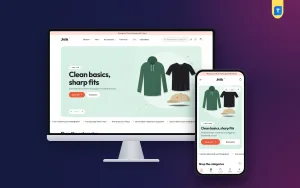
Jhilik is bright, rounded and quick. Soft pastel panels and colourful tiles make even a plain white tee look friendly, and nothing feels stiff. In the demo, the menu lists Women, Men, Accessories, Footwear, a red Sale link and Style Notes, with a rounded search bar for tees, co-ords and sneakers beside the account, wishlist and bag icons.

The homepage has 14 blocks that you drag into any order or move with arrows, and each block has an Edit link that jumps to its settings. The hero slider is a rounded panel with text on one side and the picture on the other, holding up to three slides. Below it, a moving ticker carries short offers and shipping notes, and in the demo it mentions cash on delivery, exchanges, Friday drops and payment options.
Trend, budget and deals on one page
Five colourful category tiles, the first one large, can link to a category, a tag or any page, so one of them can point to a sale. Trending now tabs show what is moving, a product spotlight shows one piece big with its sizes and a bag button, and Shop by category tabs show each category's bestsellers. Shop by budget lets a customer jump to the price range in mind, and Flash deals add a countdown to the offers you choose.
Social proof that grows with you
A photo feed shows customers and models wearing your clothes, style notes pull in your latest outfit posts, and customer reviews and a promise row finish the page. Top rated stays hidden until at least two products have reviews, which is thoughtful for a new brand: an empty rating block never makes the store look unfinished during its first weeks.
On the Phone and at Checkout

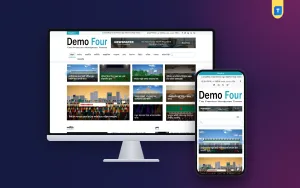
On a phone, Jhilik keeps a slim header with the menu, logo and bag, and product cards shrink so two columns fit side by side. The mobile screenshot shows the hero picture stacked above the headline and the Shop men and Bestsellers buttons, the offer ticker, the start of Shop the categories and a bottom bar with Home, Shop, Search, Wishlist and Account.
Buying runs on Themeve Commerce, which comes in the package and installs during setup. Customers log in from a small popup and stay exactly where they were. The product page has a size guide and one-tap add to bag, reviews open in a fold under the product, with a popup for the first reviewer, and wishlist hearts save favourites. Checkout fits on a single page, ends with an Order placed popup, and buyers can follow their parcel on the tracking page.
Payments, Couriers and Ads for a Young Label
Anyone researching how to sell clothes online in Bangladesh soon learns that payment choice matters. Jhilik lets customers pay with bKash, Nagad, SSLCommerz, manual payment or cash on delivery, and orders ship with Steadfast or Pathao courier. Coupons and invoices are included, a Telegram message can tell you when an order lands, and SMS and OTP are available. The store sits under Shop in your dashboard.
For a young label, Facebook and Instagram bring most of the traffic. Jhilik supports the Facebook Pixel with the Conversion API, so you can see which ads lead to orders rather than just clicks. Send each drop's ad to its category or to the spotlight product, use your own photos of real people wearing the clothes, and keep captions short. Bangla captions with the fabric and fit often get better replies than long English copy.
Cash on delivery will be popular at first, so confirm larger orders by phone and ask regular buyers to pay through bKash or Nagad. The exchange note in the demo's top bar is a reminder that a clear exchange rule is part of how to sell clothes online with fewer returns: write yours in plain words and show it everywhere.
Setting Up the Template in Your First Hour
Jhilik 1.1.0 runs on WordPress 6.0 or later with PHP 7.4 or later, tested through WordPress 7.1. Upload the zip from Appearance, Themes, Add New, Upload Theme and activate it. Then go to Jhilik, Setup and install the bundled Themeve Commerce plugin with one click, and paste the licence key from My Account, Licenses into Jhilik, License so updates reach you through your Themeve account.
Next, open Jhilik, Demo Import and load the Everyday Fashion demo. It imports 36 products across women, men, accessories and footwear, each with size and colour options, plus size guides, category tiles, trending tabs, flash deals, a photo feed, style notes, menus and pages such as About Us, Size Guide, Shipping & Delivery, Returns & Exchange, Our Stores, FAQ, Track Order and Wishlist. All artwork is sample content.
Then pick one of six colour sets, coral, ocean, mint, berry, sunset or grape, in Jhilik, Theme Options or the Live Customizer. Settings are grouped into Design, Site, Home page and Shop, there is a setting search, and you can reset, export or import. If the main menu is empty, product categories appear instead. The WordPress documentation helps with menus and pages if you are new to them.
The best test is still hands-on. Open the live demo on your phone, try the budget section and add something to the bag. Then visit the demo dashboard to see how blocks and products are edited. If both feel simple, the template will not slow down your weekly drops.
Mistakes New Brands Make With Templates
The most common mistake is choosing a fashion website template for a look you do not sell. A dark, dramatic design may suit a streetwear label but not a pastel everyday brand, and the reverse is just as true. The second mistake is filling the homepage with every available block on day one. Start with fewer sections, add trending and top rated blocks as your catalogue and reviews grow, and keep the page quick on mobile data.
Other mistakes come later. Brands forget to update offers after a flash sale ends, leave demo text in the footer, or never write a size guide. Some pick a template that needs a developer for every small change, which is costly when you post new pieces each week. Choose something you can run yourself from one settings page.
Frequently Asked Questions
Is a fashion website template enough to start selling?
A template gives you the layout and shop pages, but you still need products, photos, a size guide, delivery and exchange rules, and payment details. With Jhilik, the bundled Themeve Commerce plugin covers cart, checkout, payments, couriers and order tracking, so the main work left is your own content.
Can I change colours without code?
Yes. Choose from six colour sets in Theme Options or the Live Customizer and fine-tune any main colour, while the soft pastel tints of panels and tiles stay put. Google Fonts can also be switched off there, and nothing requires opening a code file.
Which other Themeve themes suit clothing brands?
A label with a bolder, darker look may prefer Jhor – Streetwear WordPress Theme. If your range is mostly jackets, knitwear and shawls, see Kantha – Winter Wear WordPress Theme. Jhilik suits bright, everyday clothing sold on a budget to young, phone-first buyers.
Final Thoughts
A good fashion website template should match your brand, work beautifully on a phone, help buyers browse by trend and budget, and take them to a placed order in a few taps. Everything else is decoration. If your label sells everyday clothes to young, phone-first buyers in Bangladesh, test Jhilik – Modern Fashion WordPress Theme against this checklist and see how much of your first season it handles for you.