The right furniture website template shapes how a high-end showroom feels long before a buyer walks through your door. This guide is for owners of premium furniture showrooms in Bangladesh, workshop owners who make solid wood and upholstered pieces, and interior designers or freelancers who build stores for them. We look at what wealthy, careful buyers expect online, how to plan rooms, photos and details, and how to handle delivery, assembly and payment.
Selling a walnut dining set is nothing like selling a phone case. The buyer is spending a large sum, will live with the piece for years and usually wants to discuss it with family first. They visit your page several times, zoom into the fabric and measure the living room twice. A showroom website has to support that slow decision with calm pages, clear facts and an easy way to visit the real showroom.
Our example throughout is Nibash – Luxury Furniture WordPress Theme, built for showrooms selling sofas, beds, dining sets, workspace pieces and decor. Before we open it, though, it helps to be clear about what a premium showroom actually needs from its site, because a beautiful demo is not the same thing as a store that sells.
What a High-End Showroom Needs From a Furniture Website Template
Atmosphere comes first. A good showroom floor has space, soft light and furniture arranged in real rooms, not stacked in rows. Your site should feel the same: fewer, larger pictures, plenty of empty space and a quiet colour scheme. A furniture website template that crowds twenty products into every row and flashes sale badges everywhere will make a hand-finished teak bed look like warehouse stock.
Next come three practical questions every buyer asks. How will it look in my room? What exactly is the finish or fabric? Will it fit through my door and up the stairs? A furniture ecommerce website for premium pieces should answer all three on the page, with room photos, named finishes and full dimensions, so the buyer arrives at your showroom ready to decide instead of just browsing.
Planning Your Showroom Website Before You Build
Organise collections by room
People furnish a home one room at a time. Group your stock into living, bedroom, dining, workspace and decor, then decide which few pieces lead each room. A premium shop does not need hundreds of products on day one. Twenty or thirty well-photographed pieces, each with full details, will do more for your brand than a large catalogue full of thin listings and missing measurements.
Photography that sells a feeling
Plan three kinds of photo for every piece: a clean studio shot, a styled room shot and close-ups of the grain, joints, stitching or fabric. Shoot in the same light so finishes look consistent from page to page. If your showroom has well-dressed corners, use them as sets. One excellent room photo that shows a sofa, rug, coffee table and lamp together can sell several pieces at once.
Write down every dimension and finish
Measure width, depth and height for each piece, and for beds note the mattress size it takes. Record the wood, the finish, the fabric or leather, and any choices a buyer can make. Decide your delivery areas, whether assembly is included and what your warranty and return terms really are. These notes become your product pages, so collect them before you start building anything.
How Nibash Presents a Luxury Collection
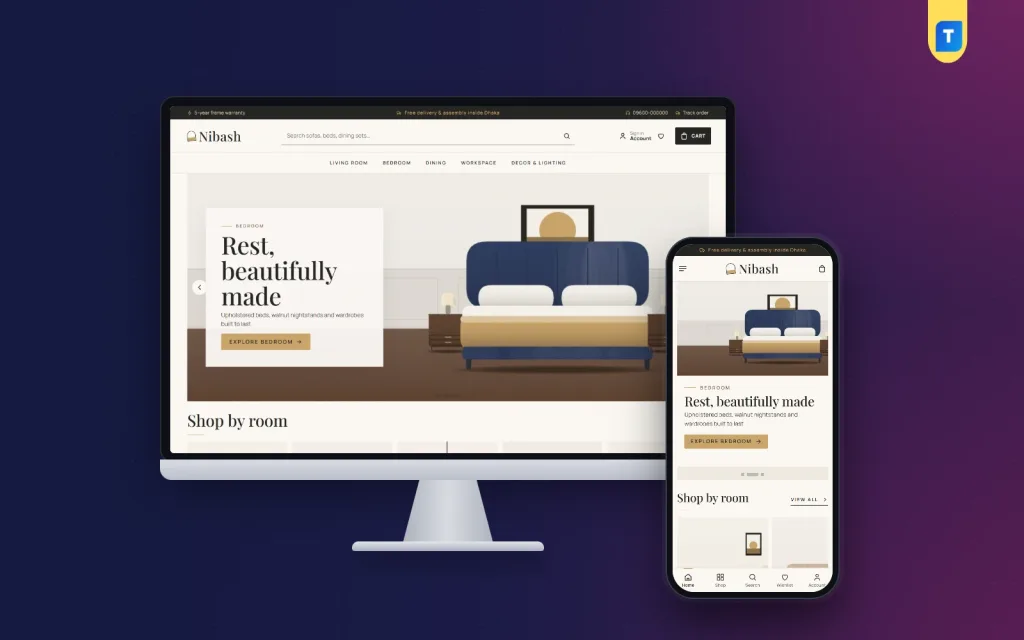
Nibash takes the calm of a good showroom and puts it online. Charcoal, smoked oak and brass set the mood, with Playfair Display headings on top. The demo shows a premium showroom with 35 pieces from 5 workshops: sofas, armchairs, coffee tables, TV units, beds, wardrobes, dressers, dining sets, desks, office chairs, lighting and mirrors. Every name and picture is an invented sample, ready to be replaced by your own collection.
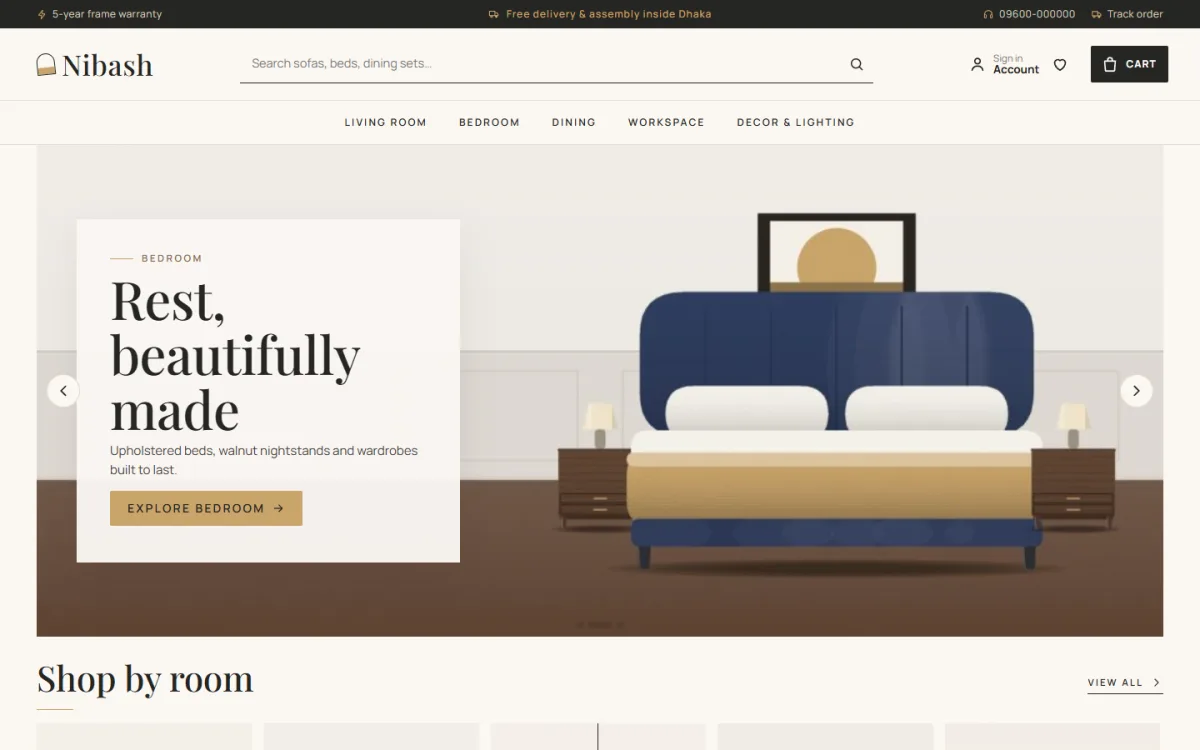
The desktop screenshot of the demo shows the tone clearly. A dark top bar holds short service notes, a phone number and a Track order link; these notes are sample text, so write your own. The search box invites visitors to look for sofas, beds and dining sets. The menu is set in spaced capitals, Living Room, Bedroom, Dining, Workspace and Decor & Lighting, and the hero slide shows an upholstered bed with walnut nightstands under the line Rest, beautifully made, followed by a Shop by room heading.
Shop the room and the finishes library
Shop the room is the block that makes this furniture website template feel like a showroom visit. One styled room picture carries tappable hotspots, each dot opens a small card for that piece, and a numbered list of everything in the room follows below. You place the dots in Theme Options by position and product, so wiring up a new room photo is quick when you restyle a corner for the new season.
The finishes library offers six swatches, teak, oak, walnut, velvet, leather and linen. Each has a short note and a piece count and opens every product in that finish, so a buyer who already knows they want walnut goes straight there. Shop by room splits the store into tall tiles for living, bedroom, dining, workspace and decor, matching the way people really furnish a home.
Details that answer the size question
Every product card shows dimensions as a W × D × H line under a serif name, inside an ivory photo well with an outlined Add to cart button. The product page carries studio, room and close-up photos, a dimensions card with a simple box drawing, a delivery and assembly note and an expected delivery date. Reviews sit in a neat fold, and the demo includes bed and dining size guides.
The Showroom on a Phone
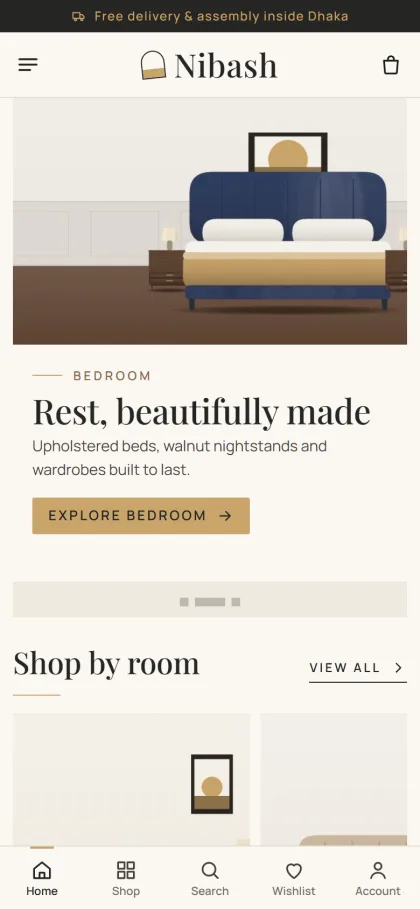
Many premium buyers first see your pieces on a phone, often from an Instagram or Facebook post shared by a friend. In the mobile screenshot, a single delivery note runs across the top, the header shrinks to menu, logo and cart, and the hero picture sits above its headline and Explore bedroom button. Shop by room comes next with a View all link, and a bottom bar shown in the demo offers Home, Shop, Search, Wishlist and Account.
Big purchases are rarely made in one visit, so the wishlist matters. Customers can save pieces while they think it over and sign in or register in a popup without leaving the page. The owner side works on a phone too: the Theme Options dashboard runs on a small screen, and arrow buttons move homepage blocks, which helps when you want to swap a seasonal room between showroom visits.
Setting Up Your Furniture Website Template
Nibash needs WordPress 6.0 or newer and PHP 7.4 or newer, and it is tested up to WordPress 7.1. In Appearance, Themes, Add New, Upload Theme, choose the Nibash zip and activate it. Then open Nibash, Setup and install the bundled Themeve Commerce plugin in one click. Activate your license under Nibash, License using the details in your Themeve account, so updates reach you.
Run Nibash, Demo Import to load the Luxury Furniture Showroom. It adds 35 products, journal posts, menus and every page, including Delivery & Assembly, Returns & Warranty, Our Stores and Track Order. Rewrite those policy pages first, because they carry the promises buyers will hold you to. Then replace the sample pieces one room at a time, starting with the room that sells best in your physical showroom.
Nibash, Theme Options is split into Start here, Design, Homepage and Pages. The homepage has 24 blocks, 18 switched on by default, including new in the showroom, most loved by room, three room departments, shop by style, service cards, showroom offers with a countdown, shop by budget, trending, highly rated, workshop logos and the journal. Five palettes, from Charcoal & brass to Ink & sand, and four font pairs are ready, and the Live Customizer shows changes as you make them.
Walk through the live demo as a buyer would, tapping hotspots and opening a sofa page, then look at the demo admin to see where products and orders are kept. If you are new to WordPress menus and media, the WordPress documentation is a sensible place to start.
Payments, Delivery and Assembly in Bangladesh
Checkout is a single page. Buyers pay by bKash, Nagad, SSLCommerz, cash on delivery or manual payment, then see an Order placed popup, and the Track Order page shows progress while the piece is on its way. The bundled plugin also handles Steadfast and Pathao courier, coupons, invoices, SMS and OTP messages, and Telegram alerts the moment an order arrives.
For large pieces, most showrooms use their own van and fitters, while couriers suit lamps, mirrors and smaller decor. Ask for an advance on made-to-order items, confirm the delivery floor and whether there is a lift, and ask buyers to measure doorways before a big sofa leaves the workshop. Clear delivery and assembly terms on a furniture ecommerce website prevent most of the arguments that happen at the door.
The demo's promise strip lists delivery, assembly, warranty and EMI. Keep only what you can honour. Card instalment plans are usually arranged with banks or your payment provider, so offer EMI only once it is set up and explain the terms on a page. Facebook Pixel and the Conversion API help measure your ads, and the Our Stores page invites serious buyers to visit the real showroom.
Mistakes Premium Showrooms Make Online
The first mistake is copying a discount store. Crowded grids, flashing badges and endless sale banners undo the calm that makes a premium piece feel worth it. The second is hiding details. If a buyer has to send a message just to learn the depth of a sofa, many will not bother. A furniture website template that shows dimensions on every card fixes that problem without extra work from you.
Other common slips include mismatched photos where walnut looks orange on one page and grey on the next, delivery dates nobody can meet, and slow replies to serious enquiries. Keep the journal alive with care tips and room ideas, update stock when a piece sells, and make sure every room photo on the homepage still links to pieces you actually have.
Frequently Asked Questions
Is a furniture website template good enough for a premium brand?
Yes, if it is built for showrooms rather than general shops. What matters is space, room photography, honest dimensions and calm design. Nibash lets you change palettes, fonts and block order, so the site can match your showroom's own colours instead of looking like every other store in town.
How do I set up the Shop the room hotspots?
In Nibash, Theme Options you add each dot by its position on the picture and the product it should open. The numbered list of pieces under the room appears on its own, so changing the room photo each season only takes a few minutes once your products are in place.
Can buyers see the size of a piece before opening it?
Yes. Every product card shows a W × D × H line, and the product page adds a dimensions card with a box drawing, an assembly note and an expected delivery date. The demo also includes size guides for beds and dining sets that you can edit for your own range.
What if I sell value furniture for city flats?
Then look at Shegun – Modern Furniture WordPress Theme, which suits brighter, practical pieces for compact homes. Nibash is the quieter choice for showrooms that sell slowly chosen pieces where atmosphere, finishes and room styling do most of the selling.
Final Thoughts
A high-end showroom sells calm, craft and confidence. Online, that means room photos, named finishes, full dimensions, honest delivery and assembly terms and an easy path to visit in person. Choose a furniture website template that respects all of that and your site becomes a second showroom that never closes. To build yours, start with Nibash – Luxury Furniture WordPress Theme and your best room photo.