If you want to know how to sell vegetables online, start by picturing a single day. Your stock is bought before sunrise, priced by breakfast, packed by noon and gone by evening. Anything left over loses value by the hour. This guide is for small traders, young founders and farm groups in Bangladesh who want to run that daily cycle through a website, with orders, delivery slots and payments that work every single day.
Vegetables are the most frequent purchase a household makes. A family that trusts you for spinach, potol and tomatoes may order three or four times a week, which is why a vegetable shop can build loyal customers faster than almost any other food business. The flip side is pressure. Prices change daily, freshness fades fast and a late delivery means wilted greens and an unhappy customer.
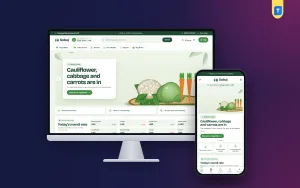
To show how a website supports this rhythm, we use Sobuj – Vegetable Shop WordPress Theme as the example. It is made for sellers of leafy shak, gourds, roots, onion and garlic, beans, cabbage and cauliflower, cut and ready trays, organic produce and weekly veg boxes. Its pale mint and deep forest green make a store look freshly picked, but the business habits come first.
Why Vegetables Are a Different Kind of Online Grocery Business
Most shops can keep stock for weeks. A vegetable seller cannot. That one fact shapes everything: how much you buy, how you price, when you deliver and what you tell customers. An online grocery business that sells packaged goods can promise delivery in two days. A vegetable shop has to promise today, and keep that promise even when traffic is bad or a rider is sick.
Customers also behave differently. They know the bazar price because they or a neighbour checked it this morning. They want to see what is in season, how much it costs today and when it will arrive. If your site answers those three questions on the first screen, you remove most of the hesitation that stops someone from ordering vegetables from a stranger on the internet.
The Daily Rhythm of a Vegetable Delivery Shop
Before sunrise: buying at the mandi
Build relationships with a few wholesalers at your nearest mandi, or with farmer groups who can deliver to you early. Buy based on yesterday's orders plus a small buffer, not on guesswork. Keep a notebook or simple sheet of what sold, what was left and what was wasted. After two or three weeks, you will see clear patterns by day of the week and season.
Morning: posting today's rates
Once you know your cost, set your prices and publish them before customers start ordering. A short daily rate list shared on your website and Facebook page builds a morning habit among regulars. Show whether a price went up or down since yesterday. Customers respect a seller who is open about the market, even on days when prices rise sharply.
Midday to evening: delivery slots
Instead of promising delivery at any time, offer two or three fixed slots a day with a clear order cut-off for each. Slots let you group orders by area, plan rider routes and pack in batches. They also give customers a clear expectation. A buyer who knows their order will arrive between five and eight in the evening rarely calls to ask where it is.
How to Sell Vegetables Online Without Waste
Waste is the silent profit killer in this trade. Reduce it with ready boxes: a fixed bundle of vegetables in small, family and large sizes lets you plan purchases days ahead. Push what is in season, because seasonal produce is cheaper, fresher and sells faster. Turn slightly imperfect stock into cut and ready trays for busy households. Finally, move slow items with a short daily deal before they spoil.
What Sobuj Puts on the Homepage
Sobuj is built around the morning mandi and the question that comes right after it: when will it reach me? The Today's mandi rate block shows up to eight vegetables with today's price per kg. A green arrow means the price went down since yesterday, a red one means it went up. You type the rates in Sobuj, Theme Options, so there is no outside feed to set up or pay for.
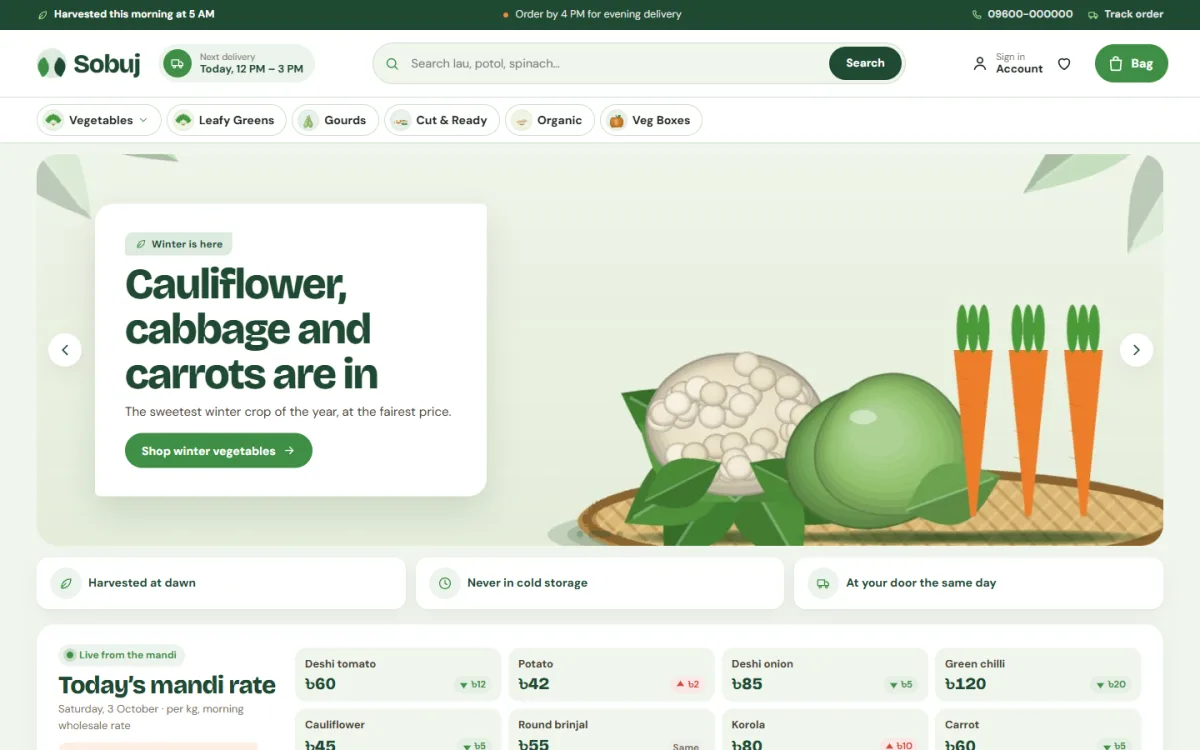
The desktop screenshot shows the full idea. A deep green top bar carries a harvest note and an order cut-off message in the demo. The header has the sprout logo, a Next delivery pill, a rounded search and a green bag button. Below it, a row of picture chips reads Vegetables, Leafy Greens, Gourds, Cut and Ready, Organic and Veg Boxes. A winter slide for cauliflower, cabbage and carrots leads into three promise cards and the mandi rate board.
The delivery pill is the clever part. You set up to three delivery slots a day, and the header shows the next slot a new order can still make, while the footer lists every slot and a Delivery Slots page explains the rest. Chips with sub-items open a picture panel, so a shopper can jump to gourds or leafy greens in one tap.
Season Tabs, Sobji Boxes and Quick Cards
The What's in season block has winter, summer and monsoon tabs, and the tab for the current month's season opens first. Each vegetable is a chip that searches your shop, so a buyer craving winter cauliflower is one tap from your stock. The Sobji boxes block shows three ready boxes, small, family and big, each listing what is inside with the price and a one-tap Add.
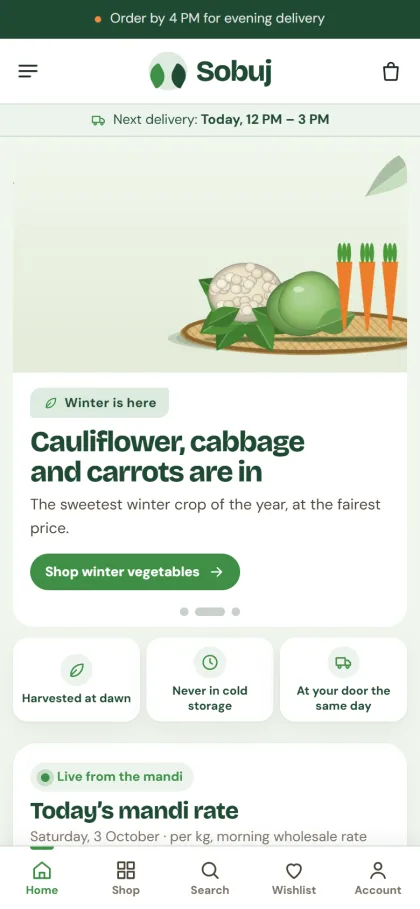
On a phone, the header comes down to menu, logo and bag, and in the demo the next delivery time sits in a strip right below it. Vegetable cards show the pack size, the price and a round Add button that turns into a minus, one, plus stepper, synced wherever the item appears. The cards are about 230px tall on phones, so shoppers see plenty of vegetables on each screen.
The homepage has 25 blocks you can switch off or drag into a new order, with arrows on a phone. Beyond the ones above, there is shop by vegetable on round mint tiles, picked this morning in tabs, cheap today with a countdown and stock bars, Cook tonight recipe cards, fill a bag under price tiles, farmer group of the month, ready lists, a weekly sobji plan banner, field notes from your blog and a promise strip.
Getting the Shop Live
Sobuj needs WordPress 6.0 or newer and PHP 7.4 or newer, and it is tested up to WordPress 7.1. Upload the zip from Appearance, Themes, Add New, Upload Theme and activate it. In Sobuj, Setup, install the bundled Themeve Commerce plugin in one click. Then activate the theme in Sobuj, License with the licence listed under My Account, Licenses in your Themeve account.
Next, bring in the Fresh Vegetables demo from Sobuj, Demo Import. It adds 43 products from 6 invented farmer groups, field notes posts, menus and every page, including Delivery Slots, Freshness Promise, FAQ, Our Stores and Track Order. Then open Sobuj, Theme Options to enter your mandi rates, delivery slots, seasons and boxes. The WordPress documentation covers the basics of menus and pages.
Theme Options also holds five palettes, Field green, Spinach, Carrot, Brinjal and Monsoon, plus four font pairs such as Bricolage Grotesque with DM Sans and Lexend with Inter. A settings search, a sticky save bar, export, import and reset round it off. Before you decide, open the live demo on your own phone and look through the demo dashboard.
Payments, Riders and Facebook Orders
Checkout comes from the bundled Themeve Commerce plugin. Buyers sign in or register in a popup and pay on one page with bKash, Nagad, SSLCommerz, cash on delivery or manual payment. An Order placed popup follows, and the Track Order page shows where things stand. Steadfast and Pathao courier are supported, and coupons, invoices, SMS, OTP and Telegram alerts for new orders are built in.
For fresh vegetables, your own riders are usually the better choice inside your delivery zone, because leafy greens cannot sit in a courier hub. Couriers suit dry items like onions, garlic and potatoes going further. Facebook Pixel and Conversion API are ready for your ads. Post the daily rate list each morning in Bangla, reply quickly to comments, and link straight to the sobji boxes for new buyers.
Common Mistakes Vegetable Sellers Make Online
The first mistake is opening too wide an area too soon. Ten nearby neighbourhoods served on time beat a whole city served late. The second is leaving yesterday's rates on the site. If you cannot update prices every morning, your online grocery business will lose trust quickly. The third is promising what the demo text says without checking it. Lines such as same-day delivery or never in cold storage only belong on your site if they are true.
The demo promise strip reads picked at dawn, cash on delivery, fair price and freshness promise, so change any line your shop cannot keep. Other mistakes include unclear substitution rules when an item runs out, no photos of real packed orders and no simple way to report a bad item. Fix these early and your repeat orders will grow week by week.
Frequently Asked Questions
How do I update the mandi rate board?
Type today's price per kg for up to eight vegetables in Sobuj, Theme Options. The arrows compare against yesterday's price, green for cheaper and red for dearer. It takes a few minutes each morning and becomes the reason regular buyers open your site before they head to the bazar.
How do delivery slots work in Sobuj?
You set up to three slots a day. The header shows the next slot a new order can still make, and the footer lists them all. A Delivery Slots page in the demo explains your timings, cut-offs and areas, and you can rewrite it to match your own routes.
Is there a theme for fruit or a wider organic range?
If your shop is mostly mangoes, litchi and seasonal fruit, look at Rosaal – Fruit Shop WordPress Theme. If you also sell honey, oils and organic rice, Tazaa – Organic Grocery WordPress Theme covers that wider market. Sobuj stays focused on vegetables, rates and delivery slots.
Final Thoughts
Learning how to sell vegetables online is mostly about discipline: buy to demand, publish honest rates every morning, deliver in fixed slots and push what is in season. A website should make that routine visible to customers and quick to manage for you. If your day starts at the mandi before sunrise, try Sobuj – Vegetable Shop WordPress Theme, post today's rates and let the orders come in.