If you are wondering how to start a supermarket business that also takes orders online, this guide walks you through it step by step. It is written for shop owners in Bangladesh who already run a mudi dokan and want to grow, for founders planning a delivery-first store, and for freelancers who build shops for clients. We cover planning, stock, suppliers, delivery areas, payments and the website that ties it together.
A supermarket is different from a small grocery. Customers expect to find rice, fish, shampoo, baby food and cleaning liquid in one trip, and more and more of them make that trip from a phone. Families in Dhaka, Chattogram and other cities now order the weekly basket online and want it at the door the same day. Your shelves and your website have to work as one shop, with the same stock, prices and offers.
We use Protidin – Supermarket WordPress Theme as the website example throughout. It is made for online grocers who carry a bit of everything, from fresh produce, meat and fish to dairy, bakery, snacks, baby care, cleaning and frozen food. But a theme is the last piece. First you need a clear plan for what you sell, where you deliver and how each order reaches the customer.
Why a Supermarket Needs Online Orders From Day One
Shopping habits have changed. Many customers compare offers on Facebook before they leave home, and busy households would rather spend ten minutes on a phone than an hour in traffic. A store that only sells across the counter misses those buyers, while a store that only sells online misses the trust that a real shop front brings. Running both from the start lets your shop act as a warehouse and a showroom at once.
Online orders also smooth out the day. Walk-in traffic peaks in the evening and on weekends, but an online grocery shop receives orders in the morning, at lunch and late at night. When you plan staff and delivery runs around both, the same rent and the same team serve far more customers. That is the real economics behind a modern supermarket, and it shapes every decision that follows.
How to Start a Supermarket Business: The Planning Steps
Location and delivery radius
Choose a spot with steady footfall and room for storage, then draw the area you can deliver to within a few hours. Start small. It is better to promise reliable delivery to four or five nearby areas than to accept orders from the whole city and arrive late. Write down each area and how long delivery usually takes, because you will show that list to customers on your website later.
Paperwork, suppliers and cash flow
Get your trade licence and any food-related registration your local authority asks for before you open. Then build a supplier list: a rice and dal wholesaler, an oil and spice distributor, fresh produce from a local market, fish and meat from a trusted source, and company distributors for packaged goods. Agree on credit terms early. Cash flow, not sales, is what closes many new supermarkets in their first year.
Departments and opening stock
Group your stock the way customers think: fruits and vegetables, meat and fish, dairy and eggs, rice, dal and oil, spices, bakery, snacks and drinks, baby care, personal care, cleaning, household and frozen food. Start with the fast sellers in each department instead of every brand on the market. Track what sells each week and widen the range slowly. Clear departments help staff restock and help shoppers find things.
What Your Supermarket Website Must Do
A supermarket website has a harder job than most online shops. The catalogue is long, products are bought often, and customers want to fill a whole basket in minutes. The site needs clear departments, a search that works, a quick way to add items without opening each product, and a basket that is easy to change.
It also needs to answer delivery questions before they are asked, because the first message most stores receive is: do you deliver to my area, and when? Showing areas and times up front saves dozens of calls a day. Regular customers also want a reason to come back each week, such as a fresh offer sheet or a quick way to reorder everyday items.
How Protidin Organises a Large Catalogue
Protidin is built on the idea that a supermarket lives or dies on how fast people find things, so it gives shoppers three ways in. On wide screens, a sticky departments sidebar keeps a numbered list of every department beside the homepage while the shopper scrolls. The department bar also opens an All departments panel, with departments on the left and their aisles, with pictures, on the right.
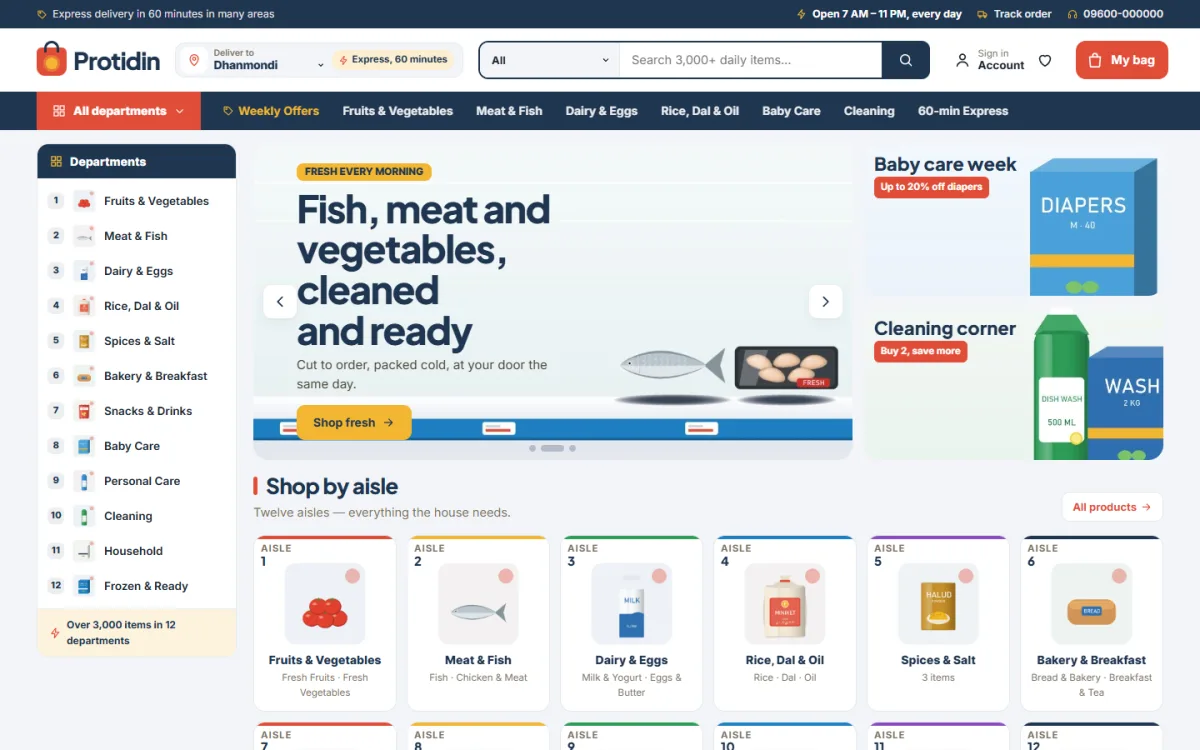
The screenshot shows how this looks in the demo. A navy top bar carries a delivery message, and the header holds the logo, the Deliver to picker, a search with a category dropdown, an account link, a wishlist heart and a coral My bag button. Next to the sidebar, a hero slider with a fish, meat and vegetables slide sits beside two side cards for baby care and cleaning, followed by the Shop by aisle section.
That section is the third way in. Shop by aisle turns every department into a numbered aisle card that lists its aisles, which feels familiar to anyone who has walked through a real supermarket. The one-click demo fills in 12 departments and 13 aisles, so you see the structure working before you add your own stock. Light grey, navy and coral with crisp white cards keep a long catalogue calm and readable.
Delivery Areas, Weekly Offers and the Daily List
The header has a Deliver to area picker. You type your areas and their delivery times in Theme Options, the shopper picks theirs, and the browser remembers the choice for the next visit. That one step answers the delivery question before anyone has to call. A service band above the footer holds a delivery-areas card, and the demo includes a Delivery Areas page you can edit to match your own routes.
Two blocks help turn first orders into weekly habits. This week's flyer shows up to eight offers on a printed-flyer panel, valid Saturday to Friday, each with a red price burst, the old price, the saving and a quick add button. The daily checklist lists up to ten everyday items, all ticked by default. The shopper unticks what is already at home, sees the total and adds the rest to the bag in one tap.
Use these blocks with discipline. Change the flyer every Saturday, only feature items you really have in stock, and keep the checklist to staples people buy every few days, such as eggs, milk, bread and onions. A flyer that never changes teaches customers to ignore it.
Building the Homepage of Your Online Grocery Shop
The homepage has 25 blocks. You can switch any of them off, drag them into a new order, or use arrows when you are working from a phone. A hero slider with two side cards opens the page. Best sellers this week is tabbed by department, Hourly deals adds a countdown with stock bars, and three department blocks each carry a banner and eight products.
Further down sit Most added to bags as a sliding row, Brands you trust and Brand of the week for your suppliers, Popular aisles as square picture tiles, Ready lists and Ready bundles, and a large Picked for you grid with Load more. Few stores need all 25 at once, so start with the blocks that match your stock.
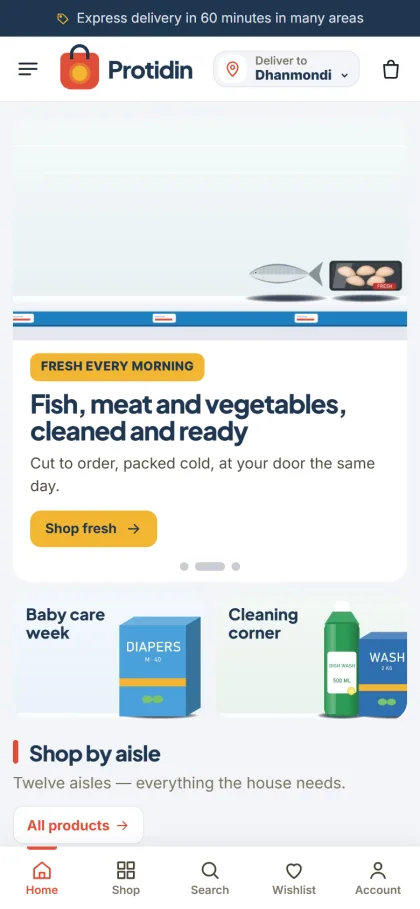
Most orders will come from phones, so the mobile view matters most. Product cards stay compact, and the outlined Add button becomes a minus, one, plus stepper, so a shopper can change quantities without opening a product page. The header folds down to menu, logo and bag, and in the demo the Deliver to picker stays visible next to the logo. Shoppers sign in or register in a popup without losing their place.
Setting Up the Store Website Step by Step
Protidin needs WordPress 6.0 or newer and PHP 7.4 or higher, and it is tested up to WordPress 7.1. Upload the zip under Appearance, Themes, Add New, Upload Theme, and activate it. Then open Protidin, Setup and install the bundled Themeve Commerce plugin with one click. It runs the cart, wishlist, coupons, one-page checkout, payments and courier features. Activate your licence under Protidin, License, using the details from your Themeve account.
Next, run Protidin, Demo Import. One click brings in 54 products from 6 brands across 12 departments, plus the flyer, checklist, delivery areas, posts, menus and every page, including Our Stores and Returns. The brands are invented samples, so replace them with your real stock and photos. If WordPress itself is new to you, the WordPress documentation explains pages, menus and users clearly.
Then open Protidin, Theme Options. Every setting lives there, with a search box, a sticky save bar, and export, import and reset. Pick one of five palettes, Supermarket, Fresh green, Ocean, Berry or Sunflower, and one of four font pairs built on Plus Jakarta Sans, Poppins, Rubik and Figtree. Before you buy, try the live demo on your phone and look around the demo dashboard.
Payments, Couriers and Selling in Bangladesh
Checkout is a single page. Customers can pay with bKash, Nagad, SSLCommerz, cash on delivery or manual payment, and every customer sees an Order placed popup and gets a Track Order page. Orders can go out with Steadfast or Pathao courier. In the back office you have invoices, SMS and OTP, Telegram alerts for new orders, and Facebook Pixel with Conversion API for your ads.
For a supermarket, your own riders should usually cover nearby areas, because fish, meat and frozen items cannot wait in a courier hub. Use courier services for dry goods going farther. Confirm large cash on delivery orders by phone before packing, and state your minimum order for free delivery clearly if you offer one. Post weekly flyer items on your Facebook page with Bangla captions and link straight to the product.
Common Mistakes New Supermarket Owners Make
The biggest mistake is listing everything at once. A website with thousands of products and half of them out of stock frustrates buyers more than a smaller, reliable range. Start with what you can actually deliver, mark items out of stock honestly, and grow department by department. Another mistake is promising delivery times you cannot keep. One late order of frozen food can lose you a customer for good.
Owners also forget to update prices online when the market moves, which leads to awkward calls at the door, so make price updates a fixed morning task. Many skip the policy pages too, yet a clear returns page and an Our Stores page with your address build trust. Finally, train staff to check online orders as often as they serve the counter.
Frequently Asked Questions
How much stock do I need to open?
There is no fixed amount. Most new stores begin with the fast sellers in each department, enough to cover one or two weeks of sales, and reorder from suppliers every week. Watch your sales closely in the first months and add new brands only when customers ask for them or the numbers show steady demand.
Can shoppers choose their delivery area on Protidin?
Yes. The Deliver to picker in the header lists the areas and delivery times you type in Theme Options. The shopper's choice is remembered in their browser, so regular customers do not have to pick their area again each time they come back to order their weekly groceries.
Is the store plugin included with the theme?
Yes. Themeve Commerce comes bundled, and Protidin, Setup installs it in one click. The cart, wishlist, coupons, checkout, payments and courier features all come from it, so you do not need to piece together separate plugins for the basic buying path of your supermarket.
Is there a theme for a smaller grocery or an organic shop?
For a smaller corner shop, look at Mudi – Grocery Shop WordPress Theme. If your range is mostly organic and farm-fresh, compare Tazaa – Organic Grocery WordPress Theme. Protidin fits stores with many departments and a long catalogue that changes every week.
Final Thoughts
Knowing how to start a supermarket business comes down to a few habits: a realistic delivery area, clear departments, reliable suppliers, honest prices and a weekly reason for customers to return. Your website should make those habits visible to every shopper. When you are ready to take the store online, start with Protidin – Supermarket WordPress Theme and build your departments, delivery areas and first weekly flyer around it.