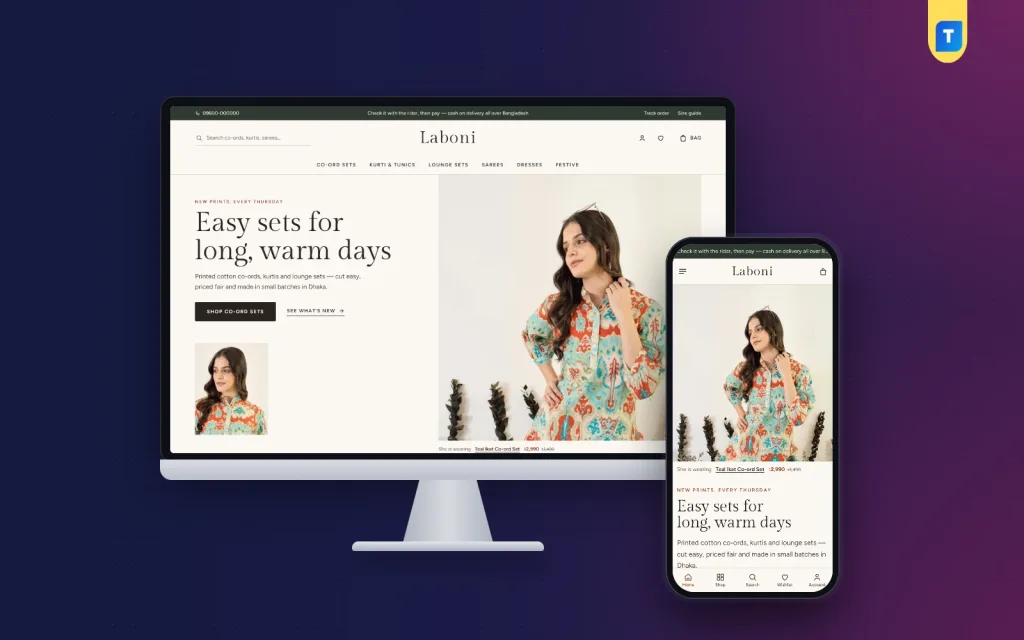
If you are wondering how to start an online clothing business in Bangladesh, the good news is that you no longer need a mall shop or a big budget. Many women's labels that people follow today began with a few printed co-ord sets, a phone camera and a Facebook page. This guide is for that kind of seller: a small womenswear label selling kurtis, co-ords, lounge sets, sarees or dresses, ready to grow beyond inbox orders.
We will walk through choosing a range, sourcing in small batches, getting sizes right, pricing with courier costs in mind and setting up a shop that takes orders while you sleep. The example tool is Laboni – Ladies Fashion WordPress Theme, a calm womenswear theme with an editorial hero, shop the look, a size guide and a one-page checkout with bKash, Nagad and cash on delivery.
Why a Small Womenswear Label Needs Its Own Shop
Facebook and Instagram are where buyers discover you, and they will stay important. The trouble starts when orders grow. Almost every buyer asks the price, whether her size is available and how much delivery costs. Orders get lost between chats, and your best photos sink under newer posts within a week.
A proper fashion website fixes most of this. Prices, sizes and delivery charges sit on the product page, so buyers answer their own questions. Orders arrive in one place with the name, phone number and address already typed. Your collection stays organised by category, and a new buyer from an ad can see your whole range, your story and your reviews before she decides to trust you with her money.
How to Start an Online Clothing Business in Bangladesh, Step by Step
Before you think about design, settle the business basics. Pick a name you can use everywhere, check that the Facebook page name and a matching domain are free, and keep the spelling simple enough for buyers to type. Open a separate bKash or Nagad merchant number or a bank account for the business so sales do not mix with family money. A trade licence from your city corporation or union parishad helps later with payment gateways and bank accounts.
Pick a narrow range first
New labels often try to sell everything at once: sarees, kurtis, abayas, kidswear and jewellery. That spreads your money thin and confuses buyers. Start with one or two things you can make or source well, for example printed cotton co-ords and everyday kurtis, and become known for them. You can add lounge sets, dresses or festive wear once the first range sells steadily.
Source in small batches
Small batches protect your cash. Produce or order a limited run of each design in a few sizes, see what sells, then reorder the winners. Many labels drop new prints on a fixed day each week, which gives followers a reason to come back. Keep a simple sheet with each design, its cost, the quantity per size and what has sold, so you always know what to reorder before a festival rush.
Get sizes and fit right
Wrong sizes are the most expensive problem in online clothing. Each exchange costs two courier trips and often a disappointed buyer. Measure finished garments rather than patterns, and write a size chart with bust, waist, hip and length for every size. Note whether a design runs loose or fitted. Put the chart on every product page and repeat it on a separate size guide page that you can link from your Facebook posts.
Price with delivery and returns in mind
Work out the full cost of each piece: fabric, stitching, printing, packaging, photography and your share of ad spend. Then add the real cost of delivery and of parcels that come back unopened, because cash on delivery refusals happen to every seller. Decide whether you charge delivery separately inside and outside Dhaka, and set a clear return and exchange rule before the first order arrives, then apply it to everyone the same way.
What a Fashion Website Needs to Sell Clothes
A clothing shop online has different needs from a gadget or grocery store. Buyers shop with their eyes first, so photos must be large and in one consistent shape. They want to see how a piece looks on a person, not only on a hanger. They need sizes that are easy to pick, a size guide close to the buy button, clear delivery charges and an exchange policy written in plain words. The checkout must be short and work on a cheap phone with mobile data, and the shop should feel like your label, not a marketplace listing with a logo on top.
How Laboni Presents a Womenswear Label
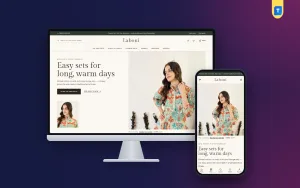
Laboni, whose name means grace, is made for small clothing labels selling co-ord sets, kurtis and tunics, lounge sets, handloom sarees, dresses and festive wear. The look is calm: ivory pages, umber text and terracotta accents, with Gilda Display headings and Figtree for reading. The header centres your wordmark between search and the account, wishlist and bag.
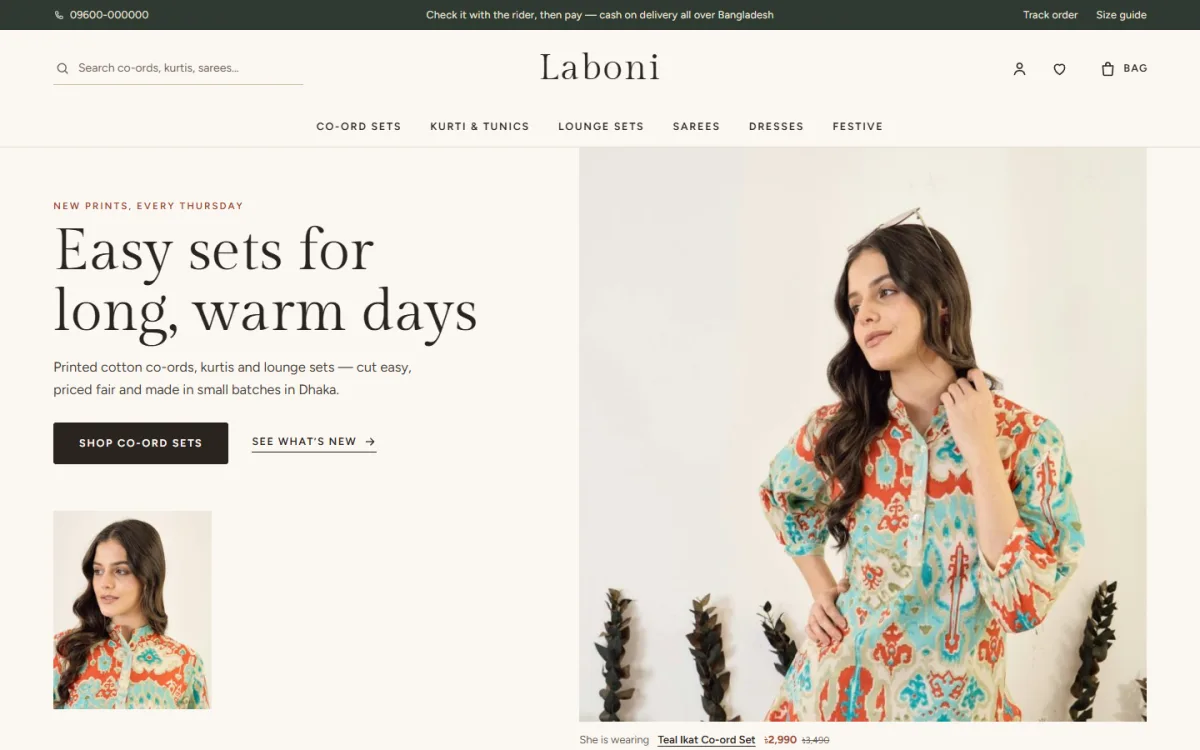
The hero puts a big portrait photo beside your headline and two buttons, with a smaller photo under the text on desktop. Under the big photo, a “She is wearing” line names the piece the model wears, shows its price and links straight to it. The headline and text in the demo are samples, so write your own about your prints and where you make them.
Homepage blocks that tell your label's story
The homepage has 17 blocks, and each can be switched off or moved. After the hero come a service line for delivery, cash on delivery and exchange, photo tiles for each category, and New this week with the eight newest pieces, which suits a label that drops new prints on a set day. Our story pairs a photo with a short note from the studio, signed by you.
Most loved groups favourites into tabs by category, Two edits are large photo links for a season or collection, and Last few runs a quiet countdown beside sale pieces. Shop the look shows one photo with the pieces in it, each added to the bag with one tap, so a kurti, its pants and a dupatta can sell together. Dress for the day uses four photo cards with your own titles and links.
Two department blocks pair a photo with eight products each, and Reviews shows the latest five-star reviews with the piece each was written for. Shop by price, a More to love grid, Worn by you with six square photos linked to your Instagram, and Journal complete the page.
Product cards and the product page
Product cards use 4:5 photos, the shape most fashion photos are shot in. Hover a card and the second photo appears, while the sizes rise up for a one-tap add. Sale and new tags sit on the photo. On the product page, sizes are square buttons and the size guide is switched on, so the size chart you measured earlier sits right where buyers decide.
Delivery charges and times come from your store settings, and you write the return and exchange text and the default care instructions once in Theme Options. A “Frequently bought together” row picks pieces with the same tags from other categories, so a kurti can suggest its matching bottoms. Reviews sit in a fold, and a popup invites the first review on a new piece.
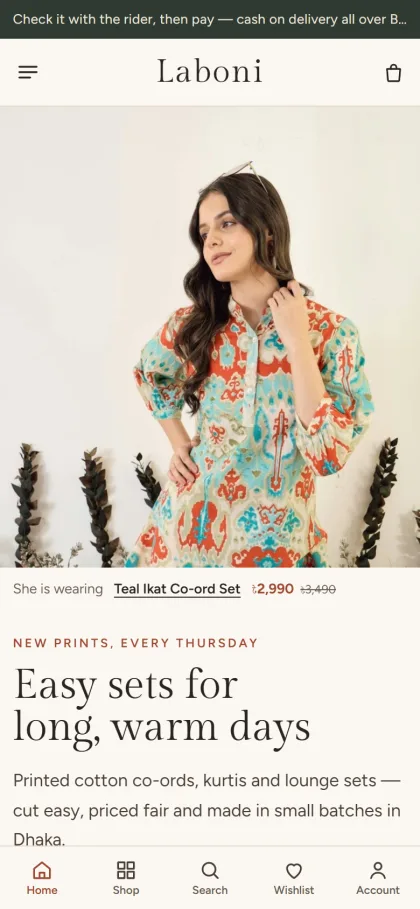
Most of your buyers will come from Facebook on a phone, so the phone view matters most. Product cards stay compact so more pieces fit on each screen, and sign in and register open in a popup, so a buyer never loses the piece she was looking at.
Orders, Payments and Delivery
Laboni runs on Themeve Commerce, a plugin bundled with the theme and installed in one click. Checkout is a single page. Buyers pay with bKash, Nagad, SSLCommerz, cash on delivery or manual payment, then see an “Order placed” popup, and the Track Order page lets them follow the parcel. Orders go out with Steadfast or Pathao courier.
The plugin also brings coupons and offers, invoices, returns, back-in-stock alerts for prints that sell out, a wishlist and a store locator for an Our Stores page. New-order alerts can reach you on Telegram, and the Facebook Pixel with the Conversion API shows which ads bring real orders.
Setting Up Laboni Step by Step
Laboni needs WordPress 6.0 or newer and PHP 7.4 or newer, and it is tested up to WordPress 7.1. Upload the zip under Appearance → Themes → Add New → Upload Theme and activate it. Open Laboni → Setup and install Themeve Commerce in one click, then enter the license key from your Themeve account under My Account → Licenses. The WordPress documentation covers pages, menus and media if you are new to it.
Next, run Laboni → Demo Import. One click brings in “Laboni — Everyday Womenswear”: 32 pieces across co-ord sets, kurtis and tunics, lounge sets, handloom sarees, dresses and festive wear, with a size guide, journal posts, menus and every page, including Returns & Exchange and Track Order. The demo photos and label names are samples to replace with your own.
Then make it yours in Laboni → Theme Options, which also works well on a phone. Pick one of four palettes, Ivory & terracotta, Linen & indigo, Rose clay or Sage & paper, or set each colour yourself. Choose from five font pairs, starting with Gilda Display and Figtree. There is a Main menu plus two footer menus, Shop and Help.
Open the live demo on your phone and add a piece from Shop the look, then try the demo dashboard to see Theme Options.
Selling Tips for Bangladesh
Keep Facebook and Instagram as your shop window and send every post to the product page on your fashion website, not to the inbox. Write captions in Bangla, show each piece on a real person in daylight, and pin a comment with the link. Run small ads on your best sellers first. For orders outside Dhaka, many sellers take the delivery charge in advance through bKash or Nagad to cut refused parcels.
Call or message to confirm cash on delivery orders before dispatch, especially large ones. Plan festival collections early, because Eid, Pohela Boishakh and Puja bring the biggest rush and couriers slow down in the final week. Announce a last order date and keep it. After each delivery, ask buyers for a review and a photo, because real reviews from real buyers are what convince the next stranger to order.
Common Mistakes When Starting Out
The first mistake is copying a supplier's size chart instead of measuring your own pieces, which leads straight to exchanges. The second is mixed photos: different backgrounds, shapes and lighting make even good clothes look cheap. The third is hiding delivery charges until the last step, which makes buyers feel tricked. A fourth is a vague exchange rule that changes from buyer to buyer and starts arguments in the comments.
Many new labels also stock too many designs at once and run out of cash before they know what sells. Others test their shop only on a laptop, never on a cheap phone with mobile data, and some forget that buyers still like a fast human reply before a first order.
Frequently Asked Questions
How much stock do I need to start?
There is no fixed number. Many labels start with a handful of designs in three or four sizes each and reorder only what sells, which keeps cash moving while you learn what buyers like.
Do I need coding skills to run Laboni?
No. Blocks, colours, fonts, photos and texts are set in Laboni → Theme Options or the Live Customizer, and the Theme Options page works on a phone. You add products, sizes and prices in the WordPress dashboard, the same way as in any other online shop.
Is Laboni only for sarees?
No. It is made for everyday womenswear: co-ord sets, kurtis and tunics, lounge sets, sarees, dresses and festive wear. If your label sells mainly sarees and handloom, Tanti – Saree and Handloom WordPress Theme is worth a look, and for a broader women's range there is Ura – Women's Fashion WordPress Theme.
Final Thoughts
Learning how to start an online clothing business in Bangladesh comes down to a few steady habits: a narrow range, small batches, measured sizes, honest delivery charges, a clear exchange rule and quick replies. A good shop puts all of that in front of the buyer on her phone. To give your womenswear label a calm, graceful home with shop the look and a size guide, start with Laboni – Ladies Fashion WordPress Theme.