A modest clothing website gives an abaya, hijab or prayer wear label a calm home of its own, away from the noise of a busy Facebook feed. This guide is for Bangladeshi sellers who already sell modest wear through pages and groups, for boutique owners opening a second channel, and for freelancers who build stores for clients. We look at what modest wear buyers expect, how to plan your range and pages, and how to run payments and delivery without stress.
Modest fashion in Bangladesh is a careful market. Buyers check fabric, length, colour and how a hijab will sit with an abaya before they pay. Many shop for mothers, sisters and daughters at once in the weeks before Ramadan and Eid, usually late at night on a phone. If they cannot see these details quickly, they message you, and every unanswered message is a sale that may drift to the next page in their feed.
As the working example we use Noor – Modest Wear WordPress Theme, a theme made for shops that sell abayas, hijabs, kaftans, office wear, prayer wear, jubbas and accessories. It uses warm sand, deep sage and soft gold with serif headings and small eight-point star details, so the store feels quiet and respectful. Before any theme, though, comes the plan.
Why a Modest Fashion Brand Needs Its Own Website
Social media is good for reach but weak for selling a full range. Posts sink within a day, albums get messy, and buyers cannot filter by colour or size. A modest fashion brand with its own site keeps every abaya, hijab and set in a searchable catalogue, with prices, fabric notes and size charts on the same page. Orders arrive in one dashboard instead of five inboxes, and you stop typing the same answer forty times a day.
A website also builds trust in a way a page cannot. Buyers can read your delivery and exchange rules, see reviews from other customers and track a parcel without calling you. For a modest clothing website this matters even more, because many customers buy for family members and want to be sure about length, fit and fabric before ordering something that will be worn to prayer, to the office or at an Eid gathering.
Planning Your Modest Clothing Website Before You Build
Start with how your buyers think. Most modest wear shoppers look for a type of garment first, then a shade, then an occasion. Write your main categories in plain words such as Abayas, Hijabs, Kaftans and Dresses, Office Wear, Prayer Wear, Men and Accessories, and add sub-groups only where you have enough products to fill them. A thin category with three items looks empty and makes the whole store feel smaller than it is.
Colour, length and fabric details
Colour matters more in modest fashion than in most clothing. Many buyers already own an abaya and want a hijab to match it, or the reverse. Name your shades consistently, for example sage, sand, navy, blush and olive, and use the same names in product titles and photos. For every abaya, note the length for each size, the fabric such as nida, crepe, chiffon, modal or jersey, and whether it needs ironing. These small notes stop most size and fabric complaints.
Sets, occasions and the yearly calendar
Think in outfits, not single pieces. An abaya with a matching hijab and underscarf is one decision for the buyer and a bigger order for you. Plan a few ready sets for each season. Then mark the big dates on a calendar: Ramadan, Eid ul-Fitr, Eid ul-Adha, winter and the wedding season. Photos, product text and stock for Eid should be ready weeks before the rush, while couriers are still quick.
Policies modest wear buyers look for
Write simple pages for delivery, exchange and returns, sizes and your store address if you have one. Say clearly how long a buyer has to ask for a size exchange, who pays the return delivery, and which items cannot be exchanged, such as altered pieces. Many first-time buyers read these pages before they order, especially when they are spending on a whole family, so keep the language short, polite and free of small print.
How Noor Shapes a Modest Clothing Website
Noor is built around the way modest fashion buyers browse. Its homepage has 20 blocks, and under Homepage layout you can switch each one off or on and drag it to a new spot, while phones get arrow buttons for the same job. Every block has its own settings section, so you can show only what your shop really needs and keep the page gentle instead of crowded.

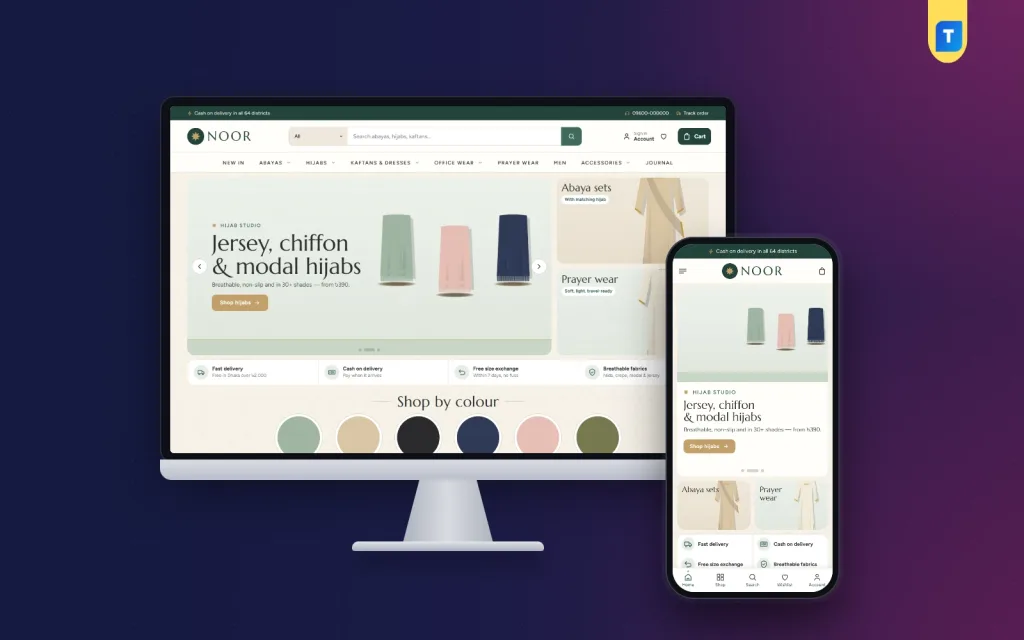
In the demo you see the idea at once. A thin top bar carries a cash on delivery message, a hotline number and a Track order link. Below the logo sits a search box with a category picker, then a menu for New In, Abayas, Hijabs, Kaftans and Dresses, Office Wear, Prayer Wear, Men, Accessories and Journal. The hero slider sits beside two cards, here for abaya sets and prayer wear, and a promise strip covers delivery, COD, exchange and fabrics.
Shop by colour and Complete the look
Two blocks suit modest wear especially well. Shop by colour shows six round swatches near the top, so a buyer hunting for a sage hijab or a navy abaya can go straight to that shade without scrolling through everything. Complete the look pairs a banner with ready sets, so the abaya, hijab and underscarf are chosen together. You edit the swatches in Theme Options, in the section for colours, categories, deals and promos.
Offers, departments and the journal
Today's offer runs a countdown with stock bars, which works well for a short Friday or pre-Eid deal. New this week shows two rows of fresh pieces, Most loved sits in tabs by category, and three departments each get a banner with eight products. Gentle on the pocket mixes price tiles with products for students and first-time buyers, occasions appear as four picture cards, and the Style journal shows your latest three posts.
Further down there are promo cards, a Labels logo row, Trending and Highly rated rows, and Label in focus, which shows one label with its products. More to discover closes the page with a Load more button. If you only carry your own label, switch off the label blocks and give that space to sets or occasions instead.
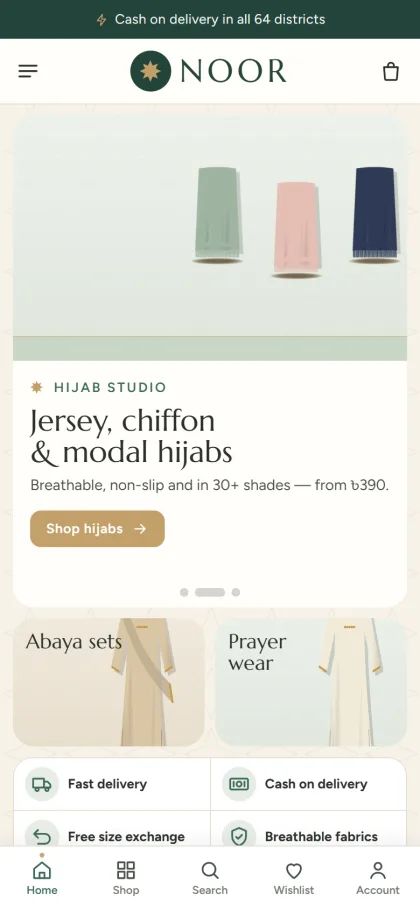
Most of your orders will come from phones, often late in the evening. Noor keeps the mobile header to the menu, logo and cart, and shows compact product cards so a buyer can compare several abayas at once. In the demo, a bar at the bottom of the screen also keeps Home, Shop, Search, Wishlist and Account one tap away. The layout is fully responsive, so the same calm look carries over to tablets and desktops.
Setting Up the Store Step by Step
Noor needs WordPress 6.0 or above and PHP 7.4 or above, and is tested on WordPress 7.1. Upload it under Appearance, Themes, Add New, Upload Theme, and activate it. Next open Noor, Setup to install the bundled Themeve Commerce plugin in one click. Then enter the licence key from your Themeve account under Noor, License, so updates reach you through that account. If WordPress is new to you, the WordPress documentation explains themes, pages and menus clearly.
Now load the demo from Noor, Demo Import. The Modest Wear demo adds 37 products from 6 labels across abayas, hijabs, kaftans, office wear, prayer wear, men and accessories. It also builds the slider, colour swatches, offers, sets, departments, occasions, journal, menus and pages such as About Noor, Size Guide, Delivery, Exchange and Returns, Journal, Our Stores and Track Order. Every label and picture in the demo is invented, so swap in your own before launch.
Then go to Noor, Theme Options, or the Live Customizer if you want a live preview. Choose one of five palettes, Sage, Midnight, Rose, Desert or Olive, and adjust any colour. Pick a font pair: Calm, Soft, Modern or Classic, built on serif headings such as Marcellus, Lora, DM Serif Display and Cinzel. A settings finder, a save bar that stays on screen, reset, and export and import for backups make the work easier. No code is needed, and Google Fonts can be switched off.
Before you buy, open the live demo on your own phone and use it as a customer would: pick a shade, open a set, add a piece to the wishlist and walk to checkout. Then look around the demo dashboard to see where products, orders and settings live. This short test tells you more than any feature list.
Payments, Delivery and Marketing in Bangladesh
Themeve Commerce handles the buying journey from the product page to the doorstep. Shoppers sign in through a popup without leaving the page, save pieces to a wishlist, and read reviews in a fold under each product, with a popup that asks for the first review. Checkout is a single page that ends with an Order placed message, and an order tracking page lets buyers follow the parcel. Back-in-stock, offers, returns and size guide tools are ready from the start.
At checkout, buyers can pay with bKash, Nagad or SSLCommerz, or choose cash on delivery or manual payment. Parcels go out with Steadfast or Pathao courier, and coupons and invoices are built in. COD is still what many new buyers want, so confirm larger orders by phone before booking the courier, and ask for a small advance on high-value or custom pieces. This one habit cuts fake orders and returned parcels.
Facebook remains the main place where a modest fashion brand in Bangladesh finds new buyers. Noor supports the Facebook Pixel and Conversion API, so your ads can show who visited and who bought. Send ads to a set or a colour page rather than only the homepage. New orders can reach you as Telegram alerts, while SMS handles customer texts and OTP checks. Write captions in Bangla or English that match how your buyers speak, and answer comments fast.
Common Mistakes on a Modest Clothing Website
The first mistake is loud design. Flashing badges, bright red sale tags and crowded banners clash with the mood most modest wear buyers want. Keep colours soft, photos clean and text short. The second mistake is hiding the details that matter: length, fabric, sheerness and care. A modest clothing website that skips these will see more returns, more messages and fewer repeat buyers, however good the photos look.
Other common problems are thin categories, no size chart, product photos shot under different lights, and Eid offers left online weeks after Eid. Many sellers also never test checkout on a budget phone with mobile data, which is how most of their buyers will see it. Finally, do not try to sell everything at once. If your range grows into a full fashion catalogue, a larger store theme may suit you better than stretching one built for a focused label.
Frequently Asked Questions
Can a modest clothing website sell men's wear too?
Yes. Noor is made for shops that also sell jubbas, and its demo includes a men's section. A small men's corner can raise the order value when families shop together before Eid, since one parcel then covers the whole household.
Do I need to code to change colours and blocks?
No. Palettes, fonts, blocks and menus are all set in Noor, Theme Options, or in the Live Customizer if you prefer to see each change as you make it. Blocks are switched on or off and moved by dragging, or with arrow buttons when you work from a phone.
Is there a size guide for abayas?
Yes. Size guide support is active, and the demo includes a Size Guide page where you can put your own length and size chart. Add abaya lengths for every size, because length is usually the first thing most buyers check.
What if I sell a much larger fashion range or denim?
Noor suits a focused, calm modest wear label. If you plan a big multi-category clothing store, look at Haat – Fashion Megastore WordPress Theme. If jeans are your main line, Neel – Denim Store WordPress Theme is made for that kind of shop.
Final Thoughts
A good modest clothing website is quiet, clear and honest. It shows true colours and lengths, groups pieces into outfits, explains delivery and exchange in plain words, and lets buyers pay the way they trust. Plan your categories, shades and Eid calendar first, then build on a theme that already understands modest fashion. For an abaya, hijab and prayer wear label in Bangladesh, Noor – Modest Wear WordPress Theme is a calm and practical place to start.